
Murmurd
Murmurd gives product teams a web-based way to run daily check-ins, surface blockers, set weekly priorities, and review updates asynchronously.
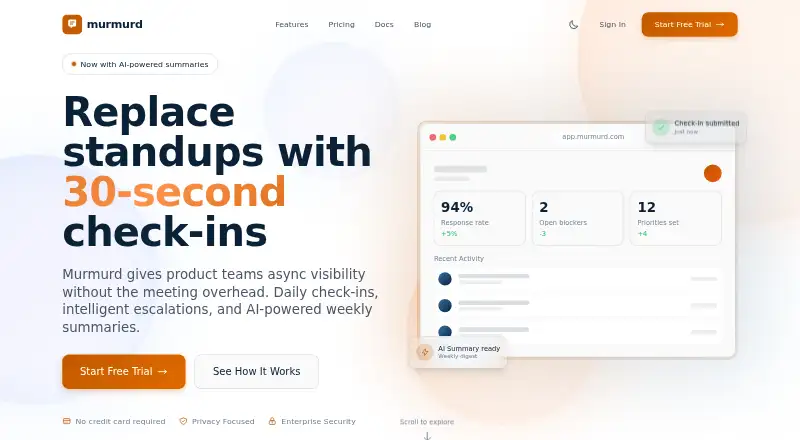
What Murmurd is
Murmurd gives product teams a web-based way to run daily check-ins, surface blockers, set weekly priorities, and review updates asynchronously. Role-aware prompts can reach team members through the web, email, or Slack, with controls to skip, pause, or mark vacation. Escalations move through Team Leader, Team Manager, and Division Manager, bypassing people who are paused or away. Teams can set weekly priorities, receive a Monday reminder, and record Friday outcomes as Completed, Shifted, or Dropped. Slack supports direct-message check-ins, /escalate and /priority commands, and Friday digests for leaders. Pro and Enterprise include AI-generated Friday Snapshots and Monday Weekstarters; confidential items are excluded from AI input. Murmurd says it processes only messages sent to its bot, not employee-to-employee DMs or channel history, and that AI summary data is not used to train models. The free plan supports up to five members; Pro costs $3/user/mo, and a 14-day trial is offered. Murmurd is based in Berlin, Germany.
Good
- Check-ins arrive through web, email, or Slack
- Escalations skip paused or vacationing people
- Tracks weekly priorities and Friday outcomes
- Slack includes leader digests and priority commands
- AI summaries exclude confidential items
Watch out
- Free plan is limited to five members
- AI summaries are included with Pro and Enterprise
- Available platform is web
Who it suits
It suits product teams that want asynchronous check-ins, blocker escalation, and weekly priorities in a web app. The free plan is intended for teams of up to five members; larger teams can consider Pro.
Verdict
Murmurd brings check-ins, escalation paths, and weekly planning into one asynchronous workflow for product teams. Its free tier has a five-member cap, while Slack integration and AI summaries are listed with Pro.
Plans and prices
From Murmurd's own pricing page, checked 7 Oct 2026.
| Plan | Price | What it gives you |
|---|---|---|
| Free | Free | Up to 5 team members · Daily check-ins · Weekly priorities · Basic escalations · Email notifications |
| Pro | $3 a month | Unlimited team members · Slack integration · AI-powered summaries · Custom questions · Priority support |
| Enterprise | Priced on request | Everything in Pro · SSO authentication · SCIM user provisioning · Custom AI options · Dedicated support · SLA guarantees |
The facts
Each one read from Murmurd's own pages, with the date it was checked.
What it does
- AI data use
- The privacy policy says AI summaries use data within the organization, exclude confidential items, and are not used to train AI models.checked 7 Oct 2026
- AI providers
- Organizations can choose OpenAI, Anthropic, Google AI, Mistral AI, or their own API key for summaries.checked 7 Oct 2026
- AI summaries
- Pro and Enterprise summaries include a Friday Snapshot and Monday Weekstarter, and confidential items are excluded from AI input.checked 7 Oct 2026
- Check-ins
- Role-aware prompts support daily updates through the web, email, and Slack, with skip, pause, and vacation controls.checked 7 Oct 2026
- Escalations
- Blockers route through Team Leader, Team Manager, and Division Manager, skipping people who are paused or on vacation.checked 7 Oct 2026
- Intended users
- Murmurd describes itself as built for modern product teams and says its free plan is for teams of up to five members.checked 7 Oct 2026
- Privacy rights
- The privacy policy describes GDPR rights including access, correction, erasure, restriction, portability, and objection.checked 7 Oct 2026
- Purpose
- Murmurd provides product teams async visibility through daily check-ins, escalations, and AI-powered weekly summaries.checked 7 Oct 2026
- Security
- The privacy policy lists AES-256-GCM encryption at rest, TLS 1.3 in transit, regular security audits, access controls, logging, and rate limiting.checked 7 Oct 2026
- Slack data access
- Murmurd says it does not read employee-to-employee DMs or channel history and processes only DMs sent to its bot.checked 7 Oct 2026
- Slack integration
- Slack supports DM check-ins, /escalate and /priority commands, and Friday digests for leaders.checked 7 Oct 2026
- Support
- Murmurd aims to respond to support requests within two business days and provides support by email without requiring an account.checked 7 Oct 2026
- Weekly priorities
- Teams can set weekly priorities, receive a Monday reminder, and record Friday outcomes as Completed, Shifted, or Dropped.checked 7 Oct 2026
The company
- Headquarters
- Berlin, Germanychecked 28 Sep 2026
The full review of Murmurd
Murmurd is an async coordination tool for product teams that want to connect daily updates with blocker escalation and weekly priorities. It suits teams looking for a structured workflow rather than a standup-only bot. Its strongest case is the combination of escalation paths and weekly follow-through; the five-person free-plan cap makes it a limited long-term fit for larger teams.
Overview
Murmurd brings check-ins, blocker routing and weekly priorities into one web-based workflow. Role-aware prompts collect daily updates, while escalation paths send blockers through team leadership and skip people who are paused or on vacation. That structure can help teams surface issues without requiring everyone to be online at once.
Weekly priorities add a useful planning loop: teams set priorities, get a Monday reminder and record Friday outcomes as Completed, Shifted or Dropped. The product is more compelling for teams that will use this loop consistently than for groups that only need a lightweight daily status prompt.
Key features
Check-ins and escalation
Daily check-ins work through the web, email and Slack, with controls to skip, pause or mark vacation. Blockers can move through Team Leader, Team Manager and Division Manager. This gives teams a defined path for raising problems, though the value depends on having those roles and escalation steps fit the organization.
Weekly planning and summaries
Weekly priorities connect Monday planning to Friday outcomes. Pro and Enterprise also include a Friday Snapshot and Monday Weekstarter generated from organizational data; confidential items are excluded from AI input, and Murmurd says that summary data is not used to train AI models. Organizations can choose OpenAI, Anthropic, Google AI, Mistral AI or their own API key. That choice is useful for teams with provider preferences, but the summaries are not part of the free plan.
Slack and privacy
Slack supports direct-message check-ins, /escalate and /priority commands, plus Friday digests for leaders. Murmurd says it processes only direct messages sent to its bot, not employee-to-employee messages or channel history. Its privacy policy describes AES-256-GCM encryption at rest, TLS 1.3 in transit, access controls, logging, rate limiting and regular security audits. It also describes GDPR rights including access, correction, erasure, restriction, portability and objection.
Pricing
Murmurd is freemium, with a free plan and paid plans from $3/user/mo. A 14-day trial is available.
| Plan | Price | What it includes |
|---|---|---|
| Free | free | Up to 5 team members, daily check-ins, weekly priorities, basic escalations and email notifications. |
| Pro | $3 a month | Unlimited team members, Slack integration, AI-powered summaries, custom questions and priority support. |
| Enterprise | Custom pricing | Everything in Pro, plus SSO authentication, SCIM user provisioning, custom AI options, dedicated support and SLA guarantees. |
Free is a practical way for a small team to use the core check-in and planning workflow, but its five-member cap and lack of Slack integration and AI summaries create clear reasons to move up. Pro removes the seat ceiling and adds the features most likely to matter to teams coordinating in Slack. Enterprise is aimed at organizations that need identity provisioning, custom AI options or service guarantees; its price is custom.
Platforms
Murmurd is available on the web, with check-ins also supported through email and Slack. The Slack features require Pro or Enterprise.
Who it's for
Murmurd is best suited to product teams that need asynchronous status updates to lead into explicit blocker escalation and weekly priority review. Small teams can start on Free; teams needing unlimited membership, Slack workflows or AI summaries will need Pro. It is a weaker fit for groups that want only a basic standup prompt or cannot use a five-seat free tier while evaluating the workflow.
Pros and cons
- Pro: Escalations skip paused and vacationing leaders, keeping a defined blocker route from depending on someone who is away.
- Pro: Monday priorities and Friday outcomes give weekly planning a clear follow-up point.
- Pro: Slack bot access is scoped to messages sent to the bot, and confidential items are excluded from AI summaries.
- Con: Free supports only five team members, so a larger team must pay to use Murmurd beyond a small pilot.
- Con: AI summaries and Slack integration are reserved for paid plans, limiting the free tier to email notifications and basic escalations.
- Con: Enterprise uses custom pricing, making its cost less straightforward to compare with the per-user Pro plan.
Alternatives
Consider DailyBot if unlimited members on its free Starter plan matter more than Murmurd's linked escalation and weekly-priority workflow; DailyBot caps compiled check-in reports at 50 per organization each month.
DailyStandup is worth comparing for teams that want daily AI summaries on its free plan, which covers up to five members and one team; its Pro plan is $8 a month billed annually.
Geekbot is another freemium alternative for teams comparing standup tools, with a free Starter plan for 10 users and a Basic — Standups plan priced at $2.50 a month on annual billing.
Openbook is another freemium daily standup option.
ScrumAI is another freemium web option, with a free Beta plan for up to five teammates per workspace.
Standup Alice is another freemium option, with a free plan for Slack teams of one to four people.
Sup Bot is another freemium alternative, with a free plan for up to 15 members and one active follow-up.
Team O'clock is another freemium option; its Growth plan starts at $3 a month per active member, starting at 10 monthly active members.
Browse more options in Daily Standup Software.
Verdict
Murmurd is a strong fit for product teams that want daily check-ins to feed a real escalation path and a weekly priority cycle. Its free plan gives small teams the core workflow, while Pro adds the unlimited seats, Slack support and AI summaries that make it more useful at scale. Look elsewhere if you need more than five free seats or only want a simpler standup tool without Murmurd's broader coordination workflow.
Alternatives to Murmurd
- 1

DailyBot
Free planAndroidiOSWebAPI8.1From $2.40 a month - 2
Standup Alice
Free planAndroidiOSWeb8.1From $19.99 a year - 3

Geekbot
Free planWebAPI7.6From $0.75 a month - 4
Openbook
Free planWebAPISelf-hosted7.4From $15 a month - 5
AsyncUp
Free planOpen sourceWebAPISelf-hosted7.0Free plan - 6
Jell
AndroidiOSWeb6.9From $5 a month