
DailyStandup
DailyStandup is a web-based tool for teams that share work updates asynchronously.
What DailyStandup is
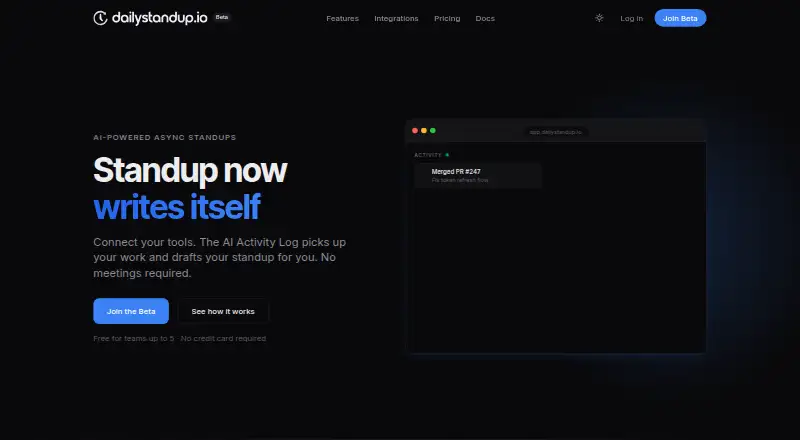
DailyStandup is a web-based tool for teams that share work updates asynchronously. Its AI Activity Log uses commits, pull requests, tickets, and messages to prepare structured standup drafts. Team members can review and edit a draft or write a manual check-in about yesterday, today, blockers, and mood; check-ins are designed to take about 60 seconds. AI summaries track blocker severity, owners, and open questions, while an organization view brings each team's progress, blockers, and health together. Teams can choose a daily standup time and timezone, with reminders before the standup closes. Integrations are listed for GitHub, Linear, and Slack; Jira and Figma are marked as coming soon. Activity events can also be sent through a REST API or connected through MCP, whose server works with Claude Code, Cursor, Windsurf, and other MCP-compatible clients. The integrations page says activity data stays in the workspace, events are visible only to the team, and users choose what goes into drafts. The free plan covers up to five members on one team with seven-day history. Pro costs $8/user/mo billed annually and adds unlimited teams and members, the Activity Log, auto-submit, fuller summaries, and 90-day history.
Good
- Free plan covers up to five members.
- Drafts can be edited or replaced with manual updates.
- Summaries track blocker severity, owners, and open questions.
- Supports REST API and MCP activity connections.
Watch out
- Free plan includes one team and seven-day history.
- Pro costs $8/user/mo billed annually.
- Jira and Figma are marked coming soon.
Who it suits
DailyStandup suits teams that want async updates drafted from work activity, with an option for manual check-ins. The free plan is sized for teams of up to five members.
Verdict
DailyStandup combines activity-based drafts with manual updates and team summaries. Its free plan is limited to five members, one team, and seven-day history; Pro is listed at $8/user/mo billed annually.
Plans and prices
From DailyStandup's own pricing page, checked 30 Sep 2026.
| Plan | Price | What it gives you |
|---|---|---|
| Free | Free | Up to 5 members · 1 team · Daily AI summaries · Basic standup prompts · 7-day history |
| Pro | $8 a month | Unlimited teams & members · AI Activity Log · Auto-submit on schedule · Full AI summaries + blocker detection · GitHub, Linear, Slack integrations · 3 AI Agents included · Pattern tracking · Weekly digests · 90-day history · Priority support · billed annually |
| Enterprise | Priced on request | Custom AI Agent limits · SAML / SSO · Custom onboarding · Dedicated support · Advanced security & compliance · Unlimited history · Admin API access · SLA guarantee |
The facts
Each one read from DailyStandup's own pages, with the date it was checked.
What it does
- Activity drafting
- The AI Activity Log picks up commits, pull requests, tickets, and messages to draft structured standups.checked 30 Sep 2026
- AI summaries
- AI summaries include blocker severity, owner tracking, and open questions.checked 30 Sep 2026
- APIs
- Activity events can be pushed through a REST API or connected through the Model Context Protocol (MCP).checked 30 Sep 2026
- Check-ins
- Manual check-ins cover yesterday, today, blockers, and mood and are designed to take about 60 seconds.checked 30 Sep 2026
- Core product
- DailyStandup is an AI-powered async standup tool that connects work tools and drafts standups automatically.checked 30 Sep 2026
- Enterprise controls
- Enterprise includes SAML/SSO, admin API access, dedicated support, advanced security and compliance, unlimited history, and an SLA guarantee.checked 30 Sep 2026
- Integrations
- Native integrations are listed for GitHub, Linear, and Slack; Jira and Figma are marked coming soon.checked 30 Sep 2026
- Manual mode
- Auto-drafts and manual check-ins work side by side, so users can edit a draft or write their own update.checked 30 Sep 2026
- MCP clients
- The MCP server works with Claude Code, Cursor, Windsurf, and any MCP-compatible client.checked 30 Sep 2026
- Organization view
- Org-level summaries show each team’s progress, blockers, and health in one view.checked 30 Sep 2026
- Privacy
- The integrations page says activity data stays in the workspace, events are visible only to the team, and users choose what enters drafts.checked 30 Sep 2026
- Scheduling
- Teams can set a daily standup time and timezone, with reminders before the standup closes.checked 30 Sep 2026
Money
- Free access
- The homepage states that the product is free for teams up to five people and requires no credit card.checked 30 Sep 2026
The full review of DailyStandup
Overview
DailyStandup is a web-based tool that prepares asynchronous standup updates from work activity and lets team members check in manually. It is best suited to teams that want routine progress and blocker updates without requiring a live meeting. Its appeal is the combination of editable drafts, scheduled check-ins and summaries; its small free-plan ceiling makes it less suitable for larger teams that are not ready to pay.
Key features
The AI Activity Log turns commits, pull requests, tickets and messages into structured draft updates. That can spare people from reconstructing their work at check-in time, while manual updates and draft editing keep the final account in each member’s hands. Manual prompts cover yesterday, today, blockers and mood, and are designed to take about 60 seconds.
AI summaries track blocker severity, owners and open questions, helping teams distinguish urgent dependencies from routine progress. Organization-level summaries bring progress, blockers and team health together, which is useful for managers following several teams. Daily scheduling supports a chosen time and timezone, with reminders before the standup closes.
Native integrations connect GitHub, Linear and Slack; Jira and Figma are marked as coming soon. Teams can push activity through a REST API or connect using MCP. The MCP server supports Claude Code, Cursor, Windsurf and other compatible clients. The integrations page says activity data stays in the workspace, events are visible only to the team, and users choose what enters drafts. That gives teams control over draft inputs, though it does not replace a review of their own data-handling requirements.
Pricing
The Free plan costs nothing and covers up to five members, one team, daily AI summaries, basic standup prompts and seven-day history. It is a useful way for a small team to try the workflow without a credit card, but the single-team cap and short history limit its value for growing organizations.
Pro costs $8/user/mo billed annually. It removes the team and member limits and adds the AI Activity Log, scheduled auto-submit, full summaries with blocker detection, GitHub, Linear and Slack integrations, three AI Agents, pattern tracking, weekly digests, 90-day history and priority support. This is the relevant tier for teams that want activity-based drafts or multiple teams, but the annual billing term is a material commitment.
Enterprise has custom pricing and adds custom AI Agent limits, SAML/SSO, custom onboarding, dedicated support, advanced security and compliance, unlimited history, admin API access and an SLA guarantee. It fits organizations that need those controls and commitments; smaller teams can avoid that tier unless those requirements matter. A free trial is offered.
Platforms
DailyStandup runs on the web. Its integrations and MCP connections extend the sources that can contribute activity, but do not change its listed platform availability.
Who it's for
Choose DailyStandup if a team wants asynchronous check-ins that combine work activity with editable or fully manual updates, especially when managers need blocker tracking and a view across teams. The free plan is suited to a small single team; Pro is the practical fit once a team needs more members, teams, integrations or longer history. It is a weaker fit for teams seeking a larger no-cost allowance or unwilling to commit to annual billing for Pro.
Pros and cons
- Pro: Activity-based drafts can reduce the effort of recalling work, while manual check-ins and editing preserve member control.
- Pro: Summaries include blocker severity, ownership and open questions, with organization-level visibility for multi-team oversight.
- Pro: REST API and MCP connections offer routes for activity beyond the native GitHub, Linear and Slack integrations.
- Con: Free access is limited to five members, one team and seven-day history, so it is restrictive for expanding teams.
- Con: Pro is $8/user/mo billed annually, making the billing term important for teams that want a lower-commitment paid option.
- Con: Jira and Figma are marked as coming soon rather than available native integrations.
Alternatives
For other options, see Daily Standup Software. Consider DailyBot if its free plan’s unlimited members and up to 50 compiled check-in reports per organization each month suit your needs better than DailyStandup’s five-member cap. Geekbot is another freemium option with a free trial; its Starter plan is for 10 users, while its Basic — Standups plan costs $2.50 a month on annual billing.
Murmurd may suit teams seeking a free plan for up to five members with daily check-ins, weekly priorities and basic escalations, or Pro at $3 a month for unlimited team members. Openbook, ScrumAI, Standup Alice, Sup Bot and Team O'clock are also alternatives to compare.
Verdict
DailyStandup is a strong choice for teams that want work activity turned into editable standup drafts, with summaries that make blockers and cross-team health easier to follow. Its main trade-offs are a restrictive free plan and annual billing for Pro; teams that need a broader free allowance or a shorter commitment should compare alternatives before settling on it.
Getting started
- Open https://dailystandup.io/.
- Use the free plan for a team of up to five people; no credit card is required.
- Choose Pro at $8/user/mo billed annually for unlimited members and teams, or explore Enterprise.
- Connect GitHub, Linear, or Slack, or push activity events through the REST API or MCP.
- Set the daily standup time and timezone, then use an AI draft or manual check-in.
Limits worth knowing
The free plan covers up to five members, one team, daily AI summaries, basic standup prompts, and seven-day history. Pro is $8/user/mo billed annually and includes 90-day history; Enterprise has a custom price.
Questions
Is DailyStandup free?
Yes. The Free plan costs nothing and supports up to five members on one team.
What does Pro cost?
Pro is listed at $8/user/mo, billed annually. Its features include unlimited teams and members, AI Activity Log, auto-submit, and 90-day history.
Which platforms does it support?
DailyStandup is available on the web.
Which integrations are available?
Native integrations are listed for GitHub, Linear, and Slack. Jira and Figma are marked coming soon.
Can updates be written manually?
Yes. Manual check-ins can be used alongside auto-drafts, and users can edit a draft or write their own update.
What does Enterprise include?
Enterprise includes SAML/SSO, admin API access, dedicated support, advanced security and compliance, unlimited history, and an SLA guarantee. Its price is custom.