mpv.net
mpv.net is a free Windows media player with a graphical interface based on mpv.
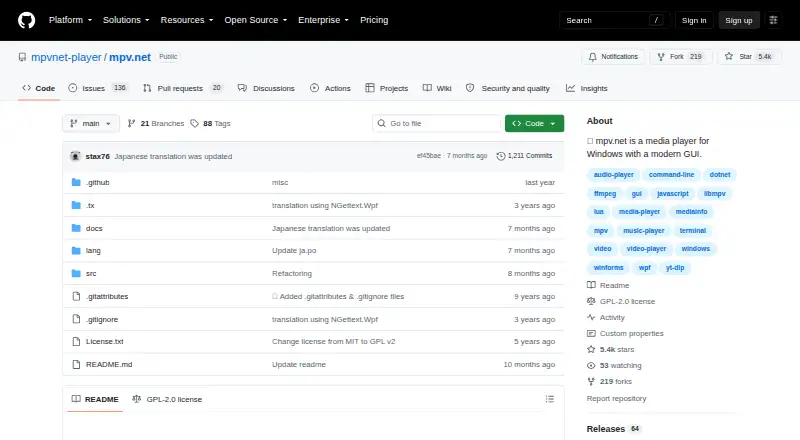
What mpv.net is
mpv.net is a free Windows media player with a graphical interface based on mpv. It plays video and audio and displays images using built-in decoders, so external codecs are not required. The project says almost all mpv features are available, with differences documented in its manual. Listed video capabilities include high-quality scaling, color management, frame timing, interpolation, HDR, and DXVA2 decoding acceleration. Network playback, subtitles, and hardware acceleration are supported. Searchable configuration and input editors, themes, context menus, and global keyboard shortcuts allow customization. Lua and JavaScript scripts, JSON IPC for external control, and an extension API for C#, VB.NET, and F# support automation. Internet streaming uses yt-dlp, which must be installed and placed on PATH or in the executable folder. Browser extensions can open content, and File Explorer can enqueue files. It requires Windows 10 or newer and .NET Desktop Runtime 10.0.
Good
- Free and GPL-2.0 licensed
- Built-in decoders avoid external codecs
- Supports HDR and hardware acceleration
- Script and extension support
- Network playback and subtitles
Watch out
- Windows only
- Requires .NET Desktop Runtime 10.0
- Internet streaming requires yt-dlp setup
- Window-free mode is unsupported
Who it suits
It suits Windows users seeking a free player for video, audio, images, subtitles, and configurable playback.
Verdict
mpv.net offers broad playback and customization in a free Windows package. Users should account for the runtime requirement and extra setup for yt-dlp streaming.
Plans and prices
From mpv.net's own pricing page, checked 11 Oct 2026.
| Plan | Price | What it gives you |
|---|---|---|
| mpv.net | Free | Windows 10 or higher · .NET Desktop Runtime 10.0 required · internet streaming requires yt-dlp |
The facts
Each one read from mpv.net's own pages, with the date it was checked.
What it does
- Automation
- It supports Lua and JavaScript scripts, JSON IPC for control by external programs, and an extension API for C#, VB.NET, and F#.checked 11 Oct 2026
- Compatibility
- The project says almost all mpv features are available and the official mpv manual applies, with differences documented in its manual.checked 11 Oct 2026
- Configuration
- It includes searchable configuration and input editors, customizable themes and context menus, and global keyboard shortcuts.checked 11 Oct 2026
- Downloads
- The manual links to stable and beta portable and setup downloads through GitHub.checked 11 Oct 2026
- File Explorer
- Files can be enqueued from File Explorer, and the manual describes Open with++ for adding Play with mpv.net and Add to mpv.net playlist context menu actions.checked 11 Oct 2026
- Hardware acceleration
- Yeschecked 21 Sep 2026
- License
- The repository lists the project under the GPL-2.0 license.checked 11 Oct 2026
- License model
- freechecked 21 Sep 2026
- Limitations
- The manual says window-free mode is unsupported and the main window remains visible even when music is played from a terminal.checked 11 Oct 2026
- Media support
- It can be used as a video player, audio player, and image viewer, with built-in decoders so external codecs do not need to be installed.checked 11 Oct 2026
- Network playback
- Yeschecked 21 Sep 2026
- Playback features
- Listed video capabilities include high quality scaling, color management, frame timing, interpolation, HDR, and DXVA2 video decoding acceleration.checked 11 Oct 2026
- Purpose
- mpv.net is a Windows media player with a modern graphical interface, based on mpv.checked 11 Oct 2026
- Requirements
- The documented requirements are Windows 10 or higher and .NET Desktop Runtime 10.0.checked 11 Oct 2026
- Streaming integration
- Internet streaming is supported through yt-dlp, which must be installed and added to PATH or placed in the mpv.net executable folder.checked 11 Oct 2026
- Subtitle support
- Yeschecked 21 Sep 2026
- Support
- The manual directs mpv.net bug reports, feature requests, and advanced questions to GitHub Issues, and recommends trying the newest beta before requesting help.checked 11 Oct 2026
Where it runs
- Browser integrations
- The manual describes Chrome and Firefox extensions for opening content with mpv.net; the Play with mpv Chrome extension also requires a companion app to communicate with it.checked 11 Oct 2026
- Supported platforms
- windowschecked 21 Sep 2026
Money
- Free plan
- Yeschecked 21 Sep 2026
Alternatives to mpv.net
- 1

Infuse
Free planiOSmacOS7.4From $16.99 a year - 2
RealPlayer
Free planAndroidiOSmacOSWindows7.4From $4.99 a month - 3
ALLPlayer
Free planAndroidiOSWindows7.1$1.40 one-time - 4
mpv
Free planAndroidAPILinuxmacOS7.1Free plan - 5
Flowplayer
AndroidiOSWebAPI7.0$99 one-time - 6
Dragon Player
Free planOpen sourceLinux6.9Free plan