MPC-Qt
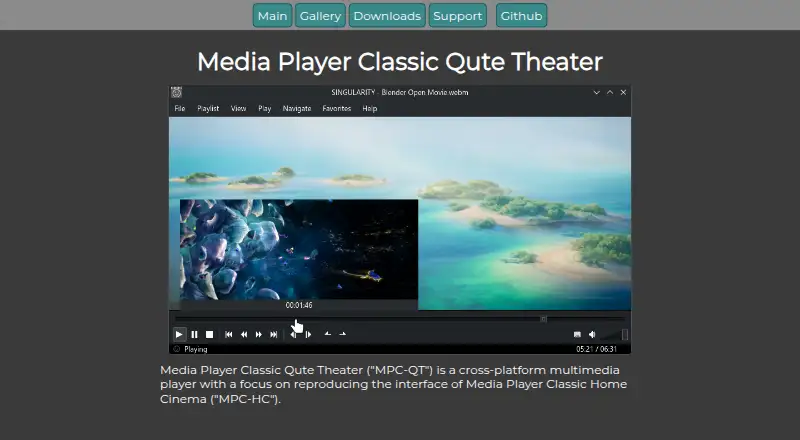
The facts below are what the maker publishes about MPC-Qt, checked and dated. Our editors have not written about it yet.
The facts
Each one read from MPC-Qt's own pages, with the date it was checked.
Where it runs
- Appearance
- The app supports custom styling and adapts to dark or light themes.checked 11 Oct 2026
- Linux downloads
- The downloads page lists Linux Flatpak, AppImage, and executable packages.checked 11 Oct 2026
- Windows downloads
- The downloads page lists Windows installer and portable packages.checked 11 Oct 2026
What it does
- Development builds
- Development versions are intended for testing the latest unreleased version and are updated after each commit to the main repository.checked 11 Oct 2026
- Downloads
- The downloads page lists Windows installer and portable packages, plus Linux Flatpak, AppImage, and executable packages.checked 11 Oct 2026
- Feature status
- The project notes that unimplemented options are hidden or disabled in the options dialog.checked 11 Oct 2026
- License
- The project states that MPC-QT is copyrighted under GPL v2 by the MPC-QT developers.checked 11 Oct 2026
- Limit
- The project describes encoding support like VirtualDub as a possible upcoming feature dependent on developer time.checked 11 Oct 2026
- Multiple playlists
- It supports separate playlists and tracks the last played file in each playlist.checked 11 Oct 2026
- Online video
- It can play online videos using yt-dlp, including subtitles and multiple audio tracks.checked 11 Oct 2026
- Options
- The options dialog exposes mpv scalar and color-correction options alongside options laid out like MPC-HC.checked 11 Oct 2026
- Playback controls
- Features include seekbar video previews, shuffle, quick queuing, playlist search, and looped playback.checked 11 Oct 2026
- Playback engine
- It uses libmpv to play video instead of DirectShow.checked 11 Oct 2026
- Playlist library
- Deleted playlists can be restored from backup, according to the gallery page.checked 11 Oct 2026
- Playlists
- It supports multiple playlists and tracks the last played file for each playlist.checked 11 Oct 2026
- Playlist tools
- It supports playlist shuffling, quick queuing, and playlist searching.checked 11 Oct 2026
- Product
- MPC-QT is a cross-platform multimedia player that aims to reproduce the interface and functionality of MPC-HC.checked 11 Oct 2026
- Screenshots
- Screenshot templates let users customize the screenshot filename and choose what information to include.checked 11 Oct 2026
- Screenshots and metadata
- Users can set screenshot filename templates and display custom metadata in the playlist.checked 11 Oct 2026
- Seek preview
- Hovering over the seek bar displays a video thumbnail at that position.checked 11 Oct 2026
- Source builds
- The project encourages compiling from source and provides instructions in the Git repository README.checked 11 Oct 2026
- Styling
- The app supports custom styling in the app.checked 11 Oct 2026
- Subtitle feature
- Displayed subtitles can be copied to the clipboard.checked 11 Oct 2026
- Support
- Users can ask questions, report bugs, or request features through the issue tracker; bug reports should include the app version and a description.checked 11 Oct 2026
Alternatives to MPC-Qt
- 1

Infuse
Free planiOSmacOS7.4From $16.99 a year - 2
RealPlayer
Free planAndroidiOSmacOSWindows7.4From $4.99 a month - 3
ALLPlayer
Free planAndroidiOSWindows7.1$1.40 one-time - 4
mpv
Free planAndroidAPILinuxmacOS7.1Free plan - 5
Flowplayer
AndroidiOSWebAPI7.0$99 one-time - 6
Dragon Player
Free planOpen sourceLinux6.9Free plan