Morphyre
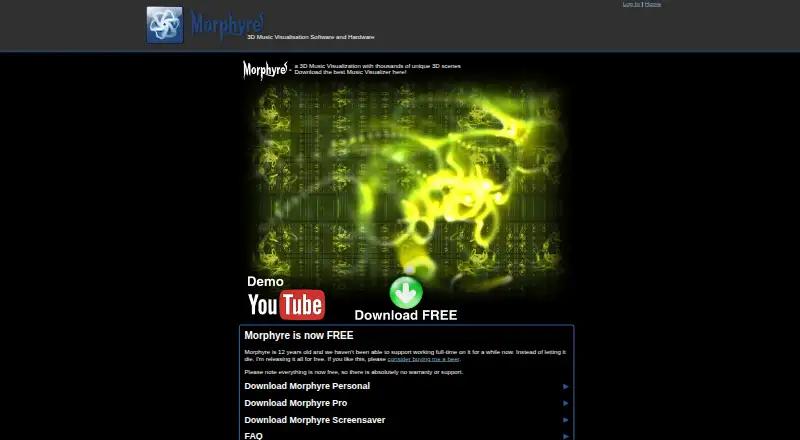
Morphyre is a music-responsive 3D visualizer that generates animated scenes that move with music.
What Morphyre is
Morphyre is a music-responsive 3D visualizer that generates animated scenes that move with music. Its scene library includes forms, tunnels, fractals, animated blocks, and sketches, and users can design scenes of their own. The Scene Designer can also be used to make music videos for YouTube. Listed music player plugins support iTunes, Windows Media Player, and Winamp; the Read Me also gives instructions for MediaMonkey. Morphyre Free and Morphyre Personal are limited to personal use. Professional use at nightclubs, gigs, or public venues requires Morphyre Pro, which supports stereoscopic visuals when a venue has suitable glasses. New scenes update automatically when Morphyre is running online, but full program updates require a separate download. The maker lists Windows or an x86-based Macintosh, a processor faster than 1 GHz, and a graphics card supporting OpenGL 2 as system requirements. Morphyre Free also needs internet access at least every fifth time it runs. The maker says the software is free and has no warranty or support.
Good
- Animated 3D scenes respond to music
- Users can design their own scenes
- Scene Designer can make music videos for YouTube
- Player plugins support iTunes, Windows Media Player, and Winamp
Watch out
- Free and Personal versions are for personal use only
- Free version needs internet access at least every fifth run
- Full program updates require a separate download
- Maker says there is no warranty or support
Who it suits
Morphyre suits people who want animated music visuals for personal use and the listed desktop environments. Professional venue use requires Morphyre Pro.
Verdict
Morphyre combines music-responsive visuals with scene creation and listed player plugins. Check the personal-use restriction, system requirements, and recurring internet requirement before choosing the Free version.
Plans and prices
From Morphyre's own pricing page, checked 8 Oct 2026.
| Plan | Price | What it gives you |
|---|---|---|
| Morphyre Free | Free | Personal use · no warranty or support |
| Morphyre Pro | Free | Professional use · available as a download; current site says everything is free |
The facts
Each one read from Morphyre's own pages, with the date it was checked.
What it does
- Customization
- Morphyre Personal features include scene controls, themes, favorites, settings and visual effects such as strobe, HDR, negate and blur.checked 8 Oct 2026
- Data collection
- The Read Me says connected use sends computer type, music player and Morphyre status information; it says Morphyre does not retrieve material from other applications.checked 8 Oct 2026
- Internet requirement
- The Read Me says Morphyre Free will stop running if it does not get internet access at least every fifth time it runs.checked 8 Oct 2026
- Personal use restriction
- Morphyre Free and Morphyre Personal are for personal use only; the Read Me says professional use requires Morphyre Pro.checked 8 Oct 2026
- Player integrations
- The maker lists iTunes, Windows Media Player and Winamp as supported music player plugins; its Read Me also gives instructions for MediaMonkey.checked 8 Oct 2026
- Privacy detail
- The FAQ says usage information includes version, graphics card and driver, errors, scene viewing duration and scene files, and excludes identifying details such as MAC address or hard disk key.checked 8 Oct 2026
- Product
- Morphyre is a music responsive 3D visualizer that creates animated scenes which move with music.checked 8 Oct 2026
- Professional use
- Morphyre Pro is described for professional use at nightclubs, gigs and public venues, and supports stereoscopic visuals where venues have suitable glasses.checked 8 Oct 2026
- Scene creation
- Users can create their own 3D scenes with Morphyre and use the Scene Designer to make music videos for YouTube.checked 8 Oct 2026
- Scenes
- The maker describes thousands of unique 3D scenes, including forms, tunnels, fractals, animated blocks and sketches.checked 8 Oct 2026
- Support
- The maker says everything is free and there is no warranty or support; its download page points users to a forum to report problems.checked 8 Oct 2026
- System requirements
- The maker lists Windows or x86 based Macintosh, a processor faster than 1 GHz, and a graphics card that supports OpenGL 2.checked 8 Oct 2026
- Updates
- New scenes update automatically while Morphyre is running online, while full program updates require a separate download.checked 8 Oct 2026
The company
- Maker
- Morphyre was created by Gordon Williams and other visual enthusiasts, and the site credits Pur3 Ltd.checked 8 Oct 2026
The full review of Morphyre
Morphyre is a music-responsive 3D visualizer that turns tracks into animated scenes. It suits listeners who want varied visuals or the tools to design their own scenes and videos. The key choice is whether its personal-use terms and older system requirements fit your setup.
Overview
Morphyre pairs music with 3D scenes that range from tunnels and fractals to animated blocks and sketches. Its large selection offers variety for casual listening, while scene creation gives more creative users room to make visuals of their own. Scene Designer can also create music videos for YouTube, with video export up to 1080p.
Plugins are listed for iTunes, Windows Media Player and Winamp, and instructions also cover MediaMonkey. New scenes update automatically when Morphyre is running online; full program updates require a separate download. Free has a recurring connectivity condition: it stops running if it fails to get internet access at least every fifth time it runs.
Key features
Scene creation and controls
Morphyre Personal adds scene controls, themes, favorites and settings, along with effects such as strobe, HDR, negate and blur. Those options suit users who want to shape the visual style or build scenes themselves; listeners content with ready-made visuals may have little reason to seek the extra controls.
Professional visuals
Morphyre Pro is intended for nightclubs, gigs and public venues, and supports stereoscopic visuals when suitable glasses are available. Free and Personal are for personal use only, so they do not fit public performance.
Pricing
Morphyre Free costs nothing and is restricted to personal use. It comes without warranty or support, and its internet check can interrupt use on machines that regularly run offline.
Morphyre Pro costs nothing and is available as a download for professional use. The maker says everything is free, making Pro the relevant option for venue use without a listed charge.
Morphyre Personal is also restricted to personal use and includes scene controls, themes, favorites, settings and visual effects. No price is given for this plan, so it has custom pricing. There is no free trial.
Platforms
Morphyre is listed for Android, macOS, web and Windows, with web and desktop platform coverage. The stated system requirements call for Windows or an x86-based Macintosh, a processor faster than 1 GHz and a graphics card supporting OpenGL 2. Check those requirements against your device, particularly if you use a newer Mac that is not x86-based.
Who it's for
Morphyre fits listeners who want music-led 3D scenes, desktop player plugins or the freedom to create custom visuals and YouTube videos. Its scene controls also suit people who enjoy adjusting effects. Those who need offline reliability, current high-resolution video delivery or a simple plug-and-play setup may prefer a different tool.
Pros and cons
- Pro: A broad range of animated 3D scenes gives listeners visual variety without requiring them to design every scene.
- Pro: Scene creation and 1080p video export support users making their own music visuals.
- Pro: Pro is available as a free download for professional venue use and supports stereoscopic visuals with suitable glasses.
- Con: Free and Personal cannot be used professionally, which rules them out for public performances.
- Con: Free needs internet access at least every fifth run, limiting dependable offline use.
- Con: The stated processor and OpenGL requirements, plus the x86-based Macintosh condition, may exclude some devices.
- Con: Free has no warranty or support, and full program updates require a separate download.
Alternatives
For an open-source visualizer and VJ tool across Linux, macOS, web and Windows, choose Le Biniou. dmn Visualiser is an option for Android, iOS and web users who want a free preview or access under its first-75-users offer. Choose Renderforest Music Visualizer for mobile and web use with free watermarked HD video or a paid Lite plan. Fosfora offers 56 effects in an open-source desktop app for Linux, macOS and Windows, with no account required. Music Waveform is a free mobile and web option with no account, watermark or paywall. projectM covers Android, iOS, Linux, macOS, web and Windows. AUDIOVIZOR offers web and Windows presets, with 15-minute sessions and watermarked 720p export on its free plan. Kauna is a free Windows option.
Browse more options in Audio Visualizer Software.
Verdict
Morphyre is a strong fit for personal listeners who want expressive 3D visuals and the option to design scenes or export videos at up to 1080p. Its free entry and no-cost Pro download are appealing, but the personal-use restriction, recurring internet check on Free and dated system requirements make it a poor choice for offline users or anyone whose device falls outside the stated specifications.
Getting started
- Open https://www.morphyre.com/Morphyre
- Choose the free Morphyre download or the listed web access
- Install on Windows or an x86-based Macintosh when using the desktop version
- Use a processor faster than 1 GHz and an OpenGL 2-capable graphics card
- Connect a supported music player plugin
- Create or customize scenes with the Scene Designer
Limits worth knowing
Morphyre Free and Morphyre Personal are limited to personal use. Morphyre Free also stops running if it lacks internet access at least every fifth time it runs.
Questions
Is Morphyre free?
Yes. Morphyre Free is listed as free, and the maker says everything is free.
Can Morphyre be used professionally?
Professional use at nightclubs, gigs, and public venues requires Morphyre Pro. Pro supports stereoscopic visuals where suitable glasses are available.
Which platforms are supported?
The listing covers Android, macOS, web, and Windows, with desktop requirements also described for Windows or an x86-based Macintosh.
Can Morphyre export video?
Yes. Video export is supported, with a listed maximum resolution of 1080p.
Which music players integrate with Morphyre?
Plugins are listed for iTunes, Windows Media Player, and Winamp. The Read Me also provides instructions for MediaMonkey.
Alternatives to Morphyre
- 1

AUDIOVIZOR
Free planWebWindows7.3From C$4.99 a month - 2
Renderforest Music Visualizer
Free planAndroidiOSWeb7.3From $9 a month - 3
SongRender
Free planWeb7.3From $15 a month - 4
dmn Visualiser
Free planAndroidiOSWeb7.2From $1.45 a month - 5

Music Waveform
Free planAndroidiOSWeb7.2Free plan - 6

SYQEL
AndroidiOSWebmacOS7.0From $60 a year