Momento
Momento is a free, open-source game recorder for 64-bit Windows 10 version 1903 or newer and Windows 11.
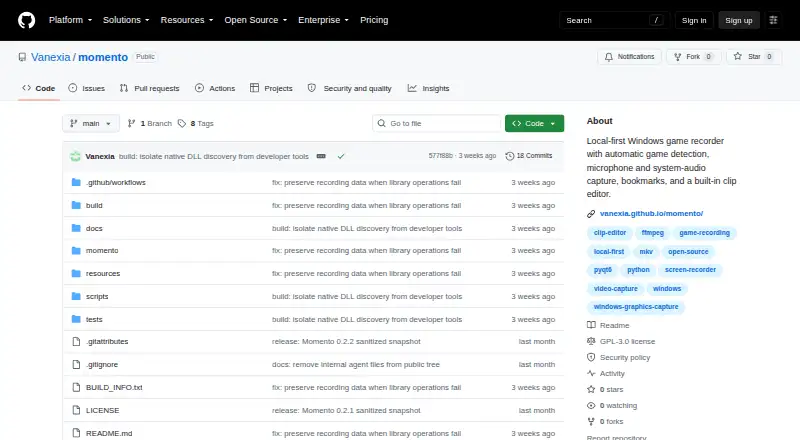
What Momento is
Momento is a free, open-source game recorder for 64-bit Windows 10 version 1903 or newer and Windows 11. It watches a configurable game list and begins recording when a matching game window appears. Capture uses Windows Graphics Capture and can include microphone and system audio. Recordings are stored locally in MKV; the built-in editor can browse, search, preview, repair, and trim clips, then export them as MP4 without re-encoding. A bookmark hotkey defaults to F8. The standard public build has no account, telemetry, analytics, advertising, automatic uploads, or cloud library. Optional YouTube uploads require the user to create and import a Google Cloud Desktop OAuth client. The installer uses about 300 MB, with additional room needed for recordings; default 60 fps and 16,000 kbit/s settings use about 7.2 GB per hour before audio and container overhead. Momento does not include a replay buffer, streaming, webcam capture, or HDR recording. Live recordings cannot be previewed or edited before finalization. The Windows installer is not code-signed, so Windows may show an Unknown Publisher or SmartScreen warning.
Good
- Automatically starts recording when a listed game opens.
- Captures microphone and system audio.
- Exports MP4 clips without re-encoding.
- Recordings and clips stay on the computer.
Watch out
- No replay buffer, streaming, webcam capture, or HDR recording.
- Live recordings cannot be edited before finalization.
- The installer is not code-signed.
- Recording storage can use about 7.2 GB per hour at default settings.
Who it suits
Momento suits Windows users who want game recordings and clip editing kept on their own computer. It is less suited to users who need a replay buffer, streaming, webcam capture, or HDR recording.
Verdict
Momento focuses on local game capture and editing, with optional YouTube uploads requiring user setup. Its missing replay, streaming, webcam, and HDR features are important limits to weigh.
The facts
Each one read from Momento's own pages, with the date it was checked.
What it does
- Automatic recording
- It watches a configurable game list and starts recording when a matching game window appears.checked 10 Oct 2026
- Bookmarks and clips
- The configurable bookmark hotkey defaults to F8, and the editor can browse, search, preview, repair, trim, and export MP4 clips without re-encoding.checked 10 Oct 2026
- Capture
- It captures the game window with Windows Graphics Capture and can record microphone and system audio.checked 10 Oct 2026
- Capture resolution
- 1440pchecked 20 Sep 2026
- Clip editing
- The editor can browse, search, preview, repair, trim, and export MP4 clips without re-encoding.checked 9 Oct 2026
- Credential protection
- Momento stores the imported YouTube OAuth client and connected-account token in separate files encrypted with Windows DPAPI.checked 10 Oct 2026
- Credential security
- Imported YouTube OAuth client details and account tokens are stored separately in DPAPI-encrypted files.checked 9 Oct 2026
- GPU encoding
- Yeschecked 20 Sep 2026
- Installer limitation
- The Windows installer is not code-signed, so Windows may display an Unknown Publisher or SmartScreen warning.checked 9 Oct 2026
- Installer trust
- The Windows installer is not code-signed, and the project recommends comparing its SHA-256 against the checksum file from the same release.checked 10 Oct 2026
- Instant replay
- Nochecked 20 Sep 2026
- Integration
- Optional YouTube uploads require the user to create a Google Cloud Desktop OAuth client and import its JSON file.checked 9 Oct 2026
- Known limitations
- Momento does not provide a replay buffer, streaming, webcam capture, or HDR recording, and live recordings cannot be previewed or edited before finalization.checked 10 Oct 2026
- License
- Momento is licensed under GPL-3.0-only.checked 10 Oct 2026
- Local storage
- The standard public build stores recordings and clips on the computer and has no Momento account, telemetry, analytics, or cloud library.checked 10 Oct 2026
- Privacy
- The standard public build has no Mementos account, telemetry, analytics, advertising, automatic uploads, or cloud library.checked 9 Oct 2026
- Purpose
- Momento is a local-first Windows game recorder with automatic game detection, audio capture, bookmarks, and a built-in clip editor.checked 10 Oct 2026
- Recording formats
- Recordings use MKV for crash tolerance, while exported clips use MP4.checked 10 Oct 2026
- Recording limitations
- Mementos does not provide a replay buffer, streaming, webcam capture, or HDR recording.checked 9 Oct 2026
- Security reporting
- The maintainer asks users to report vulnerabilities through GitHub's private vulnerability reporting form.checked 9 Oct 2026
- Storage
- Recordings use MKV and exported clips use MP4; recordings and clips stay on the user's computer.checked 9 Oct 2026
- Storage requirements
- The app uses about 300 MB installed, plus recording space; its default 60 fps and 16,000 kbit/s settings use about 7.2 GB per hour plus audio and container overhead.checked 10 Oct 2026
- System requirements
- The installer requires 64-bit Windows 10 version 1903 or newer, or Windows 11, and about 300 MB of installed disk space plus recording storage.checked 9 Oct 2026
Where it runs
- Supported platforms
- Windows 10 version 1903 or newer; Windows 11checked 20 Sep 2026
Alternatives to Momento
- 1
RevoSpin 360
Free planAndroidiOSWeb7.6$49.99 one-time - 2
Touchpix
AndroidiOSWebAPI7.6From $36.66 a month - 3
FreeBooth
Free planOpen sourceWebLinuxmacOSWindows7.5Free plan - 4
FotoBox
Free planOpen sourceLinuxmacOSSelf-hosted7.1Free plan - 5

LumaBooth
AndroidiOSWebmacOS7.0From $7.99 a month - 6

AI Photo Booth Pro
AndroidiOSmacOSWindows6.8From $49 a month