
LumaBooth
LumaBooth is photo booth software for events, with versions for Windows, Apple devices, and Android.
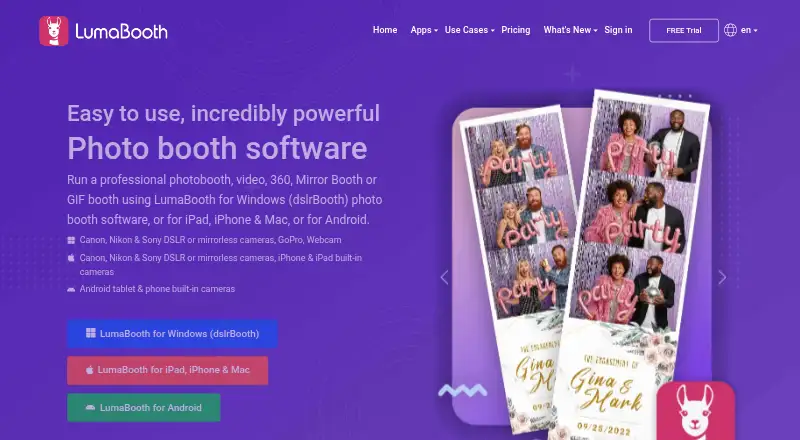
What LumaBooth is
LumaBooth is photo booth software for events, with versions for Windows, Apple devices, and Android. Its Apple app supports photo, video, GIF, boomerang, and 360 booth modes, plus a template editor, event branding, overlays, filters, stickers, and guest signatures and responses. Listed camera support includes Canon, Nikon, Sony, built-in cameras, and webcams; GoPro is also listed for Windows. Guests can share by email, SMS, Instagram, QR code, AirDrop, or WhatsApp, and physical prints are supported. When an Apple booth is offline, email and SMS shares wait until a connection is available. Booth Copilot can remotely monitor session information, start sessions, and send print commands over the internet. Annual plans are listed at $17 a year for Windows, and $18 a year for Apple and Android, billed at the respective monthly rates; monthly Apple and Android plans are $19.99 a month. The free app trial has no stated time limit, but permanently watermarks photos and videos and is not intended for events.
Good
- Apple app offers five capture modes.
- Supports physical prints and multiple sharing methods.
- Email and SMS shares queue during offline use.
- Booth Copilot can start sessions remotely.
Watch out
- Free trial permanently watermarks photos and videos.
- Free trial is not intended for events.
- No free plan is listed.
Who it suits
LumaBooth suits event organizers who need configurable photo booth modes, guest sharing, and print support. It may also fit operators using Windows, Apple devices, or Android, with a two-device Apple subscription for running two events simultaneously.
Verdict
LumaBooth offers event-focused capture, customization, sharing, and printing across several device types. Check the trial watermark and the plan terms for the platform and device setup you need.
Plans and prices
From LumaBooth's own pricing page, checked 30 Sep 2026.
| Plan | Price | What it gives you |
|---|---|---|
| LumaShare | $7.99 a month | Standalone sharing station · USD $7.99/month |
| LumaBooth for Windows — annual | $17 a month | Windows · first two devices · USD $17/month, billed annually; includes first two devices |
| LumaBooth for Android — annual | $18 a month | Android · first two devices · USD $18/month, billed annually; includes first two devices |
| LumaBooth for Apple — annual | $18 a month | iPad · iPhone · Mac · first two devices · USD $18/month, billed annually; includes first two devices |
| LumaBooth for Apple — monthly | $19.99 a month | iPad · iPhone · Mac · first two devices · USD $19.99/month |
| LumaBooth for Android — monthly | $19.99 a month | Android · first two devices · USD $19.99/month |
| HashPrinter | $25 a month | Windows · Mac · first two devices · prints Instagram hashtagged photos · USD $25/month; includes first two devices |
| LumaBooth for Windows — monthly | $49.99 a month | Windows · first two devices · USD $49.99/month |
The facts
Each one read from LumaBooth's own pages, with the date it was checked.
What it does
- Camera support
- The product pages list Canon, Nikon, Sony, built-in cameras, and webcams, with GoPro also listed for Windows.checked 30 Sep 2026
- Capture modes
- The Apple app supports photo, video, GIF, boomerang, and 360 booth modes.checked 30 Sep 2026
- Customization
- The Apple app includes a template editor, event branding, overlays, filters, stickers, and guest signatures and responses.checked 30 Sep 2026
- Integrations
- LumaShare supports guest sharing through email, text, WhatsApp, Instagram, AirDrop, and QR codes.checked 30 Sep 2026
- Offline sharing
- The Apple app says email and SMS shares queue until an internet connection is available when the booth is offline.checked 30 Sep 2026
- Privacy and data processing
- Lumasoft publishes a DPA stating that it covers processing under GDPR and incorporates standard contractual clauses between controllers and processors.checked 30 Sep 2026
- Purpose
- LumaBooth is photo booth software for events, with versions for Windows, Apple devices, and Android.checked 30 Sep 2026
- Remote control
- Booth Copilot can remotely monitor session information, start sessions, and send print commands over the internet.checked 30 Sep 2026
- Security
- Lumasoft's privacy policy says sensitive and credit information is transmitted using SSL, its card-processing system follows PCI DSS, and card details are not stored on its servers after a transaction.checked 30 Sep 2026
- Sharing
- The Apple app lists sharing by email, SMS, Instagram, QR code, AirDrop, and WhatsApp, as well as physical prints.checked 30 Sep 2026
- Support
- The site links to a help center, product user groups, and YouTube tutorials.checked 30 Sep 2026
Where it runs
- Device limit
- The Apple subscription includes two devices, and the product page says those devices can run two events at the same time.checked 30 Sep 2026
The company
- Headquarters
- East Brunswick, New Jersey, USAchecked 23 Sep 2026
Money
- Trial limit
- The free app trial is available for as long as needed, but adds a permanent watermark to photos and videos and is not intended for events.checked 30 Sep 2026
The full review of LumaBooth
LumaBooth is event photo booth software for operators working across Windows, Apple devices, or Android. It is best suited to events that need multiple capture formats, guest sharing, and printing in one setup. Its strongest case is breadth across platforms and booth tasks; the two-device allowance is useful, but Windows pricing rises sharply for month-to-month use.
Overview
LumaBooth combines booth capture with event customization, sharing, and printing. The Apple app spans still photos, video, GIFs, boomerangs, and 360 booth sessions, while the wider product includes Windows and Android versions. Camera options include Canon, Nikon, Sony, built-in cameras, and webcams; GoPro is also supported on Windows.
The wider toolkit includes LumaShare, a separate sharing station, and Booth Copilot, which can monitor session information, start sessions, and issue print commands remotely over the internet. Offline capture, lead capture, and a live event gallery extend its event workflow. These capabilities make it more than a camera app, though the platform-specific plans mean buyers should confirm the right subscription for their equipment.
Key features
Capture and customization
Apple users can build layouts in a template editor and tailor the booth with branding, overlays, filters, stickers, guest signatures, and responses. That gives operators meaningful control over the event experience without limiting capture to stills. The documented range is specifically for the Apple app, so don't assume every mode or customization is identical on Windows and Android.
Guest sharing and printing
The Apple app offers email, SMS, Instagram, QR code, AirDrop, and WhatsApp sharing, as well as physical prints. Email and SMS shares queue while the booth is offline and send when a connection returns, a practical safeguard for venues with unreliable connectivity. LumaShare supports guest sharing through the same broad mix of channels, making it useful as a dedicated sharing station alongside the booth.
Remote operation and data handling
Booth Copilot can monitor session information, start sessions, and send print commands over the internet, which helps an operator oversee a booth without standing beside it. Lumasoft says sensitive and credit information is transmitted using SSL, its card processing follows PCI DSS, and card details are not retained on its servers after a transaction. Its DPA addresses GDPR processing and standard contractual clauses between controllers and processors.
Pricing
There is no free plan. A free app trial is available for as long as needed, but it permanently watermarks photos and videos and is not intended for events, so it is a way to explore rather than a usable event tier.
| Plan | Price and fit |
|---|---|
| LumaShare | $7.99 a month; a standalone sharing station. |
| LumaBooth for Windows — annual | $17 a year (billed USD $17/month, billed annually); Windows, first two devices. |
| LumaBooth for Apple — annual | $18 a year (billed USD $18/month, billed annually); iPad, iPhone, and Mac, first two devices. |
| LumaBooth for Android — annual | $18 a year (billed USD $18/month, billed annually); Android, first two devices. |
| LumaBooth for Apple — monthly | $19.99 a month; iPad, iPhone, and Mac, first two devices. |
| LumaBooth for Android — monthly | $19.99 a month; Android, first two devices. |
| HashPrinter | $25 a month; first two devices across Windows and Mac, for printing Instagram hashtagged photos. |
| LumaBooth for Windows — monthly | $49.99 a month; Windows, first two devices. |
The annual Apple and Android plans cost less per month than their monthly counterparts, in exchange for an annual billing commitment. The Windows annual plan is especially attractive against its monthly price, but its displayed terms pair an annual total of $17 a year with billing at USD $17/month billed annually; buyers should verify the checkout total before committing. Each LumaBooth subscription covers the first two devices, and the Apple product page says those devices can run two events simultaneously. The plans do not make a free ongoing option available; LumaShare and HashPrinter are narrower add-ons rather than substitutes for the full booth app.
Platforms
LumaBooth supports Windows, macOS, iOS, and Android, with web also included among its platform tags. Product plan coverage is clearest for Windows, Apple devices, and Android. The Apple subscription explicitly spans iPad, iPhone, and Mac, while the two-device allowance suits a small setup or concurrent events rather than a larger fleet.
Who it's for
LumaBooth is a strong fit for event operators who want a choice of Windows, Apple, or Android hardware and need capture, customization, sharing, and printing together. Apple-based events benefit from the broadest explicitly described capture modes and sharing channels. A single operator can also use remote controls and offline share queuing to handle connectivity and oversight challenges. It is less compelling for businesses needing more than two included devices or a free, watermark-free event setup.
Pros and cons
- Pros: Broad capture modes and customization on Apple give operators several ways to shape the guest experience.
- Pros: Email and SMS shares queue offline, reducing the risk that poor venue connectivity interrupts delivery.
- Pros: The first two devices are included, and Apple devices can run two events at once.
- Cons: Trial photos and videos carry a permanent watermark, ruling out the trial for real events.
- Cons: Windows monthly service costs $49.99 a month, substantially above the annual option's displayed monthly billing rate.
- Cons: The two-device allowance may constrain operators managing larger booth fleets.
Alternatives
Photo Booth Software is the broader category directory for comparing booth products. Consider Booth.Events if a free plan and gallery storage matter: its Basic plan covers one iPad/Mac or iPhone, three months of gallery storage, and unlimited gallery uploads; Pro includes one iPad/Mac and unlimited iPhones.
Curator Live suits readers who want a free tier or event-priced option: Standard is $29, paid once per event for one capture device, with additional device licenses at $19. Choose AI Photo Booth Pro if a 12-mode package and two devices fit better; its Starter price is $49 a month, with a 15% annual saving stated for annual billing.
Breeze Booth is another paid option with iOS, web, and Windows support. Snappic may suit operators seeking a one-booth Starter plan with 60+ event templates and SMS and email sharing, priced at $69 a month. Touchpix is worth comparing for its wider platform support, including Linux, and a PhotoPass plan with two active events and unlimited devices.
Fiesta offers an annual Plus plan with one booth at a time, unlimited events and captures, permanent gallery hosting, and offline support. Simple Booth HALO is another paid option for web and iOS.
Verdict
Choose LumaBooth if you need a flexible event booth across Apple, Windows, or Android, especially when customization, guest sharing, and prints all belong in the same workflow. The platform breadth and two-device inclusion are its clearest advantages. Look elsewhere if a watermark-free free tier is essential, you need more than two included devices, or Windows month-to-month pricing is central to your decision.
Alternatives to LumaBooth
- 1
RevoSpin 360
Free planAndroidiOSWeb7.6$49.99 one-time - 2
Touchpix
AndroidiOSWebAPI7.6From $36.66 a month - 3
FreeBooth
Free planOpen sourceWebLinuxmacOSWindows7.5Free plan - 4
FotoBox
Free planOpen sourceLinuxmacOSSelf-hosted7.1Free plan - 5

AI Photo Booth Pro
AndroidiOSmacOSWindows6.8From $49 a month - 6

Curator Live
iOSWebmacOSWindows6.8From $499 a year