
MobyMax
MobyMax is a learning platform for teachers working to identify and address learning gaps for students in kindergarten through eighth grade.
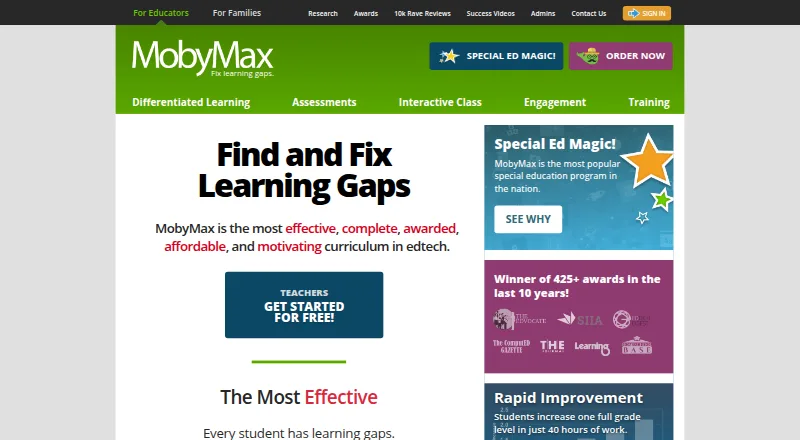
What MobyMax is
MobyMax is a learning platform for teachers working to identify and address learning gaps for students in kindergarten through eighth grade. It offers 115 curriculum modules across those grades and assigns lessons based on diagnostic results and student progress. Assessments include Skill Checker, Placement Tests, and Benchmarker tests based on state standards. Teachers can monitor progress in real time and analyze standards data by student, class, school, or district. Interactive Class tools support live lessons using the curriculum. Automatic rostering is available through Clever and ClassLink; users can also sign in with Google Classroom credentials or import a CSV. Clever has eligibility requirements for licensing and continued syncing. MobyMax is available on Android, iOS, macOS, web, and Windows, and its remote-learning document says it works on a device with a browser and internet connection. The free educator version has limited access compared with licensed features. The Family plan costs $7.99 per month for K–8 subjects. The maker says it complies with COPPA and FERPA and uses encryption to protect personal information.
Good
- 115 modules covering kindergarten through eighth grade
- Lessons adapt to diagnostic results and student progress
- Real-time progress monitoring and standards data analysis
- Free educator version available
- Supports Android, iOS, macOS, web, and Windows
Watch out
- Offline access is not available
- Free educator access is limited compared with licensed features
- Clever syncing has student-count and licensing requirements
Who it suits
MobyMax suits K–8 teachers and administrators who need assessments, adaptive lessons, and progress monitoring. Its stated audience also includes parents, students, and homeschool families.
Verdict
MobyMax combines adaptive K–8 lessons, assessments, and teacher progress tools in one platform. Check the free-version limits and Clever requirements against your school’s needs.
Plans and prices
From MobyMax's own pricing page, checked 20 Sep 2026.
| Plan | Price | What it gives you |
|---|---|---|
| Free | Free | Free educator version · Limited access compared with licensed features |
| Family | $7.99 a month | K-8 subjects · billed monthly |
| MAX Schoolwide License | $4,795 a year | Unlimited teachers · Unlimited students · 1 year · Unlimited teachers and students for one year |
| MAX Districtwide License | — | Unlimited teachers · Unlimited students |
| Teacher free version | Free | Free version · no obligation |
| Free educator | Free | Teacher access · limited features after 30-day full-access period · free registration |
| MAX License | $6.95 a year | SideBySide Sessions · Pinpoint Assessments Suite · No Gap Learning Curriculum Suite · per student |
| Family subscription | $7.99 a month | K-8 subjects · up to 9 children per family account · per month |
| SBS License | $149 a year | SideBySide Sessions · per teacher |
| SBS License schoolwide | $995 a year | SideBySide Sessions · unlimited school access · schoolwide |
| MobyMax Schoolwide License | $4,795 a year | Unlimited teachers and students · one school · one year |
| MAX License schoolwide | $4,795 a year | Unlimited teachers and students · full curriculum, assessments and engagement tools · schoolwide |
| MobyMax Districtwide License | Priced on request | All schools in district · unlimited teachers and students · save up to 20% off schoolwide pricing · one year |
The facts
Each one read from MobyMax's own pages, with the date it was checked.
What it does
- Adaptive learning
- It automatically assigns lessons based on students’ diagnostic results and progress.checked 29 Sep 2026
- API and SDKs
- The public Help Center contains no API or SDK documentation, while the terms prohibit automated access, copying and resale of site content.checked 14 Oct 2026
- Assessments
- Assessment tools include placement tests, benchmarkers, skill checkers, reading-level assessments, fluency tests, quizzes and Quick Question.checked 14 Oct 2026
- Audience
- MobyMax describes its users as teachers, administrators, parents, and students, including homeschool families.checked 29 Sep 2026
- Clever limit
- Clever integration is limited to schools or districts with a schoolwide or districtwide license, or licenses for at least 100 students; continued sync requires at least 11 active students per school.checked 29 Sep 2026
- Clever limitation
- Clever syncing requires a schoolwide, districtwide or 100-plus-student license and at least 11 active students per school.checked 14 Oct 2026
- Curriculum
- MobyMax says it has 115 modules covering kindergarten through eighth grade.checked 29 Sep 2026
- Curriculum coverage
- The service lists 115 modules spanning kindergarten through eighth-grade subjects.checked 14 Oct 2026
- Customer support
- Support is available by email, phone and contact form Monday-Wednesday and Friday 8:00-17:00 ET and Thursday 8:30-17:00 ET.checked 14 Oct 2026
- Data practices
- The privacy materials say schools may use aliases, and MobyMax does not sell or rent information, use targeted advertising or require student addresses, Social Security numbers or birth dates.checked 14 Oct 2026
- Differentiated learning
- Placement results or teacher assignments are used to give students individualized lessons at their level and pace.checked 14 Oct 2026
- Documentation
- The Help Center provides administrator, teacher, subject, assessment and Interactive Class articles plus videos, FAQs and live chat.checked 14 Oct 2026
- Employee rating
- Glassdoor lists MobyMax at 4.1 out of 5 from 109 employee reviews, with 70% saying they would recommend it.checked 14 Oct 2026
- Engagement tools
- The platform includes badges, certificates, games, game time, class rewards, team activities and messaging.checked 14 Oct 2026
- Founders
- MobyMax's About page says Glynn Willett and Wade Willett founded the company in 2010.checked 14 Oct 2026
- Integrations
- Automatic rostering options include Clever and ClassLink; Google Classroom credentials can be used to sign in, and CSV import is also available.checked 29 Sep 2026
- Interactive Class
- Interactive Class provides live whole-class whiteboards, Quick Question activities, team games, leaderboards and teacher-created problems.checked 14 Oct 2026
- Interactive instruction
- MobyMax offers Interactive Class tools for live lessons using its curriculum.checked 29 Sep 2026
The company
- Company facts
- LinkedIn lists MobyMax as a privately held e-learning company headquartered in Pittsburgh, with 51-200 employees and a 2011 founding year.checked 14 Oct 2026
- Founded
- 2010checked 23 Sep 2026
- Legal maker
- The site's terms name MobyMax Education, LLC as operator, while the trademark record identifies Learn Without Limits, LLC as MOBYMAX owner.checked 14 Oct 2026
Where it runs
- Device access
- A MobyMax remote-learning document says it works on any device with a browser and internet connection, with no additional hardware or operating system requirements.checked 29 Sep 2026
- Device support
- Supported devices include Windows 10 or later, macOS 12 or later, current ChromeOS, iPads using Safari and Android devices using Chrome.checked 14 Oct 2026
Money
- Free plan
- Yeschecked 20 Sep 2026
The full review of MobyMax
Overview
MobyMax is a learning platform for K–8 students, built to help educators identify learning gaps and respond with targeted instruction. It is best suited to schools and families that want assessments, adaptive lessons, and progress tracking together; its appeal is broad, but the right license depends on how many students need access.
Key features
Assessment-led instruction
MobyMax says its curriculum spans 115 modules from kindergarten through eighth grade. Skill Checker, Placement Tests, and state-standards-based Benchmarker tests help identify student needs, then the platform assigns lessons based on diagnostic results and progress. That connection can reduce the work of matching practice to gaps, though teachers still need to review progress and decide what to address.
Monitoring and live teaching
Teachers can follow progress in real time and examine standards data at student, class, school, and district levels. Interactive Class tools support live lessons using MobyMax’s curriculum. The range is useful for both classroom instruction and broader oversight, while the district-level tools will matter less to a family using the platform at home.
Access, integrations, and privacy
Automatic rostering is available through Clever and ClassLink; students can also sign in with Google Classroom credentials, and schools can import rosters by CSV. Clever has meaningful eligibility and continuity conditions: a school or district needs a schoolwide or districtwide license, or licenses for at least 100 students, and continued syncing requires at least 11 active students per school. Schools that cannot meet those thresholds have other setup options, but not Clever rostering.
MobyMax works in a browser with an internet connection, and its listed platforms include Android, iOS, macOS, web, and Windows. Offline access is not available, so students need connectivity. MobyMax says it complies with COPPA and FERPA, does not collect students’ home addresses, Social Security numbers, or dates of birth, and uses security measures including encryption. It also offers free live training webinars several times a week.
Pricing
The educator and teacher free versions cost nothing, with limited access compared with licensed features for the educator version. They provide a no-obligation way to start, but are not equivalent to a full school license.
The Family plan is $7.99 a month, billed monthly, and covers K–8 subjects. It is the clearest fit for a household seeking access across those subjects without a schoolwide purchase.
The MAX Schoolwide License and MobyMax Schoolwide License each cost $4,795 a year. Both provide unlimited teachers and students for one year; the MobyMax license specifies one school. These are school-level options rather than per-student subscriptions. The MAX Districtwide License has custom pricing and includes unlimited teachers and students. The MobyMax Districtwide License also has custom pricing, covers all schools in a district, and says it can save up to 20% off schoolwide pricing. Schools should compare the license scope and Clever thresholds with their roster needs before choosing.
A 30-day trial is offered. Confirm the applicable license scope before relying on the trial as a test of schoolwide or districtwide deployment.
Platforms
MobyMax lists Android, iOS, macOS, web, and Windows support. Browser access requires an internet connection, and there is no offline mode. Its browser-based access avoids additional device hardware or operating-system requirements, but connectivity remains essential.
Who it's for
MobyMax is aimed at teachers, administrators, parents, and students, including homeschool families. It is especially relevant where educators want standards-based assessment to inform lesson assignments and need progress views beyond an individual student. Families may find the monthly Family plan more appropriate; schools and districts needing unlimited teacher and student access should consider the corresponding institutional licenses. It is a weaker fit for offline learning or for schools that need Clever syncing but fall below its enrollment and license conditions.
Pros and cons
- Pros: Assessment results and progress drive adaptive lesson assignments, tying diagnosis to follow-up practice.
- Pros: Standards data can be reviewed across student, class, school, and district levels, supporting more than individual classroom tracking.
- Pros: Rostering and sign-in options include Clever, ClassLink, Google Classroom credentials, and CSV import.
- Cons: Offline access is unavailable, making a reliable internet connection necessary.
- Cons: Clever syncing has minimum license and active-student requirements that can rule it out for smaller deployments.
- Cons: The free educator access is limited compared with licensed features, and districtwide pricing is custom, so institutional buyers may need to clarify costs before committing.
Alternatives
Choose Khan Academy if a free plan across Android, iOS, and web better suits your needs; its listed Enterprise Starter option is $10 a year, billed at $10/student/year for U.S. schools and districts with 1,000 or fewer student licenses.
Kiddom is another freemium option. Its listed student full course set for K–Algebra 2 costs $27 a year per student and includes print curriculum material.
Consider Amplify Classroom if free K–12 interactive lessons in math, literacy, and science are the priority; its free educator plan includes a Teacher Dashboard, Polypad virtual manipulatives, and partial content customization.
Eureka Math offers free PreK–12 PDF curriculum with Student and Teacher Editions, curriculum maps, and overviews; choose it when downloadable curriculum materials are a better fit than an adaptive platform.
OpenSciEd is a free web option for educators or parents who want science curriculum and resources to download, with registration required.
Illustrative Mathematics provides a free online TK–12 curriculum with downloadable and printable teacher and student PDFs, making it a fit when math curriculum materials rather than broader adaptive instruction are the need.
Waggle Math is a paid K–8 practice option; its listed license includes Skill Boosts, and final pricing depends on account and contract details.
Reading Eggs is a paid alternative with a free trial and broad device support. Its Reading & Math monthly plan costs $13.99 a month and covers all reading and math programs for up to four children.
Verdict
MobyMax is a strong choice for K–8 educators who want diagnostic assessments to feed adaptive assignments, alongside standards-based progress monitoring and live instruction tools. Its main advantage is the breadth of that connected teaching workflow; look elsewhere if offline use is essential or if a small school cannot meet Clever’s thresholds and needs that integration.
Getting started
- Visit the MobyMax website.
- Choose the free educator version, Family plan, or a school or district license.
- Use MobyMax on Android, iOS, macOS, web, or Windows with an internet connection.
- Set up rostering with Clever or ClassLink, sign in with Google Classroom credentials, or import a CSV.
Limits worth knowing
The free educator version provides limited access compared with licensed features. The Family plan costs $7.99 a month and covers K–8 subjects. Clever rostering requires a schoolwide or districtwide license, or licenses for at least 100 students; continued sync requires at least 11 active students per school.
Questions
Is there a free plan?
Yes. MobyMax offers a free educator version with limited access compared with licensed features.
How much does the Family plan cost?
The Family plan costs $7.99 a month and covers K–8 subjects.
Which devices can run MobyMax?
MobyMax is available on Android, iOS, macOS, web, and Windows. It requires a browser and internet connection for device access.
What rostering and sign-in options are available?
Automatic rostering options include Clever and ClassLink. Google Classroom credentials can be used to sign in, and CSV import is also available.
What does MobyMax do for teachers?
It provides adaptive lessons, assessments, real-time progress monitoring, standards data, and tools for live lessons using its curriculum.
Who makes MobyMax?
MobyMax is made by MobyMax, whose headquarters are in Pittsburgh, Pennsylvania. The maker was founded in 2010.
Alternatives to MobyMax
- 1

Brilliant
Free planAndroidiOSWebmacOS9.0Free plan - 2

Boddle
Free planAndroidiOSWeb8.6Free plan - 3
Monster Math
Free planAndroidiOSWeb8.3From $59.99 a year - 4
MATHia
AndroidiOSWebmacOS8.2 - 5
DreamBox Math
iOSWebmacOSWindows8.2 - 6
GeoGebra
Free planAndroidiOSWebAPI8.1Free plan