MinecraftCircle Tools
MinecraftCircle Tools is a free set of browser utilities and references for planning Minecraft block geometry.
What MinecraftCircle Tools is
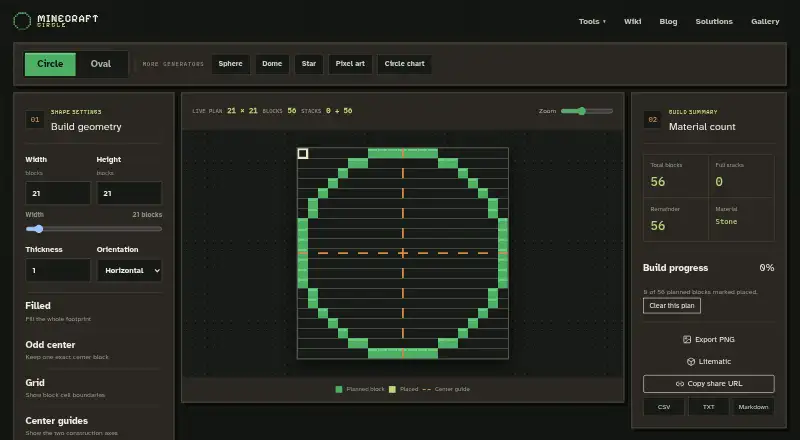
MinecraftCircle Tools is a free set of browser utilities and references for planning Minecraft block geometry. Its circle and oval generator creates symmetrical plans in outline or filled form, with exports to PNG, Litematic, CSV, TXT, or Markdown and a URL-sharing option. Other tools generate hollow or filled spheres, upper-half dome roof plans, and symmetric five-point stars. The sphere tool provides horizontal slices and layer counts. Sphere and dome interfaces cap the displayed range at 129, while the engine and exports support dimensions through 256. The site also includes pixel art tools; images are resized and quantized in the browser rather than sent to its server. Circle build progress is stored in browser local storage and is not sent to the server. The site says its grid and row plans describe block positions usable in Java and Bedrock, while Litematic is for compatible Java mod workflows. No account is required for the free browser utilities.
Good
- Free browser utilities with no account required
- Exports plans in five listed formats
- Includes six supported shape types
- Pixel art processing stays in the browser
- Build progress is stored locally
Watch out
- Sphere and dome displays cap at 129
- Service is provided as-is and as-available
- Litematic is limited to compatible Java mod workflows
Who it suits
It suits Minecraft builders planning circles, ovals, spheres, domes, stars, or pixel art with block-by-block layouts. Builders who use Java or Bedrock can use the grid and row plans; Litematic is for compatible Java mod workflows.
Verdict
MinecraftCircle Tools offers several geometry planners, multiple export formats, and browser-based pixel art processing. Keep the sphere and dome display cap in mind, even though the engine and exports support larger dimensions.
Plans and prices
From MinecraftCircle Tools's own pricing page, checked 5 Oct 2026.
| Plan | Price | What it gives you |
|---|---|---|
| Free browser building utility | Free | Circle generator and related browser utilities · no account required |
The facts
Each one read from MinecraftCircle Tools's own pages, with the date it was checked.
Money
- Circle and oval plans
- The circle generator creates symmetrical block by block plans for circles or ovals, with outline or filled geometry.checked 5 Oct 2026
What it does
- Circle exports
- Circle plans can be exported as PNG, Litematic, CSV, TXT, or Markdown, or shared using a URL.checked 5 Oct 2026
- Dome generator
- The dome generator produces the upper half of a block sphere as a layer by layer roof plan.checked 5 Oct 2026
- Game compatibility
- The site says its grid and row plans describe block positions usable in Java and Bedrock Edition, while Litematic is for compatible Java mod workflows.checked 5 Oct 2026
- Integrations
- The maker describes Litematic as a separate Java mod ecosystem format; no other integrations are stated on the opened pages.checked 5 Oct 2026
- Operator
- The legal notice says the website is operated by ToolSphere Tech LLC.checked 5 Oct 2026
- Pixel art privacy
- Pixel art images are resized and quantized in the browser and are not sent to the MinecraftCircle server.checked 5 Oct 2026
- Product
- MinecraftCircle publishes browser utilities and editorial references for planning block geometry.checked 5 Oct 2026
- Progress storage
- Circle build progress is stored in browser local storage, and the site says it is not sent to its server.checked 5 Oct 2026
- Service terms
- The legal notice says the tools are provided as-is and as-available and does not guarantee uninterrupted, timely, secure, or error-free service.checked 5 Oct 2026
- Sphere generator
- The sphere generator creates hollow or filled spheres and lets users inspect horizontal slices and layer counts.checked 5 Oct 2026
- Star generator
- The star generator creates symmetric five point block stars for floors, walls, roofs, and server emblems.checked 5 Oct 2026
- Support
- Users can submit feedback and geometry corrections through a contact form, with email optional for a reply.checked 5 Oct 2026
- Trust and affiliation
- The maker describes MinecraftCircle as an independent fan project not approved by or associated with Mojang or Microsoft.checked 5 Oct 2026
- Volume size limit
- The sphere and dome interfaces cap the displayed range at 129, while the engine and exports support dimensions through 256.checked 5 Oct 2026
The company
- Headquarters
- Cheyenne, Wyoming, United Stateschecked 23 Sep 2026
The full review of MinecraftCircle Tools
MinecraftCircle Tools is a browser-based collection for turning Minecraft geometry into coordinate, layer, and downloadable build plans. It suits builders who need circles, spheres, domes, stars, or pixel-art conversion in one place, especially when avoiding accounts matters. Its broad export support is useful, but the on-screen size ceiling and Java-specific Litematic workflow narrow its fit for some large or cross-edition projects.
Overview
MinecraftCircle Tools focuses on planning block geometry rather than managing complete Minecraft projects. The set covers circles, ovals, spheres, domes, five-point stars, and browser-side pixel-art processing. Coordinate output and layer-by-layer views make the results practical for manual construction, while URL sharing gives circle plans a convenient way to pass between builders. Progress for circle builds stays in local browser storage and is not sent to the service, which is a sensible arrangement for players who want to keep their work on their own device.
The service is operated by ToolSphere Tech LLC and identifies itself as an independent fan project with no approval or affiliation from Mojang or Microsoft. It is supplied as-is and as-available, without a promise of uninterrupted, timely, secure, or error-free operation.
Key features
Geometry and layer planning
The circle generator creates symmetrical block-by-block circles and ovals in either outline or filled form. That distinction matters: an outline is appropriate for rings, rims, and guides, while a filled plan is better for solid platforms or discs. Circle layouts can be inspected as coordinates and shared by URL, then exported as PNG, Litematic, CSV, TXT, or Markdown. This unusually wide set of outputs lets a builder choose an image reference, structured data, plain text, or a schematic-style workflow instead of retyping a plan.
Sphere generation supports hollow and filled forms, with horizontal slices and layer counts that clarify how each level changes. The dome generator uses the upper half of a block sphere as a layer-by-layer roof plan, making it a direct option for domed halls and shelters rather than requiring a sphere plan to be adapted manually. The star generator produces symmetrical five-point block stars for floors, walls, roofs, and server emblems, covering decorative jobs that circle tools cannot.
Pixel art and scale limits
Pixel-art images are resized and quantized in the browser and are not sent to the MinecraftCircle server. That local processing is a meaningful privacy advantage for builders converting personal artwork. The sphere and dome interfaces display dimensions only through 129, although the underlying engine and exports support sizes through 256. Larger builds therefore remain possible, but the visual planning interface is less helpful at those dimensions than the export capability suggests.
Game compatibility
The grid and row plans describe block positions usable in both Java and Bedrock Edition. Litematic output belongs to compatible Java mod workflows, so Bedrock builders and Java players without that mod ecosystem should favor the CSV, TXT, Markdown, PNG, or coordinate views instead. No other integrations are stated. Feedback and geometry corrections can be sent through a contact form, with email optional when a reply is wanted.
Pricing
MinecraftCircle Tools has one plan: Free browser building utility costs free. It includes the circle generator and related browser utilities, supports circles, ovals, spheres, domes, pixel art, and stars, and requires no account. There is no trial period because the service is already free, and no paid tier, seat charge, renewal, or quota is stated. This is a straightforward choice for occasional builders and servers that need shared planning utilities without subscription administration.
Platforms
The tools run on the web. The site describes its grid and row plans as usable in Java and Bedrock Edition; Litematic exports are intended for compatible Java mod workflows. Browser local storage is used for circle-build progress, so that saved progress depends on the local browser environment.
Who it's for
Choose MinecraftCircle Tools if you design varied block geometry, want both hollow and filled options, need layer or coordinate guidance, or regularly move plans between image, text, CSV, and Litematic formats. It is particularly well suited to account-free personal projects and builders who prefer browser-side pixel-art handling. Look elsewhere if your priority is an unrestricted visual range beyond 129 for spheres and domes, a dedicated 3D preview, or an output workflow centered on a format other than those provided.
Pros and cons
Pros
- Broad shape coverage: circles, ovals, spheres, domes, stars, and pixel art cover both structural and decorative planning.
- Flexible exports: PNG, Litematic, CSV, TXT, and Markdown support different building and documentation workflows.
- Useful inspection tools: coordinates, horizontal slices, layer counts, and layer views make manual construction more predictable.
- Local handling: pixel-art processing and circle progress stay in the browser rather than being sent to the server.
- No account cost: the complete free utility avoids sign-up and paid-plan restrictions.
Cons
- Sphere and dome display cap: the interface stops at 129 even though the engine and exports reach 256, making large designs harder to inspect visually.
- Litematic is ecosystem-specific: that format is useful for compatible Java mods but not a universal Java-and-Bedrock interchange.
- Limited integration scope: no integrations beyond the described Litematic workflow are stated.
- Service guarantees are limited: the operator provides the tools as-is and as-available without uptime or error-free commitments.
Alternatives
Minecraft Shape Generators is the broader category guide for comparing shape-planning options.
Mcgic Circle Generator is a better pick for mobile access or circles up to 512 by 512 blocks, though it handles full blocks only and does not offer MinecraftCircle Tools' stated shape range.
Minecraft Plot suits readers wanting a freemium planning service with mobile and web platforms, a free basic tier, and optional premium membership.
Block Shape Generator is a focused web alternative whose listed controls include spheres, cones, domes, and cylinders with no numeric limits stated.
Block Round is a free web option for the core round-shape job without a required paid tier.
MinecraftMaps Pixel Circle Generator is preferable for thin, thick, or filled circle and oval grids with downloadable PNG output.
SchemForge Sphere Generator is the stronger choice when an interactive 3D voxel preview, private build history, or a daily free-build allowance is more important than broad shape coverage.
SeedLander is a freemium web tool aimed at world-oriented planning with premium world and team add-ons.
Astroworld Circle & Dome Generator is a no-sign-up web alternative offering circle and dome work through 256 blocks with no ads stated.
Verdict
MinecraftCircle Tools is a strong free choice for builders who want several geometry types, detailed layer and coordinate plans, privacy-conscious browser processing, and many export formats without creating an account. Its main reason to look elsewhere is the 129-display ceiling for spheres and domes, compounded by Litematic's Java-mod dependency; large-scale or preview-first workflows may be better served by a more specialized generator.
Alternatives to MinecraftCircle Tools
- 1

SeedLander
Free planWeb7.5From £1.99 a month - 2

Minecraft Plot
Free planAndroidiOSWeb7.3$4.99 one-time - 3

BlockBlend
Free planWeb6.7Free plan - 4

Mcgic Circle Generator
Free planAndroidiOSWeb6.7Free plan - 5

SchemForge Sphere Generator
Free planWeb6.5From $3.99 a month - 6

Block Shape Generator
Free planWeb6.4Free plan