
Block Round
Block Round is a free browser tool for making circles, ellipses, spheres, and ellipsoids with Minecraft block textures.
What Block Round is
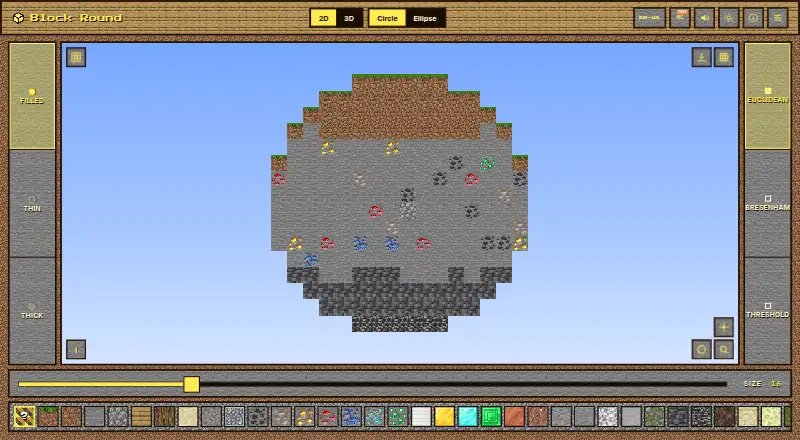
Block Round is a free browser tool for making circles, ellipses, spheres, and ellipsoids with Minecraft block textures. Its 2D modes provide Euclidean, Bresenham, and Threshold algorithms, while 3D modes include X, Y, and 45-degree diagonal cuts and a 3D preview. Users can select blocks such as Grass Block, Dirt, Stone, Oak, Diamond, Sand, and Gravel, or choose a Random mix. The tool exports 2D figures as PNG files and 3D figures as Sponge schematic v2 files, which WorldEdit, Litematica, and MCEdit can import. Block Round requires no installation, account, or backend, and the README says it works offline as a PWA. Its settings are session-only and return to defaults after a reload. A technical math companion is available as PDFs in nine languages, each described as at least 25 pages. The project states that its code, layout, design system, and sound engine are All Rights Reserved, and that it is not affiliated with, endorsed by, or sponsored by Mojang Studios or Microsoft.
Good
- Creates four types of geometric shapes.
- Offers three algorithms for 2D figures.
- Exports 2D figures as PNG files.
- Exports schematics compatible with WorldEdit, Litematica, and MCEdit.
- Works offline as a PWA.
Watch out
- Settings reset to defaults after a reload.
- The project states its code and design are All Rights Reserved.
Who it suits
Block Round suits Minecraft players who want to create block-textured shapes and export images or schematic files. It can also suit users who need a browser tool that works offline and requires no account.
Verdict
Block Round covers shape creation, algorithm selection, preview, and exports in a browser-based tool. Its settings do not persist across reloads, so users should expect to start with defaults on a later visit.
Plans and prices
From Block Round's own pricing page, checked 7 Oct 2026.
| Plan | Price | What it gives you |
|---|---|---|
| Free plan | Free | Free to use for the core job; no paid tier required |
The facts
Each one read from Block Round's own pages, with the date it was checked.
What it does
- 2D algorithms
- The available 2D algorithms are Euclidean, Bresenham, and Threshold.checked 7 Oct 2026
- 3D cuts
- Sphere and ellipsoid modes support X, Y and 45-degree diagonal cuts.checked 7 Oct 2026
- Access
- The README describes it as browser-based, requiring no installation, account or backend.checked 7 Oct 2026
- Algorithms
- Its 2D modes offer Euclidean, Bresenham and Threshold algorithms.checked 7 Oct 2026
- Block choices
- Users can select Minecraft blocks including Grass Block, Dirt, Stone, Oak, Diamond, Sand and Gravel, along with a Random mix and other blocks.checked 7 Oct 2026
- Block picker
- The block picker includes Minecraft blocks such as Grass Block, Dirt, Stone, Oak, Diamond, Sand, and Gravel, as well as Random mix.checked 7 Oct 2026
- Documentation
- A technical math companion is available in nine languages, with each PDF described as at least 25 pages.checked 7 Oct 2026
- Exports
- It exports 2D figures as PNG and 3D figures as Sponge schematic v2 files.checked 7 Oct 2026
- Image export
- The README states that 2D figures can be exported as PNG files.checked 7 Oct 2026
- Integrations
- The exported schematic can be imported by WorldEdit, Litematica and MCEdit.checked 7 Oct 2026
- License
- The README states that the code, layout, design system and sound engine are All Rights Reserved.checked 7 Oct 2026
- Minecraft disclaimer
- The project says it is not affiliated with, endorsed by or sponsored by Mojang Studios or Microsoft.checked 7 Oct 2026
- Offline use
- The README says the app works offline as a PWA.checked 7 Oct 2026
- Persistence limit
- Settings are session-only and reset to defaults after reload.checked 7 Oct 2026
- Privacy architecture
- The README describes the app as having no backend.checked 7 Oct 2026
- Purpose
- Block Round generates circles, ellipses, spheres and ellipsoids rendered with Minecraft block textures.checked 7 Oct 2026
- Schematic export
- The tool exports Sponge schematic v2 files that the README says WorldEdit, Litematica, and MCEdit can import.checked 7 Oct 2026
- Settings persistence
- Settings are not saved across reloads; each visit starts with the defaults.checked 7 Oct 2026
- Setup
- The README describes it as browser-based, with no installation, account, or backend required.checked 7 Oct 2026
- Technical stack
- It uses vanilla JavaScript, Canvas 2D and three.js, with no framework or build step, and loads as a single static HTML file.checked 7 Oct 2026
The full review of Block Round
Block Round is a free web generator for Minecraft-textured circles, ellipses, spheres and ellipsoids. It suits builders who need rasterized shapes they can inspect, save as images, or move into schematic editors. Its broad shape and export coverage makes it a strong one-off utility, while session-only settings make repeat production less convenient.
Overview
The app runs directly in a browser with no installation, account or backend, and it can operate offline as a progressive web app. That combination keeps the workflow lightweight and suitable for a laptop or other web-capable device without committing project data to a service. A 3D preview helps users judge volumetric forms before exporting them, rather than relying on a flat representation.
Block Round handles both visual output and Minecraft-oriented handoff. Two-dimensional figures export as PNG files, while three-dimensional figures export as Sponge schematic v2 files. The latter can be imported into WorldEdit, Litematica and MCEdit, giving builders a practical route from generated geometry to in-game editing.
Key features
- Shape coverage: Circle, ellipse, sphere and ellipsoid modes cover common round structures in both flat and volumetric builds. It is a better fit for users who need more than a pixel-circle outline, though it is focused on these four families rather than general shape construction.
- Selectable 2D algorithms: Euclidean, Bresenham and Threshold methods let users choose how circles and ellipses are rasterized into blocks. That is useful for comparing edge behavior and selecting a pattern that matches a particular build style.
- Material picker: Grass Block, Dirt, Stone, Oak, Diamond, Sand, Gravel, Random mix and other Minecraft blocks are available. Material selection happens inside the generator, reducing the need to recolor an exported result afterward.
- 3D cuts: Sphere and ellipsoid modes offer X, Y and 45-degree diagonal cuts. These options help when a build needs a directional slice or diagonal treatment, although the documented cut choices are limited to those orientations.
- Preview and export: The 3D preview provides a visual check, .schem output supports Minecraft editing tools, and PNG output gives 2D work a broadly usable image format.
- Technical footprint: The app is a single static HTML page built with vanilla JavaScript, Canvas 2D and three.js, without a framework or build step. Its offline PWA behavior and no-backend design suit privacy-conscious, disconnected use.
Pricing
Block Round has one Free plan at no cost, with the core generator available without a paid tier. There are no paid seats, recurring charges or trial conditions to weigh. This is the right pricing model for occasional builders and experimentation; it also means there is no upgraded plan offering saved settings or additional documented capacity.
Platforms
It is available on the web. The browser delivery requires no installation or account, and the app can work offline as a PWA. That makes it practical on supported desktop or mobile browsers, but it remains dependent on a browser-based interface rather than a dedicated native application.
Who it's for
Choose Block Round for Minecraft builders who want circles, ellipses, spheres or ellipsoids with block materials, a 3D check, and files ready for WorldEdit, Litematica or MCEdit. It is especially suitable for one-off designs, offline use and users who want both PNG and schematic outputs. It is less suitable for a repeat-heavy workflow where remembered presets are important, because every reload returns settings to their defaults.
Pros and cons
Pros
- Free core workflow: The generator costs nothing and does not require a paid tier.
- Useful Minecraft handoff: Sponge schematic v2 export connects 3D results with three established editing tools.
- Good material and algorithm choice: Multiple rasterization methods and named Minecraft blocks provide meaningful control over appearance.
- Low-friction, offline access: No account, installation or backend is required, and PWA operation supports disconnected sessions.
Cons
- Settings do not persist: Reloading means rebuilding the configuration from defaults, which slows iterative or recurring projects.
- Narrow geometry scope: The documented generator centers on four round shape types and specified cut directions, not a general-purpose voxel modeller.
- Rights are restrictive: The code, layout, design system and sound engine are stated to be All Rights Reserved, limiting reuse of the implementation.
Alternatives
For a broader starting point, see the Minecraft Shape Generators list.
- Mcgic Circle Generator is a better choice when you need Android or iOS access, circle sizes up to 512 × 512 blocks, and full-block output.
- Minecraft Plot fits users seeking a freemium tool with basic tools on its free plan and an optional premium membership.
- Block Shape Generator is preferable when sphere, cone, dome and cylinder controls matter more than Block Round's documented export workflow.
- MinecraftCircle Tools suits users wanting a circle generator and related browser utilities without an account.
- MinecraftMaps Pixel Circle Generator is the better fit for thin, thick or filled circle and oval grids with downloadable PNG output.
- SchemForge Sphere Generator is worth choosing when a daily free build, interactive 3D voxel preview and private build history are priorities.
- SeedLander is an alternative for world-oriented planning rather than this tool's shape generation.
- Astroworld Circle & Dome Generator suits users who want no sign-up, no ads and diameters from 1 to 256 blocks.
Verdict
Block Round is a strong pick for Minecraft builders who need free, browser-based round geometry with material choices, a 3D preview and direct PNG or schematic exports. Its main reason to choose it is the combination of offline, account-free access and compatibility with established schematic editors. Look elsewhere if your projects depend on persistent presets, broader shape families or a native mobile app.
Getting started
- Open the Block Round website in a browser
- Choose a circle, ellipse, sphere, or ellipsoid
- Select a 2D algorithm or 3D cut where applicable
- Pick a Minecraft block texture or Random mix
- Preview the 3D figure when using a 3D mode
- Export the result as PNG or Sponge schematic v2
Limits worth knowing
Settings are session-only and reset to defaults after a reload. The free plan covers the core job, with no paid tier required.
Questions
Does Block Round cost anything?
No. The Free plan costs nothing, and no paid tier is required for the core job.
What can it create?
It generates circles, ellipses, spheres, and ellipsoids rendered with Minecraft block textures.
Which export formats are available?
Two-dimensional figures export as PNG files. Three-dimensional figures export as Sponge schematic v2 files.
What can import the schematic files?
The project says WorldEdit, Litematica, and MCEdit can import its Sponge schematic v2 exports.
Does it require an account or installation?
No. It runs in a browser without installation, an account, or a backend, and it can work offline as a PWA.
Are settings saved between visits?
No. Settings last for the current session and return to defaults after reloading.
Alternatives to Block Round
- 1
SeedLander
Free planWeb7.5From £1.99 a month - 2

Minecraft Plot
Free planAndroidiOSWeb7.3$4.99 one-time - 3

BlockBlend
Free planWeb6.7Free plan - 4

Mcgic Circle Generator
Free planAndroidiOSWeb6.7Free plan - 5

SchemForge Sphere Generator
Free planWeb6.5From $3.99 a month - 6

Block Shape Generator
Free planWeb6.4Free plan