MineConfig Banner Creator
MineConfig Banner Creator is a free browser tool for designing custom banners for Minecraft Java and Bedrock editions.
What MineConfig Banner Creator is
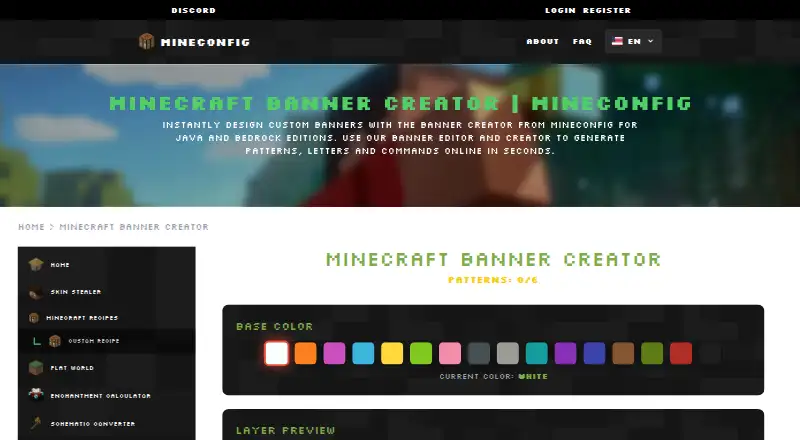
MineConfig Banner Creator is a free browser tool for designing custom banners for Minecraft Java and Bedrock editions. Users can build a design with multiple colors and patterns, using up to six patterns, then generate and copy a Minecraft command for use in-game or in a command block. The editor provides a pattern library, color picker, layer rearrangement, and live preview, including views from different angles. A letters tool creates words from pattern combinations. Designs can be saved and shared in a gallery, but an account is required to save, edit, and manage them; basic tools do not require mandatory registration. The page says its pattern catalog and command syntax support Minecraft 1.21. The editor runs in a browser with a drag-and-drop workflow and no downloads. MineConfig describes its tools as serving Minecraft players and server administrators, and lists Discord and email as contact options.
Good
- Supports Java and Bedrock editions
- Generates commands for designs
- Live preview from different angles
- Includes a letter-banner tool
- Basic tools need no mandatory registration
Watch out
- Editor shows a six-pattern limit
- Saving and managing designs requires an account
- Banner patterns and command syntax are stated for Minecraft 1.21
Who it suits
It suits Minecraft players and server administrators who want to design banners for Java or Bedrock and generate commands for their designs. It also fits users who want to preview and share banner patterns through a browser tool.
Verdict
MineConfig Banner Creator offers browser-based banner design, live previews, and command generation for both Minecraft editions. Its six-pattern limit and account requirement for saving and managing designs are worth noting.
The facts
Each one read from MineConfig Banner Creator's own pages, with the date it was checked.
Where it runs
- Browser based
- The banner editor runs in a browser without downloads and offers a drag-and-drop workflow with a live preview.checked 4 Oct 2026
What it does
- Command generation
- After designing a banner, users can generate and copy its Minecraft command for use in-game or in a command block.checked 4 Oct 2026
- Integrations
- The generated command can be pasted into Minecraft or a command block.checked 4 Oct 2026
- Intended users
- MineConfig describes its tools as serving Minecraft players and server administrators.checked 4 Oct 2026
- Layer controls
- The editor includes a color picker, a pattern library, layer rearrangement, and controls to remove the last pattern or reset the banner.checked 4 Oct 2026
- Layer editing
- The FAQ describes a pattern library, color picker, layer management, and the ability to rearrange layers.checked 4 Oct 2026
- Layers and patterns
- The creator supports multiple layers, patterns, and colors, with up to six patterns shown in the editor.checked 4 Oct 2026
- Letter banners
- The FAQ says a dedicated letters tool can create letter banners using pattern combinations.checked 4 Oct 2026
- Letters
- The page says its banner letters tool can create words using pattern combinations.checked 4 Oct 2026
- Patterns and colors
- The creator lets users build banners with multiple layers, patterns, and colors, and the editor shows a limit of 6 patterns.checked 4 Oct 2026
- Preview
- The FAQ says users can preview designs live from different angles.checked 4 Oct 2026
- Purpose
- MineConfig Banner Creator is an online tool for designing custom Minecraft banners for Java and Bedrock editions.checked 4 Oct 2026
- Save and share
- The page offers options to save a banner and share it in the gallery; it says an account is needed to save, edit, and manage designs.checked 4 Oct 2026
- Saving and sharing
- The editor offers save and gallery-sharing options, and says users need a free account to save, edit, and manage custom designs.checked 4 Oct 2026
- Security and compliance
- The banner page links to privacy and cookies policies, but the page content reviewed does not state specific security or compliance measures.checked 4 Oct 2026
- Support
- The site links to Discord and email as ways to connect with MineConfig.checked 4 Oct 2026
- Support channels
- The site links to Discord and email as contact channels.checked 4 Oct 2026
- Version claim
- The page says the creator is updated with patterns and command syntax for Minecraft 1.21.checked 4 Oct 2026
- Version support
- The FAQ says the creator supports Minecraft 1.21 patterns and command syntax.checked 4 Oct 2026
Money
- Cost
- MineConfig says its essential tools are free and that its tools can be used without mandatory registration.checked 4 Oct 2026
- Free access
- MineConfig says its essential tools are free and basic tools can be used without mandatory registration.checked 4 Oct 2026
The company
- Maker
- The About page describes MineConfig as a platform for creative Minecraft tools for players and server administrators.checked 4 Oct 2026
Alternatives to MineConfig Banner Creator
- 1

NeedCoolerShoes
Free planOpen sourceAndroidiOSWeb7.9Free plan - 2
MineBuildr Banner Generator
Free planWeb7.2From $9 a month - 3

Mcgic Banner Maker
Free planAndroidiOSWeb7.1Free plan - 4

Astroworld Banner Designer
Free planWeb6.6Free plan - 5

BeeForge Minecraft Banner Generator
Free planWeb6.6Free plan - 6
MCPlayerTools Banner Maker
Free planWeb6.6Free plan