MidiStickers
MidiStickers is paid music education software for learning and teaching music theory and harmony from a keyboard on Windows or macOS.
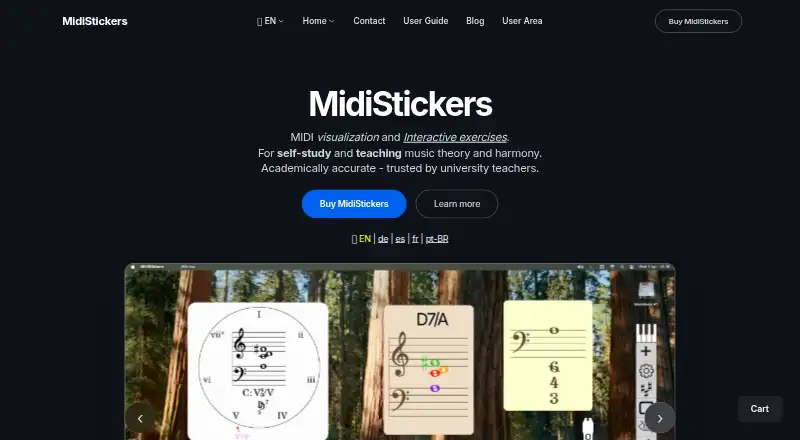
What MidiStickers is
MidiStickers is paid music education software for learning and teaching music theory and harmony from a keyboard on Windows or macOS. As MIDI plays, it displays notes and chords on a staff, with optional Roman numerals, figured bass, and harmonic functions. Lessons and exercises provide guided practice with backing tracks covering scales, modulations, and jazz progressions. Widgets visualize MIDI through piano, harpsichord, fretboard, xylophone, and recorder views. Detachable widgets, annotations, image tools, and Overlay mode support lessons, presentations, video calls, recording software, DAWs, and notation or composing software. A MIDI controller is recommended, while Virtual Piano and Fretboard widgets accept computer-keyboard input. MidiStickers Pro costs 59.00 USD as a one-time purchase, with permanent access, free updates, and bug fixes. A seven-day full trial requires no credit card. One license can be active on one device at a time, and Windows tablet pen input is not yet supported.
Good
- Displays notes and chords in real time
- Guided exercises include backing tracks
- Multiple instrument visualizations
- Advanced notation and harmony tools
- Seven-day trial requires no credit card
Watch out
- One active device at a time
- Windows tablet pen input unsupported
- Native Windows ARM release has no announced date
- No free plan
Who it suits
It suits music learners, teachers, and keyboard-based theory or harmony users on Windows or macOS. It is also relevant to people using MIDI, notation, DAW, presentation, or video-call workflows.
Verdict
MidiStickers combines MIDI analysis, guided exercises, notation, harmony, and teaching widgets for music study. Consider the one-device activation limit and Windows tablet limitations alongside the one-time Pro license.
Plans and prices
From MidiStickers's own pricing page, checked 8 Oct 2026.
| Plan | Price | What it gives you |
|---|---|---|
| MidiStickers Pro | $59, paid once | Permanent access · One active device at a time · Free updates and bug fixes · one-time purchase |
The facts
Each one read from MidiStickers's own pages, with the date it was checked.
What it does
- Data handling
- MidiStickers says it does not directly collect or store payment card information; purchases and licensing are handled through Moonbase AS.checked 8 Oct 2026
- Input options
- A MIDI controller is recommended for the best experience, while its Virtual Piano and Fretboard widgets can accept computer keyboard input.checked 8 Oct 2026
- Instrument views
- Its widgets visualize MIDI input with piano, harpsichord, fretboard, xylophone, and recorder views.checked 8 Oct 2026
- Integrations
- The site says detachable widgets and Overlay mode can be used with video calls, recording software, presentation software, DAWs, and music notation or composing software.checked 8 Oct 2026
- License limit
- A license can be installed on multiple devices, but only one device can be active at a time.checked 8 Oct 2026
- Notable limitation
- The changelog says pen input is not yet supported on Windows tablets and a native Windows ARM build has no announced release date.checked 8 Oct 2026
- Practice tools
- Lessons and exercises provide guided practice with backing tracks, including scales, modulations, and jazz progressions.checked 8 Oct 2026
- Privacy
- The privacy policy says MidiStickers does not use cookies for advertising, visitor tracking, or analytics, while its Moonbase storefront may use cookies needed to operate purchases and accounts.checked 8 Oct 2026
- Purpose
- MidiStickers is music education software for learning and teaching music theory and harmony from a keyboard.checked 8 Oct 2026
- Real-time analysis
- It displays notes and chords on a staff and can show Roman numerals, figured bass, and harmonic functions as MIDI is played.checked 8 Oct 2026
- Support
- The site offers a contact form and links to a user guide and YouTube channel for more information.checked 8 Oct 2026
- Teaching tools
- It offers detachable widgets, on-screen annotations, and image tools for teaching presentations and lessons.checked 8 Oct 2026
Money
- Trial
- The free trial provides full access for 7 days without requiring a credit card.checked 8 Oct 2026
Alternatives to MidiStickers
- 1
Harmonia
Free planAndroidiOSWebmacOS8.0$20.95 one-time - 2

ChordIQ
Free planAndroidiOSWebmacOS7.6Free plan - 3

note-noodle
Free planAndroidWebLinuxmacOS7.4From €7 a month - 4

Complete Rhythm Trainer
AndroidiOSWebmacOS7.0From €9.99 a year - 5

Musition
AndroidiOSWebmacOS7.0From $39 a year - 6
music21
Free planWebLinuxmacOSWindows6.7Free plan