MelonLoader
MelonLoader is a free mod loader for Unity games that use either Il2Cpp or Mono.
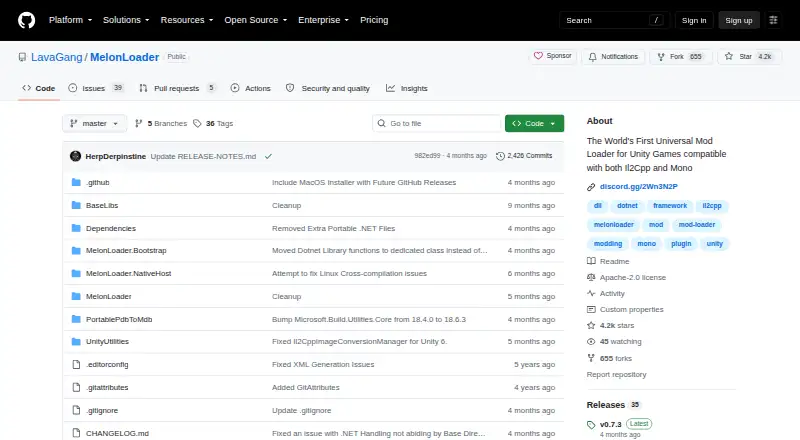
What MelonLoader is
MelonLoader is a free mod loader for Unity games that use either Il2Cpp or Mono. It supports mods and plugins, with separate Mods and Plugins folders in the game installation directory. Its listed capabilities include load-order control and dependency handling. An installer guide and manual installation instructions are available, and game logs are written to a MelonLoader/Logs folder. For Il2Cpp games, the listed requirement is the .NET 6.0 Desktop Runtime; the repository says it is installed automatically on Windows. Windows loading uses a proxy DLL at game startup, and the project identifies that mechanism as Windows-only. Linux guidance covers WINE, Steam Proton, and native use, while Android and Oculus Quest support is marked as work in progress. Debug mode is intended for developing and debugging the loader, plugins, and mods. The configuration also includes a Mono debug server, and the Il2Cpp Assembly Generator can be configured to work without contacting its remote API. MelonLoader is licensed under Apache License, Version 2.0.
Good
- Supports Unity games using Mono or Il2Cpp
- Supports plugins, load-order control, and dependencies
- Installer guide and manual installation instructions
- Offline option for Il2Cpp Assembly Generator
Watch out
- Android and Oculus Quest support is work in progress
- Windows proxy DLL mechanism is Windows-only
- Il2Cpp games list .NET 6.0 Desktop Runtime requirement
Who it suits
MelonLoader suits Unity game players who want to load mods or plugins, as well as developers working on them. Android and Oculus Quest users should note that support is still in progress.
Verdict
MelonLoader provides mod and plugin loading for Unity games, with installation guidance and debugging features. Platform support varies, and Android and Oculus Quest remain in progress.
Plans and prices
From MelonLoader's own pricing page, checked 15 Oct 2026.
| Plan | Price | What it gives you |
|---|---|---|
| MelonLoader | Free | Windows/Linux installers · x86/x64 packages · nightly builds |
The facts
Each one read from MelonLoader's own pages, with the date it was checked.
What it does
- 32/64-bit dependencies
- The wiki requires matching Microsoft Visual C++ 2015–2019 Redistributables for 32-bit or 64-bit games.checked 15 Oct 2026
- Community and support
- The repository links to the Official Wiki and an official Discord invite.checked 30 Sep 2026
- Configuration
- After first launch, Loader.cfg exposes loader, console, logging, Mono debugger and Unity/Il2Cpp settings.checked 15 Oct 2026
- Debugging
- A debug mode and numerous command-line switches support diagnosing loader, Unity and mod problems.checked 15 Oct 2026
- Debugging configuration
- The configuration includes a Mono debug server with a default listen address of 127.0.0.1 and port 55555.checked 30 Sep 2026
- Development
- Debug mode is intended to help develop and debug MelonLoader, plugins, and mods.checked 30 Sep 2026
- Documentation depth
- The official wiki documents automated and manual installation, launcher detection, Linux environment variables, troubleshooting pitfalls, support contact and launch arguments.checked 15 Oct 2026
- Game logs
- MelonLoader writes logs to a MelonLoader/Logs folder in the game's installation directory.checked 30 Sep 2026
- Il2Cpp requirement
- Il2Cpp games require the .NET 6 Desktop Runtime; Windows installation can install it automatically.checked 15 Oct 2026
- Installation methods
- Users can install through the dedicated installer or manually copy the loader directory and proxy DLLs into a closed game directory.checked 15 Oct 2026
- Install options
- The repository links to an installer guide and provides instructions for manual installation from a release archive.checked 30 Sep 2026
- Licence
- The repository and installer are licensed under Apache License 2.0.checked 15 Oct 2026
- License
- The repository states MelonLoader is licensed under Apache License, Version 2.0.checked 30 Sep 2026
- Limit: anti-cheat
- The same review warns that DLL injection is unsuitable for games with kernel-level anti-cheat because of ban risk.checked 15 Oct 2026
- Limit: compatibility
- An independent technical review says games with their own version.dll or launchers that verify files can fail to start with the proxy approach.checked 15 Oct 2026
- Limit: difficult setup
- A Steam community poster describes the tool as aimed at expert users, complicated, dependent on old versions for some patches and difficult to remove.checked 15 Oct 2026
- Limit: launch failures
- A BONELAB Steam discussion reports the game stopping before launch, a missing Bootstrap.dll message and difficulty removing residual loader files.checked 15 Oct 2026
- Logging
- Runtime logs are written under MelonLoader/Logs in the game installation directory.checked 15 Oct 2026
Where it runs
- Android status
- Android and Oculus Quest support is explicitly marked work in progress.checked 15 Oct 2026
- Limit: platform maturity
- The independent review characterizes Android/Quest support as experimental and notes uneven platform parity.checked 15 Oct 2026
- Linux integration
- The installer supports Steam games on Linux and documentation covers Wine, Proton and native launches.checked 15 Oct 2026
- Linux support
- The repository links to a Linux support guide covering WINE, Steam Proton, and native use.checked 30 Sep 2026
- macOS integration
- The installer lists Steam games on macOS and provides a launch script for macOS installation.checked 15 Oct 2026
The company
- Maker identity
- The project is maintained by the LavaGang GitHub organization and contributors.checked 15 Oct 2026
The full review of MelonLoader
MelonLoader is a free mod loader for Unity games, suited to players adding mods and plugins and developers working on them. Its support for both Mono and Il2Cpp makes it a flexible choice within Unity, but Android and Oculus Quest support is still a work in progress.
Overview
MelonLoader injects into compatible Unity games and supports games built on either Mono or Il2Cpp. Mods and plugins live in separate Mods and Plugins folders in the game installation directory; load-order control and dependency handling help keep multi-mod setups manageable. That makes it useful for players whose games have an active mod ecosystem, but it is not a general-purpose loader for games built on other engines.
Users can follow an installer guide or install manually from a release archive. Logs go to a MelonLoader/Logs folder inside the game directory, giving players and developers a concrete place to look when troubleshooting. Debug mode is aimed at developing and debugging the loader, mods, and plugins, so its value is greatest for people who build or maintain add-ons rather than players who only install them.
Key features
- Mono and Il2Cpp coverage: Supports both Unity runtime types, avoiding the need to choose a loader solely on that distinction.
- Organized mod and plugin loading: Separate folders, load-order control, and dependency handling suit setups with multiple add-ons, though users still need to manage files in the game directory.
- Installation choices: An installer guide and manual release-archive instructions offer two routes, useful for different preferences but requiring installation within each game's directory.
- Developer diagnostics: Debug mode supports work on MelonLoader, mods, and plugins. The Mono debug server defaults to 127.0.0.1 on port 55555.
- Logs and offline generation: Game logs are written to MelonLoader/Logs, and the Il2Cpp Assembly Generator can be configured to run without contacting its remote API.
Pricing
MelonLoader costs nothing under the Apache License 2.0. There is no paid tier or trial to weigh; the free plan is the whole offer, making it a straightforward option for players who want Unity mod loading without a software charge.
Platforms
MelonLoader supports Windows, Linux, macOS, Android, and Oculus Quest, but the latter two are marked work in progress. Linux guidance covers WINE, Steam Proton, and native use, giving Linux users several documented paths. On Windows, a proxy DLL loads MelonLoader when the game starts; that mechanism is Windows-only. For Il2Cpp games, the listed requirement is the .NET 6.0 Desktop Runtime, which is installed automatically on Windows.
Who it's for
MelonLoader is the right fit for players modding Unity games that use Mono or Il2Cpp, especially when they need plugin support, load-order control, or dependency handling. It also suits developers who want debug mode and a defined log location. Players on Android or Oculus Quest should treat support as experimental in status, while anyone modding a non-Unity game should look elsewhere.
Pros and cons
- Pros: Free under Apache License 2.0; supports both Mono and Il2Cpp; offers plugin loading, load-order control, and dependency handling; provides installer and manual installation guidance.
- Cons: Restricted to Unity games; Android and Oculus Quest support remains in progress; Windows proxy loading does not apply on other platforms; Il2Cpp games require the .NET 6.0 Desktop Runtime.
Alternatives
For Stardew Valley players, SMAPI is another free option, though Linux, macOS, Windows, and Steam Deck users need Stardew Valley 1.6.14 or later. BepInEx is also free and offers manual installation with stable and bleeding-edge builds; consider it if those builds suit your workflow better. Satisfactory Mod Loader is a free alternative for its supported game, with no required dependencies and Windows client and server plus Linux server support.
Hell2Modding is a free alternative for macOS and Windows. MWSE is a free, open-source option for Linux and Windows, licensed under GNU GPL with no warranty. Everest is a free alternative with Linux, macOS, Windows, and API platform support. Northstar is free and supports Linux and Windows, while ModTek is free and supports Windows, macOS, and Linux. Browse the Game Mod Loaders list for more options.
Verdict
Choose MelonLoader if you want a free loader for a Unity game and value support for both Mono and Il2Cpp, plus plugin and debugging tools. Its clearest advantage is that broad Unity runtime coverage paired with organized add-on loading. Look elsewhere if your game is not built on Unity or if you need finished Android or Oculus Quest support.
Getting started
- Open the MelonLoader GitHub website.
- Use the installer guide or follow the manual installation instructions for a release archive.
- For an Il2Cpp game, ensure the .NET 6.0 Desktop Runtime requirement is met; Windows installs it automatically according to the project.
- Place mods in the Mods folder and plugins in the Plugins folder within the game installation directory.
Questions
How much does MelonLoader cost?
The listed plan is free at no cost, under Apache License, Version 2.0.
Which games does MelonLoader support?
It supports Unity games using Mono or Il2Cpp.
Which platforms are supported?
The listed platforms are Windows, Linux, macOS, and Android. Linux guidance covers WINE, Steam Proton, and native use; Android and Oculus Quest support is marked as work in progress.
How are mods and plugins installed?
The repository instructions place mods in a Mods folder and plugins in a Plugins folder in the game installation directory.
What is required for Il2Cpp games?
The listed requirement is the .NET 6.0 Desktop Runtime. The project says it is installed automatically on Windows.
What license and support resources are listed?
MelonLoader is licensed under Apache License, Version 2.0. The repository links to an Official Wiki and an official Discord invite.
Alternatives to MelonLoader
- 1
BepInEx
Free planOpen sourceAPILinuxmacOSWindows7.2Free plan - 2
Baldur's Gate 3 Script Extender
Free planOpen sourceAPILinuxWindows7.1Free plan - 3
Satisfactory Mod Loader
Free planLinuxWindows6.4Free plan - 4

SMAPI
Free planAndroidLinuxmacOSWindows6.4Free plan - 5
RED4ext
Free planWindows6.3Free plan - 6
ScriptHookVDotNet
Free planWindows6.3Free plan