
McMeddon's Worlds
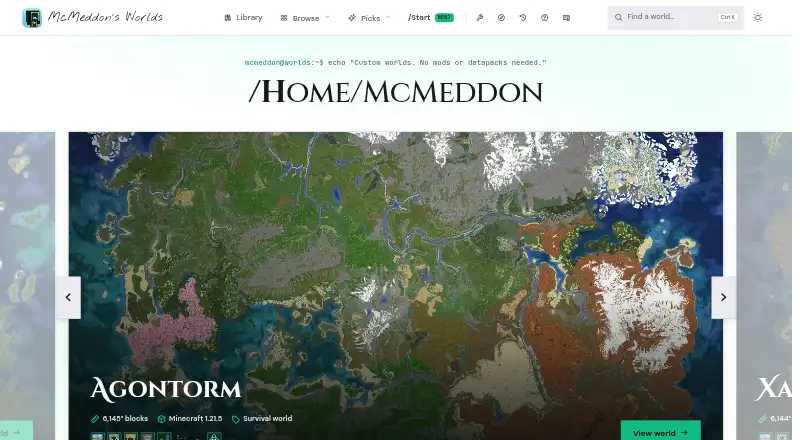
McMeddon's Worlds is a library of custom Minecraft worlds with data and browser-based 3D viewers for checking terrain before downloading.
What McMeddon's Worlds is
McMeddon's Worlds is a library of custom Minecraft worlds with data and browser-based 3D viewers for checking terrain before downloading. Its collection covers survival, creative, single-biome, civilization, SkyBlock, seasonal, community, and test worlds. You can fly over terrain in the browser without installing anything. Downloads are for Java Edition; Bedrock files are provided only for worlds marked as supporting Bedrock. Some world files are free, while others require a Patreon membership. Listed membership plans include small survival worlds for $5 a month and large survival worlds for $9 a month. Worlds downloaded during a subscription remain playable afterward, but new downloads stop when membership ends. The site also lists browser utilities for Java vault fixing, loot chest command generation, and searching world contents; its maker says these process files locally without uploading them. Bedrock conversions may have rough map edges, empty chests, or missing living villagers. Worlds are generally under a Creative Commons Attribution-NonCommercial 4.0 license, which requires attribution and prohibits as-is resale or redistribution.
Good
- Browser-based 3D terrain exploration
- Includes multiple world types
- Some world files are free
- Subscribed worlds remain playable afterward
Watch out
- Bedrock files exist only for marked worlds
- Bedrock conversions may have rough edges
- Some downloads require Patreon membership
Who it suits
It suits Minecraft players looking for downloadable worlds and people who want to inspect terrain in a browser first. Check edition labels and membership requirements before choosing a world.
Verdict
McMeddon's Worlds combines a varied map library with browser previews and utilities. Edition-specific availability, membership access, and the stated Bedrock conversion issues are worth checking before downloading.
Plans and prices
From McMeddon's Worlds's own pricing page, checked 3 Oct 2026.
| Plan | Price | What it gives you |
|---|---|---|
| Patreon survival worlds — Small worlds | $5 a month | 150+ worlds · vanilla compatible · sizes 2k, 3k, 4k · Starting at $5; Patreon membership |
| Patreon survival worlds — Large worlds | $9 a month | 100+ worlds · vanilla compatible · sizes 2k, 3k, 4k · Starting at $9; Patreon membership |
| Changes to existing worlds | $25, paid once | Small changes $25+ · extended changes $50+ · intensive changes $150+ · Starting at $25+ |
| Creative world creation | $50, paid once | Small $50+ · large $100+ · giant $200+ · Starting at $50+ |
| Survival world creation | $75, paid once | Small $75+ · large $125+ · giant $200+ · Starting at $75+ |
The facts
Each one read from McMeddon's Worlds's own pages, with the date it was checked.
What it does
- 3D exploration
- Visitors can fly over a world's terrain in a browser-based 3D explorer without installing anything.checked 3 Oct 2026
- Desktop installation
- The FAQ gives Java save-folder instructions for Windows, macOS, and Linux.checked 3 Oct 2026
- Integrations
- The commissions page lists WorldPainter, WorldEdit, and Axiom as tools used by teams working with commissioned creative landscapes.checked 3 Oct 2026
- Known limitations
- The maker says Bedrock conversions may have rough map edges, empty chests, and missing living villagers.checked 3 Oct 2026
- License
- The site says worlds are generally under Creative Commons Attribution-NonCommercial 4.0 with stated permissions for server use and modifications, while requiring attribution and prohibiting as-is resale or redistribution.checked 3 Oct 2026
- Membership access
- Worlds downloaded during a Patreon subscription remain playable after the subscription ends, but new downloads stop.checked 3 Oct 2026
- Minecraft editions
- Downloads are for Java Edition, and Bedrock files are available only for worlds specifically marked as supporting Bedrock.checked 3 Oct 2026
- Mobile support
- The Bedrock import guide describes opening a world file by tapping it on a phone and says its steps apply to supported desktop and mobile devices.checked 3 Oct 2026
- Product
- McMeddon's Worlds is a library of custom Minecraft worlds with data and 3D viewers for exploring landscapes before downloading.checked 3 Oct 2026
- Support
- The FAQ directs users with unlisted issues to Discord, where they can report problems for a possible later export fix.checked 3 Oct 2026
- Tools and privacy
- The maker says its local browser utilities process files in the browser without uploading the world to a server.checked 3 Oct 2026
- Utility features
- The tools page lists a Java vault fixer, a version-aware loot chest command generator, and a searchable world contents finder.checked 3 Oct 2026
- World creation
- The maker describes using World Machine for terrain, Minecraft for trees and structures, and WorldPainter to assemble and export worlds.checked 3 Oct 2026
- World types
- The library includes survival, creative, single-biome, civilization, SkyBlock, seasonal, community, and test worlds.checked 3 Oct 2026
Money
- Free downloads
- The maker says some world files are free, while others require the indicated Patreon membership.checked 3 Oct 2026
The full review of McMeddon's Worlds
Overview
McMeddon’s Worlds is best suited to Minecraft players looking for a curated custom map and a way to inspect its terrain before downloading. Its broad mix of world types and browser-based previews make browsing more considered; Java is the default, and Bedrock conversions can have noticeable shortcomings.
Key features
Maps and previews
The 262-map collection ranges across survival, creative, single-biome, civilization, SkyBlock, seasonal, community, test, and commissioned worlds. Filters help narrow the selection, and multiplayer maps are included. A browser-based 3D explorer lets visitors fly over terrain without installing a separate viewer, a useful way to judge a landscape before committing to a download. There are no creator uploads, so this is a curated library rather than a place to publish your own worlds.
Utilities and creation
Three browser utilities target specific world-file tasks: a Java vault fixer, a loot chest command generator that accounts for game versions, and a searchable world contents finder. The maker says these tools process files locally in the browser rather than uploading worlds to a server, which suits users who want to keep files on their device.
For commissioned creative landscapes, the site identifies WorldPainter, WorldEdit, and Axiom as tools used by its teams. Its stated creation process combines World Machine terrain, Minecraft-built trees and structures, and WorldPainter assembly and export.
Edition support and limitations
Downloads are for Java Edition unless a world is specifically marked as supporting Bedrock. Bedrock conversions may have rough edges, empty chests, or missing living villagers, so players who need a polished Bedrock map should check compatibility carefully. Java save-folder instructions cover Windows, macOS, and Linux; the Bedrock guide describes importing by tapping the world file on a phone and applies to supported desktop and mobile devices.
The FAQ directs users with unresolved issues to Discord to report them for a possible later export fix. Worlds are generally licensed under Creative Commons Attribution-NonCommercial 4.0: server use and modifications are permitted under stated conditions, but attribution is required and as-is resale or redistribution is prohibited.
Pricing
The library is freemium: some world files are free, while others require the indicated Patreon membership. There is no free trial. Patreon survival-world access starts at $5 a month for small worlds, covering 150+ vanilla-compatible worlds in 2k, 3k, and 4k sizes. This is the entry point for players seeking smaller survival maps. The large-world membership starts at $9 a month and covers 100+ vanilla-compatible worlds in those same sizes, for players prioritizing larger maps. Both are subscriptions; worlds downloaded while subscribed remain playable afterward, but new downloads stop when membership ends.
Custom work is priced per project. Changes to existing worlds start at $25, paid once, with small changes from $25+, extended changes from $50+, and intensive changes from $150+. Creative world creation starts at $50, paid once: small projects from $50+, large from $100+, and giant from $200+. Survival world creation starts at $75, paid once, with small projects from $75+, large from $125+, and giant from $200+. These are custom-priced commissions rather than fixed-scope packages.
Platforms
The site and browser tools are available on the web. The directory’s platform coverage also includes Android, Linux, macOS, and Windows. Java installation guidance covers the three desktop operating systems; Bedrock import instructions address supported mobile and desktop devices.
Who it's for
Choose McMeddon’s Worlds if you want a varied custom-map catalog, value a terrain preview before downloading, or need focused browser utilities for Minecraft world files. It is especially well matched to Java players, who can use the stated desktop save-folder guidance without relying on a conversion.
It is a weaker fit for players who require dependable Bedrock conversions, want to upload their own maps, or expect every download to be free. Bedrock support is selective and conversions have stated defects; some worlds require membership.
Pros and cons
- Pro: A 262-map collection spanning many genres gives players more than one kind of world to browse.
- Pro: Browser-based 3D previews make it possible to inspect terrain before downloading or installing a map.
- Pro: Local browser utilities address vault repair, version-aware loot commands, and world-content searches without uploading files to a server.
- Con: Java is the standard download format; Bedrock files are limited to marked worlds, and conversions can have rough edges, empty chests, and missing villagers.
- Con: Some downloads require an ongoing Patreon membership, and new downloads end with the subscription.
- Con: The curated catalog does not accept creator uploads.
Alternatives
For a wider directory of places to find maps, browse Minecraft Map Repositories. For a free option with broader mobile coverage, Modscraft Maps runs on Android, iOS, web, and Windows. If you want a free web-only repository, CTM Map Repository is another choice.
MCPE-Planet Maps suits Android and web users who want all worlds free with no paid unlocks. For free web resource downloads, consider MinecraftSix; some creators may offer optional premium versions or accept donations. EarthMC Map Archive is a free alternative spanning web, desktop, iOS, and Android. For another free web option, see MineBrush or Bravith Maps. Flamezam offers free downloads without a premium tier or download queues.
Verdict
McMeddon’s Worlds is a strong pick for Java players who want varied custom maps, browser terrain previews, and practical world-file tools in one place. Its clearest reason to choose it is the combination of breadth and previewing; look elsewhere if you need dependable Bedrock conversions, user uploads, or an entirely free catalog.
Alternatives to McMeddon's Worlds
- 1
EarthMC Map Archive
Free planAndroidiOSWebAPI8.0From €68.99 a year - 2
MinecraftMaps.com
Free planAndroidiOSWebmacOS7.3Free plan - 3

MCPEDL
AndroidiOSWebmacOS7.2From $29.99 a year - 4
MapMC Worlds
AndroidiOSWebLinux6.9$19.90 one-time - 5

MinecraftSix
Free planWeb6.4Free plan - 6
MCPE-Planet Maps
Free planAndroidWeb6.3Free plan