MapMC Worlds
MapMC Worlds converts a selected real-world area into a downloadable Minecraft world using OpenStreetMap data and the Arnis conversion engine.
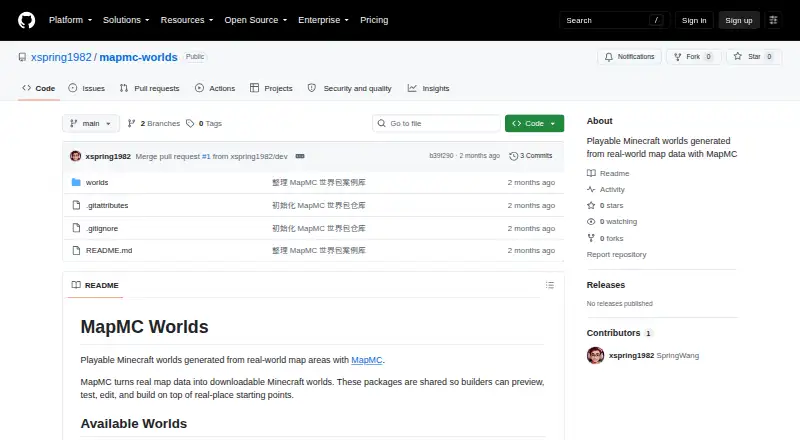
What MapMC Worlds is
MapMC Worlds converts a selected real-world area into a downloadable Minecraft world using OpenStreetMap data and the Arnis conversion engine. Generated worlds can represent mapped roads, buildings, water, land cover, terrain, and other features. The browser-based generator needs no local installation, and the site says it works on phones and tablets. Downloads are available as a Java world ZIP or a Bedrock .mcworld file, covering both Minecraft editions. Standard-detail areas can be up to 40 km² for Java and 32 km² for Bedrock; high detail is limited to 5 km². Free use includes one map generation or 300 signup Credits, plus one AI texture generation; Seed Map and all Finders are always free. There is no subscription: users can make one-time generation payments or top up Credits, which do not expire. Plus costs $19.90, paid once, Pro costs $49, paid once, and Studio costs $99, paid once. Generated world files are automatically deleted after 30 days, so download any you want to keep.
Good
- Creates worlds from OpenStreetMap data.
- Supports Java and Bedrock world downloads.
- Runs in a browser without local installation.
- Includes one free map generation or 300 signup Credits.
- Credits never expire.
Watch out
- High-detail areas are limited to 5 km².
- Generated files are deleted after 30 days.
- Paid Credit options require one-time payments.
Who it suits
MapMC Worlds suits Minecraft players who want to turn a real-world location into a playable map. It offers Java and Bedrock downloads and browser access on phones and tablets.
Verdict
MapMC Worlds offers a browser-based way to generate Minecraft worlds from real locations, with formats for both editions. Check the area limits and download generated files within 30 days if you want to retain them.
Plans and prices
From MapMC Worlds's own pricing page, checked 8 Oct 2026.
| Plan | Price | What it gives you |
|---|---|---|
| plus | $19.90, paid once | 3,500 Credits (+1,510 bonus) · about 3 standard 0.5 km² areas · $19.90 one-time |
| pro | $49, paid once | 10,000 Credits (+5,100 bonus) · about 10 standard 0.5 km² areas · $49.00 one-time |
| studio | $99, paid once | 25,000 Credits (+15,100 bonus) · about 25 standard 0.5 km² areas · $99.00 one-time |
The facts
Each one read from MapMC Worlds's own pages, with the date it was checked.
What it does
- Area limits
- Standard detail supports up to 40 km² for Java and 32 km² for Bedrock; high detail is limited to 5 km².checked 8 Oct 2026
- Map data and engine
- It uses OpenStreetMap data and the Arnis conversion engine to generate worlds.checked 8 Oct 2026
- Payment methods
- The pricing page lists card via Stripe, PayPal, and Alipay as payment methods.checked 8 Oct 2026
- Payments
- MapMC has no subscription; it offers one-time generation payments and Credit top-ups, and Credits never expire.checked 8 Oct 2026
- Privacy and processors
- The privacy policy names Stripe, Neon, Cloudflare R2, APIMart, Sightengine, NVIDIA, Replicate, Resend, Vercel, Google, Microsoft, and Cloudflare Turnstile as service providers or processors.checked 8 Oct 2026
- Purpose
- MapMC converts a selected real-world map area into a downloadable, playable Minecraft world.checked 8 Oct 2026
- Refunds
- Eligible failed generations restore balance payments automatically, while direct-payment refunds are processed asynchronously to the original method.checked 8 Oct 2026
- Retention
- Generated world files are kept for 30 days and then automatically deleted, so users must download files they want to keep.checked 8 Oct 2026
- Support
- MapMC provides a contact form and lists [email protected] for download, billing, or location questions.checked 8 Oct 2026
- World details
- Generated worlds can include roads, buildings, water, land cover, terrain, and other mapped features.checked 8 Oct 2026
- World formats
- Users can download a Java world ZIP or a Bedrock .mcworld file.checked 8 Oct 2026
Where it runs
- Browser and mobile
- The generator runs in a browser without a local install, and the site says it works on phones and tablets.checked 8 Oct 2026
Money
- Free use
- The site offers one free map generation or 300 signup Credits, plus one free AI texture generation; Seed Map and all Finders are always free.checked 8 Oct 2026
The company
- Maker
- The imprint identifies the operator as WANG XIAOCHUN and gives a Shenzhen, China address; it does not state a founding date.checked 8 Oct 2026
The full review of MapMC Worlds
Overview
MapMC Worlds is a browser-based generator that turns a chosen real-world location into a Minecraft map. It is best for players who want to explore a specific place in-game rather than choose from premade worlds. Its main trade-off is clear: you choose the location and edition, but area caps and temporary file storage limit how much you can generate and how long you can leave it online.
Key features
MapMC builds worlds from OpenStreetMap data using the Arnis conversion engine. Generated areas can include roads, buildings, water, land cover, terrain and other mapped features. This makes the tool useful for grounding a Minecraft world in recognizable geography; the result depends on the mapped features of the selected area.
The generator runs in a browser without a local installation, and MapMC says it works on phones and tablets. You can download a Java world ZIP or a Bedrock .mcworld file, so the same service serves both editions. Generated files are kept for 30 days before automatic deletion, which makes downloading and storing any world you want to keep an essential final step.
Standard detail supports up to 40 km² for Java and 32 km² for Bedrock. High detail is capped at 5 km². That gives users room to cover a broad area at standard detail, while high detail is a better fit for a compact location than a large region.
The service also offers one free map generation or 300 signup Credits, plus one free AI texture generation. Seed Map and all Finders are always free. The free entry point is useful for trying the workflow, but it does not remove the area limits or 30-day retention period.
Pricing
MapMC has no subscription. It combines free use with one-time generation payments and Credit top-ups; Credits never expire. The paid options are:
- Plus: $19.90, paid once, billed $19.90 one-time, for 3,500 Credits (+1,510 bonus), or about 3 standard 0.5 km² areas. A modest top-up for occasional map generation.
- Pro: $49, paid once, billed $49.00 one-time, for 10,000 Credits (+5,100 bonus), or about 10 standard 0.5 km² areas. Better suited to repeated generation without a recurring bill.
- Studio: $99, paid once, billed $99.00 one-time, for 25,000 Credits (+15,100 bonus), or about 25 standard 0.5 km² areas. It makes sense for frequent use, but the quoted area count is based on standard 0.5 km² areas.
Card via Stripe, PayPal and Alipay are listed payment methods. Eligible failed generations restore balance payments automatically; direct-payment refunds are processed asynchronously to the original method. This is a pay-as-needed model rather than a monthly commitment, though each package's estimated area count should be weighed against the map size and detail you need.
Platforms
MapMC lists Android, iOS, Linux, macOS, web and Windows. The browser generator and stated phone and tablet support mean users need no local installation to create a world; the downloadable file still needs to be saved if it is to outlast the 30-day retention period.
Who it's for
MapMC suits Minecraft players who want to build or explore a real-world location, particularly those who need a choice of Java or Bedrock output and prefer one-time payments to subscriptions. It is less suited to someone seeking a premade-map catalog, a high-detail map covering a large region, or cloud storage for generated worlds beyond 30 days.
Pros and cons
- Pro: Real locations can be generated for both Java and Bedrock, with mapped features such as roads and buildings adding geographic structure.
- Pro: The browser-based generator needs no local install, and free generation or signup Credits provide an entry point.
- Pro: One-time payments and non-expiring Credits avoid recurring subscription charges.
- Con: High detail is limited to 5 km², while standard area limits differ by edition: 40 km² for Java and 32 km² for Bedrock.
- Con: Generated files are automatically deleted after 30 days, so users must download and retain their own copies.
Alternatives
For a wider range of premade maps and resources, browse Minecraft Map Repositories. If you want an archive rather than a generated location, EarthMC Map Archive offers three past world archives for free; its largest listed download is 50.8 GB and downloads are licensed CC BY-NC 4.0. MCPE-Planet Maps is the simpler choice for free worlds on Android or web, with no paid unlocks.
MCPEDL is an option for free maps and other resources, with VIP membership options including a $3.99 a month auto-renewing plan and a 9.99 USD three-month listing. MinecraftSix suits readers seeking free web downloads; creators may also offer premium versions or accept donations. McMeddon's Worlds is an alternative for Patreon survival worlds, with small-world membership starting at $5 a month.
Flamezam offers free web downloads with no premium tier or download queues. MCBuild is another free web option, with free installers, downloads and tools. MCPECUBE Maps provides free .mcworld map downloads for Android and web.
Verdict
Choose MapMC Worlds if you want to turn a real place into a Minecraft world, need Java or Bedrock output, and are comfortable downloading your files within 30 days. Its location-based generation and non-subscription payments are the strongest reasons to use it. Look elsewhere if you want a premade map library, high-detail coverage beyond a small area, or persistent online storage.
Getting started
- Open https://github.com/xspring1982/mapmc-worlds.
- Run the generator in a browser; the site says it works on phones and tablets.
- Select a real-world map area and choose a detail level within its area limit.
- Use the free generation or signup Credits, or make a one-time generation payment or Credit top-up.
- Download the generated Java world ZIP or Bedrock .mcworld file before it is automatically deleted.
Limits worth knowing
Standard detail supports up to 40 km² for Java and 32 km² for Bedrock; high detail is limited to 5 km². Free use includes one map generation or 300 signup Credits and one AI texture generation. Generated world files are automatically deleted after 30 days.
Questions
Is MapMC Worlds free?
It offers one free map generation or 300 signup Credits, plus one free AI texture generation. Seed Map and all Finders are always free.
Does MapMC Worlds require a subscription?
No. Generation payments are one-time, and users can also top up Credits, which never expire.
What does a paid option cost?
Plus costs $19.90, paid once, Pro costs $49, paid once, and Studio costs $99, paid once.
Which Minecraft editions and world formats are supported?
Both Java and Bedrock are supported. Downloads are available as a Java world ZIP or a Bedrock .mcworld file.
What are the generation area limits?
Standard detail supports up to 40 km² for Java and 32 km² for Bedrock. High detail is limited to 5 km².
How long are generated files available?
Generated world files are kept for 30 days and then automatically deleted.
Alternatives to MapMC Worlds
- 1
EarthMC Map Archive
Free planAndroidiOSWebAPI8.0From €68.99 a year - 2
MinecraftMaps.com
Free planAndroidiOSWebmacOS7.3Free plan - 3

MCPEDL
AndroidiOSWebmacOS7.2From $29.99 a year - 4

McMeddon's Worlds
AndroidWebLinuxmacOS6.7From $5 a month - 5

MinecraftSix
Free planWeb6.4Free plan - 6
MCPE-Planet Maps
Free planAndroidWeb6.3Free plan