MaxLauncher
MaxLauncher is a free, open-source tabbed launcher for Windows that helps users find and run programs, folders, or commands with two or three keystrokes.
What MaxLauncher is
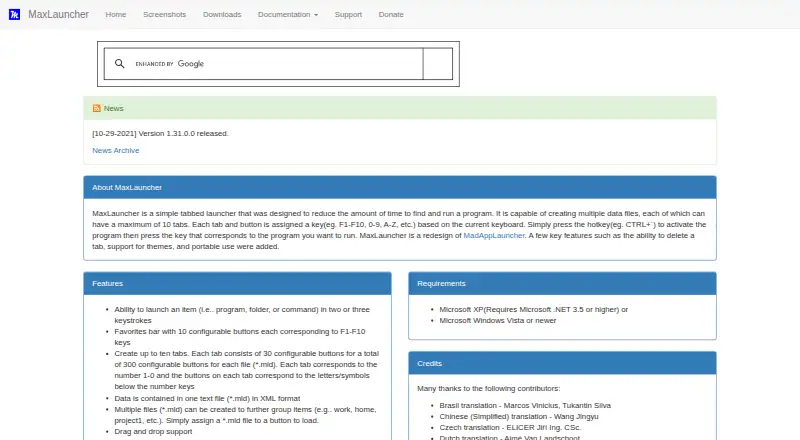
MaxLauncher is a free, open-source tabbed launcher for Windows that helps users find and run programs, folders, or commands with two or three keystrokes. A data file can hold up to ten tabs, each with 30 configurable buttons, for a total of 300; a separate favorites bar provides ten buttons assigned to F1–F10. Launcher data is stored in XML-format .mld text files, and multiple files can group shortcuts such as work and home. Features include drag and drop, configurable activation hotkeys, custom themes, multi-launch, multiple instances, and basic multi-monitor support. Users can install it with an executable or use a portable ZIP archive, which the maker says can run from a USB stick or external hard drive. Portable settings can be made read-only to prevent changes to launcher data and related files. The listed requirements are Windows Vista or newer, or Windows XP with Microsoft .NET 3.5 or higher; the application runs on 32-bit and 64-bit versions. The downloads page lists version 1.31.0.0, dated October 29, 2021, as its latest release shown. Its product page identifies the license as Microsoft Reciprocal License (MS-RL).
Good
- Provides up to 300 configurable launcher buttons per file.
- Favorites bar maps ten buttons to F1–F10.
- Portable ZIP can run from external storage.
- Supports custom themes and multi-launch.
Watch out
- Requires Windows.
- The latest release shown is dated October 29, 2021.
- Windows XP requires Microsoft .NET 3.5 or higher.
Who it suits
MaxLauncher suits Windows users who want keyboard-driven access to grouped program, folder, and command shortcuts. Its portable ZIP option may suit users who want to run it from external storage.
Verdict
MaxLauncher offers substantial shortcut capacity and portable use for Windows desktops. Consider the listed system requirements and the date of the latest release shown before choosing it.
Plans and prices
From MaxLauncher's own pricing page, checked 11 Oct 2026.
| Plan | Price | What it gives you |
|---|---|---|
| MaxLauncher | Free | Free download; no paid plans listed |
The facts
Each one read from MaxLauncher's own pages, with the date it was checked.
What it does
- Architecture
- The maker says the application runs on 32-bit and 64-bit versions.checked 11 Oct 2026
- Capacity
- Each data file can contain up to ten tabs with 30 configurable buttons each, for 300 buttons per file.checked 11 Oct 2026
- Data format
- Launcher data is stored in XML-format .mld text files, and multiple files can be used to group items.checked 11 Oct 2026
- Favorites
- The favorites bar has ten configurable buttons corresponding to F1–F10.checked 11 Oct 2026
- Features
- The product supports drag and drop, configurable activation hotkeys, custom themes, multi-launch, multiple instances, and basic multi-monitor use.checked 10 Oct 2026
- Installation options
- The maker documents both an executable installer and a portable ZIP installation.checked 10 Oct 2026
- Integrations
- The product can launch programs, folders, or commands; the maker pages do not list third-party service integrations.checked 11 Oct 2026
- Intended users
- SourceForge lists the intended audience as advanced end users and end users/desktop.checked 11 Oct 2026
- Keyboard launch
- A configurable hotkey opens the launcher, and users can launch items with two or three keystrokes.checked 11 Oct 2026
- Launch targets
- Buttons can launch programs, folders, or commands in two or three keystrokes.checked 10 Oct 2026
- License
- The product page identifies the license as Microsoft Reciprocal License (MS-RL).checked 10 Oct 2026
- Notable limit
- The maker’s downloads page lists version 1.31.0.0, dated October 29, 2021, as the latest release shown.checked 11 Oct 2026
- Operating system
- The maker lists Windows XP with .NET 3.5 or higher, or Windows Vista or newer, as requirements.checked 11 Oct 2026
- Other features
- The maker lists drag and drop, international keyboard layouts, custom themes, multiple instances, multi-launch, read-only mode, and basic multi-monitor support.checked 11 Oct 2026
- Portable use
- MaxLauncher can run in portable mode from a USB stick or external hard drive, with a separate portable installation described by the maker.checked 11 Oct 2026
- Purpose
- MaxLauncher is a tabbed launcher designed to reduce the time needed to find and run programs.checked 11 Oct 2026
- Read-only settings
- Portable configuration options can prevent changes to application, favorites, window, tab data, and icon cache files.checked 10 Oct 2026
- Security and compliance
- The maker lists a read-only mode and identifies the license as Microsoft Reciprocal License (MS-RL); no security certifications are stated on the pages reviewed.checked 11 Oct 2026
- Support
- Support is offered through SourceForge bug reports, feature requests, support requests, and discussion forums.checked 11 Oct 2026
Where it runs
- Platform requirement
- The maker lists Microsoft Windows Vista or newer, or Windows XP with Microsoft .NET 3.5 or higher, as requirements.checked 10 Oct 2026
The full review of MaxLauncher
MaxLauncher is a Windows tabbed launcher for programs, folders, and commands, built around configurable buttons and keyboard access. It suits advanced desktop users who want a large, portable shortcut library organized into separate contexts. The central trade-off is generous control and capacity in exchange for a more deliberate, file-based setup than a simple search box.
Overview
MaxLauncher replaces repeated Start-menu navigation with a launcher opened by a configurable hotkey. Items are reached in two or three keystrokes, making it a good fit for people who repeatedly open the same tools, directories, or shell commands. It is less suitable if you want a launcher that primarily discovers applications automatically or offers a highly elaborate desktop-dashboard experience.
The application is open source under the Microsoft Reciprocal License (MS-RL) and costs nothing to download. Its source-oriented approach is reflected in the way shortcut collections are stored and moved, while support is available through bug reports, feature requests, support requests, and a help forum.
Key features
Each .mld XML text data file can hold up to ten tabs, with 30 configurable buttons per tab, for a total of 300 buttons. A separate favorites bar provides ten more configurable buttons mapped to F1 through F10. That scale is useful for separating development, administration, media, or personal workflows; users with only a few shortcuts may find the structure unnecessarily deep.
Multiple data files can keep work and home collections apart, and the text-based format is practical for carrying or managing those sets. It does, however, favor users comfortable maintaining their own organization rather than those who want the launcher to build categories for them. Drag and drop, custom themes, configurable activation hotkeys, custom search, multi-launch, and multiple instances broaden the ways shortcuts can be arranged and started.
MaxLauncher can add Windows Apps and Control Panel items and import MadAppLauncher data files, helping users bring existing collections across. Basic multi-monitor support is useful for ordinary multi-screen desktops but is not a reason to choose it for complex display-management needs. International keyboard layouts are supported.
A portable ZIP installation can run from a USB stick or external hard drive. Portable settings can make application, favorites, window, tab-data, and icon-cache files read-only, which is valuable when a carefully arranged setup must not be altered accidentally. The same controls are more restrictive for anyone who expects to edit configuration freely while on the move.
Pricing
MaxLauncher is free and open source. The MaxLauncher plan costs nothing and is a free download; there are no paid plans, trial period, renewal charge, seat quota, or paid-tier feature split to weigh. Its practical limits come from the per-file capacity of ten tabs and 300 buttons, plus the ten-button favorites bar, rather than from a subscription.
Platforms
MaxLauncher runs on Windows in both 32-bit and 64-bit versions. Requirements are Windows Vista or newer, or Windows XP with Microsoft .NET 3.5 or higher. Installation is available as an executable installer or a portable ZIP archive, giving users a conventional setup or a self-contained drive-based option.
Who it's for
This is a strong match for advanced end users and desktop users who rely on keyboard shortcuts, need hundreds of categorized launch targets, or move a consistent setup between Windows machines. It also suits people who want separate XML-based collections for work and home and value a read-only portable configuration.
Look elsewhere if you need macOS or Linux support, a modern cross-platform launcher, or sophisticated multi-monitor behavior. The most recent release shown is version 1.31.0.0, dated October 29, 2021, so readers who prioritize a newer release cadence should factor that into the decision.
Pros and cons
Pros
- Large shortcut capacity: up to 300 buttons per data file plus ten F1–F10 favorites accommodates substantial workflows.
- Fast keyboard access: a configurable activation hotkey and two- or three-keystroke launching reduce repeated menu navigation.
- Portable organization: XML .mld files, multiple collections, and a USB-capable ZIP installation make setups easy to carry between Windows systems.
- Useful control options: read-only configuration, custom themes, multi-launch, multiple instances, and imports from MadAppLauncher add flexibility.
Cons
- Windows-only: it cannot serve households or teams needing one launcher across operating systems.
- Basic multi-monitor support: it offers only a modest solution for elaborate display layouts.
- Manual structure: tab, button, and XML-file organization rewards technical users but may feel laborious for people seeking automatic discovery.
- Older release: the latest release shown dates to October 29, 2021.
Alternatives
For a broader category view, see Start Menu Customization Software.
Starling is the better choice when Linux, macOS, web, or Windows access matters; it is free, open source, and Apache 2.0 licensed.
Choose IObit Uninstaller instead when the priority is removing software, Windows apps, and leftover files rather than launching shortcuts.
Launchy fits readers who want a free launcher across Android, Linux, macOS, and Windows, with a pay-what-you-want model.
Parkdale is another free option for Android, macOS, and Windows.
LaunchMenu is a free open-source application for macOS and Windows.
PExplorer is freely available for Windows and WinPE.
Pinpoint is a free open-source keystroke launcher for Windows.
SbieShell is a freely available Windows shell for isolated Sandboxie desktops.
Verdict
Choose MaxLauncher if you want a no-cost Windows launcher with unusually high button capacity, fast keyboard activation, and a portable, file-based setup. Its strongest advantage is the control it gives advanced users over large, task-specific shortcut collections. Look elsewhere for cross-platform coverage, deeper display integration, or a newer release history.
Alternatives to MaxLauncher
- 1
Launchy
Free planOpen sourceAndroidAPILinuxmacOS7.7Free plan - 2
Executor
Free planOpen sourceSelf-hostedWindows7.2Free plan - 3
LaunchMenu
Free planOpen sourceAPImacOSWindows7.0Free plan - 4
Starling
Free planWebLinuxmacOSWindows6.7Free plan - 5

Dawn Launcher
Free planWindows6.5CN¥34 one-time - 6
Listary
Free planWindows6.5$19.95 one-time