
MapArtisan
MapArtisan is a web tool that converts images into Litematica blueprints for Minecraft map art.
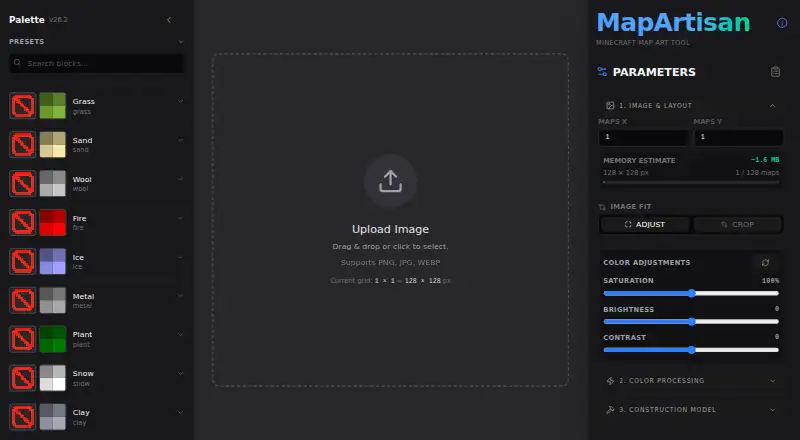
What MapArtisan is
MapArtisan is a web tool that converts images into Litematica blueprints for Minecraft map art. It supports multi-map grids, including layouts of 15 or more maps, and lets users adjust fit or crop images and change saturation, brightness, and contrast. Ten dithering options include Smart (Hybrid), Floyd-Steinberg, Bayer, and None. Build modes include flat 2D and 3D Valley, with controls for 3D precision and structural support. Users can filter palettes by Minecraft target version, choose blocks by color group or name, and save, load, or share custom presets. Its pixel editor supports painting, color or block picking, brightness adjustment, and undo and redo. Edits are cleared when processing settings such as palette, dithering, or build mode change. MapArtisan provides interactive 2D and real-time 3D previews, exports Litematica files, and supplies block quantities and stack counts. Larger-than-1×1 builds are bundled in ZIP files.
Good
- Converts images into Litematica blueprints.
- Supports multi-map grids, including 15 or more maps.
- Provides interactive 2D and real-time 3D previews.
- Lists block quantities and stack counts.
Watch out
- Pixel edits clear when processing settings change.
- Exports are Litematica files for use with the Litematica mod.
Who it suits
MapArtisan suits Minecraft map-art builders who want to turn images into Litematica blueprints and plan multi-map layouts. Its palette controls, previews, and materials information may help users refine and organize a build.
Verdict
MapArtisan offers image conversion, palette and dithering controls, editable pixels, and build previews for Minecraft map art. Note that changing processing settings clears pixel edits.
The facts
Each one read from MapArtisan's own pages, with the date it was checked.
What it does
- Build modes
- It offers 2D flat and 3D Valley build modes.checked 8 Oct 2026
- Dithering
- It offers 10 dithering options, including Smart (Hybrid), Floyd-Steinberg, Bayer, and None.checked 4 Oct 2026
- Edit limitation
- Pixel edits are cleared when processing settings such as palette, dithering, or build mode change.checked 8 Oct 2026
- Exports
- It exports .litematic files for use with the Litematica mod, a PNG preview, and a material list with block quantities and stack counts.checked 8 Oct 2026
- Exports and materials
- It exports Litematica files, bundles multi-map builds larger than 1×1 in a ZIP, and provides block quantities and stack counts.checked 4 Oct 2026
- Image controls
- Image settings include adjust or crop fitting and saturation, brightness, and contrast filters.checked 4 Oct 2026
- Image processing
- It provides 10 dithering algorithms and controls for saturation, brightness, and contrast.checked 8 Oct 2026
- Integration
- The project describes its .litematic downloads as being for direct use with the Litematica mod.checked 4 Oct 2026
- Map grids
- It supports multi-map grids, including grids of 15 or more maps.checked 4 Oct 2026
- Minecraft versions
- The project states support for Minecraft 1.16.0 through 26.2 and filters palettes for the selected version.checked 8 Oct 2026
- Multi-map projects
- It supports grids of 15 or more maps and bundles builds larger than 1×1 into a ZIP file.checked 8 Oct 2026
- Palette presets
- Users can select blocks by color group, search by name, and save, load, and share custom presets.checked 4 Oct 2026
- Palettes
- Users can select blocks by color group, save and share custom presets, and apply one-click presets.checked 8 Oct 2026
- Pixel editing
- The pixel editor supports manual painting, color or block picking, brightness adjustment, and undo and redo.checked 4 Oct 2026
- Pixel editor
- The editor supports manual pixel painting, a color or block picker, brightness adjustment, and undo and redo.checked 8 Oct 2026
- Preview
- It provides interactive 2D and real-time 3D previews of map art.checked 8 Oct 2026
- Previews
- It provides interactive 2D and real-time 3D previews of map art.checked 4 Oct 2026
- Purpose
- MapArtisan converts images into schematics for Minecraft map art.checked 8 Oct 2026
Alternatives to MapArtisan
- 1
ImageToMapMC
Free planOpen sourceLinuxWindows7.1Free plan - 2
BlocksItems Map Art Generator
Free planWebAPI6.7Free plan - 3

MakeBead Minecraft Map Art Generator
Free planWeb6.6Free plan - 4
Map Art Maker for Minecraft
AndroidiOSWebWindows6.5 - 5

SchemForge Map Art Generator
Free planWeb6.5From $3.99 a month - 6
MCCircle Minecraft Map Art Generator
Free planWeb6.2Free plan