MCCircle Minecraft Map Art Generator
MCCircle Minecraft Map Art Generator is a free web tool that converts an image into a Minecraft map-art plan.
What MCCircle Minecraft Map Art Generator is
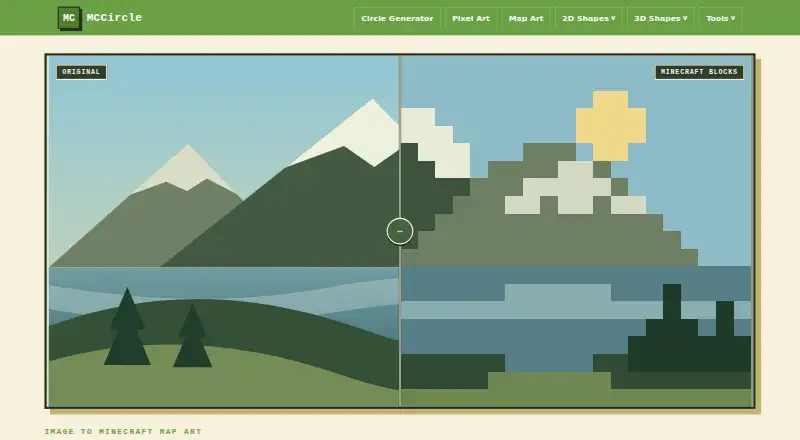
MCCircle Minecraft Map Art Generator is a free web tool that converts an image into a Minecraft map-art plan. Upload a PNG, JPG, WebP, GIF, or BMP to get a tiled grid preview, block colors, material counts, and a downloadable PNG guide. The single-map layout is 128×128 blocks; other options span two maps horizontally at 256×128, two maps vertically at 128×256, or four maps at 256×256. Each section represents one Minecraft map item and aligns with the standard 128×128 map area. Choose wool, concrete, terracotta, or natural blocks, with dithering controls. The grid maps each pixel to one block, and the material list shows how many blocks to gather. The instructions recommend concrete for clean colors, wool for easier gathering, and terracotta for softer art. Simple illustrations, icons, and high-contrast photos are suggested for conversion. MCCircle says processing stays in the browser. The tool is free, with no account or subscription required; lightweight ads are planned for future monetization.
Good
- Accepts PNG, JPG, WebP, GIF, and BMP.
- Offers layouts from one to four maps.
- Provides a grid preview and material counts.
- Downloads a PNG building guide.
- Image processing stays in the browser.
Watch out
- Palette choices are limited to four block types.
- No schematic export is available.
Who it suits
It suits Minecraft players planning map walls, logos, posters, or skin faces, especially those who want a block count before building. Simple art, icons, and high-contrast images are recommended.
Verdict
MCCircle turns an image into a block-by-block map-art plan with layout choices and material counts. It is a practical option for players who want a downloadable guide before building.
Plans and prices
From MCCircle Minecraft Map Art Generator's own pricing page, checked 5 Oct 2026.
| Plan | Price | What it gives you |
|---|---|---|
| Free | Free | No account or subscription required |
The facts
Each one read from MCCircle Minecraft Map Art Generator's own pages, with the date it was checked.
What it does
- Block palettes
- The flat map palette offers wool, concrete, terracotta, and natural blocks, with dithering controls.checked 4 Oct 2026
- Blueprint alignment
- The page says each section becomes one Minecraft map item and each tile stays aligned to the standard 128×128 map area.checked 4 Oct 2026
- Blueprint output
- The generator provides a tiled grid preview and lets users download a PNG guide.checked 5 Oct 2026
- Build guide
- The generated plan includes a block grid and material list showing how many blocks to gather.checked 4 Oct 2026
- Build method
- The instructions map each grid pixel to one Minecraft block and recommend concrete for clean colors, wool for easier gathering, and terracotta for softer art.checked 5 Oct 2026
- Download
- After conversion, users can download a PNG guide with the block grid and material list.checked 4 Oct 2026
- Image formats
- The upload accepts PNG, JPG, WebP, GIF, and BMP files.checked 5 Oct 2026
- Intended uses
- The page suggests using the tool for map walls, logos, posters, skin faces, and survival-friendly block planning.checked 4 Oct 2026
- Map layouts
- Layouts include one map at 128×128, two maps wide at 256×128, two maps tall at 128×256, and a four-map wall at 256×256.checked 4 Oct 2026
- Map size
- The default single-map blueprint is 128×128 blocks, and layouts can combine up to four maps in a 256×256 wall.checked 5 Oct 2026
- Material counts
- The material list shows how many Minecraft blocks to gather for the plan.checked 5 Oct 2026
- Palettes
- Users can choose wool, concrete, terracotta, and natural block palettes, with dithering available.checked 5 Oct 2026
- Pricing and accounts
- MCCircle says it is free forever and does not require accounts or subscriptions; it says future monetization is planned through lightweight ads.checked 5 Oct 2026
- Privacy
- The page says image processing stays in the user's browser.checked 5 Oct 2026
- Purpose
- Turns an uploaded picture into a Minecraft map art blueprint.checked 5 Oct 2026
- Recommended images
- The instructions say simple art, icons, and high-contrast photos convert best.checked 5 Oct 2026
- Supported uses
- The page suggests it for map walls, logos, posters, and survival-friendly block planning.checked 5 Oct 2026
Where it runs
- Browser processing
- The page states that image processing stays in the user's browser.checked 4 Oct 2026
The full review of MCCircle Minecraft Map Art Generator
MCCircle Minecraft Map Art Generator converts an image into a Minecraft map-art blueprint. It suits builders who want block counts and a visual guide without installing software; the fixed palette and lack of schematic export limit how much control it offers.
Overview
Each image pixel becomes a block in the plan, with one map covering 128×128 blocks. You can combine maps into a 256×128 horizontal layout, a 128×256 vertical layout, or a 256×256 four-map wall; each section aligns to a standard 128×128 map item. That map-based structure is useful for planning wall-sized designs, though it is less flexible than an arbitrary canvas.
Simple art, icons and high-contrast photos are the strongest starting points. The tool is intended for map walls, logos, posters, skin faces and survival-friendly planning, but subtle image detail will not translate as clearly into a block grid.
Key features
- Image conversion: Upload PNG, JPG, WebP, GIF or BMP files. Processing stays in the browser, which keeps the image on the user's device.
- Block palettes and dithering: Choose wool, concrete, terracotta or natural blocks, with dithering controls. The palette is fixed rather than customizable; the guidance recommends concrete for clean colors, wool for easier gathering and terracotta for softer art.
- Build planning: A tiled grid preview and material list show the block-by-block layout and how many blocks to gather. This makes the output useful for preparing a build, but it does not replace a schematic file or offer editable palette control.
- PNG guide: Download the grid and material list as a PNG after conversion, making the plan easy to keep alongside a build.
Pricing
MCCircle is free forever at no cost, with no account or subscription required and no free-trial period. There are no paid tiers to weigh against the free plan. The trade-off is functional rather than financial: palette control is fixed, and schematic export is not available. Lightweight ads are planned as a future monetization route.
Platforms
MCCircle runs on the web. Because image processing happens in the browser, it is a practical choice for users who prefer not to install a desktop app.
Who it's for
Choose MCCircle if you want to translate a suitable image into a map-aligned plan, check material quantities and build from a downloadable guide. It is especially well matched to simple designs and survival builds where knowing what to gather matters. Look elsewhere if you need a schematic export or more control over the palette.
Pros and cons
- Pro: Four map-layout sizes make it possible to plan both a single map and a larger wall without losing standard map alignment.
- Pro: Material counts accompany the grid, helping builders plan block gathering before starting.
- Pro: Browser-side processing, no account and no subscription keep the workflow private and low-friction.
- Con: The palette is fixed, so builders cannot tailor the available colors beyond choosing among the offered block families.
- Con: No schematic export means the PNG guide is the build output, not an editable placement file.
- Con: The guidance favors simple, high-contrast images, so detailed or low-contrast pictures are a weaker fit.
Alternatives
Minecraft Map Art Generators is the broader category list for comparing options. Choose ImageToMapMC if you want a free Linux or Windows desktop application under the MIT license. SchemForge Map Art Generator offers one free build each day, an interactive 3D voxel preview and private build history; its 48-hour unlimited option costs $0.99, paid once. BlocksItems Map Art Generator is another free web option with no account required.
Pick MakeBead Minecraft Map Art Generator if you want browser-based use without sign-up and exports that include map_N.dat and build files. Map Art Maker for Minecraft is available on Android, iOS, web and Windows, with source under the MIT License. mc-api Map Art Converter may suit API-oriented workflows; its free service uses one credit per conversion and carries no availability or response-time guarantee. Minecraft Map Art Generator is a free browser-based option with no sign-up, watermark or usage limits. wWaypoints is another option from a creator who makes Minecraft mods, videos and tools.
Verdict
MCCircle is a sound pick for players who want a free, browser-based map-art plan with clear dimensions and material counts, especially for simple images and survival builds. Its main reason to look elsewhere is the same practical boundary: if your workflow depends on schematic files or adjustable palettes, this PNG guide is not enough.
Getting started
- Open the generator at https://mccircle.org/minecraft-map-art-generator/.
- Upload a PNG, JPG, WebP, GIF, or BMP image.
- Choose a map layout and block palette, with dithering controls as needed.
- Use the grid and material list to plan the build, or download the PNG guide.
Limits worth knowing
Schematic export is unavailable, and palette control is fixed. The listed layouts cover up to four maps in a 256×256 wall.
Questions
How much does MCCircle Minecraft Map Art Generator cost?
It is free forever, with a listed price of no cost plan. No account or subscription is required.
Which image formats does it accept?
It accepts PNG, JPG, WebP, GIF, and BMP images.
What layouts can I choose?
Options are one 128×128 map, two maps wide at 256×128, two maps tall at 128×256, or a four-map 256×256 wall.
Can I download the blueprint?
Yes. You can download a PNG guide with the block grid and material list.
Does it offer schematic export?
No. Schematic export is not available.
Where is the image processed?
Image processing stays in the user's browser.
Alternatives to MCCircle Minecraft Map Art Generator
- 1
ImageToMapMC
Free planOpen sourceLinuxWindows7.1Free plan - 2
BlocksItems Map Art Generator
Free planWebAPI6.7Free plan - 3
MakeBead Minecraft Map Art Generator
Free planWeb6.6Free plan - 4
Map Art Maker for Minecraft
AndroidiOSWebWindows6.5 - 5

SchemForge Map Art Generator
Free planWeb6.5From $3.99 a month - 6
mc-api Map Art Converter
Free planWebAPI6.0Free plan