
ManageEngine Ransomware Protection Plus
ManageEngine Ransomware Protection Plus detects ransomware, isolates infected systems, and supports endpoint recovery.
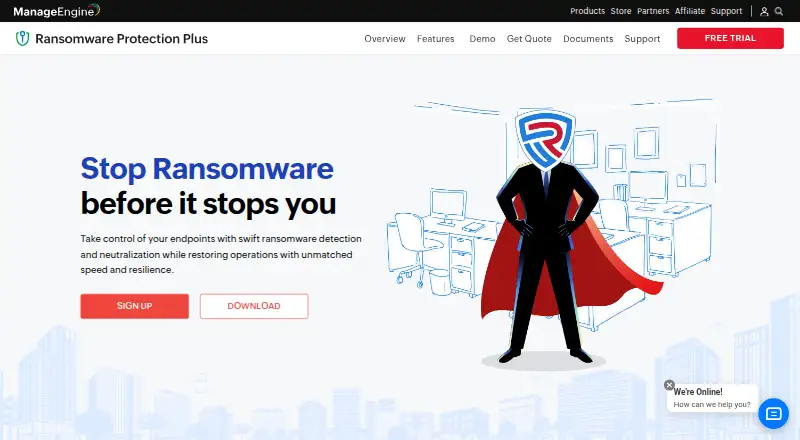
What ManageEngine Ransomware Protection Plus is
ManageEngine Ransomware Protection Plus detects ransomware, isolates infected systems, and supports endpoint recovery. Its behavioural detection examines process and file activity for unusual alteration, deletion, or modification patterns. Edge-based detection is designed to protect endpoints in low- or no-network conditions without relying on regular definition updates. The product can map attack lifecycles, provide root cause analysis and MITRE ATT&CK mapping, and identify indicators of compromise. It can isolate infected devices in real time. For recovery, it uses Microsoft VSS to create endpoint file copies every three hours and supports rollback to a pre-attack state. The free edition covers up to 25 endpoints; Enterprise Edition costs $6.99 per endpoint per year. A free 30-day trial includes all features, and cloud and on-premises download options are offered. The product has Windows operating system coverage, and deployments above 35,000 computers require contacting support about a customized server setup.
Good
- Behavioural detection flags unusual file and process changes.
- Edge-based detection supports low- or no-network conditions.
- Provides root cause analysis and attack mapping.
- Creates endpoint file copies every three hours.
- Free edition covers up to 25 endpoints.
Watch out
- Operating system coverage is Windows.
- Enterprise Edition costs $6.99 per endpoint per year.
- Deployments above 35,000 computers require contacting support.
Who it suits
Ransomware Protection Plus suits organizations seeking ransomware detection, endpoint isolation, and rollback support for Windows systems. It may be relevant where low- or no-network endpoint protection is needed.
Verdict
Ransomware Protection Plus combines detection, endpoint containment, and recovery features. The free edition has an endpoint cap, and larger deployments require a customized setup discussion.
Plans and prices
From ManageEngine Ransomware Protection Plus's own pricing page, checked 15 Oct 2026.
| Plan | Price | What it gives you |
|---|---|---|
| Free Edition | Free | ML/Behaviour detection · Zero-day attack prevention · Encrypted file recovery · Root cause analysis · Up to 25 endpoints |
| Enterprise Edition | $6.99 a year | ML/Behaviour detection · Zero-day attack prevention · Encrypted file recovery · Root cause analysis · Unlimited endpoints · per endpoint per year |
| Cloud monthly | $45 a month | 50 computers · 5 technicians; cloud is available only on subscription · Monthly subscription |
| On-premises annual | $345 a year | 50 computers · 5 technicians; pricing varies by computer, server, and technician count · Annual |
| Cloud annual | $445 a year | 50 computers · 5 technicians; cloud is available only on subscription · Annual subscription |
| On-premises perpetual | $863, paid once | 50 computers · 5 technicians; pricing varies by computer, server, and technician count · Perpetual |
The facts
Each one read from ManageEngine Ransomware Protection Plus's own pages, with the date it was checked.
What it does
- Agent installation
- Agents can be deployed from the console, through Windows GPO, or manually with a setup batch file.checked 15 Oct 2026
- Attack forensics
- Incident analysis traces an attack from entry device through process activity and supports root-cause investigation.checked 15 Oct 2026
- Bandwidth claim
- The vendor states its agent uses less than 1% of system bandwidth.checked 15 Oct 2026
- Behavioral detection
- Behavior models inspect suspicious process and file behavior in real time.checked 15 Oct 2026
- Compliance
- ManageEngine states that its cloud services and on-premises products are covered by SOC 2 Type II controls and that its offerings support GDPR and CCPA privacy requirements.checked 15 Oct 2026
- Console requirements
- The console is accessed using Microsoft Edge, Mozilla Firefox, Google Chrome, or Zoho Ulaa.checked 30 Sep 2026
- Containment
- Real-time device isolation quarantines infected endpoints to help prevent ransomware from spreading across the network.checked 30 Sep 2026
- Databases
- Supported databases are PostgreSQL and Microsoft SQL Server 2008 through 2022, including AWS SQL Server deployments.checked 15 Oct 2026
- Deployment
- The product supports on-premises and cloud deployments according to GetApp.checked 15 Oct 2026
- Detection
- Its behavioural detection analyzes processes and file behaviour for unusual alteration, deletion, or modification patterns.checked 30 Sep 2026
- Detection claim
- The vendor reports more than 99% ransomware-detection accuracy from its behavior analytics engine.checked 15 Oct 2026
- Documentation
- ManageEngine publishes system requirements, user-guide material, FAQs, datasheets, presentations and ransomware guides.checked 15 Oct 2026
- Endpoint Central integration
- The product integrates with ManageEngine Endpoint Central for unified endpoint management and security operations.checked 15 Oct 2026
- Existing security tools
- ManageEngine says the product can coexist with an organization's existing security stack.checked 30 Sep 2026
- Exploit prevention
- Exploit protection targets ransomware using application or operating-system vulnerabilities.checked 15 Oct 2026
- Fileless protection
- Memory scanning is used to detect ransomware that runs without traditional files.checked 15 Oct 2026
- Forensics
- The product maps the attack lifecycle and provides root cause analysis, MITRE ATT&CK mapping, and indicators of compromise detection.checked 30 Sep 2026
- Indicators of compromise
- The product identifies malicious hashes, IP addresses and URLs linked to ransomware campaigns.checked 15 Oct 2026
The company
- Company founded
- LinkedIn lists ManageEngine as founded in 2002.checked 15 Oct 2026
- Company ownership
- ManageEngine is the IT-management division of Zoho Corporation.checked 15 Oct 2026
- Company size
- LinkedIn lists ManageEngine as privately held with 5,001–10,000 employees.checked 15 Oct 2026
- Founded
- 1996checked 23 Sep 2026
- Headquarters
- LinkedIn lists headquarters in Del Valle, Texas.checked 15 Oct 2026
Where it runs
- Device isolation
- Infected endpoints can be isolated automatically to limit lateral spread.checked 15 Oct 2026
The full review of ManageEngine Ransomware Protection Plus
ManageEngine Ransomware Protection Plus is ransomware defense software for Windows endpoints, with cloud and on-premises deployment options. It is best suited to organizations that need endpoint containment and recovery alongside behavioral detection. Its strongest appeal is the combination of offline-aware detection and rollback; Windows-only coverage and plan-specific capacity limits narrow its fit.
Overview
The product brings ransomware detection, investigation, device isolation, and recovery into one offering. Its edge-based detection is designed to work when network access is limited, without relying on regular definition updates. That can help protect intermittently connected Windows systems, but it does not make this a cross-platform choice for mixed Windows, macOS, and Linux fleets.
ManageEngine says the software can coexist with an organization’s existing security tools, making it a potential addition to an established security stack rather than a replacement. Deployment is hybrid: customers can choose cloud or on-premises, though cloud is subscription-only.
Key features
Detection and investigation
Behavioral analysis looks for unusual process and file alteration, deletion, or modification. The product also maps the attack lifecycle, provides root cause analysis and MITRE ATT&CK mapping, and detects indicators of compromise. That gives administrators context to investigate suspicious activity, not only an alert that it occurred.
Containment and recovery
Real-time isolation quarantines an infected endpoint to help prevent ransomware from spreading across the network. For recovery, Microsoft VSS creates endpoint file copies every three hours, with rollback to a pre-attack state. The combination makes containment and recovery central strengths, but a three-hour copy interval means buyers should not treat the feature as a guarantee that no recent changes will be lost.
Pricing
The free edition costs nothing and covers up to 25 endpoints. It includes machine-learning and behavioral detection, zero-day attack prevention, encrypted file recovery, and root cause analysis. It is a practical starting point for a small Windows deployment, but the endpoint cap rules it out for larger fleets.
Enterprise Edition costs $6.99 a year, billed per endpoint per year, and supports unlimited endpoints with the same listed core protections. It suits organizations that want per-endpoint annual pricing without the free edition’s cap.
For 50 computers and five technicians, Cloud monthly costs $45 a month, while Cloud annual costs $445 a year. Both are subscription plans, and cloud is available only by subscription. On-premises annual costs $345 a year; On-premises perpetual costs $863, paid once. Both on-premises plans cover 50 computers and five technicians, with pricing varying by computer, server, and technician count. The annual option avoids a one-time purchase, while perpetual billing avoids an annual term; buyers should match either option to their required capacity and deployment model.
A free 30-day trial includes all features, with cloud and on-premises download options. For deployments above 35,000 computers, ManageEngine asks customers to contact support for a customized server setup. The trial download page also offers registration for free technical support.
Platforms
The product supports Windows endpoints and offers web and self-hosted access. Agents support Windows 8, 8.1, 10, 11, and listed Windows Server releases; server and distribution server support includes Windows 10, Windows 11, and listed Windows Server releases. The console works in Microsoft Edge, Mozilla Firefox, Google Chrome, or Zoho Ulaa. Organizations seeking endpoint coverage for macOS or Linux should look elsewhere.
Who it's for
This is a sensible fit for organizations managing Windows endpoints that want behavioral detection, attack investigation, isolation, and rollback in one product, particularly when offline-aware protection matters. Small teams can begin with the 25-endpoint free edition; larger buyers can choose per-endpoint Enterprise or a 50-computer cloud or on-premises plan. It is less suitable for mixed-OS environments or deployments whose required capacity does not match the selected plan.
Pros and cons
- Pro: Edge-based detection is designed for low- or no-network conditions without depending on regular definition updates.
- Pro: Isolation, attack investigation, and rollback combine prevention of spread with tools to understand and recover from an incident.
- Pro: The free edition includes recovery and root cause analysis for up to 25 endpoints.
- Con: Windows-only endpoint coverage excludes organizations needing one product across Windows, macOS, and Linux.
- Con: The free edition’s 25-endpoint limit and the 50-computer, five-technician capacity of several named plans require careful matching to deployment size.
- Con: Cloud is subscription-only, so it does not suit buyers who require a perpetual cloud license.
Alternatives
Ransomware Protection Software is the broader category to browse when comparing ransomware tools.
AEGIS may suit buyers who want a free, open-source option with Linux and macOS as well as Windows support; its free plan covers 20 nodes, 100 assets, and three users.
Kaseya Ransomware Protection is an alternative for Windows 8.1 and up, but its Ransomware Detection offering requires an active VSA subscription and a separate license.
Halcyon Anti-Ransomware & Cyber Resilience Platform is worth considering for buyers seeking pre-execution prevention, a 24/7 Ransomware Operations Center, data-exfiltration detection and prevention, and a ransomware warranty; it has no free plan.
NeuShield Ransomware Protection offers a free edition and a $24.99 a year single-device license, making it an option for buyers comparing freemium and per-device pricing.
AppCheck offers a free plan for individual users and a $24.99 a year one-PC, one-year Pro plan, so it is an alternative for individual Windows users.
Rubrik Security Cloud is another paid, web-platform alternative.
Morphisec Anti-Ransomware Assurance Suite is another paid option, with Windows, macOS, and Linux platforms.
RackTop BrickStor SP is another web-platform option without a free plan.
Verdict
Choose ManageEngine Ransomware Protection Plus if you need Windows endpoint defense that pairs behavioral detection with isolation, investigation, and rollback, and its capacity and deployment terms fit your fleet. The key reason to look elsewhere is its Windows-only coverage; mixed-OS organizations need an alternative that spans their endpoints.
Getting started
- Open the ransomware protection website
- Register for the free 30-day trial or select a listed plan
- Choose cloud or on-premises deployment
- Download the cloud or on-premises package
- Install supported Windows server, distribution server, and agent components
- Access the console with Microsoft Edge, Mozilla Firefox, Google Chrome, or Zoho Ulaa
Limits worth knowing
The Free Edition allows up to 25 endpoints. Cloud monthly, cloud annual, on-premises annual, and on-premises perpetual plans list 50 computers and five technicians; deployments above 35,000 computers require a customized server setup.
Questions
Is there a free edition?
Yes. Free Edition costs nothing and covers up to 25 endpoints.
What is the Enterprise price?
Enterprise Edition costs $6.99 a year, billed per endpoint per year, with unlimited endpoints.
Is a trial available?
Yes. The vendor offers a free 30-day trial with all features.
Which operating systems are supported?
Operating-system coverage is Windows. Listed server, distribution-server, and agent support includes Windows 8, 8.1, 10, 11, and listed Windows Server releases.
Can it run in the cloud or on premises?
Yes. Cloud and on-premises options are available in hybrid deployment. Cloud is available only on subscription plans.
Who makes the product?
ManageEngine identifies itself as the enterprise IT management division of Zoho Corp.
Alternatives to ManageEngine Ransomware Protection Plus
- 1
AEGIS
Free planOpen sourceWebAPILinuxmacOS7.5Free plan - 2

AppCheck
Free planWebLinuxWindows7.5Free plan - 3
Rubrik Security Cloud
WebAPILinuxmacOS6.9 - 4
Sophos Intercept X for Mobile
AndroidiOS6.8 - 5
NeuShield Ransomware Protection
Free planWebWindows6.7From $24.99 a year - 6

Malwarebytes Ransomware Protection
AndroidiOSmacOSWindows6.3