
Magic Partition Recovery
Magic Partition Recovery is software for retrieving files and lost partitions from damaged, formatted, corrupted, or inaccessible storage.
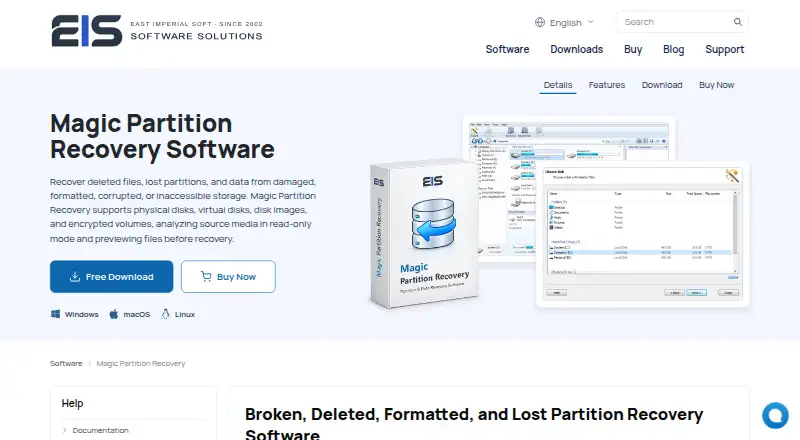
What Magic Partition Recovery is
Magic Partition Recovery is software for retrieving files and lost partitions from damaged, formatted, corrupted, or inaccessible storage. It can rebuild partition tables, MBR records, and FAT or NTFS file systems. Fast Scan uses existing file-system structures and metadata, while Full Analysis searches storage for lost partitions, damaged file systems, and recoverable files. The program supports encrypted volumes protected by BitLocker, LUKS, VeraCrypt, FileVault, EFS, and fscrypt, using passwords, keys, keyfiles, or certificates. It works with physical drives, memory cards, NAS and SAN storage, remote systems over SSH, virtual disks, and many forensic or standard disk-image formats. Source media is examined read-only, and files can be previewed before recovery. Recovered data can be saved to another disk, a ZIP archive, or an FTP server. A free trial scans and previews results; a paid license is required for recovery.
Good
- Rebuilds damaged partition tables and file systems
- Supports encrypted volumes and recovery credentials
- Read-only analysis with file preview
- Handles virtual disks and disk-image formats
- Free trial scans and previews recoverable files
Watch out
- No free plan
- Installing on affected storage risks overwriting data
- Home Edition does not support virtual machines
- Paid license required for recovery
Who it suits
It suits people recovering data from varied storage, encrypted volumes, virtual disks, or disk images. Windows, macOS, and Linux users can use it, with editions for home, internal organizational, or recovery-service work.
Verdict
Magic Partition Recovery covers physical, virtual, remote, encrypted, and image-based recovery sources with read-only analysis and previews. Its free trial helps verify scan results, but full use requires a paid edition and careful installation away from affected media.
Plans and prices
From Magic Partition Recovery's own pricing page, checked 11 Oct 2026.
| Plan | Price | What it gives you |
|---|---|---|
| Commercial Edition | — | Businesses and independent professionals · May provide data recovery services to customers |
| Home Edition | — | Personal, non-commercial home use · Does not support virtual machines |
| Office Edition | — | Commercial and non-profit organizations · Internal data recovery needs |
The facts
Each one read from Magic Partition Recovery's own pages, with the date it was checked.
What it does
- Access methods
- Supported access methods include direct-attached storage, local disk image files, NAS/SAN storage, and remote systems over SSH.checked 11 Oct 2026
- Disk image support
- It can open forensic and standard disk images including E01/EWF, AFF/AFF4, DriveImage XML, DMG, ASIF, sparseimage, and RAW formats.checked 11 Oct 2026
- Encrypted volumes
- It supports recovery from BitLocker, LUKS, VeraCrypt, FileVault, EFS, and fscrypt encrypted volumes using passwords, keys, keyfiles, or certificates.checked 11 Oct 2026
- Install guidance
- The maker recommends installing the software on a different disk or external drive to avoid overwriting data on the affected storage.checked 11 Oct 2026
- Partition repair
- The software can rebuild damaged partition tables, MBR records, and FAT and NTFS file systems.checked 11 Oct 2026
- Privacy
- The privacy policy says payment information is collected and processed by third-party payment processors and is not available to East Imperial Soft.checked 11 Oct 2026
- Purpose
- Magic Partition Recovery recovers files and lost partitions from damaged, formatted, corrupted, or inaccessible storage.checked 11 Oct 2026
- Read-only workflow
- The product analyzes source media in read-only mode and lets users preview files before recovery.checked 11 Oct 2026
- Refund policy
- The product purchase page states that customers can request a refund within 30 days if the product does not meet their needs.checked 11 Oct 2026
- Save destinations
- Recovered files can be saved to another disk, a ZIP archive, or an FTP server.checked 11 Oct 2026
- Scan modes
- Fast Scan uses available file-system structures and metadata, while Full Analysis scans the storage for lost partitions, damaged file systems, and recoverable files.checked 11 Oct 2026
- Support
- The company says support is available Monday–Friday, 9:00 AM–6:00 PM GMT+03:00, and aims to respond within one business day.checked 11 Oct 2026
- Supported operating systems
- The maker lists Windows XP–11, Windows Server 2008–2022, macOS 10.4 Tiger–26 Tahoe, and Linux distributions including Ubuntu, Debian, Fedora, Red Hat, and openSUSE.checked 11 Oct 2026
- Virtual disk support
- It supports virtual disks from VMware, Hyper-V, VirtualBox, Parallels, QEMU/KVM, Proxmox, XenServer, and ESXi, including snapshots and split images.checked 11 Oct 2026
The company
- Founded
- 2002checked 28 Sep 2026
- Headquarters
- Miami, Florida, USAchecked 28 Sep 2026
Money
- Free evaluation
- The free trial can scan storage and preview recoverable files so users can check results before purchasing a license.checked 11 Oct 2026
Alternatives to Magic Partition Recovery
- 1
EaseUS Data Recovery Wizard
Free planAndroidiOSmacOSWindows8.2Free plan - 2

Disk Drill
Free planmacOSWindows7.6From $89 a year - 3
DiskGenius
Free planWindows7.5From $99.90 a year - 4
MiniTool Power Data Recovery
Free planmacOSWindows7.5From $89 a year - 5

Hetman Partition Recovery
LinuxmacOSWindows7.2$97.95 one-time - 6
Lazesoft Recovery Suite
Free planLinuxWindows7.0$27.95 one-time