LUNA
LUNA is Universal Audio’s digital audio workstation for recording, producing, and mixing music.
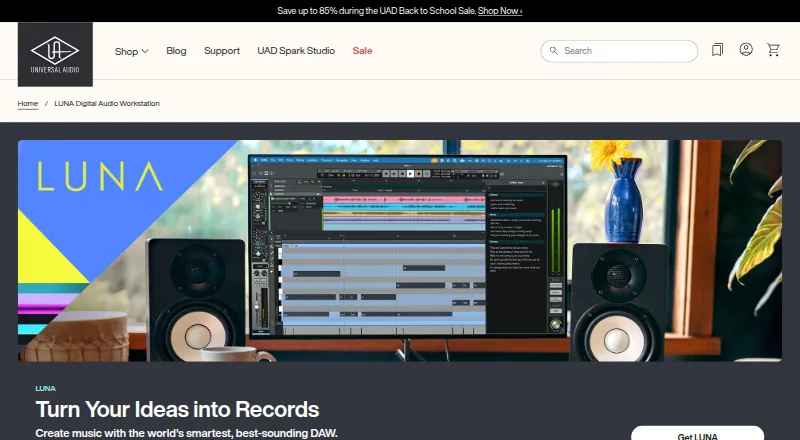
What LUNA is
LUNA is Universal Audio’s digital audio workstation for recording, producing, and mixing music. Its tools include tempo and instrument detection, voice control, stem separation, audio-to-MIDI, lyric transcription, and chord extraction, though some functions are limited to LUNA Studio. LUNA Play detects an instrument, sets levels, and suggests presets for capturing an idea. The software works with any audio interface, with deeper integration for Apollo and Volt; Apollo adds real-time tracking with UAD plug-ins, Unison preamp technology, and Accelerated Realtime Monitoring. LUNA hosts VST3 and AU plug-ins and virtual instruments. LUNA Studio adds API, Studer, and Ampex console or tape extensions, hardware inserts, and six ARA plug-ins. It runs on macOS and 64-bit Windows 10 or 11 and requires 600 MB of available storage. Installing and authorizing it requires a free Universal Audio account, UA Connect, iLok License Manager, and a free iLok account. LUNA Free costs nothing; listed paid options include $199 a month for LUNA Studio and $149 a year for UAD Spark Studio, billed annually.
Good
- Works with any audio interface.
- Hosts VST3 and AU plug-ins and virtual instruments.
- Sessions can be opened on macOS and Windows.
- Free plan includes unlimited tracks.
Watch out
- Installation requires multiple accounts and managers.
- Some smart features are limited to LUNA Studio.
- AU plug-ins will not load in sessions opened on Windows.
- LUNA Studio is $199 a month.
Who it suits
LUNA suits music makers looking for a DAW with smart songwriting and audio tools, plug-in hosting, and support for either macOS or Windows. Apollo owners may value its deeper interface integration.
Verdict
LUNA offers recording, production, and mixing tools across macOS and Windows, with added Apollo integration. Consider its setup requirements and plan details, especially if you rely on AU plug-ins across operating systems.
Plans and prices
From LUNA's own pricing page, checked 29 Sep 2026.
| Plan | Price | What it gives you |
|---|---|---|
| LUNA Free | Free | Unlimited tracks · Smart features · UAD Explore Free plug-ins · Oxide Tape |
| UAD Spark Studio | $149 a year | LUNA Studio included · 70 UAD plug-ins · New plug-ins added regularly · $149 billed upfront |
| LUNA Studio | $199, paid once | 30 UAD plug-ins · 6 ARA plug-ins · Advanced smart features · Built-in console and tape extensions |
The facts
Each one read from LUNA's own pages, with the date it was checked.
What it does
- Apollo integration
- With Apollo, LUNA supports real-time tracking with UAD plug-ins, Unison preamp technology, and Accelerated Realtime Monitoring.checked 29 Sep 2026
- Audio interfaces
- LUNA works with any audio interface, while Apollo and Volt interfaces have deeper integration.checked 29 Sep 2026
- Installation and licensing
- Installing and authorizing LUNA requires a free Universal Audio account, UA Connect, iLok License Manager, and a free iLok account.checked 29 Sep 2026
- License locations
- A LUNA license supports activation at up to three simultaneous locations, and an existing activation can be deauthorized to free a location.checked 29 Sep 2026
- LUNA Play
- LUNA Play detects an instrument, sets levels, and suggests presets to help capture an idea quickly.checked 29 Sep 2026
- Plug-in formats
- LUNA hosts VST3 and AU plug-ins and virtual instruments.checked 29 Sep 2026
- Smart tools
- Its tools include tempo detection, voice control, instrument detection, stem separation, audio-to-MIDI, lyric transcription, and chord extraction, with some features limited to LUNA Studio.checked 29 Sep 2026
- Studio features
- LUNA Studio adds API, Studer, and Ampex console or tape extensions, hardware inserts, and six ARA plug-ins.checked 29 Sep 2026
- Support
- Universal Audio provides a LUNA Knowledge Base with the online manual and downloadable PDF manual.checked 29 Sep 2026
- System requirements
- LUNA supports macOS Big Sur 11 through Tahoe 26 and 64-bit Windows 10 or Windows 11, and requires 600 MB of available system storage.checked 29 Sep 2026
- What it does
- LUNA is Universal Audio’s digital audio workstation for recording, producing, and mixing music.checked 29 Sep 2026
Where it runs
- Cross-platform sessions
- LUNA sessions can be opened on macOS and Windows, but AU plug-ins will not load in a session opened on Windows.checked 29 Sep 2026
The company
- Founded
- 1958checked 28 Sep 2026
- Headquarters
- Scotts Valley, California, United Stateschecked 28 Sep 2026
- Maker history and headquarters
- Universal Audio says it was founded in 1958 and is headquartered in Scotts Valley, California.checked 29 Sep 2026
Money
- Free plan
- Yeschecked 19 Sep 2026
The full review of LUNA
LUNA is a music-production workspace for recording, arranging, and mixing on macOS or Windows. It suits musicians who want a capable free starting point, especially those using Apollo hardware. Its strongest case is the combination of no-cost access and optional studio tools; setup and cross-platform plug-in compatibility deserve attention before committing.
Overview
LUNA spans a free DAW and paid options that add UAD plug-ins, instruments, and production tools. You can use it with any audio interface, so Apollo is not a requirement. Apollo owners get a closer hardware workflow, while other users can still work with VST3 and AU plug-ins and virtual instruments.
Key features
Its smart tools cover tempo and instrument detection, voice control, stem separation, audio-to-MIDI, lyric transcription, and chord extraction, although some are reserved for Studio. LUNA Play detects an instrument, sets levels, and suggests presets, making it a focused way to get an idea into a session quickly. The free tier includes smart features, but users who need the advanced set should factor in a paid plan.
With Apollo, LUNA supports real-time tracking through UAD plug-ins, Unison preamp technology, and Accelerated Realtime Monitoring. That makes it a more compelling fit for Apollo owners than for users seeking a hardware-agnostic DAW experience alone. Studio adds API, Studer, and Ampex console or tape extensions, hardware inserts, and six ARA plug-ins; those additions matter most to producers who specifically need those processing and integration options.
Sessions can open on macOS and Windows, but AU plug-ins will not load when a session is opened on Windows. That is a meaningful constraint for teams or individuals moving projects across operating systems with AU-based instruments or effects.
Pricing
LUNA Free costs nothing and includes unlimited tracks, smart features, UAD Explore Free plug-ins, and Oxide Tape. It is the practical place to start if you want to record and produce without paying for a subscription, though it does not include the Studio additions.
LUNA Studio is priced at $199 a month. It includes 30 UAD plug-ins and instruments, six ARA plug-ins, console and tape extensions, advanced smart features, and hardware inserts. This tier fits users who need those Studio tools, but the monthly price is a substantial step up from Free.
UAD Spark Studio costs $149 a year, billed annually. It includes LUNA Studio, 70 UAD plug-ins, and regularly added plug-ins, making it the more economical listed paid route for users who want the Studio package and a broader plug-in collection. Free accommodates unlimited tracks; license activation is limited to three simultaneous locations, with deauthorization available to free a location.
Platforms
LUNA supports macOS Big Sur 11 through Tahoe 26 and 64-bit Windows 10 or 11, with 600 MB of available system storage required. Installing and authorizing it requires a free Universal Audio account, UA Connect, iLok License Manager, and a free iLok account. That multi-part setup is a hurdle for anyone seeking a single-step install. Universal Audio also provides an online Knowledge Base and downloadable PDF manual.
Who it's for
LUNA is a strong fit for musicians who want unlimited tracks at no cost, plus an upgrade path to UAD processing and Studio production features. Apollo users have the clearest reason to choose it, thanks to the deeper real-time tracking integration. It is less suitable for workflows that depend on AU plug-ins being available across both macOS and Windows.
Pros and cons
- Pros: Free access includes unlimited tracks, smart features, UAD Explore Free plug-ins, and Oxide Tape, so cost need not block a full-track-count starting setup.
- Pros: Any audio interface can be used, while Apollo owners can add real-time UAD tracking and Unison integration.
- Cons: AU plug-ins do not load in sessions opened on Windows, complicating cross-platform projects that rely on them.
- Cons: Installation and authorization depend on both Universal Audio and iLok accounts and companion software.
- Cons: Studio features are paid additions, and the listed Studio monthly price is much higher than the free tier.
Alternatives
For a different kind of DAW plug-in rather than a full music-production workspace, Airwindows Consolidated is free and open source, with CLAP, VST3, AU, and LV2 formats across Linux, macOS, and Windows. Buddi is also free and cross-platform, but it is budgeting software rather than an audio tool. If you want a free frequency-shifting and analog-echo plug-in, Valhalla DSP Plugin Collection offers Valhalla Freq Echo for Windows and Mac.
Blue Cat's FreqAnalyst is a free real-time spectrum analyzer plug-in for readers who need analysis rather than a DAW. Guitar Rig offers a free Player edition as a standalone application and plug-in for those seeking an amp-focused option. x42-plugins provides cross-platform plug-ins, including a Whirl Speaker license at $19, paid once. For a paid collection, FabFilter Total Bundle costs $1,069, paid once and includes 14 plug-ins for Mac and Windows. Kazrog KClip 3 is a $39.99 USD perpetual-license alternative for users seeking a full version on multiple devices without subscription fees.
Browse Audio Plugins for plug-in options, Digital Audio Workstations for other production environments, or Audio Editing Software for editing-focused tools.
Verdict
Choose LUNA if you want a free DAW with unlimited tracks and a clear route to deeper UAD and Studio tools, particularly if you own Apollo hardware. Look elsewhere if your sessions depend on AU plug-ins traveling intact to Windows, or if the account and authorization setup is more overhead than you want.
Getting started
- Open the LUNA website
- Create a free Universal Audio account
- Install UA Connect and iLok License Manager
- Create a free iLok account
- Install LUNA on macOS or 64-bit Windows 10/11 with 600 MB available
- Authorize LUNA and activate it at up to three simultaneous locations
Limits worth knowing
Some smart features are limited to LUNA Studio. LUNA Studio adds API, Studer, and Ampex console or tape extensions, hardware inserts, and six ARA plug-ins.
Questions
Is there a free LUNA plan?
Yes. LUNA Free costs nothing and includes unlimited tracks, smart features, UAD Explore Free plug-ins, and Oxide Tape.
What paid plans are listed?
LUNA Studio is listed at $199 a month. UAD Spark Studio is $149 a year, billed annually, and includes LUNA Studio.
Which platforms does LUNA support?
It supports macOS Big Sur 11 through Tahoe 26 and 64-bit Windows 10 or Windows 11.
Which plug-in formats can it host?
LUNA hosts VST3 and AU plug-ins and virtual instruments; the listed plug-in formats also include AAX.
Do sessions work across macOS and Windows?
Sessions can be opened on both systems, but AU plug-ins will not load when a session is opened on Windows.
What is required for installation and authorization?
You need a free Universal Audio account, UA Connect, iLok License Manager, and a free iLok account.
Alternatives to LUNA
- 1
WavePad
Free planAndroidiOSmacOSWindows8.8From $39.95 a year - 2
n-Track Studio
Free planAndroidiOSLinuxmacOS8.7From $109 a year - 3
Zenbeats
Free planAndroidiOSmacOSWindows8.5From $2.99 a month - 4

Koala Sampler
Free planAndroidiOSLinuxmacOS8.4$2.99 one-time - 5
Pro Tools
Free planmacOSWindows8.3Free plan - 6

Soundtrap
Free planAndroidiOSWebLinux8.3Free plan