
LumarLabs Face Studio
LumarLabs Face Studio swaps a face into a video or still image, or uses motion from another clip to drive a character.
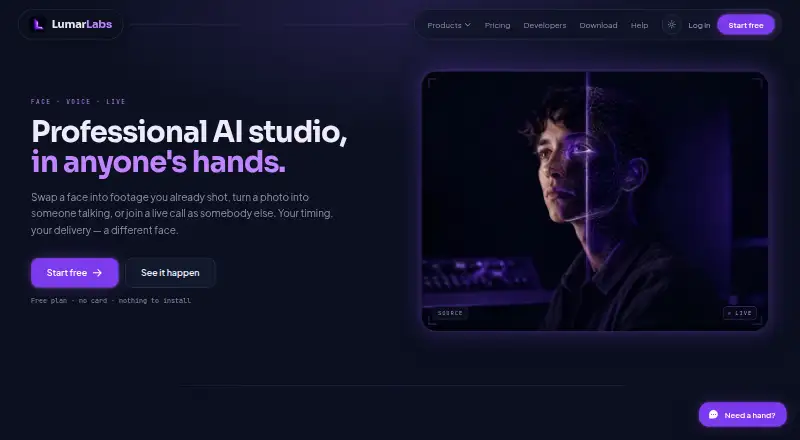
What LumarLabs Face Studio is
LumarLabs Face Studio swaps a face into a video or still image, or uses motion from another clip to drive a character. It accepts MP4, MOV, JPG, and PNG files up to 500 MB. Face Studio renders run on LumarLabs hardware, while desktop Live Swap processes frames on the user's computer. The service also offers Avatar, Lip Sync, Identity Swap, Live Swap, and Voice Swap. Its browser extension supports Meet, WhatsApp Web, Telegram, Zoom, Discord, and Teams, while Live Swap also works with OBS. A prepaid REST API exposes Face Studio and several other tools; failed jobs are refunded. The free plan offers real renders without requiring a card. Paid plans provide finished Full HD files for commercial use. LumarLabs says uploaded media is used only to generate requested results, encrypted in transit and at rest, and deleted after rendering; failed-job media is purged after 30 days. Some plans place a daily cap on Live Swap minutes.
Good
- Free plan includes real renders without a card.
- Accepts video and still-image formats up to 500 MB.
- Extension supports Meet, WhatsApp Web, Zoom, and Teams.
- Failed API jobs are refunded.
Watch out
- Paid plans are required for commercial-use Full HD files.
- Some plans cap daily Live Swap minutes.
- Failed-job media is purged after 30 days.
Who it suits
It suits individuals who want to try AI video tools on their own footage without a card. It may also fit users who need face or character tools through a browser extension or API.
Verdict
Face Studio handles both stills and video, with related tools available through the extension and API. Review plan limits if you expect to use Live Swap regularly.
Plans and prices
From LumarLabs Face Studio's own pricing page, checked 1 Oct 2026.
| Plan | Price | What it gives you |
|---|---|---|
| Free | Free | real renders · no card |
The facts
Each one read from LumarLabs Face Studio's own pages, with the date it was checked.
What it does
- API
- A prepaid REST API exposes Face Studio, Identity Swap, Avatar, Lip Sync, Voice Swap and Live Swap Pro, with failed jobs refunded.checked 1 Oct 2026
- Audience
- LumarLabs positions the product for individuals who want to try professional AI video tools on their own footage without a card.checked 1 Oct 2026
- Compliance
- The privacy policy says the service is written to comply with Nigeria's NDPR and NDPA and with GDPR and equivalent laws.checked 1 Oct 2026
- Face Studio
- Face Studio swaps a face into video or a still, or drives a character with motion from another clip.checked 1 Oct 2026
- Input formats
- The service accepts MP4, MOV, JPG and PNG inputs up to 500 MB.checked 1 Oct 2026
- Integrations
- The browser extension supports Meet, WhatsApp Web, Telegram, Zoom, Discord and Teams; Live Swap also works with OBS.checked 1 Oct 2026
- Other tools
- LumarLabs also provides Avatar, Lip Sync, Identity Swap, Live Swap and Voice Swap.checked 1 Oct 2026
- Output
- Paid plans provide finished Full HD files for commercial use.checked 1 Oct 2026
- Privacy
- Uploaded photos and videos are used only to generate the requested result and are not used to train models.checked 1 Oct 2026
- Processing
- Face Studio renders run on LumarLabs hardware, while desktop Live Swap processes frames on the user's computer.checked 1 Oct 2026
- Retention
- Media is encrypted in transit and at rest, deleted after rendering, and failed-job media is purged after 30 days.checked 1 Oct 2026
- Security
- LumarLabs says connections use TLS 1.3, passwords use salted slow one-way hashes, and payment data does not touch its servers.checked 1 Oct 2026
- Support
- Users can contact privacy support at [email protected], and the help centre says live chat has read its setup guidance.checked 1 Oct 2026
- Usage limits
- Live Swap is measured in minutes and some plans impose a daily cap that resets in the user's timezone.checked 1 Oct 2026
The full review of LumarLabs Face Studio
Overview
LumarLabs Face Studio swaps faces in photos and video, and can transfer motion from a clip to a character. It suits people who want to try AI video tools on their own footage without entering card details.
Its 1080p free tier and broad set of companion tools make it a flexible starting point; regular Live Swap use calls for a close look at minute allowances and daily caps.
Key features
Face Studio accepts MP4 and MOV video, plus JPG and PNG images, up to 500 MB. Paid plans provide finished Full HD files for commercial use, so creators who need that usage right should budget for a paid tier rather than rely on the free offer.
The wider LumarLabs suite includes Avatar, Lip Sync, Identity Swap, Live Swap and Voice Swap. Its browser extension supports Meet, WhatsApp Web, Telegram, Zoom, Discord and Teams, while Live Swap also works with OBS. That breadth is useful for users who want related generation and live tools alongside face swaps; it is more than a simple still-image swapper.
Face Studio renders run on LumarLabs hardware, whereas desktop Live Swap processes frames on the user's computer. Live Swap usage is counted in minutes, and some plans set a daily cap that resets in the user's timezone. Those limits matter most to frequent streamers and callers, who should check their expected minutes against the plan before relying on it.
The prepaid REST API exposes Face Studio, Identity Swap, Avatar, Lip Sync, Voice Swap and Live Swap Pro; failed jobs are refunded. This is a practical route for developers needing several LumarLabs tools through an API, though prepaid usage is a different fit from casual, occasional use.
Uploaded photos and videos are used to generate the requested result, not to train models. Media is encrypted in transit and at rest, deleted after rendering, and media from failed jobs is purged after 30 days. LumarLabs says connections use TLS 1.3, passwords are stored as salted slow one-way hashes, and payment data does not touch its servers. Its privacy policy says the service is written to comply with Nigeria's NDPR and NDPA, GDPR and equivalent laws. Privacy questions can go to [email protected]; the help centre says live chat has read its setup guidance.
Pricing
LumarLabs uses a freemium model, with a Free plan at no cost. It includes real renders, requires no card, supports photo and video media, allows output up to 1080p and includes API access. That makes it a useful way to try the core workflow without a payment commitment. The free plan's stated resolution ceiling is 1080p; paid plans are the option for finished Full HD files intended for commercial use.
There is no free trial. The available plan details do not establish a paid-plan price or quota, so choose a paid tier only after confirming its terms, particularly if you expect to use Live Swap regularly. Minute-based measurement and any daily cap can shape whether a plan fits your routine.
Platforms
Face Studio is available across Android, iOS, macOS, web and Windows, with an extension and API also supported. That spread accommodates both browser-based use and app-based workflows. The desktop Live Swap processing distinction is worth noting for users concerned about where frame processing happens.
Who it's for
Face Studio is best for individuals exploring face swaps, motion-driven characters and related AI media tools on personal footage, especially those who want to start without a card. Developers may also value the prepaid API and refunded failed jobs. It is a weaker fit for anyone who needs predictable high-volume Live Swap usage or wants confirmed commercial-use rights at no charge.
Pros and cons
Pros
- Genuine no-card entry point: The free plan provides real renders and supports both photo and video inputs.
- Useful suite and reach: Companion tools, broad device support and extension integrations cover more than standalone swaps.
- Defined media handling: Uploaded media is not used for model training and is deleted after rendering; failed-job media is purged after 30 days.
- Developer option: The prepaid API spans six tools and refunds failed jobs.
Cons
- Live Swap needs planning: Minute-based use and possible daily caps can constrain sustained calling or streaming.
- Commercial use points to paid plans: The free tier does not carry the stated paid-plan commercial-use provision.
- Paid-plan budgeting is difficult: Without a stated paid price or quota, frequent users cannot readily compare cost against expected usage.
Alternatives
For a category-wide comparison, browse Face Swap Software.
- FazeSwap is another freemium option across the same listed platforms; its free tier includes three face-swap videos per month, making it worth considering if a defined monthly free video allowance matters more than LumarLabs' stated real-render access.
- AKOOL is a freemium alternative with a free trial and support for API, macOS, web and Windows.
- Remaker AI sells credits as one-time purchases that do not expire, which may suit buyers who prefer non-expiring credit bundles.
- GoEnhance AI Face Swap has a 30-token free tier for personal use and a Basic plan with 600 tokens per month, no watermark and private generation.
- VidMage offers daily web swap allowances and watermarked live swap on Mac in its free plan, so it is an alternative for users comparing capped free access.
- Vidnoz Face Swap is a web-only alternative with free 720p export and a three-minute-per-video limit.
- LiveFaceSwap AI is an alternative for users comparing a paid plan with a stated monthly credit allowance and live-swap minutes.
- Mango AI is a web-based freemium alternative.
Verdict
Choose LumarLabs Face Studio if you want a no-card way to explore photo and video face swaps, with a wider tool suite and API to grow into. Its clearest advantage is that breadth paired with real free renders; look elsewhere or verify paid terms first if dependable, frequent Live Swap use or commercial work is central to your decision.
Getting started
- Visit lumarlabs.ai
- Choose the web, desktop, mobile, extension, or API access route
- Select Face Studio or another listed tool
- Upload an MP4, MOV, JPG, or PNG file up to 500 MB
- Run a free render without entering a card, or use a paid plan for commercial Full HD output
Limits worth knowing
The free plan provides real renders. Live Swap usage is measured in minutes, and some plans apply a daily cap that resets in the user’s timezone.
Questions
Is there a free plan?
Yes. The Free plan costs 0.00 USD and offers real renders without a card.
Which files can Face Studio accept?
It accepts MP4, MOV, JPG, and PNG files up to 500 MB.
What platforms are supported?
Face Studio is available on Android, iOS, macOS, Windows, web, as an extension, and through an API.
Can it be used commercially?
Paid plans provide finished Full HD files for commercial use.
Does it offer an API?
Yes. A prepaid REST API exposes Face Studio, Identity Swap, Avatar, Lip Sync, Voice Swap, and Live Swap Pro; failed jobs are refunded.
Alternatives to LumarLabs Face Studio
- 1

Remaker AI
Free planAndroidiOSWebAPI8.2Free plan - 2

Viggle
Free planAndroidiOSWebAPI8.2From $7.99 a month - 3

AKOOL
Free planiOSWebAPImacOS8.1From $12 a month - 4

FazeSwap
Free planAndroidiOSWebAPI8.0From $6.19 a month - 5
Mango AI
Free planiOSWebWindows7.9From $49.99 a year - 6
GoEnhance AI Face Swap
Free planiOSWebAPI7.0From $10 a month