Linux Game Helper
Linux Game Helper runs Windows trainers and other .exe tools inside the Proton or Wine prefix used by a Steam or Lutris game.
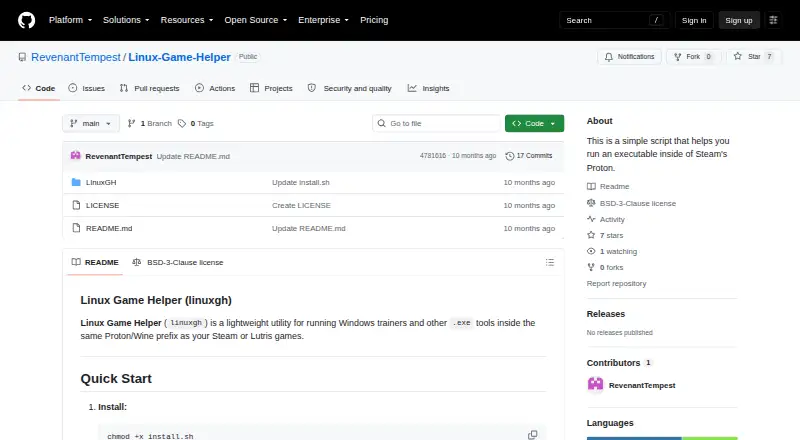
What Linux Game Helper is
Linux Game Helper runs Windows trainers and other .exe tools inside the Proton or Wine prefix used by a Steam or Lutris game. It supports Steam Proton, Lutris Proton, and Lutris Wine, capturing the game executable path, prefix location, and environment variables through a launch hook. Users can save one trainer per game for automatic launching and replace it by selecting another. The OtherExe option runs an executable in the game prefix without saving its path. Zenity dialogs provide the graphical interface, with a terminal prompt fallback and an application menu entry. The helper requires Linux, Python 3, Steam and/or Lutris, and a Proton or Wine environment; zenity is optional. Steam setup uses `linuxgh init %command%`, while Lutris uses `linuxgh init` and a SteamAppId variable.
Good
- Supports Steam Proton, Lutris Proton, and Lutris Wine
- Saves one trainer per game
- Runs unsaved executables with OtherExe
- Offers zenity dialogs and terminal fallback
- Does not require root for normal use
Watch out
- Does not support native Linux games
- Multiple running games select the first detected
- Requires Python 3 and a Proton or Wine environment
- Trainers may trigger anti-cheat or violate game terms
Who it suits
Linux Game Helper suits Linux players using Steam or Lutris games through Proton or Wine. It is for running Windows executables in those compatibility prefixes.
Verdict
Linux Game Helper focuses on launching Windows trainers and tools in game prefixes. Its compatibility-prefix limitation and trainer risks should be considered before use.
The facts
Each one read from Linux Game Helper's own pages, with the date it was checked.
What it does
- Dependencies
- The README describes it as lightweight, with no external dependencies beyond Python 3 and zenity.checked 9 Oct 2026
- Game context
- The launch hook captures the game’s Proton or Wine executable path, prefix location, and environment variables.checked 8 Oct 2026
- Game support
- It works with Steam Proton, Lutris Proton, and Lutris Wine.checked 8 Oct 2026
- Interface
- It provides GUI dialogs through zenity, falls back to terminal prompts if zenity is unavailable, and can add an application-menu entry.checked 9 Oct 2026
- License
- The repository page identifies the project license as BSD-3-Clause.checked 9 Oct 2026
- License and contributions
- The repository lists a BSD-3-Clause license and welcomes contributions through pull requests.checked 8 Oct 2026
- Limit
- It is for Windows executables in Wine or Proton prefixes and does not support native Linux games.checked 9 Oct 2026
- Lutris integration
- For Lutris games, the README instructs users to set `linuxgh init` as the command prefix and configure a SteamAppId environment variable for game identification.checked 9 Oct 2026
- Multiple games
- When multiple games are running, it automatically selects the first detected game; the README suggests closing other games or using the CLI to specify an App ID.checked 9 Oct 2026
- Native games
- The README says Linux Game Helper does not support native Linux games because it is intended for Windows executables in Wine or Proton prefixes.checked 8 Oct 2026
- Other executables
- Its OtherExe option lets users browse for and run an .exe without saving its path.checked 9 Oct 2026
- Privileges
- The README says normal usage does not require root.checked 8 Oct 2026
- Purpose
- Linux Game Helper runs Windows trainers and other .exe tools inside the same Proton or Wine prefix as Steam or Lutris games.checked 9 Oct 2026
- Requirements
- It requires Linux, Python 3, Steam and/or Lutris, and a Proton or Wine environment; zenity is optional for GUI dialogs.checked 9 Oct 2026
- Security guidance
- The README warns that third-party trainers may trigger anti-cheat, contain malware, or violate game terms of service.checked 9 Oct 2026
- Supported game runners
- It works with Steam Proton, Lutris Proton, and Lutris Wine.checked 9 Oct 2026
- Trainer management
- It saves one trainer path per game and can launch that trainer again without browsing for it.checked 9 Oct 2026
- Usage limits
- When multiple games are running, it automatically selects the first detected game; the README suggests using the CLI to target a game by App ID.checked 8 Oct 2026
- Usage privilege
- The README says normal usage does not require root.checked 9 Oct 2026
The company
- Steam integration
- Steam games are configured by adding `linuxgh init %command%` to the game's launch options.checked 9 Oct 2026
Alternatives to Linux Game Helper
- 1

Cheat Happens
Free planAndroidiOSWebLinux8.0From $39.95 a year - 2

WeMod
Free planAndroidWindows7.4From $59.99 a year - 3

PLITCH
Free planAndroidiOSWindows7.2From zł199.92 a year - 4
Rival Gaming
Free planWebmacOSWindows7.0Free plan - 5
ArtMoney
Free planWindows6.5$24.90 one-time - 6

AurorAI
Free planAndroidiOSWindows6.4Free plan