
WeMod
WeMod is a Windows application for customizing single-player PC games with mods, maps, and trainers.
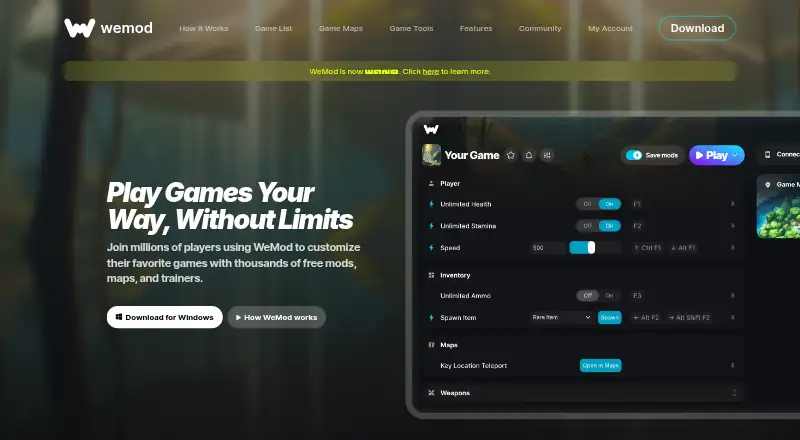
What WeMod is
WeMod is a Windows application for customizing single-player PC games with mods, maps, and trainers. The homepage says it supports more than 3,000 games and offers thousands of free tools. The app scans for installed games and pairs them with available mods; players can adjust resources, skills, speed, and difficulty, or use training mode. An in-game overlay provides controls while playing, and changes can be temporary and toggleable. Interactive maps offer fast travel, detailed mapping, and player-created markers for more than 60 games. WeMod lists support for Steam, Xbox, Ubisoft, Origin, GOG, Epic Games, and Rockstar Games. A Pro phone app can apply mods without hotkeys. The free plan includes keyboard hotkeys and, for newly created accounts, two hours of mod use per day. Pro adds interactive controls and remote-app access at $7.99 a month or $59.99 a year. The app is Windows-only. WeMod says it collects gameplay activity and may use information for targeted advertising.
Good
- Supports more than 3,000 single-player games.
- Scans for installed games automatically.
- Overlay controls settings while playing.
- Interactive maps cover more than 60 games.
Watch out
- Desktop app is Windows-only.
- Free plan limits new accounts to two hours daily.
- Privacy policy says gameplay activity is collected.
- Information may be used for targeted advertising.
Who it suits
WeMod suits Windows players who want to customize single-player PC games with mods, training tools, or interactive maps. Its free plan has a daily usage limit for newly created accounts.
Verdict
WeMod offers game customization through an overlay, with maps and remote controls among its options. Windows-only availability and the stated gameplay data practices are worth considering.
Plans and prices
From WeMod's own pricing page, checked 30 Sep 2026.
| Plan | Price | What it gives you |
|---|---|---|
| Free | Free | keyboard hotkeys · 2 hours of mod usage per day for newly created accounts |
| Pro Monthly | $7.99 a month | interactive controls · remote app · monthly |
| Pro Yearly | $59.99 a year | interactive controls · remote app · yearly |
The facts
Each one read from WeMod's own pages, with the date it was checked.
What it does
- Accessibility
- WeMod provides flexible difficulty settings and gameplay speed adjustment.checked 30 Sep 2026
- Automatic detection
- WeMod scans the computer for installed games and pairs them with available mods.checked 30 Sep 2026
- Automatic setup
- The app says it detects installed games automatically and applies changes that are temporary and toggleable.checked 30 Sep 2026
- Core purpose
- WeMod is an application for modding thousands of single-player PC games.checked 30 Sep 2026
- Customization
- Users can control mods with sliders, buttons, and drop-downs and save mod selections for later.checked 30 Sep 2026
- Data and AI integrations
- WeMod says its services include game-session capture, interactive maps, AI-powered assistance, and integrations with Google, OpenAI, or Anthropic language-model services.checked 30 Sep 2026
- Game coverage
- WeMod supports over 2,000 single-player PC games, with new titles coming every week.checked 30 Sep 2026
- Game customization
- Listed options include adjusting game resources, skills, speed, and difficulty, plus a training mode.checked 30 Sep 2026
- Game library
- The homepage says WeMod supports more than 3,000 single-player PC games.checked 30 Sep 2026
- In-game controls
- The app includes an overlay for changing settings in real time while playing.checked 30 Sep 2026
- Interactive maps
- WeMod says its interactive maps offer fast travel and detailed mapping for 60+ games, with player-created markers.checked 30 Sep 2026
- Launcher integrations
- WeMod lists support for Steam, Xbox, Ubisoft, Origin, GOG, Epic Games, and Rockstar Games.checked 30 Sep 2026
- Maps
- WeMod offers interactive maps with fast travel and detailed mapping for more than 60 games, plus more than 150 maps.checked 30 Sep 2026
- Mobile companion
- The features page describes a WeMod Pro phone app that can apply mods without hotkeys.checked 30 Sep 2026
- Mod safety claim
- WeMod says its mods are malware-free and community-tested, and links to a VirusTotal scan.checked 30 Sep 2026
- Overlay
- The app provides an in-game overlay for customizing games without leaving the game.checked 30 Sep 2026
- Privacy and security
- The privacy policy says WeMod uses encryption for data in transit and access restrictions for sensitive data such as passwords.checked 30 Sep 2026
- Privacy limitation
- The privacy policy says WeMod collects usage information including games played, mods used, and gameplay activity, and may use information for targeted advertising.checked 30 Sep 2026
The company
- Company
- The privacy policy identifies the provider as WeMod LLC and gives its principal place of business as Miami, Florida.checked 30 Sep 2026
- Headquarters
- Miami, Florida, United Stateschecked 28 Sep 2026
Where it runs
- Desktop platform
- The download page identifies the WeMod app as Windows only.checked 30 Sep 2026
- Phone app
- The WeMod Pro app lets users adjust and apply mods from a phone without hotkeys.checked 30 Sep 2026
- Platform limit
- The WeMod app is Windows only.checked 30 Sep 2026
Money
- Free content
- The homepage says players can use thousands of free mods, maps, and trainers.checked 30 Sep 2026
The full review of WeMod
WeMod is a Windows app for adjusting supported single-player games, with trainers, an in-game overlay and interactive maps. It suits players who want optional control over difficulty, speed or other game settings; the central trade-offs are the daily limit on new free accounts and the Pro subscription for interactive and remote controls.
Its broad single-player focus makes it a useful one-app option, but it is not a general-purpose gaming tool or a desktop app for macOS or Linux.
Overview
WeMod scans a computer for installed games and pairs supported titles with available mods. Its homepage describes a library of more than 3,000 single-player PC games; the company also describes support for over 2,000, with new titles coming weekly. The breadth gives players with different games to customize a common starting point, though coverage still depends on the title.
Players can adjust resources, skills, speed and difficulty, with training mode and changes that are temporary and toggleable. That makes WeMod relevant both to players seeking more control and to those who want to make a game less demanding. Its scope is explicitly single-player, so it is not a fit for modifying multiplayer play.
Key features
Overlay and game setup
The in-game overlay lets players change settings while playing instead of switching out of the game. Controls include sliders, buttons and drop-downs, and players can save selections for later. Automatic detection and pairing reduce the manual work of finding the right options, while automatic updates help keep the app current. WeMod lists integrations with Steam, Xbox, Ubisoft, Origin, GOG, Epic Games and Rockstar Games.
Maps and phone control
Interactive maps cover more than 60 games, with more than 150 maps, detailed mapping, fast travel and player-created markers. They add value for players navigating supported games, but are a narrower benefit than the core mod library. The WeMod Pro phone app can apply mods without hotkeys, offering another way to control play; remote app access is part of Pro rather than the free plan.
Safety and privacy
WeMod says its mods are malware-free and community-tested, and points to VirusTotal scans. Its privacy policy says data in transit is encrypted and access to sensitive information such as passwords is restricted. It also says the service collects usage information, including games played, mods used and gameplay activity, and may use information for targeted advertising. Players uncomfortable with this kind of gameplay data collection should weigh that cost against the convenience of the app.
For help, WeMod directs users to support articles, a community and Discord.
Pricing
WeMod is freemium. The Free plan costs nothing and includes keyboard hotkeys, with 2 hours of mod usage per day for newly created accounts. That is enough for occasional use, but the daily cap makes it a poor fit for regular long sessions. The free listing describes this cap for newly created accounts.
Pro Monthly costs $7.99 a month, billed monthly, and adds interactive controls and the remote app. It suits players who want those controls without committing to a year. Pro Yearly costs $59.99 a year, billed yearly, and includes the same features; it is the lower listed cost for someone prepared to subscribe annually. Both paid plans are for players who need more than hotkeys or want phone control. The stated refund window is 0 days, so subscribers should be comfortable with the chosen term.
Platforms
The WeMod desktop app is Windows only, even though the service also describes an Android phone companion for Pro users. The company identifies WeMod LLC as based in Miami, Florida. Players on macOS or Linux should look elsewhere for a desktop app.
Who it's for
WeMod is best for Windows players who want to customize supported single-player games in one place, especially those who value an in-game overlay, a wide game library or maps for supported titles. It also suits players seeking adjustable difficulty or gameplay speed. Casual users can start free, while regular users who need interactive controls or phone-based adjustment will need Pro. It is a weaker choice for players who need another desktop platform, want unlimited free usage on a newly created account, or prefer not to share gameplay activity.
Pros and cons
- Broad single-player coverage: support for thousands of games gives players with varied libraries a better chance of finding relevant options.
- In-game control: the overlay and configurable controls let players adjust supported settings without leaving play.
- Useful extras: maps, fast travel and player-created markers complement the trainers for supported games.
- Free access is capped: newly created accounts get 2 hours of mod use per day, limiting the free plan for longer sessions.
- Pro gates key controls: interactive controls and the remote app require a paid plan.
- Windows-only desktop app: players on other desktop systems cannot use the app there.
- Gameplay data collection: the stated collection of games played, mods used and gameplay activity may deter privacy-conscious players.
Alternatives
Game Trainers is the category to browse when comparing trainer-focused options; Game Overlay Software is the broader category for overlay tools.
Cheat Happens is another freemium option, with a free pass for profile creation, message board access and free-pass cheats and trainers, and support across Windows, Linux, Android and iOS. Consider it if those platform options matter to you.
ChooChoo Loader is a free option for Windows, Linux, macOS and web. Choose it if a free product with broader platform coverage is the priority.
PLITCH offers a free plan with 28,298 mods and cheats, standard support and full access to 712 trainers, alongside a yearly paid plan priced at 16.66 PLN a year, billed zł 199.92 every 365 days. It may suit players comparing a different free trainer allowance or a localized yearly price.
AurorAI is a freemium alternative with unlimited free AI usage and no membership required.
Rival Gaming is free, with three sessions per day and basic cheats on its free plan; its Pro plan is earned at 2,500 XP and includes unlimited sessions, advanced cheats and priority support. It is worth considering for players who prefer an earned progression to a paid subscription.
FLiNG Trainer offers free individual PC game trainers, with options and supported versions varying by trainer. It is a fit for players looking for individual trainers rather than a unified app.
GameBuff provides a free client and no-cost access to browse and use trainers for thousands of single-player games; an optional VIP plan is also offered. Consider it if free trainer access is the main priority.
Menyoo PC is another free Windows option.
Verdict
Choose WeMod if you play supported single-player games on Windows and want a broad library, in-game adjustments and maps in one app. The free plan is a useful starting point, but its daily cap and Pro-only interactive and remote controls limit what it offers without a subscription. Look elsewhere if you need a non-Windows desktop app, or if the service's gameplay data practices are a deal-breaker.
Alternatives to WeMod
- 1

Cheat Happens
Free planAndroidiOSWebLinux8.0From $39.95 a year - 2

PLITCH
Free planAndroidiOSWindows7.2From zł199.92 a year - 3
Rival Gaming
Free planWebmacOSWindows7.0Free plan - 4
ArtMoney
Free planWindows6.5$24.90 one-time - 5

AurorAI
Free planAndroidiOSWindows6.4Free plan - 6

GameBuff
Free planWindows6.4Free plan