Linly-Dubbing
Linly-Dubbing is an open-source tool for translating and dubbing videos into multiple languages.
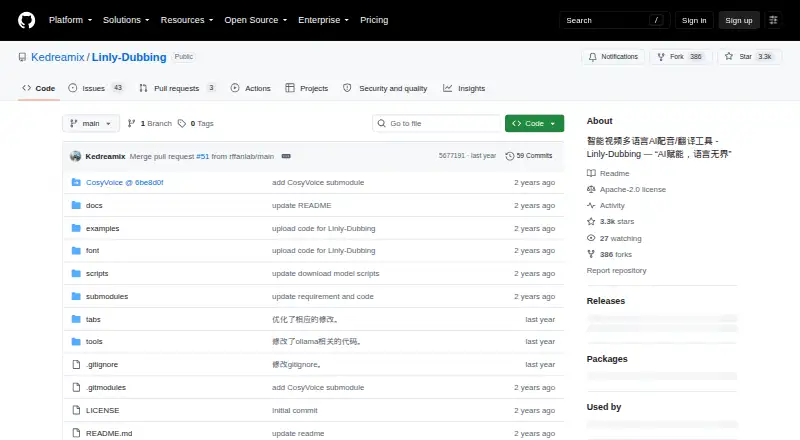
What Linly-Dubbing is
Linly-Dubbing is an open-source tool for translating and dubbing videos into multiple languages. Its documented workflow combines speech recognition and speaker identification with translation options including OpenAI models, locally run Qwen and Google Translate. Speech generation options include Edge TTS, XTTS, CosyVoice and GPT-SoVITS, while voice cloning can produce speech resembling the source video’s voice. Linly-Talker technology synchronizes dubbed audio with video visuals. The tool can add subtitles and background music, adjust music volume and playback speed, and separate vocals from accompaniment using Demucs or UVR5. Documentation also describes automatic downloads through yt-dlp, including from YouTube and other websites. Windows and Linux setup instructions use Python 3.10, PyTorch 2.3.1 and CUDA 11.8 or 12.1, with a local WebUI; a Colab script offers an online option. Depending on configuration, setup may require Hugging Face or other service credentials. The project is licensed under Apache License 2.0, and its releases page currently lists no releases. Users are advised to observe copyright, data protection and privacy laws and obtain rights-holder permission.
Good
- Offers several documented translation options.
- Voice cloning can resemble the source voice.
- Adds subtitles and background music.
- Windows, Linux and Colab options are documented.
Watch out
- Setup uses specific Python, PyTorch and CUDA versions.
- Some configurations may require external credentials.
- The releases page currently lists no releases.
Who it suits
It suits users seeking a self-hosted or online workflow for video translation, voice generation and lip synchronization. Setup requires attention to the documented dependencies and may require external service credentials.
Verdict
Linly-Dubbing combines translation, speech generation and video processing in an open-source project. Check the setup requirements and credential needs for the configuration you plan to use.
The facts
Each one read from Linly-Dubbing's own pages, with the date it was checked.
What it does
- External credentials
- The setup guide lists optional credentials or tokens for OpenAI, Hugging Face, Bytedance TTS, and Baidu Ernie Bot, and says most users only need MODEL_NAME and HF_TOKEN.checked 9 Oct 2026
- Installation
- The project is installed from its Git repository and launched as a local WebUI at 127.0.0.1:6006.checked 9 Oct 2026
- Languages
- It supports dubbing and subtitle translation in Chinese and other languages.checked 9 Oct 2026
- License
- The project is licensed under Apache License 2.0.checked 9 Oct 2026
- License and releases
- The repository identifies the project as Apache License 2.0 and its releases page currently states that there are no releases.checked 4 Oct 2026
- Lip sync
- The project integrates Linly-Talker's digital human lip-sync technology for synchronizing dubbing with video visuals.checked 9 Oct 2026
- Online option
- The README links to a Colab script for an online experience.checked 4 Oct 2026
- Privacy and rights
- The project asks users to comply with copyright, data protection, and privacy laws and not use the tool without the original author's or rights holder's permission.checked 9 Oct 2026
- Privacy and use
- The project warns users to comply with copyright, data protection, and privacy laws and to obtain permission from rights holders.checked 4 Oct 2026
- Product
- Linly-Dubbing is an intelligent multilingual AI dubbing and translation tool.checked 9 Oct 2026
- Requirements
- The README says installation is very slow and requires configuring dependencies, downloading models, and setting environment variables.checked 9 Oct 2026
- Setup
- The documented setup uses Python 3.10, PyTorch 2.3.1, and CUDA 11.8 or 12.1, with local WebUI launch instructions.checked 4 Oct 2026
- Speech recognition
- It uses AI speech recognition for speech-to-text conversion and speaker recognition.checked 9 Oct 2026
- Speech synthesis
- Documented speech synthesis options include Edge TTS, XTTS, CosyVoice, and GPT-SoVITS.checked 9 Oct 2026
- Supported environments
- The installation instructions give Linux and Windows model-download commands and list test setups using Python 3.10, PyTorch 2.3.1, and CUDA 11.8 or 12.1.checked 9 Oct 2026
- Translation
- The project describes translation through OpenAI models, locally run Qwen, and Google Translate.checked 4 Oct 2026
- Translations
- Documented translation options include OpenAI models, local Qwen, and Google Translate.checked 9 Oct 2026
- Video download
- The README describes automatic video and audio downloading with yt-dlp from YouTube and other sites.checked 9 Oct 2026
- Video downloads
- The documentation describes automatic video downloading through yt-dlp, including support for YouTube and other websites.checked 4 Oct 2026
- Video processing
- The tool can add subtitles and background music, adjust music volume, and change playback speed.checked 4 Oct 2026
- Video tools
- Video processing can add subtitles and background music, adjust background music volume, and change playback speed.checked 9 Oct 2026
- Vocal separation
- The project documents Demucs and UVR5 for separating vocals and accompaniment.checked 4 Oct 2026
- Voice cloning
- Its listed features include AI voice cloning intended to match the original video's tone and emotion.checked 9 Oct 2026
- Voice synthesis
- Documented speech synthesis options include Edge TTS, XTTS, CosyVoice, and GPT-SoVITS.checked 4 Oct 2026
Alternatives to Linly-Dubbing
- 1

HeyGen
Free planAndroidiOSWebAPI8.3From $24 a month - 2
Wavel AI
Free planWebAPILinuxmacOS8.0From $16 a month - 3

AI Studios
Free planWebAPI7.6From $24 a month - 4

ElevenLabs
Free planWebAPI7.6From $6 a month - 5
CAMB.AI
Free planWebAPI7.5From $5 a month - 6
Unmixr Dubbing
Free planWebAPI7.5From $9 a month