Lighthouse
Lighthouse is a free, open-source tool for automated web page audits.
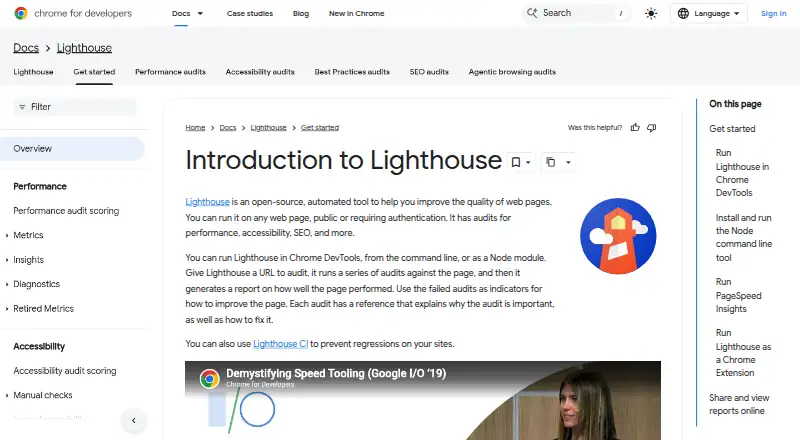
What Lighthouse is
Lighthouse is a free, open-source tool for automated web page audits. Provide a URL and it checks areas including performance, accessibility, best practices, and SEO, then produces a report with results and references explaining the audits and how to address failures. It is aimed at web developers seeking relevant, actionable guidance. Lighthouse can run in Chrome DevTools, from the command line, as a Node module, or through a web UI without installation. DevTools can audit pages requiring authentication, while the Chrome extension workflow cannot. Reports can be produced in JSON or HTML, and the command-line interface also supports CSV. Stack packs provide platform-specific recommendations, and plugins let domain experts add audits and report categories. Lighthouse can be integrated into continuous integration systems, with Lighthouse CI helping prevent site regressions. Reports can be viewed and shared online using report JSON. The CLI and Node workflows require Google Chrome installed, and Lighthouse requires Node 22 (LTS) or later. On first CLI use, it asks whether it may anonymously report runtime exceptions; opting out does not affect use.
Good
- Free and open source.
- Audits performance, accessibility, best practices, and SEO.
- Offers DevTools, CLI, Node module, and web UI workflows.
- Can be integrated into continuous integration.
- Produces JSON and HTML reports; CLI also supports CSV.
Watch out
- Requires Node 22 (LTS) or later.
- CLI and Node workflows require Google Chrome installed.
- Chrome extension cannot audit authenticated pages or local sites.
Who it suits
Lighthouse suits web developers who want audit guidance on performance, accessibility, best practices, SEO, or other web page quality areas. It can also fit teams incorporating audits into continuous integration.
Verdict
Lighthouse offers several ways to audit pages and use the resulting reports, including in continuous integration. Check its runtime and browser requirements, and choose DevTools rather than the extension for authenticated pages.
Plans and prices
From Lighthouse's own pricing page, checked 11 Oct 2026.
| Plan | Price | What it gives you |
|---|---|---|
| Lighthouse | Free | Open-source automated web page audits |
The facts
Each one read from Lighthouse's own pages, with the date it was checked.
What it does
- Accessibility and SEO
- Lighthouse includes accessibility and SEO audit categories.checked 11 Oct 2026
- Audits
- The repository lists accessibility, best practices, performance, and SEO as audit categories.checked 4 Oct 2026
- Audit targets
- It can audit any web page, including public pages and pages that require authentication.checked 11 Oct 2026
- Authentication
- The DevTools workflow can audit pages that require authentication; the Chrome extension workflow cannot.checked 4 Oct 2026
- CI
- Lighthouse CI can be used to prevent regressions on websites.checked 11 Oct 2026
- Customization
- Stack packs provide platform-specific recommendations, and plugins let experts add audits and report categories.checked 11 Oct 2026
- Extension limitation
- The Chrome extension workflow cannot test local sites or authenticated pages; Chrome DevTools can test both.checked 11 Oct 2026
- How it works
- Given a URL, Lighthouse runs audits and generates a report with results and references explaining why audits matter and how to address failures.checked 4 Oct 2026
- Integrations
- The documentation identifies PageSpeed Insights as a way to run Lighthouse and Lighthouse CI as a regression-prevention tool.checked 11 Oct 2026
- Intended users
- The documentation describes Lighthouse as guidance intended to be relevant and actionable for web developers.checked 4 Oct 2026
- Performance
- Lighthouse collects modern performance metrics and provides performance audits and insights.checked 11 Oct 2026
- Privacy setting
- The first CLI run asks whether Lighthouse may anonymously report runtime exceptions, and opting out does not affect its use.checked 4 Oct 2026
- Purpose
- Lighthouse is an open-source automated tool for improving web page quality, with audits for performance, accessibility, SEO, and more.checked 11 Oct 2026
- Reports
- Lighthouse generates a report showing page performance and gives each failed audit a reference explaining its importance and how to fix it.checked 11 Oct 2026
- Report sharing
- Reports can be viewed and shared online with Lighthouse Viewer using report JSON.checked 11 Oct 2026
- Run options
- Lighthouse can run in Chrome DevTools, from the command line, as a Node module, or through a web UI without installation.checked 4 Oct 2026
- Runtime reporting
- The first CLI run asks whether Lighthouse may anonymously report runtime exceptions, and opting out does not affect use of the tool.checked 11 Oct 2026
- Runtime requirement
- The repository states that Lighthouse requires Node 22 (LTS) or later.checked 4 Oct 2026
- Sharing
- Reports can be viewed online, and the documentation describes sharing them as secret GitHub Gists.checked 4 Oct 2026
- Source availability
- The project is open source and welcomes contributions through its repository.checked 4 Oct 2026
- Ways to run
- Lighthouse can run in Chrome DevTools, from the command line, as a Node module, or through a web UI.checked 11 Oct 2026
Where it runs
- Browser requirement
- The CLI and Node workflows require Google Chrome installed on the machine.checked 11 Oct 2026
The full review of Lighthouse
Lighthouse is a free, open-source tool for auditing web pages across performance, accessibility, SEO, and best practices. It is best suited to web developers who want actionable findings and a way to check for regressions in continuous integration. Its range of run options is useful, but browser and authentication requirements can narrow which workflow fits.
Overview
Enter a URL and Lighthouse runs audits, then produces a report with results and explanations of why checks matter and how to address failures. That context helps developers turn findings into improvement work rather than treating an audit score as an endpoint.
It can audit public pages and pages requiring authentication, but workflow choice matters: DevTools can handle authenticated and local pages, while the Chrome extension cannot. The extension is therefore a poor fit when those targets matter.
Key features
Audits and reports
Lighthouse covers performance, accessibility, SEO, and best practices. Its performance audits use modern metrics and include insights. Reports can be exported as JSON or HTML, with CSV also supported by the command-line interface. That mix suits both developers reviewing results directly and teams that need report data in another process.
Ways to run and customize
Run it in Chrome DevTools, from the command line, as a Node module, or through a web UI without installation. Stack packs add platform-specific recommendations, while plugins let domain experts contribute audits and report categories. Those options make the tool adaptable, though the command-line and Node workflows require Node 22 (LTS) or later and Google Chrome installed.
Sharing and continuous integration
Reports can be viewed online and shared through Lighthouse Viewer using report JSON; the documentation also describes sharing them as secret GitHub Gists. Lighthouse integrates with continuous integration systems, and Lighthouse CI can help prevent regressions. WebPageTest can produce Lighthouse reports alongside its analysis, while HTTPArchive stores Lighthouse results in BigQuery.
Privacy and contribution
The first CLI run asks whether Lighthouse may anonymously report runtime exceptions. Opting out does not affect use. The project is open source and welcomes contributions through its repository.
Pricing
Lighthouse is free: its open-source plan costs nothing and includes on-page audits and API access. There is no free trial because there is no paid plan to trial. Its zero price comes with no stated usage cap, though teams must account for the Node and Chrome requirements when choosing command-line or Node workflows.
Platforms
Lighthouse is listed for API, extension, Linux, macOS, web, and Windows. The web UI runs without installation. For CLI and Node use, the machine needs Google Chrome as well as Node 22 (LTS) or later. DevTools is the better choice for local or authenticated pages; the extension cannot audit either.
Who it's for
Lighthouse is aimed at web developers who need guidance that is relevant and actionable. It works well for developers auditing a page, teams incorporating checks into CI, and domain specialists extending audit coverage through plugins. It is less suitable when a user needs the Chrome extension to inspect local or authenticated pages, or cannot meet the runtime requirements for CLI or Node workflows.
Pros and cons
Pros
- Useful explanations: reports explain why an audit matters and how to address failures, so findings can guide fixes.
- Flexible workflows: DevTools, CLI, Node, and a no-install web UI accommodate different ways of working.
- CI and extensibility: Lighthouse CI can help catch regressions, while stack packs and plugins tailor recommendations and audits.
- No purchase barrier: the open-source tool is free, with on-page audits and API access.
Cons
- Extension restrictions: it cannot test local sites or authenticated pages, limiting its usefulness for those targets.
- CLI and Node prerequisites: both workflows require Node 22 (LTS) or later and Google Chrome.
- Run choice affects coverage: DevTools handles authenticated pages where the extension does not, so users must select the right workflow.
Alternatives
For a dedicated SEO crawler rather than Lighthouse's broader page-quality audits, consider Checkbot: its free Basic plan allows 100 URLs per crawl, unlimited crawls and sites, and is ad supported; the yearly Professional plan is $10 a year, billed $120 p.
Open SEO Crawler is a free, MIT-licensed, self-hosted option with unlimited URLs and no account, API key, or per-URL billing, making it a fit when those properties matter.
Screaming Frog SEO Spider offers a free crawl capped at 500 URLs and a paid licence with unlimited URLs, so it suits users who need a crawler and may outgrow that cap.
WebSite Auditor has a free plan capped at 500 URLs and one project, with no paid report exports; its Professional plan costs $149 a year. It is an option when a project-based SEO auditing workflow is preferable.
A1 Website Analyzer offers a free mode that continues after a 30-day evaluation period, with 500 page URLs per website and 500 imported URLs; consider it when those limits fit your needs.
Beam Us Up is a free SEO crawler with no limits stated.
Crab is an open-source option with no URL limits and no subscriptions.
FreeCrawl is a free, self-hosted option with unlimited URLs and no paid tier.
Browse SEO Audit Software for more options.
Verdict
Choose Lighthouse if you are a web developer who wants free, adaptable audits with explanations and a path into CI. Its central advantage is combining several page-quality audit categories with actionable reports; its chief drawback is that the extension cannot cover local or authenticated targets, while CLI and Node workflows bring runtime and browser prerequisites. Look elsewhere if you need a dedicated crawler or a workflow that avoids those constraints.
Getting started
- Open the Lighthouse website or choose a supported platform: Chrome DevTools, command line, Node module, or web UI.
- For CLI or Node use, install Node 22 (LTS) or later and have Google Chrome installed.
- Choose a URL to audit; use Chrome DevTools for local or authenticated pages.
- Run the audit and review its report in HTML or JSON; the CLI can also output CSV.
- View or share report JSON with Lighthouse Viewer.
Limits worth knowing
The free plan is listed as free, with no quota or trial length stated. CLI and Node workflows require Node 22 (LTS) or later and Google Chrome; the Chrome extension cannot test local or authenticated pages.
Questions
How much does Lighthouse cost?
The Lighthouse plan is free. Lighthouse is open source.
Is Lighthouse open source?
Yes. The project is open source and welcomes contributions through its repository.
Where can I run Lighthouse?
It runs in Chrome DevTools, from the command line, as a Node module, or through a web UI. The listed platforms include API, extension, Linux, macOS, web, and Windows.
Can it audit pages that require authentication?
Yes, in Chrome DevTools. The Chrome extension workflow cannot audit authenticated pages or local sites.
What report formats does it support?
It can produce HTML and JSON reports. Its CLI also supports CSV output.
Does Lighthouse integrate with other tools?
It can run in continuous integration systems, and Lighthouse CI can help prevent regressions. WebPageTest can produce Lighthouse reports, and HTTPArchive stores Lighthouse results in BigQuery.
Alternatives to Lighthouse
- 1

Screaming Frog SEO Spider
Free planAPILinuxmacOSSelf-hosted7.8Free plan - 2
SEO PowerSuite
Free planAPILinuxmacOSWindows7.7From $349 a year - 3

Sitebulb
WebExtensionmacOSWindows7.5 - 4

Checkbot
Free planExtensionLinuxmacOSWindows7.4From $120 a year - 5

Sitechecker
WebAPIExtension7.2From $83 a month - 6
A1 Website Analyzer
Free planmacOSWindows7.0$49 one-time