LegalTime AI
LegalTime AI is paid timekeeping software for hourly law firms on macOS and Windows.
What LegalTime AI is
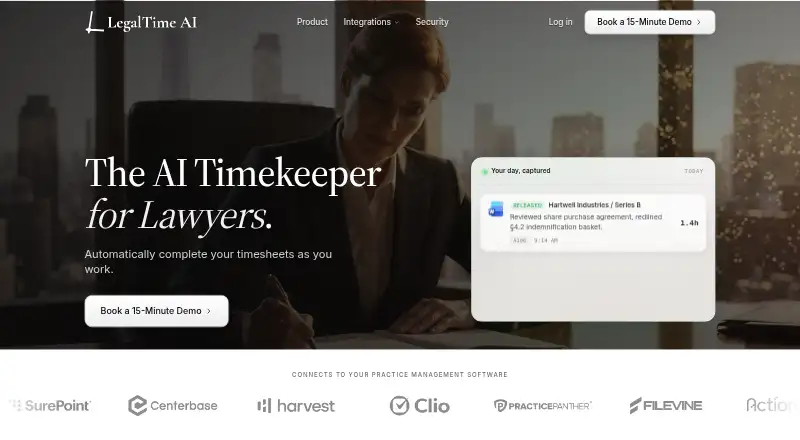
LegalTime AI is paid timekeeping software for hourly law firms on macOS and Windows. It captures attorneys’ work and drafts billing entries containing a narrative, matter, billing code, and duration. Attorneys review each draft and can approve, edit, or discard it before release, so nothing is billed automatically. Capture is local-first on the attorney’s device by default and can be paused with one click; relevant activity is sent for AI processing when draft generation runs. Drafts remain visible only to the attorney until release. The company says raw activity is purged on a rolling basis, client content does not train shared models, and every firm receives a Data Processing Agreement. Stored data uses AES-256 encryption, while released entries travel over TLS 1.2+. Integrations include Clio Manage, MyCase, Filevine, PracticePanther, and other listed billing systems. Pricing is quoted per firm, with monthly or annual billing and a free trial.
Good
- Drafts include narrative, matter, code, and duration
- Attorneys approve, edit, or discard entries
- Capture can pause with one click
- Supports many billing-system integrations
- Free trial and onboarding included
Watch out
- Pricing is provided per firm on request
- Not SOC 2 certified
- Relevant activity is sent for AI processing
- Supports macOS and Windows only
Who it suits
LegalTime AI is intended for lawyers and hourly law firms that need draft time entries connected to billing systems. It suits firms wanting attorney approval before entries are released.
Verdict
LegalTime AI focuses on reviewable time-entry drafts rather than automatic billing. Its local-first capture, privacy statements, encryption, and broad billing integrations may fit hourly practices, but firms should note the pending SOC 2 examination and custom pricing.
Plans and prices
From LegalTime AI's own pricing page, checked 4 Oct 2026.
| Plan | Price | What it gives you |
|---|---|---|
| One plan | Priced on request | Unlimited time-entry drafting · Every practice management adapter shipped · Email and document capture · On-device OCR via desktop app · Per-firm correction learning · Onboarding call and wrap-up review · Per attorney per month; annual or monthly billing; exact price quoted per firm on the first call |
The facts
Each one read from LegalTime AI's own pages, with the date it was checked.
What it does
- AI processing
- When draft generation runs, relevant activity is sent for AI processing.checked 4 Oct 2026
- Audience
- The maker describes LegalTime AI as automated timekeeping for hourly law firms and as built for lawyers who bill by the hour.checked 4 Oct 2026
- Capture controls
- Capture is local-first on the attorney’s device by default and can be paused with one click.checked 4 Oct 2026
- Data handling
- The company says raw activity is purged on a rolling basis, it signs a Data Processing Agreement with every firm, and client content does not train shared models.checked 4 Oct 2026
- Encryption
- Released entries travel to the billing system over TLS 1.2+, and data stored at rest is encrypted with AES-256.checked 4 Oct 2026
- Founders
- The company says it was founded by Joaquin Del Pego and Quinn Godfredsen through the UC Santa Barbara New Venture Competition.checked 4 Oct 2026
- Included onboarding
- The plan includes an onboarding call and wrap-up review, and the trial includes white-glove onboarding for the first attorneys.checked 4 Oct 2026
- Integrations
- Supported billing systems listed are Clio Manage, MyCase, Filevine, PracticePanther, SurePoint, Centerbase, TimeSolv, LeanLaw, Harvest, Sage Timeslips, and Actionstep.checked 4 Oct 2026
- Purpose
- LegalTime AI automates timekeeping for hourly law firms by drafting entries from attorneys’ work and holding them for review.checked 4 Oct 2026
- Review privacy
- Drafted entries are visible only to the attorney until release, and the company says LegalTime AI is not a monitoring tool.checked 4 Oct 2026
- Security status
- A SOC 2 Type II examination is in progress, and LegalTime AI is not SOC 2 certified.checked 4 Oct 2026
- Setup
- Connecting takes about ten minutes per attorney through the firm’s existing login, and nothing is installed on a server.checked 4 Oct 2026
- Workflow
- It captures work, drafts entries with narrative, matter, billing code, and duration, then releases them after attorney approval.checked 4 Oct 2026
Where it runs
- Human approval
- Nothing is billed automatically; attorneys approve, edit, or discard drafts before entries are released.checked 4 Oct 2026