
L-ISA Studio
L-ISA Studio lets sound creators mix object-based audio on headphones in binaural mode or in a studio with up to 16 audio outputs.
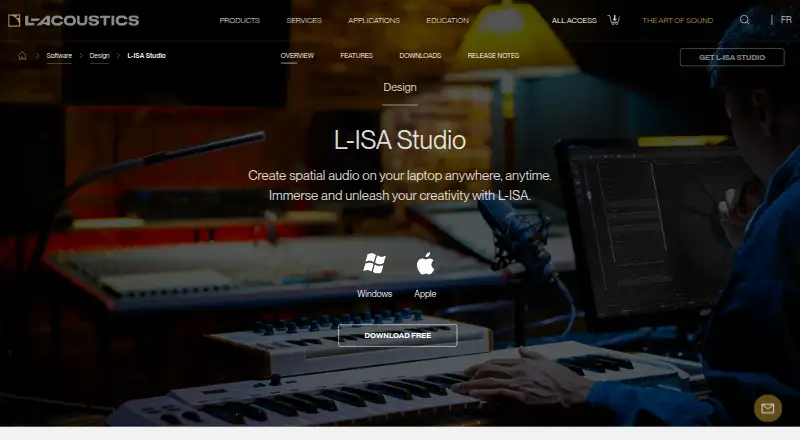
What L-ISA Studio is
L-ISA Studio lets sound creators mix object-based audio on headphones in binaural mode or in a studio with up to 16 audio outputs. Its spatial controls adjust pan, width, distance, and elevation, and its Room Engine supports object-based reverberation and Virtual Acoustics applications. L-ISA Processor Desktop can render up to 96 audio objects to 16 outputs through the L-ISA Audio Bridge. The bridge supports formats including 5.1, 7.1, 9.1, 5.1.2, 7.1.2, 7.1.4, 9.1.6, and 16.0. Binaural headphone monitoring can use certified head trackers. DAW automation plugins are available in VST, AU, and AAX formats; the product can also interact with show control, game engines, mixing consoles, tracking systems, and OSC devices. L-ISA Studio runs on Windows 10 or 11 and macOS Catalina or later, with native Apple M1 support. The free tier is free, billed Forever, for one seat with headphone mixing and binaural mode. Speaker mixing and up to 16 outputs are listed for paid tiers; a 30-day trial is also listed.
Good
- Free tier includes one seat
- Supports binaural headphone monitoring
- Renders up to 96 audio objects
- Offers VST, AU, and AAX control plugins
Watch out
- Free tier is limited to headphone mixing
- Speaker mixing is listed for paid tiers
- Requires at least 8 GB RAM
- Download form requests job title
Who it suits
L-ISA Studio suits sound creators working with object-based audio who want binaural headphone mixing or a studio workflow with multiple outputs. DAW users can use its VST, AU, or AAX control plugins for spatial-mixing automation.
Verdict
L-ISA Studio combines object-based spatial controls with headphone monitoring, room processing, and multichannel output support. The free tier is specifically for one-seat headphone mixing; speaker mixing and up to 16 outputs are listed for paid tiers.
Plans and prices
From L-ISA Studio's own pricing page, checked 8 Oct 2026.
| Plan | Price | What it gives you |
|---|---|---|
| Free | Free | 1 seat · mix on headphones · binaural · Forever |
| Enterprise | — | Up to 5 seats · everything in Individual |
| Individual | — | 1 seat · mix on up to 16 audio outputs · everything in Free |
The facts
Each one read from L-ISA Studio's own pages, with the date it was checked.
What it does
- Audio formats
- The Audio Bridge supports studio formats including 5.1, 7.1, 9.1, 5.1.2, 7.1.2, 7.1.4, 9.1.6, and 16.0.checked 8 Oct 2026
- Binaural monitoring
- The binaural engine supports headphone monitoring with certified head trackers.checked 8 Oct 2026
- DAW integration
- L-ISA Control Plugins are available in VST, AU, and AAX formats for DAW automation of L-ISA spatial mixing parameters.checked 8 Oct 2026
- Download and support
- The download form requests name, email, job title, country, and operating system, and the product page links to documentation and quick-start videos.checked 8 Oct 2026
- Object rendering
- L-ISA Processor Desktop can render up to 96 audio objects to 16 audio outputs via the L-ISA Audio Bridge.checked 8 Oct 2026
- Operating systems
- The listed operating systems are Windows 10 or 11 and macOS Catalina (OSX 10.15) or later, with native Apple M1 support.checked 8 Oct 2026
- Other integrations
- The product page says L-ISA Studio can interact with Digital Audio Workstations, Show Control, Game Engines, mixing consoles, tracking systems, and OSC devices.checked 8 Oct 2026
- Purpose
- L-ISA Studio lets sound creators mix object-based audio on headphones in binaural or in a studio with up to 16 audio outputs.checked 8 Oct 2026
- Room engine
- The Room Engine supports object-based reverberation and Virtual Acoustics applications.checked 8 Oct 2026
- Spatial mixing
- The spatial processing controls PAN, WIDTH, DISTANCE, and ELEVATION.checked 8 Oct 2026
- System requirements
- The minimum requirements include 8 GB RAM, an i5 quad-core processor, and a 1920 × 1080 screen; an i7 is recommended.checked 8 Oct 2026
The company
- Founded
- 1984checked 23 Sep 2026
- Headquarters
- Marcoussis, Francechecked 23 Sep 2026
- Maker
- L-Acoustics was founded in 1984 by Dr. Christian Heil.checked 8 Oct 2026
Money
- Free tier limit
- The Free tier includes one seat, headphone mixing, and binaural mode; mixing on speakers and up to 16 outputs are listed for paid tiers.checked 8 Oct 2026
The full review of L-ISA Studio
L-ISA Studio is built for engineers and sound designers creating immersive, object-based mixes rather than ordinary stereo productions. It is most convincing when headphone spatialisation, tracked binaural monitoring, or a defined multichannel delivery format matters. The free edition is useful for learning and headphone work, but serious speaker-based production depends on a paid tier.
Overview
L-ISA Studio divides its offering between personal headphone production and larger speaker-oriented workflows. The Free plan provides one seat with headphone mixing and binaural mode, giving an individual creator a no-cost way to work with spatial objects. It does not provide the speaker mixing or 16-output capability needed for a full studio monitor array, so it is an introduction rather than a complete surround-room solution.
At the upper end, L-ISA Processor Desktop can render up to 96 audio objects across 16 outputs through the L-ISA Audio Bridge. Supported layouts include 5.1, 7.1, 9.1, 5.1.2, 7.1.2, 7.1.4, 9.1.6, and 16.0, with Dolby Atmos ADM export also supported. That makes the system relevant to productions with explicit immersive-delivery requirements; a conventional stereo mixer will find the architecture unnecessarily specialised.
Key features
Object placement is handled through dedicated PAN, WIDTH, DISTANCE, and ELEVATION controls. These parameters give an engineer separate control over position, spread, depth, and height, which is more expressive than relying on a single left-right pan control. The Room Engine adds object-based reverberation and supports Virtual Acoustics applications, extending spatial design into the acoustic environment around each source.
The binaural engine is aimed at headphone monitoring and works with certified head trackers. That is valuable when a speaker array is unavailable or when a production must be judged through headphones, although the free plan remains limited to that headphone-oriented mode. L-ISA Control Plugins come in VST, AU, and AAX formats, allowing spatial parameters to be automated from compatible digital audio workstations.
The product can interact with DAWs, show-control systems, game engines, mixing consoles, tracking systems, and OSC devices. This broad integration target suits installations and live or interactive workflows as well as linear audio. The Audio Bridge's format coverage and 16-output ceiling provide a clear path for common surround and immersive layouts, rather than locking a project to stereo delivery.
Pricing
| Plan | Price | What you get |
|---|---|---|
| Free | free, billed Forever | 1 seat; mix on headphones; binaural |
| Individual | Custom pricing | 1 seat; mix on up to 16 audio outputs; everything in Free |
| Enterprise | Custom pricing | Up to 5 seats; everything in Individual |
A 30-day trial is offered. Free is the sensible choice for a solo creator who only needs headphone monitoring and binaural work. Individual is the relevant upgrade for one engineer who must mix on speakers or address as many as 16 outputs; its custom price means the financial step up cannot be judged from a published rate. Enterprise adds shared access for up to five seats and is aimed at small teams, while still requiring a quotation. The free plan's one-seat and headphone-only limits are the important trade-offs.
Platforms
L-ISA Studio runs on Windows 10 or 11 and macOS Catalina (OSX 10.15) or later, with native Apple M1 support. Minimum requirements include 8 GB of RAM, an i5 quad-core processor, and a 1920 × 1080 display; an i7 is recommended. The download form asks for a name, email address, job title, country, and operating system, and documentation plus quick-start videos are linked from the product page.
Who it's for
This is a strong fit for spatial-audio engineers, sound designers, immersive media teams, and studios delivering specified surround or Dolby Atmos work. Headphone-based creators can start on Free, while speaker-array work, installations, and multichannel rooms need Individual or Enterprise. It is a poor match for uncomplicated stereo mixing, casual playback, or DJ use, where its object model and room-processing focus add complexity without addressing the primary job.
Pros and cons
Pros
- Free access includes one-seat binaural headphone mixing, so a solo creator can begin spatial production without a subscription.
- Up to 96 objects and 16 outputs cover demanding immersive arrangements and established surround layouts.
- PAN, WIDTH, DISTANCE, and ELEVATION provide discrete control over an object's spatial behaviour.
- VST, AU, and AAX plugins support DAW automation, while integrations extend to show control, game engines, consoles, tracking, and OSC.
- Certified head-tracker support strengthens headphone monitoring when speakers are unavailable.
Cons
- The Free plan is restricted to one seat and headphone/binaural work, excluding speaker mixing and the multichannel workflow many professional rooms require.
- Individual and Enterprise use custom pricing, making budgeting harder than with a fixed subscription.
- The specialised object-based design is excessive for straightforward stereo production or DJ playback.
- The download process requires job and location information before access.
Alternatives
Audio Mixing Software is the broader category to browse when you want conventional mixing tools alongside spatial options.
DaVinci Resolve is a better pick for an all-in-one video post-production environment, with Linux support and a free plan; its Studio edition costs 295.00 USD once.
VirtualDJ suits performance and DJ playback instead, offering a free nonprofessional tier and a HOME plan at $4 a month.
djay is the more appropriate choice for cross-platform DJ mixing, with a free download and optional PRO features.
KLANG:app is a free controller for supported KLANG immersive processors rather than a full L-ISA mixing environment.
rekordbox is aimed at music management and DJ workflows, with a free tier that includes basic features and 1,000 cloud tracks under its stated conditions.
Mixxx offers a completely free, full DJ application on Linux, macOS, and Windows.
DJUCED is for Hercules-controller users who need four decks, MIDI control, recording, streaming, and related DJ functions.
Elgato Wave Link is a free macOS and Windows audio-routing option that works with any microphone or audio interface and has no subscription or feature gates.
Verdict
Choose L-ISA Studio if you need object-based spatial control, binaural headphone monitoring, or a documented multichannel output path, especially when DAW automation and external production systems are part of the workflow. The Free plan makes headphone-focused experimentation accessible, while Individual and Enterprise address speaker rigs and shared seats. Look elsewhere for ordinary stereo work, DJ performance, or a fixed-price multichannel tool: L-ISA Studio's strongest capabilities are specialised, and its paid tiers require custom pricing.
Alternatives to L-ISA Studio
- 1

djay
Free planAndroidiOSmacOSWindows8.1From $49.99 a year - 2
rekordbox
Free planAndroidiOSmacOSWindows8.0From $10 a month - 3

VirtualDJ
Free planAndroidiOSAPImacOS8.0From $4 a month - 4

RØDE UNIFY
Free planmacOSWindows7.4From $45.31 a year - 5

DJUCED
Free planmacOSWindows6.7From €5.99 a month - 6
KLANG:app
Free planAndroidiOSmacOSWindows6.6Free plan