KLANG:app
KLANG:app is the graphical interface for KLANG processors, used for setup, mixing, and signal placement.
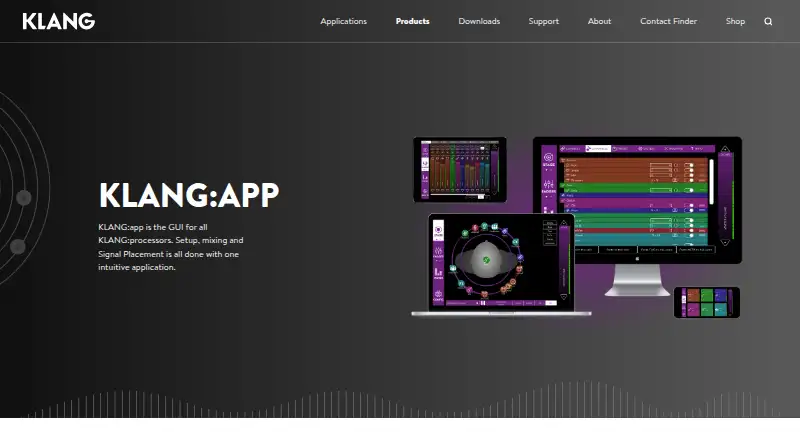
What KLANG:app is
KLANG:app is the graphical interface for KLANG processors, used for setup, mixing, and signal placement. Each musician can control an individual sound mix, move instruments around a 3D space—including above or below the listener's head—or choose conventional stereo. The app includes faders, panning, system settings, and graphical 3D and i3D orbits. It connects to KLANG processors over Wi-Fi or LAN and can control one mix per device or all mixes with one app. An offline editor and demo mode are available. Console workflows include DiGiCo SD and Quantum integration for KLANG mix parameters and snapshot recall. The maker also documents SSL Live integration with two-way fader, panning, mute, solo, and tone-filter control. External control options include Open Sound Control and MIDI MCU and MIDI for Allen & Heath consoles. KLANG:app is free for supported devices and runs on Android, iOS, macOS, and Windows. The listed downloads include Android, Mac, and Windows versions, including Windows ARM and 32-bit versions. KLANG is headquartered in Aachen, Germany.
Good
- Lets musicians control their individual sound mixes.
- Offers spatial placement or conventional stereo.
- Includes an offline editor and demo mode.
- Connects to KLANG processors over Wi-Fi or LAN.
Watch out
- Free only for supported devices.
- Requires KLANG processors for its stated control purpose.
- No free trial is listed.
Who it suits
KLANG:app suits musicians and audio operators using KLANG processors for personal or spatial mixing, including users working with the listed console integrations.
Verdict
KLANG:app is a free control interface for KLANG processor setup, mixing, and signal placement across mobile and desktop platforms. Its offline editor and documented console integrations may be useful, but its stated purpose centers on KLANG processor control.
Plans and prices
From KLANG:app's own pricing page, checked 7 Oct 2026.
| Plan | Price | What it gives you |
|---|---|---|
| KLANG:app | Free | Free for supported devices · controls KLANG immersive processors |
The facts
Each one read from KLANG:app's own pages, with the date it was checked.
What it does
- Connectivity
- The app connects to KLANG processors over Wi-Fi or LAN.checked 7 Oct 2026
- Controls
- The app includes faders, panning, system settings, and graphical 3D and i3D orbits.checked 7 Oct 2026
- DiGiCo integration
- KLANG:app supports console integration with DiGiCo SD and Quantum consoles, including control of KLANG mix parameters and snapshot recall.checked 7 Oct 2026
- Download versions
- The software page lists KLANG:app 6.0.10 downloads for Android, Mac, Windows ARM, Windows 32-bit, and Windows.checked 7 Oct 2026
- External control
- KLANG:app communicates with KLANG processors via Open Sound Control and can connect to MIDI MCU and MIDI for Allen & Heath consoles.checked 7 Oct 2026
- Mix control
- Users can control one mix per device or all mixes with one app.checked 7 Oct 2026
- Offline use
- The app includes an offline editor and demo mode.checked 7 Oct 2026
- Other console integration
- The maker documents an app-based SSL Live console integration with bidirectional fader, panning, mute, solo, and tone-filter control.checked 7 Oct 2026
- Personal mixing
- The app gives each musician control over their own individual sound mix.checked 7 Oct 2026
- Purpose
- KLANG:app is the graphical interface for KLANG processors, used for setup, mixing, and signal placement.checked 7 Oct 2026
- Spatial mixing
- Users can drag instruments around and above or below the listener’s head and choose conventional stereo or 3D.checked 7 Oct 2026
- Support
- KLANG provides a technical support contact option and publishes manuals, technical specifications, videos, and FAQs.checked 7 Oct 2026
The company
- Headquarters
- Aachen, Germanychecked 28 Sep 2026
Where it runs
- Platforms
- KLANG lists the app for iOS, Android, PC, and Mac.checked 7 Oct 2026
The full review of KLANG:app
KLANG:app is most compelling for musicians and audio crews working with KLANG immersive processors. Its free, processor-focused interface combines personal mix control with spatial placement; it is not a substitute for a general-purpose audio mixing or production app.
Overview
The app handles KLANG processor setup, signal placement and mixing. Musicians can shape individual sound mixes, while one app can control a single mix per device or manage all mixes. That makes it relevant both to performers adjusting their own monitor sound and to teams coordinating multiple mixes, provided their workflow is built around KLANG processors.
Key features
Spatial placement is the central draw. Users can move instruments around the listener, including above or below the head, and choose conventional stereo or 3D. Faders, panning, system settings and graphical 3D and i3D orbits bring familiar mix adjustments together with spatial control. This is useful for immersive monitoring; those orbit and placement tools offer little reason to choose the app for ordinary production work.
KLANG:app connects to processors over Wi-Fi or LAN. Its offline editor and demo mode allow work with the interface without a live processor connection, but live processor control depends on that link. Console integration makes it more useful in supported setups: DiGiCo SD and Quantum consoles can control KLANG mix parameters and recall snapshots. The documented SSL Live integration provides bidirectional control of faders, panning, mute, solo and tone filters.
The app also communicates with KLANG processors through Open Sound Control and can connect to MIDI MCU and MIDI for Allen & Heath consoles. These options matter to teams fitting KLANG control into existing console workflows; they do not broaden the app into an all-purpose mixer. KLANG provides technical support contact options alongside manuals, specifications, videos and FAQs.
Pricing
KLANG:app costs nothing. The free plan is for supported devices and controls KLANG immersive processors, so it suits users who already have compatible hardware and need its control interface. There is no free trial; the app itself is free. Its value is therefore tied to the processor ecosystem rather than to a tiered feature comparison, and it is not a free standalone mixing solution for users without that setup.
Platforms
KLANG:app supports Android, iOS, macOS and Windows. The software page lists version 6.0.10 downloads for Android, Mac, Windows ARM, Windows 32-bit and Windows. WAV, MP3, M4A, XML, .KLANGshow and .kup appear as supported export formats, though the app’s main role remains processor control and mix placement.
Who it's for
This is a focused choice for musicians who want personal control over a KLANG monitor mix, and for audio teams using supported processors and console integrations. The offline editor and demo mode can help users work with the interface outside a live connection. Anyone seeking broad audio production, DJ software or mixing independent of KLANG processors should look elsewhere.
Pros and cons
- Pro: Individual mix control and the option to manage one mix per device or all mixes from one app suit both performers and operators.
- Pro: Stereo and 3D placement, including above- and below-head positioning, give immersive monitor workflows meaningful spatial control.
- Pro: Wi-Fi and LAN connectivity, plus documented DiGiCo, SSL Live and Allen & Heath workflows, provide several routes into supported setups.
- Con: Its purpose centers on KLANG processor setup and control, so users without that hardware have little reason to choose it.
- Con: Processor control requires a connection; the offline editor and demo mode do not replace a live processor link.
Alternatives
For a different audio workflow, Audio Mixing Software is a starting point for comparing category options. L-ISA Studio is another spatial-audio option, with a free headphone and binaural plan for one seat; choose it if that specific workflow fits better than controlling KLANG processors.
DaVinci Resolve is the alternative to consider for a broader video-editing workflow, with a free version and a paid Studio edition at $295, paid once. For DJ-focused mixing, VirtualDJ, djay, rekordbox, Mixxx and DJUCED are alternatives; their plans range from free options to paid tiers, with Mixxx fully free. Elgato Wave Link is worth considering for microphone or audio-interface workflows on Windows or macOS, with no subscription or feature gates.
Verdict
Choose KLANG:app if you need to control a KLANG immersive processor, especially for personal monitor mixes or spatial placement: it is free and combines performer-level control with console integrations. Look elsewhere if you need a standalone mixing or production app, because KLANG hardware is the defining condition for its usefulness.
Getting started
- Open the KLANG:app product website
- Choose Android, iOS, macOS or Windows
- Download the version for your device
- Connect the app to a KLANG processor over Wi‑Fi or LAN
- Use the offline editor or demo mode when a processor connection is not required
Limits worth knowing
The free plan is for supported devices and controls KLANG immersive processors. Live operation requires a KLANG processor and compatible connection or console integration.
Questions
How much does KLANG:app cost?
The KLANG:app plan is free at no cost, for supported devices.
Which platforms does it support?
It runs on Windows, macOS, iOS and Android. Downloads include Windows ARM and 32-bit Windows versions.
Is there a free trial?
No. The listed offering is a free plan rather than a trial.
Can it work offline?
Yes. KLANG:app includes an offline editor and demo mode.
Which consoles can it integrate with?
It supports DiGiCo SD and Quantum consoles, and KLANG documents SSL Live integration. MIDI connections are available for Allen & Heath consoles.
Alternatives to KLANG:app
- 1
djay
Free planAndroidiOSmacOSWindows8.1From $49.99 a year - 2
rekordbox
Free planAndroidiOSmacOSWindows8.0From $10 a month - 3
VirtualDJ
Free planAndroidiOSAPImacOS8.0From $4 a month - 4

RØDE UNIFY
Free planmacOSWindows7.4From $45.31 a year - 5

DJUCED
Free planmacOSWindows6.7From €5.99 a month - 6
Serato DJ Pro
macOSWindows6.5From $11.99 a month