Klive IDE
Klive IDE combines an emulator and development environment for writing and debugging software for Sinclair Z80-based computers.
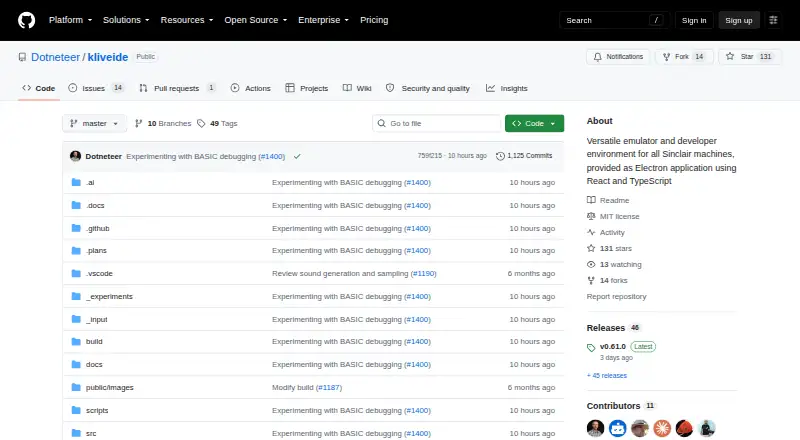
What Klive IDE is
Klive IDE combines an emulator and development environment for writing and debugging software for Sinclair Z80-based computers. Its active emulators cover the ZX Spectrum 48K and 128K, ZX Spectrum +2E/+3E, and Cambridge Z88; ZX Spectrum Next support is in progress. The IDE supports Z80 Assembly, ZX BASIC (Boriel's Basic), and SJASMPLUS. Its native assembler is built in, while ZX BASIC and SJASMPLUS use external toolchains. A one-click build workflow compiles code, loads it into the emulated machine, and runs or debugs it with breakpoints. The Monaco-based editor includes VS Code keyboard shortcuts, syntax highlighting, diagnostics, code folding, and symbol navigation. Debugging views provide CPU and ULA state, memory, disassembly, watches, BASIC listings, and system variables. Klive handles TAP and TZX tape files and DSK disks for ZX Spectrum +3E, and exports TAP, TZX, or Intel HEX. It can also record emulator video with stereo audio. The open-source project is MIT licensed and runs on macOS, Windows, and Linux.
Good
- Native assembler is built in
- Build workflow runs or debugs code in the emulator
- Debugger exposes CPU state, memory, and disassembly
- Supports TAP and TZX tape files
- Free and MIT licensed
Watch out
- ZX BASIC and SJASMPLUS use external toolchains
- ZX Spectrum Next support is still in progress
- macOS may flag the installer as untrusted
Who it suits
Klive IDE is for retro-computing enthusiasts developing for Sinclair Z80-based machines. It is particularly relevant to users working with the listed ZX Spectrum models or Cambridge Z88.
Verdict
Klive IDE brings coding, emulation, and debugging together for several Sinclair Z80-based machines. Users should note the external toolchains for some languages and that ZX Spectrum Next support remains in progress.
Plans and prices
From Klive IDE's own pricing page, checked 5 Oct 2026.
| Plan | Price | What it gives you |
|---|---|---|
| Klive IDE | Free | Not-for-profit passion project · macOS, Windows x64, Linux |
The facts
Each one read from Klive IDE's own pages, with the date it was checked.
What it does
- Automation
- Klive includes a JavaScript-like scripting engine for IDE commands and custom build pipelines.checked 5 Oct 2026
- Automation API
- The product documents a klive ide command-line interface and JSON-RPC 2.0 automation protocol over a local socket or named pipe.checked 15 Oct 2026
- Automation security
- Automation is disabled by default, stays local, uses a per-start token and offers read, control and full permission levels.checked 15 Oct 2026
- Build and debug
- A one-click workflow compiles code, injects it into the emulated machine, and runs or debugs it with breakpoints.checked 5 Oct 2026
- Build limitation
- The developer wiki says emulator WebAssembly builds require a separate wat2wasm/native WebAssembly step and a multi-process development workflow.checked 15 Oct 2026
- Built-in assembler
- The native Klive Z80 assembler supports documented and undocumented Z80 instructions, ZX Spectrum Next instructions, compile-time control flow and parameterized macros.checked 15 Oct 2026
- CI testing
- The klive test command runs unit tests without the GUI and emits JUnit XML and LCOV coverage files for CI dashboards.checked 15 Oct 2026
- Debugger views
- The emulator exposes CPU, ULA, live memory, disassembly, breakpoints, system variables and BASIC-listing views.checked 15 Oct 2026
- Developer architecture
- The mirrored developer wiki describes separate Electron emulator and VS Code-extension packages managed in a Lerna monorepo.checked 15 Oct 2026
- Documentation depth
- The documentation includes installation, first-run, scripting, automation, debugging, navigation and unit-testing sections, with several pages updated in October 2026.checked 15 Oct 2026
- Editor
- The IDE uses Monaco with VS Code keyboard shortcuts, syntax highlighting, diagnostics, folding, symbol navigation, inlay hints and rename support.checked 15 Oct 2026
- Emulator controls
- Users can start, pause, continue, restart and single-step machines, with CPU speed adjustable from 1x to 24x.checked 15 Oct 2026
- Emulator tools
- Debugging views expose CPU and ULA state, memory, disassembly, breakpoints, watches, BASIC listings, and system variables.checked 5 Oct 2026
- File support
- Klive loads tape files in TAP and TZX formats and disk files in DSK format for ZX Spectrum +3E, and exports TAP, TZX, or Intel HEX.checked 5 Oct 2026
- Independent feature description
- The same Espamática article describes the extension as combining a debugger, IDE, emulator and syntax highlighting inside VS Code.checked 15 Oct 2026
- Input formats
- Klive loads TAP and TZX tape images and DSK disks for ZX Spectrum +3/+3E systems.checked 15 Oct 2026
- Installers
- Official releases provide macOS PKG, Windows x64 EXE or portable ZIP, and Linux AppImage packages.checked 15 Oct 2026
- Integrations
- ZX BASIC and SJASMPLUS use external toolchains, and the IDE also documents integration with the PASTA/80 Pascal compiler, which uses SjasmPlus as its assembler backend.checked 5 Oct 2026
- Language integrations
- Projects can use Klive Z80 Assembly, Boriel ZX BASIC and SJASMPLUS; the latter two require external toolchains.checked 15 Oct 2026
- Languages
- The IDE supports Z80 Assembly, ZX BASIC (Boriel's Basic), and SJASMPLUS, with the native Klive assembler built in and no external dependencies.checked 5 Oct 2026
- License
- The public repository identifies Klive IDE as MIT licensed.checked 15 Oct 2026
- Limit: extension usability
- An Espamática article reports a user initially could not get the VS Code extension running and later still needed to work out debugging.checked 15 Oct 2026
- Limit: external toolchains
- ZX BASIC and SJASMPLUS projects need separately installed toolchains, unlike the built-in Klive assembler.checked 15 Oct 2026
The company
- Company profile
- Istvan Novak's personal site describes SoftwArt as a small Hungarian IT consultancy and identifies him as its principal and chief technology consultant.checked 15 Oct 2026
The full review of Klive IDE
Klive IDE is a development environment and emulator for building software for classic Sinclair Z80-based machines. It is best suited to retro-computing enthusiasts who want to write, run, and debug code in one workspace. Its built-in assembler and integrated debugging make it a strong choice for Z80 Assembly; projects using other supported languages require external toolchains.
Overview
Klive combines an editor, build workflow, debugger, and emulators for the ZX Spectrum 48K and 128K, ZX Spectrum +2E/+3E, and Cambridge Z88. That breadth makes it useful for people moving between these machines, while the in-progress ZX Spectrum Next support is a meaningful limitation for developers focused on the Next.
The project is a free, MIT-licensed passion project aimed at creation and community rather than commercial returns. It is a sensible fit for hobbyists comfortable with a community project, but not for readers seeking a commercial support arrangement.
Key features
The native Klive assembler handles Z80 Assembly without external dependencies. A one-click workflow compiles code, injects it into the emulated machine, then runs or debugs it with breakpoints. Keeping those steps together is the IDE’s strongest practical advantage over pairing a separate editor with an emulator.
The Monaco-based editor includes VS Code keyboard shortcuts, semantic syntax highlighting, diagnostics, code folding, and symbol navigation. These features support a familiar coding workflow, while the debugger’s views of CPU and ULA state, memory, disassembly, watches, BASIC listings, and system variables give machine-level work more context than a basic run-and-stop emulator.
Klive also supports ZX BASIC (Boriel’s Basic) and SJASMPLUS, but both rely on external toolchains. It documents integration with the PASTA/80 Pascal compiler, which uses SjasmPlus as its assembler backend. That flexibility is useful for users prepared to set up companion tools; those wanting every language path contained in the IDE should stick to its native assembler.
For project assets, Klive loads TAP and TZX tapes and DSK disks for ZX Spectrum +3E, and exports TAP, TZX, or Intel HEX. Virtual keyboard and floppy-drive support extend its machine controls. A JavaScript-like scripting engine can automate IDE commands and custom build pipelines, while video recording with stereo audio supports MP4, WebM, and MKV; FFmpeg is bundled.
Pricing
Klive IDE costs nothing. The free plan is the project itself: a not-for-profit passion project for macOS, Windows x64, and Linux, with no paid tier or seat-based plan described. Its open-source MIT license suits hobbyists and developers who value inspectable, modifiable software, though the project’s passion-project framing is not a substitute for commercial support.
Platforms
Klive runs on macOS, Windows, and Linux; the plan specifies Windows x64. Mac users should be prepared for an installation step: the guide says macOS may flag the installer as untrusted and directs users to allow it through Privacy & Security settings.
Who it's for
Choose Klive if you write or study software for its actively emulated Sinclair machines and want editing, compilation, emulation, and debugging in one place. Its native assembler makes the strongest case for Z80 Assembly projects. It is less suitable if you need established ZX Spectrum Next support, want to avoid external toolchains for ZX BASIC or SJASMPLUS, or require commercial support.
Pros and cons
- Pros: The native assembler and one-click build-run-debug flow keep core Z80 Assembly work in one environment.
- Pros: Detailed debugger views, including CPU and ULA state, watches, and system variables, support low-level investigation.
- Pros: Tape and disk handling, multiple export formats, scripting, and recording add useful project and emulator tools.
- Cons: ZX BASIC and SJASMPLUS depend on external toolchains, adding setup beyond the IDE.
- Cons: ZX Spectrum Next support is still in progress, so Next-focused projects need another choice.
- Cons: The macOS installer may require manual approval in Privacy & Security settings.
Alternatives
For a broader emulator-first comparison, browse the ZX Spectrum Emulators category.
- JNEXT is a free, open-source option for Linux, macOS, and Windows; choose it if you want a GPLv3 alternative rather than Klive’s integrated development workspace.
- Unreal Speccy Portable is free and open source on Android as well as desktop platforms, making it a candidate when Android support matters.
- zx_go is a free, MIT-licensed emulator for Linux, macOS, and Windows; its Spectrum Next ROMs are not bundled.
- ZEsarUX is free software with optional donations and supports Linux, macOS, Windows, and self-hosting.
- CSpect is described as free with a name-your-own-price option; its terms state no support or warranty, and updates are not guaranteed.
- SpeccyDate is another free option for macOS and Windows.
- Spectral is a free, open-source experimental ZX Spectrum emulator whose code is prone to change.
- ZX-Poly Emulator is free and open source, with prebuilt desktop downloads and a cross-platform JAR.
Verdict
Klive IDE is the right pick for retro-computing enthusiasts who want an integrated workspace for Z80 Assembly on its actively emulated Sinclair machines. The built-in assembler and machine-level debugger are its clearest reasons to choose it; look elsewhere if you need completed Spectrum Next support or a self-contained toolchain for every supported language.
Getting started
- Open the Klive IDE GitHub website
- Install the version for macOS, Windows, or Linux
- Create or open a project in the Monaco-based editor
- Choose Z80 Assembly, ZX BASIC, or SJASMPLUS
- Compile and inject the program with the one-click workflow
- Run or debug it in the selected emulator
Limits worth knowing
ZX Spectrum Next emulation is still in progress, and ZX BASIC or SJASMPLUS rely on external toolchains.
Questions
Is Klive IDE free?
Yes. The listed Klive IDE plan costs nothing, and the project is open source under the MIT license.
Which operating systems can run Klive IDE?
Klive IDE is available for macOS, Windows x64, and Linux.
Which machines does it emulate?
Active emulators include ZX Spectrum 48K and 128K, ZX Spectrum +2E/+3E, and Cambridge Z88. ZX Spectrum Next support is in progress.
What languages and assemblers are supported?
It supports Z80 Assembly, ZX BASIC (Boriel's Basic), and SJASMPLUS. A native Klive assembler is built in, while ZX BASIC and SJASMPLUS use external toolchains.
Which file formats can it handle?
Klive loads TAP and TZX tape files and DSK disks for ZX Spectrum +3E. It exports TAP, TZX, and Intel HEX.
Does it include debugging and recording tools?
Yes. Breakpoints, watches, disassembly, CPU and ULA state, memory, BASIC listings, and system variables are available. Emulator video with stereo audio can be recorded to MP4, WebM, or MKV.
Alternatives to Klive IDE
- 1
Unreal Speccy Portable
Free planOpen sourceAndroidiOSLinuxmacOS7.8Free plan - 2
Avidemux
Free planOpen sourceWebLinuxmacOSWindows7.3Free plan - 3

JNEXT
Free planLinuxmacOSWindows6.6Free plan - 4

Spectaculator
AndroidiOSWindows6.6$2.99 one-time - 5
SpeccyDate
Free planmacOSWindows6.3Free plan - 6
zx_go
Free planLinuxmacOSWindows6.3Free plan