Kindle Create
Kindle Create is a free desktop tool for preparing completed manuscripts for Kindle or print publishing through KDP.
What Kindle Create is
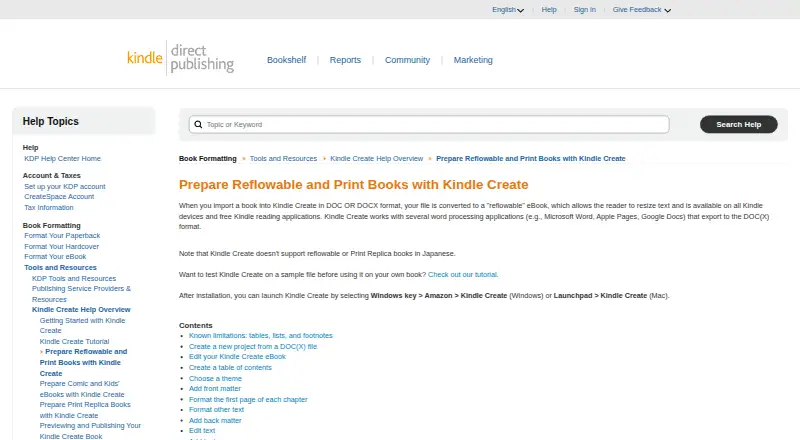
Kindle Create is a free desktop tool for preparing completed manuscripts for Kindle or print publishing through KDP. It supports reflowable eBooks, interactive print replica books, and comics with Guided View. DOC or DOCX files can be converted into reflowable books with text readers can resize, and one project file can prepare a book for both digital and print editions. Kindle Create adjusts content and margins for the selected trim size. Editing tools include chapter detection, tables of contents, themes, front and back matter, text formatting, image placement, and hyperlinks. Comic projects can use Guided View panels, reorder pages, and set them as facing pages. The tool works with documents exported from Microsoft Word, Apple Pages, or Google Docs, and creates a KPF file for KDP submission. Kindle Create runs on Windows and macOS. It supports eBooks in Dutch, English, French, German, Gujarati, Hindi, Italian, Malayalam, Marathi, Portuguese, Spanish, and Tamil; Japanese is not supported for reflowable and Print Replica books. Tables, lists, footnotes, and imported inline images cannot be edited in the app.
Good
- Free desktop manuscript formatting tool
- Supports reflowable, print replica, and comic books
- One project can prepare digital and print editions
- Exports KPF files for KDP submission
Watch out
- Tables, lists, and footnotes cannot be edited
- Imported inline images cannot be edited
- Japanese is unsupported for reflowable and Print Replica books
- Available on Windows and macOS only
Who it suits
Kindle Create suits authors preparing manuscripts for Kindle or print publishing through KDP, including creators of comics with Guided View. It may fit writers who work in DOC or DOCX and use Windows or macOS.
Verdict
Kindle Create offers manuscript layout and publishing preparation for several KDP book formats. Before choosing it, consider the editing restrictions and the stated language limitation.
Plans and prices
From Kindle Create's own pricing page, checked 8 Oct 2026.
| Plan | Price | What it gives you |
|---|---|---|
| Kindle Create | Free | Desktop book formatting tool · exports files for publishing through KDP |
The facts
Each one read from Kindle Create's own pages, with the date it was checked.
What it does
- Book formats
- It supports reflowable books, interactive print replica books, and comics with Guided View.checked 8 Oct 2026
- Comic features
- Comic eBooks can include Guided View panels, a table of contents, and pages that can be reordered or set as facing pages.checked 8 Oct 2026
- Editing and layout
- Features include chapter detection, tables of contents, predefined themes, front and back matter, text formatting, image placement, and hyperlinks.checked 8 Oct 2026
- Integrations
- Kindle Create works with word processing applications such as Microsoft Word, Apple Pages, and Google Docs that export to DOC or DOCX.checked 8 Oct 2026
- Languages
- The tool supports eBooks in Dutch, English, French, German, Gujarati, Hindi, Italian, Malayalam, Marathi, Portuguese, Spanish, and Tamil; reflowable and Print Replica books in Japanese are not supported.checked 8 Oct 2026
- Limitations
- Tables, lists, and footnotes cannot be edited in Kindle Create, and imported inline images cannot be edited there.checked 8 Oct 2026
- Print headers
- Headers and footers are available for paperbacks but not for eBooks.checked 8 Oct 2026
- Print preparation
- A single project file can prepare a book for digital and print publishing, and Kindle Create resizes content and margins for the chosen trim size.checked 8 Oct 2026
- Publishing files
- Export creates a KPF file for submission to KDP, while the KCB project file and related resources are used to update the book.checked 8 Oct 2026
- Purpose
- Kindle Create turns a completed manuscript into a book for Kindle or print publishing through KDP.checked 8 Oct 2026
- Reflowable input
- DOC or DOCX files can be converted into reflowable eBooks with text readers can resize.checked 8 Oct 2026
- Support
- KDP's Kindle Create help overview directs users to contact support for issues, feature requests, or additional guidance.checked 8 Oct 2026
Money
- Free plan
- Yeschecked 20 Sep 2026
Where it runs
- Platforms
- The download page offers Kindle Create for Windows 10 or later and macOS 10.15 or later, with Apple M1 requiring macOS 11 or later.checked 8 Oct 2026
Alternatives to Kindle Create
- 1

Blurb BookWright
Free planiOSWebAPImacOS8.1Free plan - 2

Flipsnack
Free planAndroidiOSWebAPI8.1Free plan - 3
InPage
Free planAndroidiOSWebLinux8.0From $50 a year - 4
VivaDesigner
Free planWebAPILinuxmacOS7.7Free plan - 5
Scribus
Free planOpen sourceAPILinuxmacOSSelf-hosted7.5Free plan - 6

Adobe InDesign
APImacOSSelf-hostedWindows7.3From $19.99 a month