Karma
Karma is Windows software for managing karaoke, DJ, and VJ shows.
What Karma is
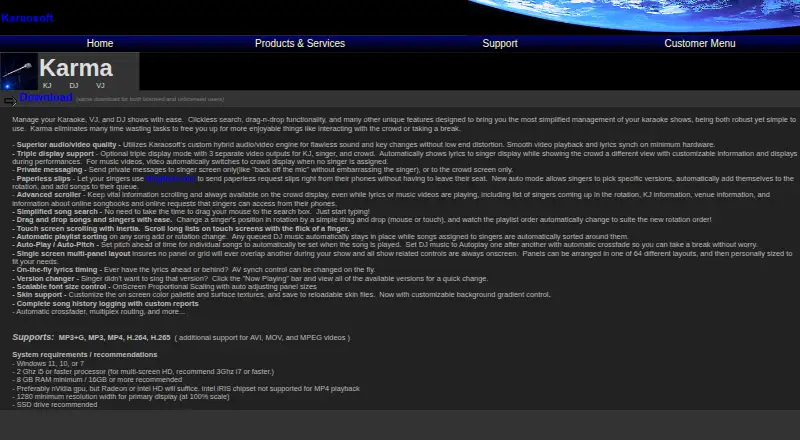
Karma is Windows software for managing karaoke, DJ, and VJ shows. Clickless search, drag-and-drop controls, singer rotation, playlist sorting, and a song-version changer support live show operation. Karaosoft’s hybrid audio/video engine handles MP3+G, MP3, MP4, H.264, H.265, AVI, MOV, and MPEG video. Singers can use SingNext.com on their phones to submit paperless requests, select versions, join the rotation, and queue songs. Auto-Play runs DJ music consecutively with automatic crossfade, while Auto-Pitch sets a song’s pitch during playback. Optional triple-display mode separates video for the KJ, singer, and crowd, and private messages can target either screen. Karma logs song and singer history, supports drag-and-drop requeue, and creates custom reports. The interface offers 64 panel layouts, scalable fonts, and customizable skins. Windows 11, 10, or 7, a 2 GHz i5-or-faster processor, 8 GB RAM, and a 1280-pixel primary display are listed requirements.
Good
- Supports karaoke, DJ, and VJ show management
- Phone-based paperless requests through SingNext.com
- Triple-display output for host, singer, and crowd
- Automatic crossfade and pitch controls
- 64 layouts with skins and scalable fonts
Watch out
- Windows-only software
- Internet is required for activation
- Intel iRIS chipsets are unsupported for MP4 playback
- At least 8 GB RAM is listed
Who it suits
Karma suits Windows karaoke, DJ, and VJ hosts who need request handling, multi-screen output, playback controls, and show history.
Verdict
Karma brings request intake, playback automation, multi-screen presentation, and reporting into one Windows show tool. Activation needs internet, but the software works offline afterward.
The facts
Each one read from Karma's own pages, with the date it was checked.
What it does
- Activation
- An internet connection is required to activate Karma, but the FAQ says it is no longer required after activation.checked 10 Oct 2026
- Audio and video
- Its custom hybrid audio/video engine supports key changes and on-the-fly audio/video synchronization.checked 11 Oct 2026
- Bundled suite
- Karaosoft says its Karma Suite includes licenses for Karma, KJ File Manager, and Song List Generator.checked 10 Oct 2026
- Customization
- The interface offers 64 panel layouts, scalable fonts, and customizable skins.checked 10 Oct 2026
- Customization and history
- Users can arrange panels in 64 layouts, customize skins, and generate reports from logged song history.checked 11 Oct 2026
- Displays
- Optional triple-display mode provides separate outputs for the KJ, singer, and crowd.checked 11 Oct 2026
- DJ playback
- Auto-Play can play DJ music consecutively with automatic crossfade, and Auto-Pitch can set a song’s pitch when it plays.checked 10 Oct 2026
- Download
- The product page links to a download described as the same for licensed and unlicensed users.checked 11 Oct 2026
- History and reports
- Karma logs song history and supports custom reports; it also tracks singer history and supports drag-and-drop requeue.checked 10 Oct 2026
- License resets
- The FAQ says users are granted three license resets per calendar year.checked 10 Oct 2026
- Licensing terms
- Karaosoft's product catalog says lifetime licenses expire 100 years after purchase, and added license quantity does not extend the expiration date of non-lifetime licenses.checked 11 Oct 2026
- Media formats
- Karma supports MP3+G, MP3, MP4, H.264, and H.265, with additional support for AVI, MOV, and MPEG video.checked 11 Oct 2026
- Minimum requirements
- The maker lists Windows 11, 10, or 7, a 2 GHz i5 or faster processor, 8 GB RAM minimum, and 1280-pixel minimum primary-display width.checked 10 Oct 2026
- Online songbooks
- The product page says users can upload an entire karaoke song list directly to Songbooks Live.checked 11 Oct 2026
- Purpose
- Karma manages karaoke, DJ, and VJ shows.checked 11 Oct 2026
- Show controls
- The software includes singer rotation and playlist sorting, autoplay with crossfade, autopitch, private messaging, and a song version changer.checked 11 Oct 2026
- Singer messages
- Karma can send private messages to the singer screen or crowd screen.checked 10 Oct 2026
- Singer requests
- Singers can use SingNext.com on their phones to submit paperless requests, choose song versions, join the rotation, and queue songs.checked 11 Oct 2026
- Song requests
- Singers can use SingNext.com on their phones to submit paperless requests, choose versions, join the rotation, and queue songs.checked 10 Oct 2026
- Support
- Karaosoft directs users to the app help and FAQ before emailing [email protected]; its page says paid emergency support is available through Latshaw Services.checked 11 Oct 2026
- System requirements
- The maker lists Windows 11, 10, or 7, an i5 2 GHz or faster processor, and 8 GB minimum RAM; it recommends an SSD and 16 GB or more RAM.checked 11 Oct 2026
- Video hardware limit
- The product page says Intel iRIS chipsets are not supported for MP4 playback.checked 10 Oct 2026
Alternatives to Karma
- 1
KaraFun
Free planAndroidiOSWebAPI8.0From $9.99 a month - 2
Karaoke 5
Free planAndroidiOSmacOSWindows7.9From €35 a year - 3
OpenKJ
Free planAndroidiOSWebLinux7.3From $9.99 a month - 4
Smule
Free planAndroidiOSWeb7.2From $19.99 a month - 5
Performous
Free planOpen sourceLinuxmacOSWindows7.1Free plan - 6
TKaraoke
Free planAndroidiOSWindows7.1$1 one-time