JSON Reader
JSON Reader is a web-based toolkit for working with JSON documents.
What JSON Reader is
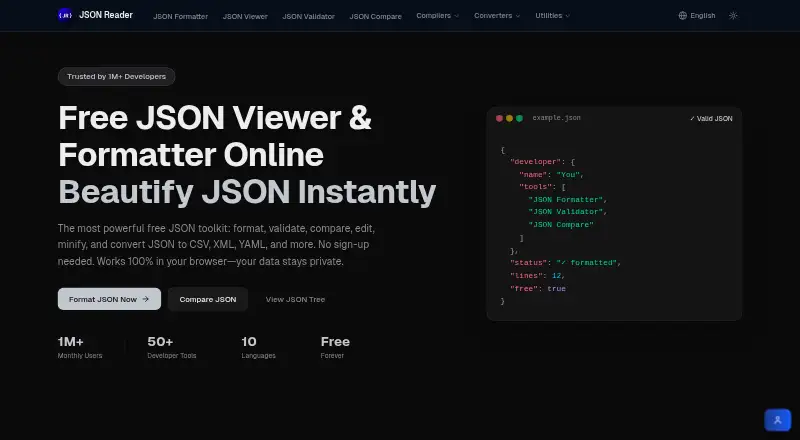
JSON Reader is a web-based toolkit for working with JSON documents. Its editor formats, minifies, validates, and automatically fixes common JSON errors. Schema validation and JSONPath querying are supported, while tree, graph, and table views offer different ways to inspect data. The site also lists converters between JSON and CSV, XML, and YAML, plus a comparison tool for finding differences between two JSON files. A test-data generator uses customizable templates and can create up to 1,000 records per run. Processing runs in the browser, and the maker says JSON data is not uploaded to its servers. Files up to 50 MB can be uploaded or dragged into the editor. The tools require no registration, login, or payment. The listed Free plan costs nothing, is billed Free forever, includes all tools, and has no usage limits.
Good
- Formats, minifies, validates, and fixes JSON
- Tree, graph, and table inspection views
- JSONPath filtering and schema validation
- Converters for CSV, XML, and YAML
- Free plan includes all tools without limits
Watch out
- Web platform only
- Editor uploads are limited to 50 MB
- No free trial is offered
Who it suits
It suits developers, data analysts, and IT professionals needing browser-based JSON utilities. It also fits users who want local browser processing without an account.
Verdict
JSON Reader combines editing, validation, querying, conversion, comparison, and test-data generation in one web toolkit. Its no-account Free plan and browser processing suit users who want a broad set of JSON tools without payment.
Plans and prices
From JSON Reader's own pricing page, checked 7 Oct 2026.
| Plan | Price | What it gives you |
|---|---|---|
| Free | Free | All tools included · no usage limits · no signup · Free forever |
The facts
Each one read from JSON Reader's own pages, with the date it was checked.
What it does
- Comparison
- The site provides a tool to compare two JSON files and find differences.checked 7 Oct 2026
- Data conversion
- The site lists converters for JSON and CSV, XML, and YAML formats.checked 7 Oct 2026
- File size limit
- The editor FAQ says JSON files up to 50 MB can be uploaded or dragged in.checked 7 Oct 2026
- Formatting and editing
- The editor can format, minify, validate, and automatically fix common JSON errors.checked 7 Oct 2026
- Intended users
- The maker describes the toolkit as designed for developers, data analysts, and IT professionals.checked 7 Oct 2026
- Local processing
- The maker says JSON processing runs in the browser and JSON data is not uploaded to its servers.checked 7 Oct 2026
- No account required
- The maker says the tools are available without registration, login, or payment.checked 7 Oct 2026
- Privacy policy
- The privacy policy says the site does not collect personal information or usage data and does not use cookies to track site activity.checked 7 Oct 2026
- Purpose
- JSON Reader is an online toolkit for formatting, validating, and editing JSON.checked 7 Oct 2026
- Support contact
- The contact page offers a form and an email address for advertising inquiries or other questions.checked 7 Oct 2026
- Test data
- The JSON generator supports customizable templates and up to 1,000 records per run.checked 7 Oct 2026
- Views and filtering
- JSON can be explored in tree, graph, or table views, and filtered with JSONPath queries.checked 7 Oct 2026
Alternatives to JSON Reader
- 1
JSONZen
Free planWebAPILinuxmacOS7.6$1 one-time - 2
jaq
Free planOpen sourceWebAPILinuxmacOS7.5Free plan - 3
jq
Free planWebLinuxmacOSSelf-hosted7.2Free plan - 4
Dadroit JSON Viewer
Free planWebLinuxmacOSWindows6.9From $98 a year - 5

BracketView
Free planWebLinuxWindows6.7From $27 a year - 6
jidoujisho
Free planAndroid6.6Free plan