Jobscan
Jobscan helps job seekers adapt resumes to specific openings by comparing a resume with a job listing, detecting the applicant tracking system, and providing…
What Jobscan is
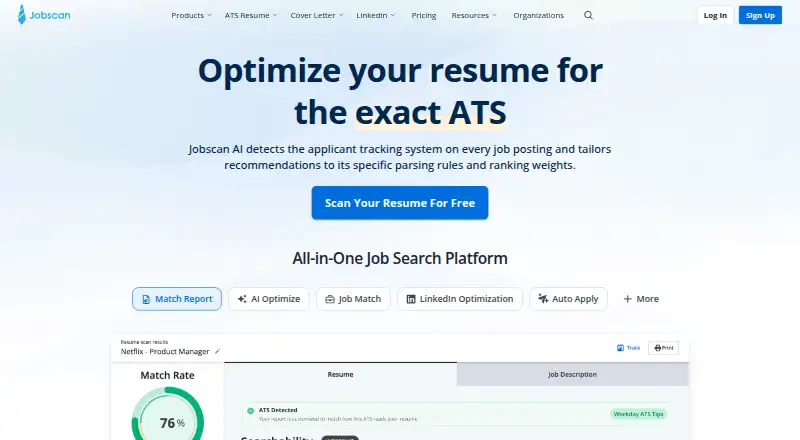
Jobscan helps job seekers adapt resumes to specific openings by comparing a resume with a job listing, detecting the applicant tracking system, and providing a match rate with optimization suggestions. Its resume tools include an ATS-friendly builder, scanner, AI-powered One-Click Optimize editor, and resume generators. Users can find personalized job listings, tailor applications, and track their search within Jobscan. A Chrome extension can save job details from Indeed, LinkedIn, and Glassdoor. Premium users can compare LinkedIn profiles with job descriptions and receive advice for profile sections. Premium also includes unlimited cover-letter scans and an AI generator that uses resume text and a job description. The free plan includes a resume builder, ATS-friendly templates, downloads, and limited resume scans. Paid offerings include Premium, quarterly Premium billing, and coach plans. Listed prices include Premium at $49.95 a month, Premium Quarterly at $89.95 a month billed every three months, Coach Monthly at $99 a month, and Coach Annual at $999 a year. A 7-day trial is listed.
Good
- Compares resumes with job listings and provides a match rate
- Free plan includes resume downloads and ATS-friendly templates
- Chrome extension saves jobs from major job sites
- Premium includes LinkedIn tools and cover-letter scans
Watch out
- Free plan offers only limited resume scans
- Premium Monthly costs $49.95 a month
- Coach Monthly costs $99 a month
Who it suits
Jobscan suits job seekers who want to tailor resumes and track applications, particularly those applying through systems that screen resumes. Its coach plans may also suit career coaches working with clients.
Verdict
Jobscan combines resume matching with tools for organizing a job search and refining application materials. The free plan provides a starting point, while LinkedIn and cover-letter features are included with Premium.
Plans and prices
From Jobscan's own pricing page, checked 20 Sep 2026.
| Plan | Price | What it gives you |
|---|---|---|
| Premium | $49.95 a month | Resume optimization · AI Optimize · Match Rate insights · LinkedIn optimization · ATS tips · billed monthly |
| Free | Free | 5 resume scans per month · limited Searchability tips and condensed skills list · Free |
| Premium Monthly | $49.95 a month | Match Report · AI Optimize · resume builder · cover letters · LinkedIn tools · Job Tracker · Auto Apply · $49.95/month |
| Premium Quarterly | $89.95 a month | Match Report · AI Optimize · resume builder · cover letters · LinkedIn tools · Job Tracker · Auto Apply · $89.95 every 3 months |
| Coach Monthly | $99 a month | 2 client slots initially · additional client slots available · $99/month |
| Coach Annual | $999 a year | 2 client slots initially · additional client slots available · $999/year |
The facts
Each one read from Jobscan's own pages, with the date it was checked.
What it does
- Accessibility
- The website displays WCAG 2.1 AA Compliance and ADA Compliance notices.checked 28 Sep 2026
- ATS optimization
- Yeschecked 20 Sep 2026
- Core purpose
- Jobscan compares a resume with a job listing, detects the applicant tracking system, and provides a match rate and optimization recommendations.checked 28 Sep 2026
- Cover letters
- Jobscan provides unlimited Premium cover-letter scans and an AI generator that uses the job description and resume text.checked 28 Sep 2026
- Download formats
- pdf_docxchecked 20 Sep 2026
- Import sources
- linkedin_documentchecked 20 Sep 2026
- Job description matching
- Yeschecked 20 Sep 2026
- Job search workflow
- Users can find personalized job listings, tailor resumes, apply, and track applications within Jobscan.checked 28 Sep 2026
- LinkedIn optimization
- Premium users can scan LinkedIn profiles against multiple job descriptions and receive advice for the headline, summary, experience, and education sections.checked 28 Sep 2026
- Organization customers
- Jobscan Organizations is offered to higher-education institutions, career coaches, government agencies, nonprofits, and employment organizations.checked 28 Sep 2026
- Paid from
- 89.95checked 20 Sep 2026
- Privacy rights
- Jobscan's GDPR page says users can request access, correction, deletion, or export of their stored data.checked 28 Sep 2026
- Resume templates
- 5checked 20 Sep 2026
- Resume tools
- The platform includes an ATS-friendly resume builder, resume scanner, AI-powered One-Click Optimize editor, and resume generators.checked 28 Sep 2026
- Scale
- Jobscan says it is trusted by over 10 million job seekers worldwide.checked 28 Sep 2026
- Support
- Jobscan provides a Help Center and customer assistance at [email protected].checked 28 Sep 2026
- Target-role tailoring
- Yeschecked 20 Sep 2026
- Widget and SSO integrations
- Jobscan offers an embeddable widget and custom white-label integrations that may include customized branding and single sign-on.checked 28 Sep 2026
Where it runs
- Auto Apply control
- Jobscan says Auto Apply keeps the user in control by requiring review of each application before it is sent.checked 28 Sep 2026
- Browser integration
- The Job Tracker Chrome extension can save jobs from Indeed, LinkedIn, and Glassdoor and add their details to Jobscan.checked 28 Sep 2026
The company
- Founded
- 2013checked 4 Oct 2026
Money
- Free plan
- Yeschecked 20 Sep 2026
The full review of Jobscan
Overview
Jobscan is a web-based job-search platform with a browser extension, built around comparing resumes with job listings and improving the match. It suits applicants who want one place to tailor materials, organize applications, and refine a LinkedIn profile. Its strongest case is the breadth of that workflow; the free plan is limited, and several of the most useful application tools require Premium.
Key features
Jobscan’s core scan compares a resume with a job description, detects the applicant tracking system, and returns a match rate with optimization recommendations. Target-role tailoring and match insights make it useful for applicants who are adapting materials to specific openings, rather than relying on a single general resume.
Resume tools include an ATS-friendly builder, scanner, resume generators, and an AI-powered One-Click Optimize editor. There are five resume templates, with PDF and DOCX downloads. These tools support a focused resume workflow, though the free plan allows only limited scans.
Jobscan also combines personalized job listings, resume tailoring, applications, and application tracking. Its Chrome Job Tracker extension can save listings from Indeed, LinkedIn, and Glassdoor into Jobscan. Auto Apply requires the user to review each application before it is sent, retaining a final approval step.
Premium adds LinkedIn profile scans against multiple job descriptions, with advice for headline, summary, experience, and education sections. It also includes unlimited cover-letter scans and an AI generator that uses the job description and resume text. These features are most relevant to applicants who want to optimize more than the resume itself.
For organizations, Jobscan offers an embeddable widget and custom white-label integrations that may include branding and single sign-on. Its Organizations offering serves higher-education institutions, career coaches, government agencies, nonprofits, and employment organizations. Jobscan says it is trusted by over 10 million job seekers worldwide. Users can request access to, correction of, deletion of, or export of stored data; the site displays WCAG 2.1 AA and ADA compliance notices. Support is available through a Help Center and [email protected].
Pricing
Jobscan uses a freemium model, with a 7-day trial and paid plans starting at $49.95 per month in the monthly Premium plans. The pricing note also gives a $89.95/mo starting figure, matching the Premium Quarterly plan’s monthly price; check the billing term before choosing, since that plan is billed every three months.
- Free: free. It includes a resume builder, ATS-friendly templates, resume downloads, and limited resume scans. This is a sensible starting point for basic resume creation, but scan limits constrain repeated tailoring.
- Premium: $49.95 a month, billed monthly. It adds resume optimization, AI Optimize, Match Rate insights, LinkedIn optimization, and ATS tips. It fits job seekers who want recurring resume and LinkedIn guidance.
- Premium Quarterly: $89.95 a month, billed every three months. It includes Premium tools, resume optimization, AI Optimize, and Match Rate insights. The lower monthly figure than monthly Premium comes with a three-month billing interval; this plan’s listed inclusions do not mention LinkedIn tools or cover letters.
- Premium Monthly: $49.95 a month, billed $49.95/month. It includes Match Report, AI Optimize, resume builder, cover letters, LinkedIn tools, Job Tracker, and Auto Apply. This is the clearest fit for applicants who want the full job-search workflow on a monthly term.
- Coach Monthly: $99 a month, billed $99/month, with 2 client slots initially; additional client slots are available. It is aimed at coaches handling multiple clients.
- Coach Annual: $999 a year, billed $999/year, with 2 client slots initially; additional client slots are available. The annual term suits coaches prepared to commit for the year.
Jobscan offers no listed seat count beyond the initial two client slots for Coach plans.
Platforms
Jobscan is available on the web and as a browser extension. The Chrome Job Tracker extension adds saved listings from Indeed, LinkedIn, and Glassdoor to the web-based workflow.
Who it's for
Jobscan is best for active applicants who tailor resumes to individual job descriptions and want tracking, LinkedIn advice, and cover-letter tools in the same service. Coaches and employment organizations may also find the dedicated organizational and client-slot offerings relevant. It is less compelling for someone who needs only a resume builder or expects unrestricted scanning without paying.
Pros and cons
- Pro: Resume-to-job matching returns a match rate and specific optimization recommendations, giving applicants a structured way to tailor each application.
- Pro: Job tracking, browser-based job saving, LinkedIn optimization, cover-letter scans, and Auto Apply extend the service beyond resume editing.
- Pro: Auto Apply keeps a review step before submission, rather than sending applications without user approval.
- Con: Free users get only limited resume scans, which makes repeated role-by-role tailoring harder without upgrading.
- Con: Premium’s feature set differs by plan: the Quarterly plan’s listed inclusions omit some tools named for Premium Monthly, so compare inclusions and billing intervals before committing.
Alternatives
For a wider look at this category, browse AI Resume Builders or AI Job Search Tools.
- Kickresume is another freemium resume and cover-letter option, with Android, iOS, and web apps.
- Rezi offers a free plan with one resume, one AI interview, and three PDF downloads; consider it if those limits suit a smaller, focused resume workflow.
- MyPerfectResume is a freemium option with Android, iOS, and web access.
- Resume Genius has a free tier with TXT-only resume downloads and a US-only job board; it may fit applicants who can work within those restrictions.
- Resume.io is a web-only freemium alternative with a 7-day trial.
- Teal offers a free plan with unlimited resume creation, 10 templates, basic analysis, the top five job-description keywords, and limited AI credits; consider it if resume creation volume matters more than Jobscan’s scan-led workflow.
- Zety is a web-based freemium resume and cover-letter builder.
- Novorésumé has a free Basic plan limited to one version and a one-page resume; its Premium month plan is $23.99 a month, paid once with no recurring billing.
Verdict
Choose Jobscan if you apply to varied roles and want resume matching, application tracking, and paid LinkedIn and cover-letter tools in one workflow. The match recommendations and breadth of tools are the main reasons to choose it; limited free scans and the need to compare differing Premium inclusions are the main reasons to look elsewhere or start with the free plan.
Getting started
- Open https://www.jobscan.co/
- Use the web platform or browser extension
- Start with the Free plan or choose a paid plan
- Import a resume from LinkedIn or a document
- Compare the resume with a job description
- Install the Job Tracker Chrome extension to save jobs from Indeed, LinkedIn, or Glassdoor
Limits worth knowing
The Free plan includes limited resume scans. Premium is listed at $49.95 per month or $89.95 per month billed every three months; coach plans start with two client slots.
Questions
Is there a free plan?
Yes. The Free plan costs nothing and includes a free resume builder, ATS-friendly templates, downloads, and limited resume scans.
What does Premium cost?
Premium is listed at $49.95 a month, while Premium Quarterly is $89.95 a month billed every three months. A 7-day trial is listed.
Which platforms are supported?
Jobscan is available on the web and as an extension.
Can it optimize LinkedIn profiles?
Premium users can scan LinkedIn profiles against multiple job descriptions and receive advice for profile sections.
Does Auto Apply send applications automatically?
Jobscan says users must review each application before it is sent.
Who makes Jobscan?
Jobscan makes the service. The company was founded in 2013 and is headquartered in Seattle, Washington, USA.
Alternatives to Jobscan
- 1

Kickresume
Free planAndroidiOSWebAPI9.0From $14.40 a year - 2
MyPerfectResume
Free planAndroidiOSWebExtension8.9From $7.95 a month - 3

Resume Genius
Free planAndroidiOSWeb8.9From $7.95 a month - 4

Huntr
Free planAndroidiOSWebAPI8.5From $40 a month - 5

Rezi
Free planiOSWebExtension8.2From $29 a month - 6
Novorésumé
Free planWeb8.2Free plan