Jhroke Camera
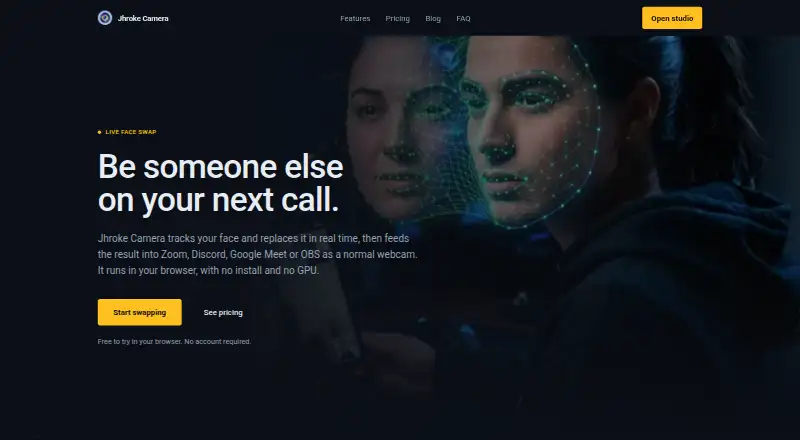
Jhroke Camera replaces a face in a live camera feed and presents the result to compatible video-call or streaming apps as a webcam.
What Jhroke Camera is
Jhroke Camera replaces a face in a live camera feed and presents the result to compatible video-call or streaming apps as a webcam. It runs in a desktop browser with WebGL support and does not require installation. The maker says live swapping and 468-point facial mapping via MediaPipe run in the browser, and that webcam video is not sent to its servers. Users can select a persona or upload a photo; uploaded persona photos stay in browser storage, according to the maker. Photo Lab and Video Lab tools also process still images and prerecorded video. The free Basic Mode includes both labs in SD with basic AI processing, but outputs are watermarked and live calls, 4K rendering, and commercial usage rights are not included. Pro Studio Max costs $18.99 a month, billed $37.98, and adds live calls, lab quality up to 4K, priority AI processing, watermark removal, and commercial usage rights. Compatible apps listed by the maker include Zoom, Discord, Google Meet, Microsoft Teams, OBS Studio, and ManyCam. The terms prohibit harmful deepfakes, unauthorized likeness use, and uses that violate privacy or intellectual property laws. The site uses cookies and log files that may include IP address, browser type, ISP, timestamps, and page activity.
Good
- Live swapping runs locally in the browser
- Works with listed video-call and streaming apps
- Free tier includes Photo Lab and Video Lab
- Pro plan supports lab output up to 4K
- Pro plans include commercial usage rights
Watch out
- Free outputs are watermarked and limited to SD
- Live calls are not included in the free tier
- Requires a desktop browser with WebGL support
Who it suits
Jhroke Camera is intended for creators, professionals, and artists exploring video synthesis. It suits people who want face replacement for compatible calls or streams, or tools for still images and prerecorded video.
Verdict
Jhroke Camera offers live face replacement alongside still-image and video tools, with browser-based processing described by the maker. The free tier is limited to watermarked SD labs; live calls and higher-resolution features require a paid plan.
Plans and prices
From Jhroke Camera's own pricing page, checked 8 Oct 2026.
| Plan | Price | What it gives you |
|---|---|---|
| Basic Mode | Free | Photo Lab SD · Video Lab SD · Basic AI processing · Watermarked content · No live video call · No 4K rendering · No commercial usage rights · Forever |
| Pro Studio Max | $18.99 a month | Video Call · Photo Lab SD, HD, 2K, 4K · Video Lab SD, HD, 2K, 4K · Ultra-high fidelity rendering · Priority AI queue · No watermarks · Commercial usage rights · $37.98; $18.99 per month |
| Annual | $79.99 a year | All Pro plans remove watermarks and unlock full studio features · Annual plan; $79.99 |
| Lifetime | $999, paid once | All Pro plans remove watermarks and unlock full studio features · Lifetime plan; $999 |
The facts
Each one read from Jhroke Camera's own pages, with the date it was checked.
Where it runs
- Browser requirements
- The features page says it runs in a browser without installation and requires a desktop browser with WebGL support.checked 8 Oct 2026
What it does
- Custom personas
- Users can select a persona or upload a photo, and the maker says uploaded persona photos stay in browser storage.checked 8 Oct 2026
- Face tracking
- The site says 468-point facial mapping runs in the browser via MediaPipe.checked 8 Oct 2026
- Intended audience
- The maker describes its mission as serving creators, professionals, and artists exploring video synthesis.checked 8 Oct 2026
- Live integrations
- The maker lists Zoom, Discord, Google Meet, Microsoft Teams, OBS Studio, and ManyCam as compatible webcam apps.checked 8 Oct 2026
- Local processing
- Live swapping runs locally in the browser, and the maker says the webcam stream is not sent to its servers.checked 8 Oct 2026
- Photo and video labs
- The product includes tools to process still images and prerecorded videos as well as live camera feeds.checked 8 Oct 2026
- Privacy policy
- The privacy policy says the site uses cookies and log files that may include IP address, browser type, ISP, timestamps, and page activity.checked 8 Oct 2026
- Purpose
- Jhroke Camera replaces a face in real time and feeds the result into video-call or streaming apps as a webcam.checked 8 Oct 2026
- Refunds
- The maker lists refund windows of 7 days for Monthly, 30 days for Annual, and 60 days for Lifetime plans.checked 8 Oct 2026
- Support
- The FAQ says Pro license holders can reach priority support 24/7 via the support channel linked on the site.checked 8 Oct 2026
- Use restrictions
- The terms prohibit using the technology to create harmful deepfakes or unauthorized likeness uses, or to violate privacy and intellectual property laws.checked 8 Oct 2026
Money
- Free tier limit
- The free tier provides Photo Lab and Video Lab in SD, and its content is watermarked.checked 8 Oct 2026
- Paid plan benefits
- Pro Studio Max includes live video calls, up to 4K lab quality, priority AI processing, watermark removal, and commercial usage rights.checked 8 Oct 2026
Alternatives to Jhroke Camera
- 1

Remaker AI
Free planAndroidiOSWebAPI8.2Free plan - 2
YouInMeme
Free planAndroidiOSWebExtension8.2From $39.99 a year - 3
DeepFace
Free planOpen sourceWebAPILinuxmacOS7.8Free plan - 4
AI Ease
Free planAndroidiOSWeb7.4Free plan - 5
iSamurai
Free planAndroidiOSWebAPI7.3From $9.90 a month - 6
SwapFace
AndroidiOSWebAPI7.3$9.99 one-time