
Javatari
Javatari is a free, cross-platform Atari 2600 emulator designed for the Web.
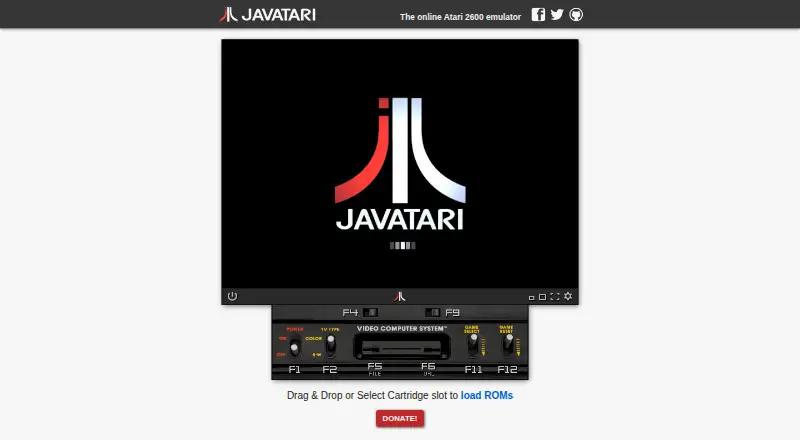
What Javatari is
Javatari is a free, cross-platform Atari 2600 emulator designed for the Web. Users can load cartridges in the browser, with ROMs opened from local storage, iCloud, Google Drive, Dropbox, or web links. The emulator runs in browsers tested with Chrome, Firefox, and Safari, and can be installed as a WebApp on iOS, Android, or desktop for offline use. It supports savestates that users can export and share, along with adjustable speed, pause, and frame-by-frame advance. Display tools include a resizable screen, fullscreen mode, screen capture, and debug modes. Controls include customizable joysticks, joykeys, and touch controllers, with haptic feedback on mobile. NetPlay lets multiple users connect to and control the same virtual console over the internet, but it does not work on Apple iOS because required WebRTC technologies are unavailable there. A JavaScript API supports ROM loading and console control. Games can be embedded in webpages or launched through a Javatari page link. NetPlay performance depends on network quality. The project repository identifies the software as licensed under AGPL-3.0.
Good
- Free Atari 2600 emulation.
- Can run offline as an installed WebApp.
- Supports exported and shared savestates.
- Customizable controls include mobile haptic feedback.
- Games can be embedded in webpages.
Watch out
- NetPlay is unavailable on Apple iOS.
- NetPlay performance depends on network quality.
Who it suits
Javatari suits Atari 2600 players who want to load cartridges in a browser or install the emulator for offline use. It also offers tools for embedding games and controlling the console through JavaScript.
Verdict
Javatari offers browser-based Atari 2600 emulation with offline WebApp use, configurable controls, and savestates. Users who want NetPlay should note its iOS limitation and dependence on network quality.
Plans and prices
From Javatari's own pricing page, checked 1 Oct 2026.
| Plan | Price | What it gives you |
|---|---|---|
| Free | Free | Atari 2600 emulator · online access |
The facts
Each one read from Javatari's own pages, with the date it was checked.
Where it runs
- Browser support
- The emulator runs in browsers and is tested in Chrome, Firefox, and Safari.checked 1 Oct 2026
- Browser technology
- It is a cross-platform HTML5/JavaScript emulator that runs in browsers tested with Chrome, Firefox and Safari.checked 1 Oct 2026
What it does
- Controls
- Javatari offers customizable joysticks, joykeys, and touch controllers, plus haptic feedback on mobile.checked 1 Oct 2026
- Creator
- The official site credits Paulo A. Peccin as the creator.checked 1 Oct 2026
- Developer API
- A JavaScript API is provided for loading ROMs and controlling the console.checked 1 Oct 2026
- Display tools
- It includes screen capture, debug modes, a resizable screen and fullscreen mode.checked 1 Oct 2026
- Embedding
- Games can be embedded in webpages or launched with a single link to a Javatari page.checked 1 Oct 2026
- File sources
- ROMs can be opened from local storage, iCloud, Google Drive, Dropbox, or web links.checked 1 Oct 2026
- JavaScript API
- A JavaScript API is available for loading ROMs and controlling the console.checked 1 Oct 2026
- License
- The project is licensed under the GNU Affero General Public License version 3.checked 1 Oct 2026
- Mobile support
- Javatari supports iOS and Android devices, including iPhone and iPad.checked 1 Oct 2026
- NetPlay
- NetPlay lets multiple users connect to and control the same virtual Atari console over the internet.checked 1 Oct 2026
- NetPlay limit
- NetPlay does not work on Apple iOS because the required WebRTC technologies are unavailable there.checked 1 Oct 2026
- NetPlay limitation
- NetPlay does not work on Apple iOS because the required WebRTC technologies are unavailable there.checked 1 Oct 2026
- NetPlay networking
- NetPlay uses a specialized peer-to-peer protocol with STUN for NAT and router traversal, and performance depends on network quality.checked 1 Oct 2026
- Offline use
- It can be installed as a WebApp on iOS, Android, or desktop and run offline.checked 1 Oct 2026
- Online use
- The official site provides an online Atari 2600 emulator with cartridge loading in the browser.checked 1 Oct 2026
- Playback controls
- The emulator provides adjustable speed, pause and frame-by-frame advance.checked 1 Oct 2026
- Product
- Javatari is a cross-platform Atari 2600 emulator designed for the Web.checked 1 Oct 2026
- Save states
- The emulator supports savestates and lets users export and share savestate files.checked 1 Oct 2026
- Touch controls
- Mobile touch controls are customizable and include haptic feedback.checked 1 Oct 2026
- What it does
- Javatari is an online Atari 2600 emulator.checked 1 Oct 2026
The company
- Maker
- Javatari was created by Paulo A. Peccin.checked 1 Oct 2026
The full review of Javatari
Javatari is a cross-platform Atari 2600 emulator built for the Web. It suits players who want browser and offline access to their own cartridges, as well as developers embedding an emulator in a page. Its broad device coverage and control options make it versatile, while Apple users should weigh the platform-specific NetPlay restriction.
Overview
Javatari runs an Atari 2600 console in Chrome, Firefox and Safari, with cartridge loading directly in the browser. It also installs as a WebApp on iOS, Android or desktop, allowing offline play after installation. That combination is a practical advantage for users who move between devices or prefer not to install a conventional desktop emulator.
ROMs can come from local storage, iCloud, Google Drive, Dropbox or a web link. Players therefore have several ways to reach their cartridges, while developers get an emulator designed to live inside web content rather than a standalone application.
Key features
Javatari supports savestates and lets users export and share those files. This is useful for preserving a difficult section, moving progress between devices, or sending a game state to another player.
Controls are configurable across joysticks, joykeys and touch controllers. Mobile haptic feedback adds tactile confirmation, and adjustable speed, pause and frame-by-frame advance give precise control over playback. Screen capture, debug modes, a resizable display and fullscreen mode serve both straightforward play and more deliberate inspection of a game.
NetPlay allows multiple users to control the same virtual Atari console online. Its peer-to-peer protocol uses STUN for NAT and router traversal, but the experience depends on connection quality. Apple iOS cannot use NetPlay because the required WebRTC technologies are unavailable, so iPhone and iPad owners are limited to solo emulation and other local features.
A JavaScript API can load ROMs and control the console. Games can be embedded in webpages or opened through a single link to a Javatari page, making the project relevant to developers building game portals, demonstrations or educational pages. The repository identifies the project as AGPL-3.0 licensed, and the official site credits Paulo A. Peccin as creator.
Pricing
Javatari is free. The Free plan costs nothing and provides the Atari 2600 emulator with online access. There are no paid tiers or seat charges described, so it is a straightforward choice for individual players and developers evaluating browser-based Atari support.
Platforms
Javatari supports web, iOS, Android, API use and self-hosted deployments. Browser operation is tested with Chrome, Firefox and Safari, while the installable WebApp extends offline use to mobile and desktop. Its iOS coverage is broad for solo play, but not for NetPlay.
Who it's for
Choose Javatari if you want Atari 2600 games in a browser, need an offline-capable WebApp, or value ROM access from cloud storage and shareable savestates. It is also a strong fit for developers who need JavaScript control, embeddable games or single-link launches. Look elsewhere if online multiplayer on Apple iOS is essential, or if your priority is a traditional native emulator rather than a web-centered tool.
Pros and cons
- Pros: Free access; browser and offline WebApp operation; ROM loading from local, cloud and web sources; exportable savestates; configurable touch and physical controls; JavaScript API and embedding support.
- Cons: NetPlay is unavailable on Apple iOS; peer-to-peer multiplayer quality varies with network conditions; the focus is Atari 2600 rather than a broader Atari system range.
Alternatives
Virtual Jaguar is a free, open-source emulator core for users who need Android, iOS, Linux, macOS, web or Windows and are comfortable supplying a libretro frontend such as RetroArch.
Atari800 is the better fit for Atari 800-series software on Android, Linux, macOS or Windows, with GPL version 2 source availability.
BigPEmu offers a free emulator download for Windows and Linux, with a freemium model and listed iOS support.
EMU7800 suits users wanting Atari 2600 and 7800 emulation on Linux, macOS or Windows.
kat5200 is aimed at Atari 5200 and 8-bit computer emulation across Android, Linux, macOS and Windows.
Gearlynx is a free alternative spanning web, mobile, desktop, extension, API and self-hosted platforms.
Stella is a free Atari 2600 VCS emulator for Linux, macOS and Windows, with voluntary donations.
z26 is a free, GPL version 2 open-source Atari 2600 emulator for Linux, macOS and Windows.
For a wider shortlist, browse Atari Emulators.
Verdict
Javatari is an excellent choice for players and developers who want free Atari 2600 emulation delivered through a browser, with offline installation, flexible ROM sources and strong sharing and embedding tools. Its principal reason to look elsewhere is equally clear: Apple iOS users cannot use NetPlay, and online multiplayer anywhere depends on network quality.
Alternatives to Javatari
- 1
Virtual Jaguar
Free planOpen sourceAndroidiOSWebAPI7.8Free plan - 2
Avidemux
Free planOpen sourceWebLinuxmacOSWindows7.3Free plan - 3
Lynx.emu
AndroidiOSLinux6.6$2.99 one-time - 4
Atari800
Free planAndroidLinuxmacOSWindows6.5Free plan - 5

BigPEmu
Free planiOSLinuxmacOSWindows6.4Free plan - 6
EMU7800
Free planLinuxmacOSWindows6.4Free plan