
Houston
Houston is a shared workspace for teams that run AI agents connected to their tools and models.
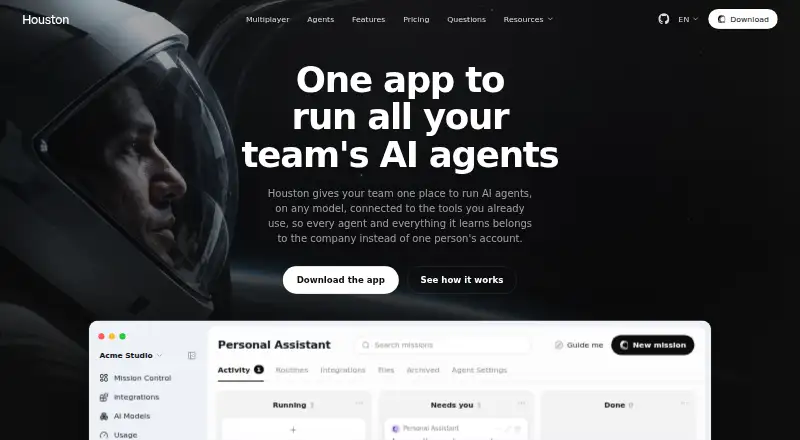
What Houston is
Houston is a shared workspace for teams that run AI agents connected to their tools and models. Agents handle tasks across those connections, post results to a mission board, and can ask a person to make a decision. Houston advertises more than 1,000 integrations, including Gmail, Slack, QuickBooks, HubSpot, and Google Drive, and says agents can use more than 400 models, with a different model available for each agent. Teams can connect an existing ChatGPT or Claude subscription, supply an API key, or run local models. Owner, Manager, and Member roles are available, and access to shared agents can be set individually. The free plan supports up to three people in one space with limited usage. A 14-day team trial needs no card and starts when the second invited member accepts. The Team plan is $12/user/mo billed annually, or $15 billed monthly. Desktop workspaces and agent materials are stored locally unless a feature such as Cloud sync uploads them. Houston says it does not sell personal information or train its own models on agent files, prompts, or messages.
Good
- Connects to more than 1,000 integrations.
- Offers a choice of more than 400 models.
- Can use local models or existing ChatGPT and Claude subscriptions.
- Supports agent-level access choices and team roles.
- Free plan includes up to three people.
Watch out
- Free plan has limited usage.
- Team plan is $12/user/mo billed annually.
- Cloud sync can upload locally stored materials.
Who it suits
Houston suits teams that want agents to work across connected tools and share agent resources. Its free plan is for spaces of up to three people; larger teams can consider the Team or Enterprise plans.
Verdict
Houston combines team access controls with agents that can work across connected tools and models. The free plan is limited to three people and limited usage, while the Team plan is billed per user.
Plans and prices
From Houston's own pricing page, checked 3 Oct 2026.
| Plan | Price | What it gives you |
|---|---|---|
| Free | Free | Personal workspace · up to three people · limited usage · all 1,000+ integrations · works with your AI subscription · community agents |
| Team | $12 a month | Unlimited teammates · unlimited usage · agents around the clock · shared agents and team spaces · roles and guardrails · billed annually · $15 billed monthly |
| Enterprise | Priced on request | For larger teams · SSO · security review · onboarding for the whole team |
The facts
Each one read from Houston's own pages, with the date it was checked.
What it does
- Agent work
- Agents carry out tasks across connected tools, show results on a mission board, and ask for a decision when needed.checked 3 Oct 2026
- AI providers
- Users can connect an existing ChatGPT or Claude subscription, use an API key, or run local models.checked 3 Oct 2026
- Data use
- The privacy policy says Houston does not sell personal information or use agent files, prompts, or messages to train its own models.checked 3 Oct 2026
- Enterprise support
- The maker lists an uptime SLA, priority support in English and Spanish, and private deployment for Enterprise.checked 3 Oct 2026
- Integrations
- Houston advertises more than 1,000 integrations and names Gmail, Slack, QuickBooks, HubSpot, and Google Drive as examples.checked 3 Oct 2026
- Models
- Houston says agents can use more than 400 models, with a different model selectable per agent.checked 3 Oct 2026
- Privacy
- The privacy policy says desktop workspaces, agent files, prompts, settings, and transcripts are stored locally unless a feature such as Cloud sync uploads them.checked 3 Oct 2026
- Product
- Houston provides a shared workspace for teams to run AI agents connected to their tools and models.checked 3 Oct 2026
- Security
- The privacy policy lists HTTPS/TLS in transit, provider-supported encryption at rest, access controls, and audit logging as security measures.checked 3 Oct 2026
- Shared learning
- The maker says an agent’s learnings, skills, and files belong to the team and remain available when new people join.checked 3 Oct 2026
The company
- Company
- Houston’s privacy policy identifies Taxflow Inc. as the company operating Houston.checked 3 Oct 2026
- Team access
- The maker lists Owner, Manager, and Member roles and says access to shared agents can be chosen per agent.checked 3 Oct 2026
Money
- Free plan limit
- The free plan supports up to three people in one space with limited usage and no credit card.checked 3 Oct 2026
- Trial
- A team space gets a 14-day free trial without a card, beginning when its second member accepts the invitation.checked 3 Oct 2026
Where it runs
- Platforms
- Houston offers desktop downloads for macOS, Windows, and Linux, and says users can also access spaces, agents, and missions on the web.checked 3 Oct 2026
The full review of Houston
Overview
Houston is a shared workspace for teams that want AI agents to work across their connected tools. It is best suited to groups that need shared agents, selectable models and team-level access controls. The free plan is a low-risk way to explore the workflow, but regular team use points toward the per-user Team plan.
Key features
Agents can carry out tasks across connected tools, report results on a mission board and ask for a decision when needed. Scheduled runs and web browsing support work that extends beyond a one-off prompt, while human approvals keep people involved at decision points. This setup fits teams seeking a managed workflow; it is less compelling for someone who only needs an individual chatbot.
Houston advertises more than 1,000 integrations, including Gmail, Slack, QuickBooks, HubSpot and Google Drive, and more than 400 models, with a model selectable for each agent. Teams can connect an existing ChatGPT or Claude subscription, use an API key or run local models. That breadth gives teams options for matching tools and models to different tasks, though the number of connections alone does not determine whether a particular workflow will suit the product.
The maker says agents’ learnings, skills and files belong to the team and remain available when people join. Owner, Manager and Member roles, plus per-agent sharing choices, give teams a way to control who can access shared work. Desktop workspaces, agent files, prompts, settings and transcripts are stored locally unless a feature such as Cloud sync uploads them. Houston says it uses HTTPS/TLS in transit, provider-supported encryption at rest, access controls and audit logging; it also says it does not sell personal information or use agent files, prompts or messages to train its own models.
Pricing
The Free plan costs nothing and supports up to three people in one space, with limited usage, all 1,000+ integrations, use with an existing AI subscription and community agents. It requires no card, but the people cap and usage limit make it better for a small team evaluating shared-agent work than for sustained use.
Team costs $12 a month when billed annually, or $15 billed monthly. It adds unlimited teammates and usage, agents around the clock, shared agents and team spaces, roles and guardrails. The per-user charge buys room to expand beyond the free plan’s three-person cap, but teams should weigh that recurring cost against their expected usage.
A 14-day free trial starts when the second team member accepts an invitation and requires no card. Enterprise has custom pricing and is aimed at larger teams, with SSO, a security review, team onboarding, an uptime SLA, priority support in English and Spanish, and private deployment.
Platforms
Houston is available on Linux, macOS, Windows and the web. Its local-storage approach for desktop workspaces may suit teams that want workspace data to remain on their devices unless they enable a cloud feature.
Who it's for
Houston is a strong fit for teams coordinating agents across multiple tools and wanting shared ownership, model choice and controls over agent access. It is a weaker fit for individuals or very small groups that need high usage without a per-user subscription, or for buyers who want an agent builder rather than a shared workspace.
Pros and cons
- Pros: Broad advertised integration and model choices, with options to bring a ChatGPT or Claude subscription, use an API key or run local models.
- Pros: Shared agent work, role-based access and per-agent sharing can help teams keep work available as membership changes.
- Pros: The free plan and card-free 14-day trial give a small group a way to assess the workflow before committing.
- Cons: Free usage is limited and the plan stops at three people, so it is not a durable option for a growing or heavily active team.
- Cons: Team is billed per user, which makes broader access a recurring cost rather than a single workspace fee.
Alternatives
For a general assistant rather than a shared agent workspace, Microsoft Copilot has a free plan with access subject to capacity and usage limits, and runs on web, Windows, macOS, iOS and Android.
Teams focused on document automation can consider Automation Anywhere Document Automation, whose free Community Edition includes Document Automation for eligible small businesses, up to five machines and 100 pages per month.
Wordware is another option.
Agentforce Vibes is another option.
Falcon Builder is another option.
Relevance AI offers a free plan with 100 credits per day, one user and 10MB of knowledge, making it a possible alternative for someone prioritizing a capped individual allowance.
Workato Agent Studio has a no-cost plan with 50,000 one-time credits.
Dust offers a free plan with 500 lifetime credits.
Browse more options in AI Agent Builders and AI Agent Platforms.
Verdict
Choose Houston if your team wants agents to work across connected tools with shared ownership, flexible model access and controls over who can use each agent. Its clearest advantage is bringing those team workflows together; look elsewhere if you need an individual assistant or cannot justify a per-user plan once the free limits become restrictive.
Getting started
- Visit https://www.gethouston.ai/.
- Choose the web option or a listed desktop platform: Linux, macOS, or Windows.
- Start with the free plan or begin the 14-day team trial without a card.
- For the team trial, invite a second member; the trial begins when they accept.
- Connect an existing ChatGPT or Claude subscription, use an API key, or run local models.
- Connect tools and configure agent models and access.
Limits worth knowing
The free plan is limited to three people in one space and has limited usage. The Team plan is $12/user/mo billed annually or $15 billed monthly; the 14-day trial begins when the second member accepts an invitation.
Questions
Is there a free plan?
Yes. It costs nothing and supports up to three people in one space with limited usage. It includes all 1,000+ integrations, works with your AI subscription, and includes community agents.
How much does Team cost?
Team is $12/user/mo billed annually, or $15 billed monthly. The plan includes unlimited teammates and usage, shared agents and team spaces, roles and guardrails, and agents around the clock.
What platforms does Houston support?
Houston is available on Linux, macOS, Windows, and the web.
Can I try the team plan?
A team space gets a 14-day free trial without a card. It starts when the second member accepts the invitation.
Which AI providers can teams use?
Users can connect an existing ChatGPT or Claude subscription, use an API key, or run local models. Houston says agents can use more than 400 models, with a different model selectable for each agent.
Who operates Houston, and how does it handle data?
Houston's privacy policy identifies Taxflow Inc. as its operator. The policy says desktop workspaces and agent materials are stored locally unless a feature such as Cloud sync uploads them, and that Houston does not sell personal information or use agent files, prompts, or messages to train its own models.
Alternatives to Houston
- 1
SmythOS
Free planOpen sourceAndroidiOSWebAPI8.5From $39 a month - 2
Workato Agent Studio
Free planiOSWebAPILinux8.3Free plan - 3

Microsoft Copilot
Free planAndroidiOSWebWindows8.2From $99.99 a year - 4

Falcon Builder
Free planWebAPISelf-hosted7.4From $29 a month - 5

Relevance AI
Free planWeb7.4From $19 a month - 6
Wordware
Free planiOSWeb7.2From $29 a month