
Hinode
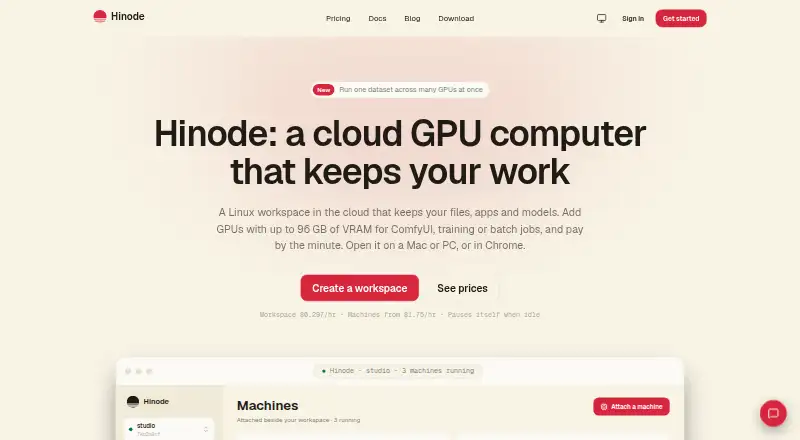
Hinode provides a Linux cloud workspace with persistent files and apps, alongside GPU machines that users can attach for AI work.
What Hinode is
Hinode provides a Linux cloud workspace with persistent files and apps, alongside GPU machines that users can attach for AI work. Listed machine options include a 24 GB L4, 48 GB L40S, and 96 GB RTX PRO 6000 Blackwell. Machines start from a workspace snapshot, and machines and the workspace can access a shared folder. A one-click app catalog includes ComfyUI, PyTorch, JupyterLab, AI Toolkit, Ollama, vLLM, and VS Code. The hinode run command can start a machine and execute a script; the machine can pause when the job finishes, and Hinode can email the result. Access is through Hinode apps for macOS, Windows, and Linux, or Chrome or Edge on a computer. SSH, scp, rsync, VS Code, and several AI assistant connection methods are also supported. Compute is metered by the minute and billed at month end, with separate charges for disks, shared-folder storage, and outgoing traffic. Workspaces and machines pause after 15 minutes without qualifying activity, but storage charges continue. Desktop streaming is not available through Safari, Firefox, or phones.
Good
- Persistent workspace and shared folder
- Several GPU machine options
- One-click catalog includes AI and development apps
- Jobs can pause machines and email results
Watch out
- Storage charges continue while machines are paused
- Disk, shared-folder, and traffic charges are separate
- Desktop stream does not work on Safari, Firefox, or phones
Who it suits
Hinode may suit people running AI image generation, model training, video models, or batch jobs who want persistent files and attachable GPU machines. It also offers access through desktop apps and selected desktop browsers.
Verdict
Hinode combines a persistent Linux workspace with GPU machines and tools for scripted jobs. Its metered compute and separate storage and traffic charges make it important to account for usage beyond the listed starting rate.
Plans and prices
From Hinode's own pricing page, checked 7 Oct 2026.
| Plan | Price | What it gives you |
|---|---|---|
| Workspace | $0.30 a month | Desktop on 1/8 of an NVIDIA L4 · pauses when idle · disk: $0.15 / GB-month written · shared folder: $0.10 / GB-month · traffic out: $0.10 / GB · Metered by the minute; billed at the end of the month. |
| Machine · 24 GB | $1.75 a month | NVIDIA L4 · 32 GB RAM $1.75, 64 GB RAM $2.36, 128 GB RAM $2.73, 256 GB RAM $5.99 · paused machine costs only its disk · Metered by the minute while running; billed at the end of the month. Price varies by RAM. |
| Machine · 48 GB | $3.30 a month | NVIDIA L40S · 32 GB RAM $3.30, 64 GB RAM $3.96, 128 GB RAM $5.30, 256 GB RAM $7.97 · paused machine costs only its disk · Metered by the minute while running; billed at the end of the month. Price varies by RAM. |
| Machine · 96 GB | $8.05 a month | RTX PRO 6000 Blackwell · 64 GB RAM $8.05, 128 GB RAM $9.56, 256 GB RAM $12.58 · paused machine costs only its disk · Metered by the minute while running; billed at the end of the month. Price varies by RAM. |
The facts
Each one read from Hinode's own pages, with the date it was checked.
Where it runs
- App catalog
- The one-click app catalog includes ComfyUI, PyTorch, JupyterLab, AI Toolkit, Ollama, vLLM, and VS Code.checked 7 Oct 2026
What it does
- Eligibility
- The terms say users must be at least 16 and able to enter a binding contract.checked 7 Oct 2026
- GPU options
- The maker lists 24 GB L4, 48 GB L40S, and 96 GB RTX PRO 6000 Blackwell machines.checked 7 Oct 2026
- Idle behavior
- The workspace and machines pause after 15 minutes without input, GPU work, traffic, or running processes; storage continues to incur charges.checked 7 Oct 2026
- Integrations
- Hinode supports SSH, scp, rsync, VS Code, and AI assistant access through Claude's connector directory, an MCP connector, or hinode mcp.checked 7 Oct 2026
- Intended users
- The maker describes use cases including ComfyUI image generation, model training, video models, and batch jobs.checked 7 Oct 2026
- Jobs
- The hinode run command can start a machine and run a script; the machine can pause after the job finishes and Hinode can email the result.checked 7 Oct 2026
- Persistent setup
- Machines start from a workspace snapshot, and the workspace and machines can read a shared folder.checked 7 Oct 2026
- Privacy
- The privacy policy says Hinode does not sell user data and identifies Google Analytics as its product analytics provider, with an opt-out setting for desktop and CLI.checked 7 Oct 2026
- Product
- Hinode provides a Linux cloud workspace with persistent files and apps, with GPU machines users can attach for AI work.checked 7 Oct 2026
- Security
- The privacy policy says Hinode protects data with encryption in transit and at rest, access controls, and regular review.checked 7 Oct 2026
- Support
- Hinode lists [email protected] for questions and support requests.checked 7 Oct 2026
- Supported desktop access
- The desktop is available in Hinode apps for macOS, Windows, and Linux, or in Chrome or Edge on a computer; the maker says Safari, Firefox, and phones cannot show the stream yet.checked 7 Oct 2026
Money
- Storage and billing
- Compute is metered by the minute and billed at month end; disks, shared-folder storage, and outgoing traffic have separate usage charges.checked 7 Oct 2026
Alternatives to Hinode
- 1

Amazon WorkSpaces
Free planAndroidiOSWebAPI8.2From $3.25 a month - 2

LoLa Cloud PCs
Free planAndroidiOSWebExtension8.0Free plan - 3

Oracle Cloud Compute
Free planAndroidiOSWebAPI7.6Free plan - 4

Ace Cloud Hosting Desktop as a Service
AndroidiOSWebLinux7.2From $352.19 a month - 5

V2 Cloud
AndroidiOSWebLinux7.2From $35 a month - 6
Shells
AndroidiOSWebLinux7.0From $14.95 a month