GitX
GitX is a free, native graphical client for Git on macOS.
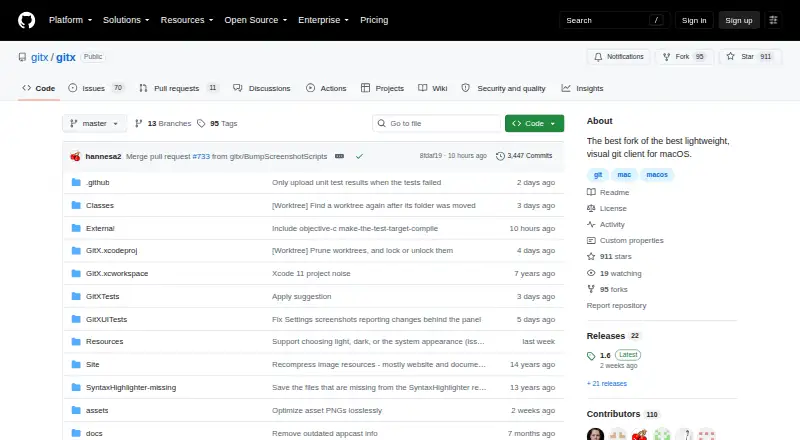
What GitX is
GitX is a free, native graphical client for Git on macOS. It provides a visual interface for working with Git repositories and is maintained by a community project that consolidates earlier branches and versions. Recent releases add worktree creation, removal, pruning, locking, and unlocking, along with an option to force-push with lease after a rejected push. Users can edit Git configuration in preferences and access Fetch and Prune menu items, including prune-on-fetch. Appearance settings include light, dark, or system, and users can select a commit-date format. GitX lets users choose a terminal application and supports opening iTerm2 as a tab. Install it with Homebrew using `brew install --cask gitx`, or download a release and move it into Applications; Apple Silicon users are directed to the arm64 release. The project documents Xcode and command-line build workflows. GitX is licensed under GPL version 2, and its build instructions list objective-git and libgit2 dependencies.
Good
- Free and licensed under GPL version 2
- Includes worktree management
- Offers configurable appearance settings
- Available through Homebrew or downloadable releases
Watch out
- macOS only
- Build instructions list objective-git and libgit2 dependencies
- Community-maintained project
Who it suits
GitX suits macOS users who want a graphical interface for Git repositories, including users managing worktrees. Apple Silicon users should choose the arm64 release.
Verdict
GitX combines repository-focused graphical tools with worktree management and terminal options. It is a fit for Mac users comfortable choosing a release or installing through Homebrew.
Plans and prices
From GitX's own pricing page, checked 11 Oct 2026.
| Plan | Price | What it gives you |
|---|---|---|
| GitX | Free | macOS git client · GPL version 2 |
The facts
Each one read from GitX's own pages, with the date it was checked.
What it does
- Architecture
- The build instructions say `ARCH=x86_64` selects an x86 build.checked 11 Oct 2026
- Build
- The project documents Xcode and command-line build workflows, including `make build`, `make unit-test`, and `make dmg`.checked 4 Oct 2026
- Build dependencies
- The build bootstrap checks out submodules and builds objective-git and libgit2, which the app links against.checked 11 Oct 2026
- Command line
- The Homebrew installation puts the `gitx` command-line tool on the user's PATH and can be updated with `brew upgrade`.checked 11 Oct 2026
- Dependencies
- The build instructions say the app links against objective-git and libgit2 dependencies.checked 4 Oct 2026
- Download
- The project provides releases for download and directs Apple Silicon users to the arm64 release.checked 4 Oct 2026
- Downloads
- The project also offers releases to download and move into Applications, with an arm64 release recommended for Apple Silicon Macs.checked 11 Oct 2026
- Git features
- The 1.7 release notes list worktree creation, removal, pruning, locking and unlocking, plus an option to force-push with lease after a rejected push.checked 11 Oct 2026
- Git operations
- Release 1.5.3 added Fetch and Prune menu items and exposed prune-on-fetch.checked 4 Oct 2026
- Install
- GitX can be installed with Homebrew using `brew install --cask gitx`.checked 11 Oct 2026
- Installation
- GitX can be installed with Homebrew using `brew install --cask gitx`.checked 4 Oct 2026
- License
- GitX is licensed under version 2 of the GNU General Public License.checked 11 Oct 2026
- Maintained project
- The repository describes this as a community-maintained version intended to consolidate earlier branches and versions.checked 11 Oct 2026
- Preferences
- Release 1.5.3 added a Git Preferences window for editing Git configuration.checked 4 Oct 2026
- Product
- GitX is a native macOS graphical client for the Git version control system.checked 4 Oct 2026
- Project
- The repository describes GitX as a community-maintained effort to consolidate earlier branches and versions.checked 4 Oct 2026
- Recent feature
- Release 1.6 added basic support for worktree branches.checked 4 Oct 2026
- Security and distribution
- The 1.6 release notes say the release DMG and ZIP ship with notarization stapled.checked 4 Oct 2026
- Security and signing
- The project instructions say debug builds are ad-hoc signed, while a developer certificate is needed for hardened-runtime builds and signed DMGs.checked 11 Oct 2026
- Terminal
- Release 1.6 lets users choose the terminal application in preferences and fixes the Open in Terminal action in released builds.checked 4 Oct 2026
- Terminal integration
- GitX supports opening iTerm2 as a tab and lets users choose the terminal application in preferences.checked 11 Oct 2026
- What it does
- GitX is a native graphical client for the git version control system on macOS.checked 11 Oct 2026
Where it runs
- History and appearance
- Version 1.7 added a selectable commit-date format and light, dark or system appearance settings.checked 11 Oct 2026
Alternatives to GitX
- 1

GitHub CodeQL
Free planWebExtensionLinuxmacOS7.5From $30 a month - 2

Gitnuro
Free planOpen sourceLinuxmacOSWindows7.4Free plan - 3

GitWand
Free planOpen sourceAPIExtensionLinuxmacOS7.2Free plan - 4

SmartGit
Free planLinuxmacOSWindows7.2From $5 a month - 5

GitButler
Free planLinuxmacOSWindows6.9Free plan - 6
Working Copy
Free planiOS6.8$35.99 one-time