FSArchiver
FSArchiver is free Linux software that saves filesystem contents in compressed archives and restores them to differently sized partitions or other filesystems.
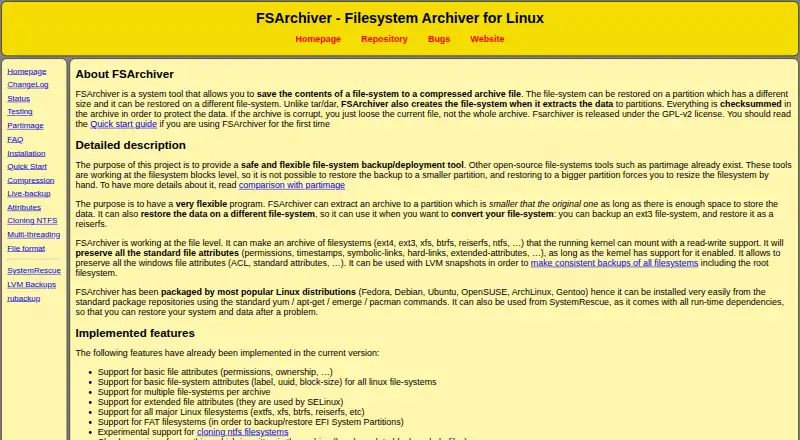
What FSArchiver is
FSArchiver is free Linux software that saves filesystem contents in compressed archives and restores them to differently sized partitions or other filesystems. It works at the file level, preserving standard attributes such as permissions, timestamps, links, and extended attributes when kernel support allows. Archives can contain multiple filesystems, and large archives can be split into files with a fixed maximum size. The supported list includes major Linux filesystems and FAT formats, including FAT for EFI System Partition backup and restore; NTFS support is experimental. Compression options include multithreaded LZO, gzip, bzip2, and LZMA/XZ. Archives can be password-encrypted with Blowfish through libgcrypt, and checksums help identify damaged contents. If an archive is corrupt, other files may still be restored while the damaged file is skipped. For a filesystem in use, the project recommends an LVM snapshot because changes on a read-write mounted volume can cause backup problems. Installation options include distribution packages, a static binary, or compiling from source; FSArchiver is also included in SystemRescue. The project identifies version 0.8.x as its latest stable series.
Good
- Archives can contain multiple filesystems.
- Preserves standard file attributes when supported.
- Offers password encryption and checksums.
- Available through packages, a static binary, or source.
Watch out
- NTFS support is experimental.
- Btrfs snapshots are not preserved.
- Read-write mounted volumes can cause backup problems.
Who it suits
FSArchiver suits Linux users who need file-level filesystem backup and restore, including transfers to differently sized partitions or other filesystems. The project recommends using a live system such as SystemRescue when restoring a root filesystem.
Verdict
FSArchiver covers a broad set of Linux and FAT filesystems and offers compression, encryption, and recovery of undamaged files from a corrupt archive. Consider its experimental NTFS support and filesystem-specific limits before relying on it for a particular restore.
Plans and prices
From FSArchiver's own pricing page, checked 8 Oct 2026.
| Plan | Price | What it gives you |
|---|---|---|
| FSArchiver | Free | GPL-v2 licensed software · Linux filesystem archiver |
The facts
Each one read from FSArchiver's own pages, with the date it was checked.
What it does
- Archive handling
- Large archives can be split into files with a fixed maximum size.checked 8 Oct 2026
- Compatibility status
- The status page calls version 0.8.x the latest stable version and recommends it for all users, while noting that NTFS support is experimental.checked 8 Oct 2026
- Compression
- The site lists multithreaded LZO, gzip, bzip2, and LZMA/XZ compression, and its installation page also lists zstd as a build dependency.checked 8 Oct 2026
- Data integrity
- The site describes checksums for archive contents and says that if an archive is corrupt, other files can still be restored while the damaged file is skipped.checked 8 Oct 2026
- Encryption
- The site says archives can be encrypted with a password using Blowfish from libgcrypt.checked 8 Oct 2026
- File-level backup
- It works at the file level and preserves standard file attributes such as permissions, timestamps, links, and extended attributes when supported by the kernel.checked 8 Oct 2026
- Filesystem support
- The site lists support for major Linux filesystems and FAT filesystems for EFI System Partition backup and restore.checked 8 Oct 2026
- Installation
- The site describes installation through Linux distribution packages, a static binary, or compiling from source, and says FSArchiver is included in SystemRescue.checked 8 Oct 2026
- Intended users
- The site describes FSArchiver as a filesystem backup and deployment tool and recommends a live system such as SystemRescue for restoring a root filesystem.checked 8 Oct 2026
- Live backups
- The site recommends using an LVM snapshot to back up a filesystem that is in use; backing up a read-write mounted volume can have problems with files changed during backup.checked 8 Oct 2026
- Multiple filesystems
- An archive can contain multiple filesystems.checked 8 Oct 2026
- Notable limitations
- The site says NTFS support is experimental and that filesystem-specific features such as Btrfs snapshots are not preserved.checked 8 Oct 2026
- Purpose
- FSArchiver saves filesystem contents to compressed archives and can restore them to differently sized partitions or different filesystems.checked 8 Oct 2026
Alternatives to FSArchiver
- 1

DAEMON Tools Lite
Free planAndroidiOSmacOSWindows8.0$3 one-time - 2

Acronis True Image
AndroidiOSWebAPI7.7From $49.99 a year - 3

FOG Project
Free planOpen sourceWebAPILinuxmacOS7.7Free plan - 4
Iperius Backup
Free planWebSelf-hostedWindows7.7From €3.29 a month - 5
EaseUS Todo Backup
Free planmacOSSelf-hostedWindows7.5From $39.95 a year - 6
Vembu BDRCloud
WebAPILinuxmacOS7.5From $1.20 a month