
Foldaway
Foldaway is a macOS utility that hides menu bar icons in a panel one click below the bar.
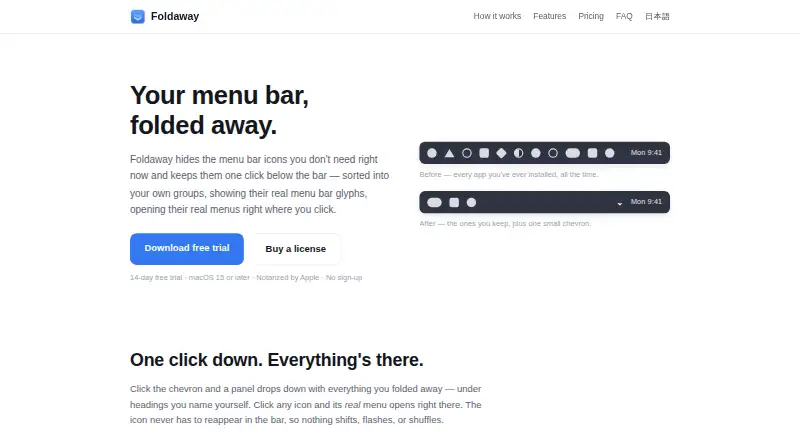
What Foldaway is
Foldaway is a macOS utility that hides menu bar icons in a panel one click below the bar. You can arrange hidden icons under custom headings and choose each app’s actual menu-bar glyph or colorful app icon. Selecting an icon opens its menu without restoring the icon, and registered icons are folded away again when the app relaunches. It runs on macOS 15 Sequoia or later on Apple Silicon and Intel Macs and supports the notch. Accessibility permission is required; Screen Recording permission is optional for real glyphs. The 14-day full trial needs no account, sign-up or payment method. A 1 Year licence costs $9.99, paid once for one Mac, while Lifetime costs $14.99, paid once for Macs you own or primarily use. There is no free plan.
Good
- Hides menu bar icons in a one-click panel
- Custom headings organize hidden icons
- Supports Apple Silicon and Intel Macs
- 14-day full trial without sign-up
- Offline licence activation
Watch out
- Requires macOS 15 Sequoia or later
- Accessibility permission is required
- System icons such as Wi-Fi cannot be folded
- No free plan
Who it suits
Foldaway suits Mac users who want a less crowded menu bar while keeping app menus accessible. It is relevant to users on macOS 15 or later, including Apple Silicon and Intel systems.
Verdict
Foldaway focuses on hiding and organizing app menu-bar items without removing their menus. The one-time licences and trial are clear, but system-reserved icons remain outside its control.
Plans and prices
From Foldaway's own pricing page, checked 8 Oct 2026.
| Plan | Price | What it gives you |
|---|---|---|
| 1 Year | $9.99, paid once | One Mac · All updates for a year · one-time |
| Lifetime | $14.99, paid once | All Macs that you own or primarily use · Updates indefinitely · one-time |
The facts
Each one read from Foldaway's own pages, with the date it was checked.
What it does
- Activation
- License activation is verified on the Mac using a cryptographic signature and works offline; the maker says it does not operate a license server or remotely count activations.checked 8 Oct 2026
- Automatic hiding
- Registered app icons are folded away again when the app relaunches.checked 8 Oct 2026
- Compatibility
- Foldaway runs on macOS 15 Sequoia or later on Apple Silicon and Intel Macs.checked 8 Oct 2026
- Groups
- Users can sort hidden icons under custom headings.checked 8 Oct 2026
- Icon display
- The panel can show an app’s actual menu bar glyph or its colorful app icon.checked 8 Oct 2026
- Menus
- Clicking an icon in the panel opens its real menu without bringing the icon back into the menu bar.checked 8 Oct 2026
- Permissions
- Accessibility permission is required to find and fold menu bar items; Screen Recording permission is optional for displaying real menu bar glyphs.checked 8 Oct 2026
- Privacy
- The app says it has no analytics, telemetry, crash reporting service, or advertising SDK, and its only outbound network request is a periodic update check.checked 8 Oct 2026
- Purpose
- Foldaway hides menu bar icons and keeps them in a panel one click below the bar.checked 8 Oct 2026
- Support
- The maker lists [email protected] as its support contact.checked 8 Oct 2026
- System icon limit
- macOS reserves system icons such as Wi-Fi and battery; Foldaway provides a shortcut to the relevant System Settings pane instead.checked 8 Oct 2026
- Updates
- The 1 Year license receives updates for 366 days from issue, while the Lifetime license receives updates indefinitely for as long as the software remains available.checked 8 Oct 2026
The company
- Headquarters
- Tokyo, Japanchecked 28 Sep 2026
Money
- Trial
- The full-functionality trial lasts 14 days from first launch and requires no account, sign-up, or payment method.checked 8 Oct 2026