
Fit It On
Fit It On is an AI virtual try-on platform for fashion brands and ecommerce sellers.
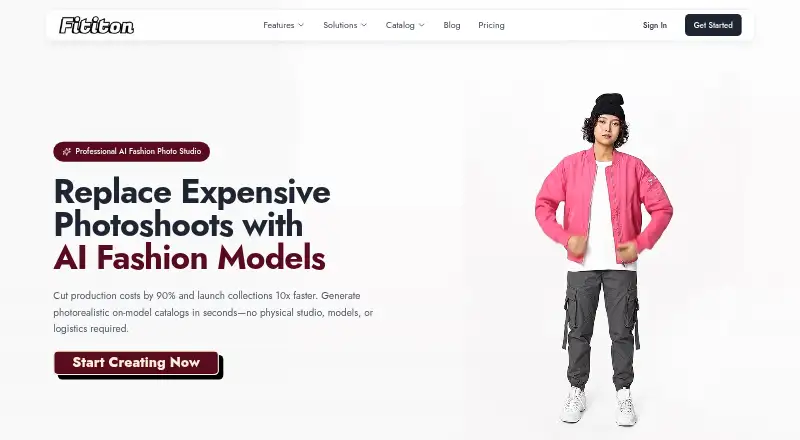
What Fit It On is
Fit It On is an AI virtual try-on platform for fashion brands and ecommerce sellers. It creates images of garments on AI models and lets shoppers preview clothing on themselves. Its Product to Model tool turns a single product image into an on-model photo, while studio tools include prompt-based try-on, pose and angle controls, ghost mannequin generation, background removal, image enhancement, and image-to-video. Users can create reusable AI models or upload faces for use across designs. The Shopify app adds a try-on widget to product pages, shown as a floating icon or inline button. A developer API offers REST endpoints for image generation, virtual try-on, and custom model creation, with asynchronous jobs and webhook support. Try-on photos are not used to train general AI models and can be deleted from the gallery. The Shopify app policy describes TLS/SSL encryption in transit and AES-256 encryption at rest. Studio features use different credit amounts: try-on costs 1–3 credits, image generation 1–5, and video 6–12.
Good
- Turns one product image into an on-model photo.
- Offers pose, angle, background, and video tools.
- Reusable AI models or uploaded faces are supported.
- Try-on photos can be deleted from the gallery.
- API includes webhooks and asynchronous jobs.
Watch out
- Studio credit use varies by feature and settings.
- Shopify data is deleted within 180 days after uninstall.
- Shopify Starter limits try-ons to 100 per month.
Who it suits
Fit It On suits ecommerce fashion brands that need product imagery or want shoppers to preview garments virtually. Its plans also address solo creators, growing brands, and agencies or studios.
Verdict
Fit It On combines virtual try-on, product image generation, and Shopify widgets with API access. Check the plan limits and credit use against the volume of images or try-ons you need.
Plans and prices
From Fit It On's own pricing page, checked 4 Oct 2026.
| Plan | Price | What it gives you |
|---|---|---|
| Shopify Free | Free | 30 try-ons per month · try-on button on products · email support · Free forever |
| Shopify Starter | $9 a month | 100 try-ons per month · dashboard analytics · full customization · floating icon · email support · $90/year and save 17% |
| Studio Starter | $15 a month | 150 credits/month · 1 team member · 4K image generation · all image generation tools · preset models · email support · video generation · custom model creation · $150/year · 2 months free |
| Studio Pro | $29 a month | 300 credits/month · 2 team members · 4K image generation · all image generation tools · preset models · video generation · custom model creation · priority processing · $290/year · 2 months free |
| Shopify Growth | $49 a month | 650 try-ons per month · user analytics · priority processing · all Starter plan features · $490/year and save 17% |
| Studio Agency | $69 a month | 1000 credits/month · 5 team members (more on request) · 4K image generation · all image generation tools · preset models · video generation · custom model creation · priority processing · dedicated support · $690/year · 2 months free |
| Shopify Enterprise | $149 a month | 2000 try-ons per month · chat + email support · dedicated support · all Growth plan features · $1,490/year and save 17% |
The facts
Each one read from Fit It On's own pages, with the date it was checked.
What it does
- API
- The developer API provides REST endpoints for image generation, virtual try-on, and custom model creation, with asynchronous jobs and webhook support.checked 4 Oct 2026
- Consistent models
- Users can create AI fashion models or upload their own faces to reuse models across designs.checked 4 Oct 2026
- Credit usage
- Studio features consume different credit amounts: virtual try-on costs 1–3 credits, image generation 1–5, and video 6–12 depending on settings or duration.checked 4 Oct 2026
- Data retention
- The Shopify app policy says store and customer data is deleted within 180 days after uninstall, and merchants can request immediate deletion.checked 4 Oct 2026
- Editing features
- The studio lists prompt try-on, pose control, ghost mannequin generation, angle generation, background removal, quality enhancement, and image-to-video tools.checked 4 Oct 2026
- Intended users
- The maker describes the platform as built for ecommerce fashion brands and presents plans for solo creators, growing brands, and agencies or studios.checked 4 Oct 2026
- Photo privacy
- The privacy policy says try-on photos are not used to train general AI models and can be deleted from the user gallery.checked 4 Oct 2026
- Product
- Fit It On is an AI virtual try-on platform that generates fashion images of clothing worn by AI models and lets shoppers preview garments on themselves.checked 4 Oct 2026
- Product photography
- Product to Model turns a single product image into an on-model photo without a photoshoot.checked 4 Oct 2026
- Shopify integration
- The Shopify app adds a virtual try-on widget to ecommerce product pages, with floating-icon and inline-button display options.checked 4 Oct 2026
- Support
- The Shopify Free and Starter plans include email support, while Shopify Enterprise includes chat and email support plus dedicated support.checked 4 Oct 2026
Where it runs
- Shopify app security
- The Shopify app policy says data in transit uses TLS/SSL encryption and data at rest uses AES-256 encryption.checked 4 Oct 2026
The full review of Fit It On
Fit It On is an AI fashion-image platform for ecommerce teams, solo creators, and studios. It suits businesses that need both product imagery and shopper try-on, though Shopify and studio work use separate plans and quotas. Its strongest case is the range of creation and integration options; the key trade-off is keeping credit or try-on use within a monthly allowance.
Overview
Fit It On covers two distinct jobs: making fashion images with AI models and letting shoppers preview garments on themselves. Shopify plans focus on store widgets and monthly try-ons, while studio plans provide image and video tools on a monthly credit allowance. That separation makes the product flexible, but buyers should choose around their main workflow rather than assume one plan covers every use.
Key features
Product to Model turns a single product image into an on-model photo without a photoshoot. For brands that need more garment imagery, this can reduce the need to arrange shoots for each image. Studio tools also include prompt-based try-on, pose control, ghost mannequin and angle generation, background removal, quality enhancement, and image-to-video. Reusable AI models, or uploaded faces, help keep a recurring model identity across designs.
Credits matter: virtual try-on uses 1–3, image generation 1–5, and video 6–12 depending on settings or duration. Video is the heaviest listed use, so the studio allowance may stretch much further for still-image workflows than for frequent video creation.
Shopify merchants can place a try-on widget on product pages as a floating icon or inline button. The developer API offers REST endpoints for image generation, virtual try-on, and custom model creation, with asynchronous jobs and webhook support. That makes it relevant to teams building an integration, while the Shopify app is the more direct route for stores that want a product-page widget.
Try-on photos are not used to train general AI models and can be deleted from the user gallery. The Shopify app uses TLS/SSL for data in transit and AES-256 for data at rest; store and customer data is deleted within 180 days of uninstall, with immediate deletion available on request.
Pricing
Fit It On offers a free Shopify tier, a free trial, and paid plans. The free tier costs nothing and provides 30 try-ons per month, a try-on button on products, and email support. It is a limited way to add the feature to a store, but lacks the higher quotas and customization of paid Shopify plans.
Shopify Starter costs $9 a month, billed $90/year and save 17%. Its 100 monthly try-ons, dashboard analytics, full customization, floating icon, and email support suit a smaller store testing or running the widget at modest volume. Shopify Growth costs $49 a month, billed $490/year and save 17%, and raises the allowance to 650 try-ons with user analytics and priority processing, plus Starter features. Shopify Enterprise costs $149 a month, billed $1,490/year and save 17%, for 2,000 monthly try-ons, all Growth features, chat and email support, and dedicated support. The jump is most relevant to higher-volume stores that need expanded support as well as quota.
Studio Starter costs $15 a month, billed $150/year with 2 months free. It includes 150 credits monthly, one team member, 4K image generation, all image-generation tools, preset models, video generation, custom model creation, and email support. Studio Pro costs $29 a month, billed $290/year with 2 months free; it raises the allowance to 300 credits and seats to two, and adds priority processing. Studio Agency costs $69 a month, billed $690/year with 2 months free; it provides 1,000 credits, five team members with more on request, and dedicated support alongside the Pro-level creation tools and priority processing. These tiers suit progressively larger creative workloads; credit use, especially for video, remains the constraint to weigh against the nominal monthly total.
Platforms
Fit It On supports web and API access, and offers a Shopify app. The API and Shopify widget address different needs: custom software integration versus a ready store-page try-on option.
Who it's for
Fit It On is a good match for fashion ecommerce brands that want to generate on-model visuals or add shopper try-on, and for creators or agencies that need reusable models and image or video tools. A small Shopify store can start with the free plan, while teams producing content should compare expected credit use and seat needs before choosing a studio tier. It is less compelling for anyone needing uncapped generation or a single plan that bundles Shopify try-on volume with studio credits.
Pros and cons
- Pros: Product-to-model generation starts from one product image, and the studio combines still-image tools, video, and reusable models.
- Pros: Shopify widget options and API endpoints cover both direct store use and custom integration.
- Pros: Try-on photos are excluded from general AI training and deletable; Shopify data has stated encryption and deletion provisions.
- Cons: Try-ons, images, and video consume capped monthly quotas or credits, with video using the most per task.
- Cons: Shopify try-on and studio creation have separate plan ladders, so users needing both should account for each workflow.
Alternatives
For a wider comparison, browse AI Fashion Model Generators. Choose FASHN AI if Android or iOS access matters, or if its 200 monthly credits on the Basic plan better match your needs. Modelia is another API-and-web option, with a free Starter tier of 20 monthly credits and a watermark. Bandy AI is a web alternative with a free plan, though its stated free allowance is zero images.
Flair.ai may suit someone seeking a free web plan that includes one custom model, five generated images, and one video generation. Looklet offers a free web tier with 10 images, 500 credits, and a virtual studio, and may appeal to those who want to begin with that allowance. No Shoots has a free web studio workflow, but its free outputs are watermarked, expire after seven days, and lack a commercial license.
On-Model is an API-and-web alternative with a free plan. Snaproom offers a free web plan with a one-time 150 credits and access to its tools, which may suit a user preferring a one-off free allowance.
Verdict
Choose Fit It On if you are a fashion brand or studio that values the combination of on-model image creation, shopper try-on, and API access. Its range is the main reason to choose it; its separate plan structures and metered usage are the main reasons to look elsewhere if your needs are narrow, high-volume, or difficult to forecast.
Getting started
- Open https://fititon.app/
- Choose Shopify or Studio plans based on your workflow
- For Shopify, install the app and add its try-on widget to product pages
- For API use, connect to the REST endpoints for generation or custom models
- Create or upload reusable models and generate try-on images
Limits worth knowing
Shopify Free includes 30 try-ons per month. Studio plans provide monthly credit pools, with each try-on, image, or video consuming a different number of credits.
Questions
Is there a free plan?
Yes. Shopify Free costs nothing and includes 30 try-ons each month.
What is the starting paid price?
Studio Starter is $15 a month. Shopify Starter is $9 a month when billed monthly.
Which platforms are supported?
The listed platforms are web and API, with a Shopify app for store product pages.
Can I use my own face or model?
Yes. You can upload faces or create AI fashion models for reuse across designs.
Does it provide API access?
Yes. REST endpoints cover image generation, virtual try-on, and custom model creation, with asynchronous jobs and webhooks.
How are try-on photos handled?
Fit It On says try-on photos are not used to train general AI models and can be deleted from the user gallery.