
Financial Modelling Pro
Financial Modelling Pro is a web application for building, analyzing, and exporting financial models.
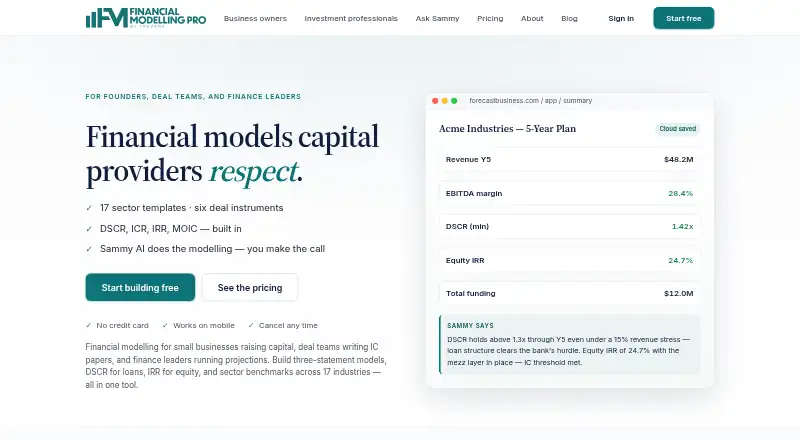
What Financial Modelling Pro is
Financial Modelling Pro is a web application for building, analyzing, and exporting financial models. It creates three-statement models with DSCR, ICR, IRR, and MOIC outputs, and supports valuation models and scenario analysis. Users can select from 17 sector templates and model deal structures such as senior and mezzanine tranches, convertibles, warrants, kickers, and preferred equity. The Sammy assistant accepts modelling changes in plain English, previews each proposed change, and supports undo. Performance Tracker overlays monthly actuals on submitted projections to show variance. Models export to PDF, Excel, and Word, although PDF exports on the Free tier are watermarked. The Free plan is free and includes one project saved in the browser and 20 Sammy messages per month. Paid plans include Solo at $25 a month and Pro at $79 a month. Mobile supports basic viewing; extensive editing is designed for a laptop.
Good
- Builds three-statement models with key financial outputs.
- Includes 17 sector templates.
- Sammy previews changes and supports undo.
- Exports to PDF, Excel, and Word.
Watch out
- Free plan has one project and 20 Sammy messages monthly.
- Free-tier PDF exports are watermarked.
- Heavy editing is designed for a laptop.
- Free plan saves projects in the browser.
Who it suits
It suits small businesses raising capital, deal teams preparing investment-committee papers, and finance leaders running projections. It is also a fit for users who need financial models with scenario analysis and export options.
Verdict
Financial Modelling Pro combines model building, change assistance, and projection tracking in a web app. The Free tier has tight project and message limits, while paid options start at $25 a month.
Plans and prices
From Financial Modelling Pro's own pricing page, checked 1 Oct 2026.
| Plan | Price | What it gives you |
|---|---|---|
| Free | Free | 1 project · browser-local save · 17 sector templates · watermarked PDF export · 20 Sammy messages/month · $0 |
| Solo | $25 a month | 5 projects · cloud save · PDF, Excel and Word exports · 3 project shares/month · 100 Sammy messages/month · email support (48h) · $25/month |
| Pro | $79 a month | Unlimited projects · unlimited project sharing · unlimited Sammy messages with priority queue · priority support (24h) · $79/month |
| Solo annual | $240 a year | 5 projects · cloud save · PDF, Excel and Word exports · 3 project shares/month · 100 Sammy messages/month · email support (48h) · $240/year (instead of $300) |
| Institutions | $349 a month | Launching Q4 2026 · SSO · white-label exports · full audit log export · custom DPA/MSA · dedicated onboarding and SLA · From $349/seat/month |
| Pro annual | $758 a year | Unlimited projects · unlimited project sharing · unlimited Sammy messages with priority queue · priority support (24h) · $758/year (instead of $948) |
The facts
Each one read from Financial Modelling Pro's own pages, with the date it was checked.
What it does
- AI assistant
- Sammy lets users describe modelling changes in plain English, previews each change and supports undo.checked 1 Oct 2026
- Audience
- The product is positioned for small businesses raising capital, deal teams writing investment-committee papers, and finance leaders running projections.checked 1 Oct 2026
- Cancellation retention
- After cancellation, projects remain accessible for 90 days before permanent deletion.checked 1 Oct 2026
- Core product
- Financial Modelling Pro is a web application for building, analysing, and exporting financial models.checked 1 Oct 2026
- Data residency
- Default data residency is the EU multi-region (Belgium and Netherlands) on Google Cloud Firebase infrastructure.checked 1 Oct 2026
- Data use
- The company says it does not sell data, share project data for commercial purposes, or use models to train AI systems.checked 1 Oct 2026
- Deal instruments
- The engine supports senior and mezzanine tranches, convertibles, warrants, revenue and EBITDA kickers, and preferred equity.checked 1 Oct 2026
- Encryption
- Data is encrypted in transit with TLS 1.2 or higher and at rest with AES-256.checked 1 Oct 2026
- Exports
- Models can be exported to PDF, Excel and Word, with watermarked PDF export on the Free tier.checked 1 Oct 2026
- Local mode
- Without an account, project data remains in browser localStorage and never leaves the device.checked 1 Oct 2026
- Mobile use
- The marketing site and basic model viewing work on mobile, while heavy editing is designed for a laptop.checked 1 Oct 2026
- Model outputs
- The product builds three-statement models with DSCR, ICR, IRR and MOIC outputs.checked 1 Oct 2026
- Performance tracking
- Performance Tracker overlays monthly actuals on submitted projections to show variance.checked 1 Oct 2026
- Sector templates
- It provides 17 sector templates covering industrials, services, financial and technology, and asset-heavy sectors, plus an Other fallback.checked 1 Oct 2026
- Support
- Support response targets are community for Free, 48 business hours for Solo, 24 business hours for Pro, and SLA-based for Institutions.checked 1 Oct 2026
The company
- Headquarters
- London, United Kingdomchecked 23 Sep 2026
The full review of Financial Modelling Pro
Financial Modelling Pro is a browser-based tool for building financial models, changing them with an AI assistant, and tracking projections against actuals. It is best suited to small businesses raising capital, deal teams preparing investment-committee papers, and finance leaders managing projections. Its modelling and export capabilities cover serious work, but the Free tier’s single-project cap makes paid plans the practical choice for ongoing collaboration.
Overview
Three-statement models, valuation models and scenario analysis bring operating forecasts and investment work into one application. Outputs include DSCR, ICR, IRR and MOIC, while Performance Tracker overlays monthly actuals on submitted projections to show variance. That combination is useful when a model needs to remain a working reference after it has been submitted, not just a one-off deliverable.
Sammy accepts modelling changes in plain English, previews each change and supports undo. The preview and reversal controls make iterative edits more manageable, but message quotas matter if frequent revisions are part of the workflow. The product also supports an audit trail, and its deal engine handles senior and mezzanine tranches, convertibles, warrants, revenue and EBITDA kickers, and preferred equity.
Seventeen sector templates span industrials, services, financial and technology businesses, as well as asset-heavy sectors, with an Other fallback. That gives users a structured starting point across several business types, though a template is a starting framework rather than a substitute for tailoring a model. Exports cover PDF, Excel and Word on paid plans; Free users get watermarked PDF export only.
Data is encrypted in transit with TLS 1.2 or higher and at rest with AES-256. Default residency is the EU multi-region—Belgium and the Netherlands—on Google Cloud Firebase. The company says it does not sell data, share project data for commercial purposes or use models to train AI systems. Without an account, project data stays in browser localStorage and does not leave the device. After cancellation, projects remain accessible for 90 days before permanent deletion.
Key features
Model changes and tracking
Sammy’s plain-English change requests, previews and undo support help users work through revisions without relying on a one-way prompt. Free users receive 20 messages a month and Solo users 100; Pro removes the message limit and adds a priority queue. Performance Tracker adds ongoing variance visibility by comparing monthly actuals with submitted projections.
Templates, instruments and exports
The template range and deal-instrument support suit financing and investment analysis as well as general projections. PDF, Excel and Word exports on paid plans offer flexibility for sharing or further work; the Free plan’s watermarked PDF is a narrower option for trying the product or producing a marked-up deliverable.
Pricing
Financial Modelling Pro has a Free tier and paid plans. There is no free trial; the Free tier is the way to try the product without paying.
- Free — free: one project, browser-local save, 17 sector templates, watermarked PDF export and 20 Sammy messages per month. Its single-project cap and lack of cloud save make it better for an individual exploring the workflow than for a growing project portfolio.
- Solo — $25 a month: five projects, cloud save, PDF, Excel and Word exports, three project shares per month, 100 Sammy messages per month and email support with a 48-business-hour response target. This is the entry paid plan for individuals who need cloud storage and standard export formats, but sharing and assistant use remain capped.
- Solo annual — $240 a year: the same five-project, sharing, export and message limits as Solo, billed $240/year instead of $300. It suits users ready to commit annually in exchange for a lower total price than twelve monthly payments.
- Pro — $79 a month: unlimited projects, unlimited project sharing, unlimited Sammy messages with a priority queue and priority support with a 24-business-hour response target. It fits heavier individual use where the Solo quotas would constrain work.
- Pro annual — $758 a year: the same Pro limits and priority support, billed $758/year instead of $948. Choose it for sustained Pro-level use rather than paying month to month.
- Institutions — from $349 per seat per month: launching Q4 2026, with SSO, white-label exports, full audit log export, custom DPA/MSA, dedicated onboarding and SLA-based support. Its per-seat cost and launch timing make it a forthcoming option for institutional requirements, not a current substitute for Solo or Pro.
Platforms
Financial Modelling Pro runs on the web. The marketing site and basic model viewing work on mobile, but heavy editing is designed for a laptop, so it is not the right fit for a primarily phone-based modelling workflow.
Who it's for
Small businesses raising capital can use the templates, financing instruments and valuation outputs to structure projections. Deal teams preparing investment-committee papers get scenario analysis and a broad set of debt and equity instruments. Finance leaders tracking forecasts can use monthly actual-versus-projection comparisons. Users needing only occasional, simple forecasts may find the modelling depth and plan limits more than they need.
Pros and cons
- Pros: Three-statement modelling, valuation, scenario analysis and multiple investment outputs cover more than basic forecasting.
- Pros: Sammy previews changes and supports undo, while Performance Tracker compares actuals with projections.
- Pros: Paid plans export to PDF, Excel and Word, and the sector templates and deal instruments support varied financing work.
- Cons: Free is limited to one project, browser-local saving and watermarked PDF output, so it is a constrained option for continuing work.
- Cons: Solo caps projects at five, sharing at three per month and Sammy at 100 messages per month.
- Cons: Heavy editing is laptop-oriented, limiting its fit for users who need to build models mainly on mobile.
Alternatives
For a broader comparison, see Financial Modeling Software.
- Workday Adaptive Planning is worth considering if a paid product with a 30-day trial and Android, iOS, macOS, web and Windows support better fits your platform needs.
- Vena may suit teams looking for its Vena Platform, Customer Success Manager, Standard Support, Customer Portal and Vena Copilot.
- Brixx is another web-based option with a free trial; its Foundations plan costs $25 a month for one plan and up to a one-year forecast, while Professional costs $50 a month for three plans and up to a three-year forecast.
- Anaplan is an alternative for buyers seeking a subscription priced by service through a Statement of Work or Order Schedule.
- Jedox offers Business and Professional plans for teams considering a different planning product.
- Valutico offers free access to create a data room or launch Diligence, which may suit users focused on those tasks.
- Pigment offers a 14-day free trial with a private workspace, weekly office hours and no credit card requirement; some capabilities are limited during the trial.
- Board is a self-hosted alternative with customized quotes for Finance, Supply chain and Retail.
Verdict
Choose Financial Modelling Pro if you need structured financial and valuation models, deal-instrument support and a way to track projections against actuals in one web app. The Free tier is a limited starting point; Solo suits modest individual use, while Pro is the clearer fit when project, sharing and Sammy quotas would get in the way. Look elsewhere if laptop-oriented editing or those limits do not suit your workflow.
Getting started
- Open https://www.forecastbusiness.com/
- Use the Free plan or select a paid plan
- Create a project in the web application
- Choose a sector template or the Other option
- View models on mobile or edit extensively from a laptop
Limits worth knowing
The Free plan includes one browser-local project, watermarked PDF export, and 20 Sammy messages per month. Solo costs $25 a month for five projects, cloud save, three project shares monthly, and 100 Sammy messages; Pro removes project and sharing limits.
Questions
Is there a free plan?
Yes. Free costs nothing and includes one project saved in browser localStorage.
What does the Free plan include?
It includes 17 sector templates, watermarked PDF export, and 20 Sammy messages per month.
How much does paid access cost?
Solo costs $25 a month. Pro costs $79 a month; annual options are also listed.
Can I use it on mobile?
The marketing site and basic model viewing work on mobile, while heavy editing is designed for a laptop.
Where is data stored and how is it protected?
Default residency is EU multi-region storage on Google Cloud Firebase. Data is encrypted with TLS 1.2 or higher in transit and AES-256 at rest.
What export formats are available?
Models can be exported to PDF, Excel, and Word; Free-tier PDF exports are watermarked.
Alternatives to Financial Modelling Pro
- 1
Uniflow
Free planAndroidiOSWebmacOS8.2Free plan - 2

IBM Planning Analytics
iOSWebAPIExtension7.9 - 3

LivePlan
AndroidiOSWebmacOS7.6From $15 a month - 4
Workday Adaptive Planning
AndroidiOSWebAPI7.5 - 5

Adlega
Free planWebAPI7.4From $41 a month - 6
Cast
Free planWeb7.2From $15 a month