ExtraBar
ExtraBar is a customizable macOS menu bar for opening apps, deep links, and custom actions.
What ExtraBar is
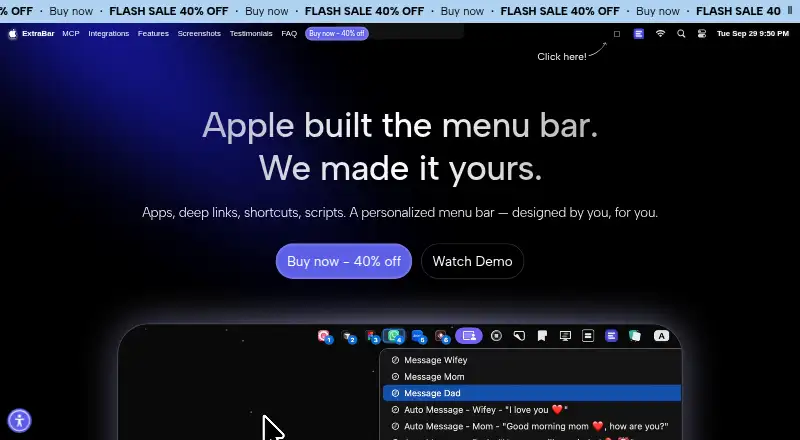
ExtraBar is a customizable macOS menu bar for opening apps, deep links, and custom actions. It can appear as a menu bar, floating bar, collapsed bar, notch display, or hide-and-show bar. Actions can open or quit apps, run scripts, launch macOS Shortcuts, open deep links, make API calls, and simulate keyboard shortcuts. You can group custom menu items and assign shortcuts. Examples include Raycast, Keyboard Maestro, Obsidian, Notion, Figma, Apple Shortcuts, and Zoom. Its bundled MCP server connects with Claude Desktop, Claude Code, Codex and ChatGPT, Cursor, VS Code, and Raycast. AI-created scripts, API calls, and keyboard-shortcut actions require native approval, with separate confirmation for destructive changes. ExtraBar works offline, stores configuration locally, and collects no app analytics or telemetry. It requires macOS 12.4 or later on Intel or Apple Silicon Macs.
Good
- Multiple menu, floating, collapsed, and notch modes
- Runs scripts, Shortcuts, API calls, and deep links
- Supports custom groups and keyboard shortcuts
- Works offline with local configuration
- Supports Intel and Apple Silicon Macs
Watch out
- macOS 12.4 or later required
- No free trial
- Cannot hide or rearrange menu items
- Internet required for license activation
Who it suits
It suits designers, developers, managers, and power users who want configurable Mac shortcuts and integrations. It is for people comfortable with one-time license purchases rather than subscriptions.
Verdict
ExtraBar centralizes many Mac actions and offers local, offline operation with AI approval controls. Check the macOS requirement and one-time license terms before choosing a plan.
Plans and prices
From ExtraBar's own pricing page, checked 8 Oct 2026.
| Plan | Price | What it gives you |
|---|---|---|
| One Year License | €14.99, paid once | 1 Mac · 1 year access · 1 year of updates · 14-day money-back guarantee |
| Lifetime Access | €23.99, paid once | 1 Mac · lifetime access · 1 year of updates · 14-day money-back guarantee |
| Forever Edition | €59.99, paid once | Up to 5 Macs · forever access · forever updates · all future app versions · 14-day money-back guarantee |
The facts
Each one read from ExtraBar's own pages, with the date it was checked.
What it does
- Accessibility
- Accessibility access is optional for enhanced keyboard navigation and is not required for basic functionality.checked 8 Oct 2026
- Actions
- Actions include opening and quitting apps, running scripts, opening deep links, running macOS Shortcuts, making API calls, and simulating keyboard shortcuts.checked 8 Oct 2026
- AI assistant support
- The bundled MCP server supports connections to Claude Desktop, Claude Code, Codex and ChatGPT, Cursor, VS Code, and Raycast.checked 8 Oct 2026
- AI safety controls
- AI-created script, API Call, and keyboard-shortcut actions require native approval before they can run, and destructive changes require separate confirmation.checked 8 Oct 2026
- Display modes
- The site lists menu bar, floating bar, collapsed, notch, and hide-and-show display modes.checked 8 Oct 2026
- DockFlow integration
- ExtraBar can show DockFlow presets and switch presets when the granted local connection permits it; the integration is marked beta.checked 8 Oct 2026
- Integrations
- The site showcases integrations or deep-link examples for Raycast, Keyboard Maestro, Obsidian, Notion, Figma, Apple Shortcuts, Zoom, and other apps.checked 8 Oct 2026
- License and updates
- The FAQ says there is no subscription and the app keeps working on versions released during the included update window; continued update access can be extended separately.checked 8 Oct 2026
- Local data and offline use
- The FAQ says ExtraBar works offline, collects no app analytics or telemetry, and stores its configuration locally on the Mac; internet is required for license activation.checked 8 Oct 2026
- Product
- ExtraBar is a customizable macOS menu bar for quick access to apps, deep links, and custom actions.checked 8 Oct 2026
- Support
- The site lists [email protected] as its support contact.checked 8 Oct 2026
- Target users
- The site names designers, developers, managers, and power users as audiences for ExtraBar.checked 8 Oct 2026
The company
- Headquarters
- Sofia, Bulgariachecked 28 Sep 2026
Where it runs
- macOS requirement
- Installation requires macOS 12.4 or later and supports Intel and Apple Silicon Macs.checked 8 Oct 2026
Money
- Trial and refund
- ExtraBar has no free trial and offers a 14-day money-back guarantee.checked 8 Oct 2026