
Exact-Cut
Exact-Cut is design-and-cut software for making logos, shapes, lettering, pinstriping, and vinyl or card projects.
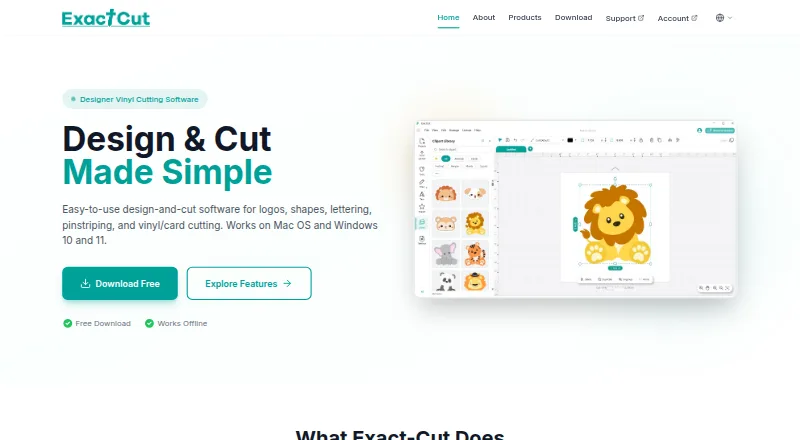
What Exact-Cut is
Exact-Cut is design-and-cut software for making logos, shapes, lettering, pinstriping, and vinyl or card projects. Drawing tools include shape welding and a freestyle pen with automatic smoothing. Contour tools create outlines around objects, shapes, and text, with controls for offset, holes, insets, and contour bleed. The software supports more than 100 materials, including vinyl, cardstock, heat transfer material, paper, fabric, leather, felt, and cork. Its free clipart library includes project shapes and ready-to-cut box templates. Cutter connections include wireless Auto-Connectivity, USB, and U-Disk; the site also mentions smartphone wireless use. Exact-Cut works fully offline and does not need an internet connection. It is free to download and use with supported cutters, but is included only with supported cutter models. The listed system requirements are Windows 10 or later or macOS 10.16 Catalina or later, with at least 4GB RAM and 500MB of disk space. The maker is Jinan Eternal Software Technology Ltd, based in Jinan, Shandong Province, China.
Good
- Works fully offline.
- Supports more than 100 materials.
- Includes a free clipart library and box templates.
- Offers USB, wireless, and U-Disk connections.
Watch out
- Included only with supported cutter models.
- Requires Windows 10 or later or macOS 10.16 or later.
- Requires at least 4GB RAM and 500MB disk space.
Who it suits
Exact-Cut suits people creating vinyl or card designs for cutting, including lettering and vehicle graphics. It is relevant to users with a supported cutter and a Windows or macOS computer meeting the listed requirements.
Verdict
Exact-Cut offers offline design and cutting tools across a broad range of materials. Its main constraint is hardware compatibility: it is free to use only with supported cutters.
Plans and prices
From Exact-Cut's own pricing page, checked 28 Sep 2026.
| Plan | Price | What it gives you |
|---|---|---|
| Exact-Cut | Free | Free to download and use with supported cutters |
| Free | Free | Free download/use · supported cutters only |
The facts
Each one read from Exact-Cut's own pages, with the date it was checked.
What it does
- Activation and validation
- The EULA allows activation, periodic validation and license monitoring, and says failure of required validation can suspend use.checked 15 Oct 2026
- Automatic registration marks
- Its ARMS feature is intended to align printed artwork for contour cutting.checked 15 Oct 2026
- Connectivity
- Supported cutter workflows include wireless Auto-Connectivity, USB and U-Disk transfer, with smartphone wireless control mentioned.checked 15 Oct 2026
- Contour cutting
- The contour tools create outlines around objects, shapes, and text, with offset adjustment, holes and inset options, and contour bleed.checked 28 Sep 2026
- Contour tools
- Contour generation includes adjustable offsets, holes, insets and bleed.checked 15 Oct 2026
- Cutting engine
- An optimized engine sends designs for cutting signs, banners, vehicle graphics, stencils, boxes and crafts.checked 15 Oct 2026
- Design library
- Offline resources include clipart, project shapes and ready-to-cut box templates with fold lines.checked 15 Oct 2026
- Drawing tools
- The software provides shape welding and a smoothed freehand pen tool.checked 15 Oct 2026
- File formats
- The VEVOR product page says the associated workflow imports and exports PNG, JPG, SVG and TIF files.checked 15 Oct 2026
- Independent usability assessment
- A Spanish review found Exact Cut less intuitive for beginners than Cricut Design Space but offering more control after learning it.checked 15 Oct 2026
- Installation licensing
- VEVOR’s manual requires registering an account and entering a PSN code from the machine’s accessory box before downloading Exact-Cut.checked 15 Oct 2026
- Licence model
- Eternal’s EULA says the software is licensed rather than sold, with intellectual-property rights retained by the licensor.checked 15 Oct 2026
- Licence restrictions
- The EULA prohibits copying beyond permitted terms, modification, reverse engineering and circumvention of activation.checked 15 Oct 2026
- Limit: basic design capability
- Reddit users describe the bundled Exact Cut editor as very basic or limited compared with Cricut Design Space.checked 15 Oct 2026
- Limit: communication failures
- A Reddit report described Windows 10 Exact-Cut jobs stopping after seconds and leaving the cutter stalled while USB connections were tried.checked 15 Oct 2026
- Limit: interface and tutorials
- ShopAbunda reviewers criticized the interface, weak beginner tutorials, language barriers and import errors.checked 15 Oct 2026
- Limit: missing repeat cutting
- A Smart1 user reported that ExactCut lacked a repeat-cut or multiple-copy function, requiring separate sends for each copy.checked 15 Oct 2026
- Limit: print-and-cut calibration
- A Reddit user reported poor ARMS print-and-cut results and undocumented calibration controls.checked 15 Oct 2026
Where it runs
- Android and iOS app
- The Smart1 manual says Android and iOS versions share the same interface and are installed through a direct download link or QR code.checked 15 Oct 2026
- macOS requirements
- macOS 10.16 Catalina or later, at least 4 GB RAM and 500 MB of disk space are required.checked 15 Oct 2026
The company
- Company background
- Eternal describes itself as a Jinan-based software company supplying cutting software internationally through equipment manufacturers and channels.checked 15 Oct 2026
- Company experience claim
- Exact-Cut’s site says its founders have more than 30 years of experience developing software for graphics, signmaking, digital-print and CNC industries.checked 15 Oct 2026
- Headquarters
- Eternal lists its office at J-Plaza Industry South Road in Jinan, Shandong, China.checked 15 Oct 2026
- Maker
- The maker is Jinan Eternal Software Technology Ltd, also identified in Chinese as 济南伊特诺软件科技有限责任公司.checked 15 Oct 2026
The full review of Exact-Cut
Overview
Exact-Cut is software for preparing designs and cut jobs for supported cutters, aimed at sign makers and craft users working with materials such as vinyl, card, fabric, or leather. Its strongest case is a no-cost, offline workflow with flexible drawing and contour tools; the catch is that access depends on owning a supported cutter.
It covers logos, lettering, pinstriping, shapes, and vehicle graphics, with cutting output for plotters. Support requests go through the Support Center.
For a wider look at this category, see our Sign Design Software list.
Key features
Drawing and contours
Shape welding and a freestyle pen with automatic smoothing support custom artwork, while contour tools can outline objects, shapes, and text. Offset adjustment, holes, insets, and contour bleed give users control over cut lines; that is useful when artwork needs a more tailored edge than a simple outline.
Materials and project assets
Support for more than 100 materials spans vinyl, cardstock, heat transfer material, paper, fabric, leather, felt, and cork. A free clipart library adds project shapes and ready-to-cut box templates, making the software more useful for users who want a starting point as well as those drawing from scratch.
Connections and offline use
Exact-Cut works fully offline. Supported cutter connections include wireless Auto-Connectivity, USB, and U-Disk, and smartphone wireless use is also mentioned. This combination suits a workshop where internet access is unreliable, though cutter compatibility remains the deciding constraint.
Pricing
Exact-Cut costs nothing. The free plan is free to download and use with supported cutters, with no free trial because the software is already free under that condition. There are no paid tiers or stated seat limits or quotas to weigh, but the included cutter models determine who can actually use it.
Platforms
Exact-Cut runs on Windows 10/11 and macOS 10.16 or later. The download requirements specify at least 4GB RAM and 500MB of disk space on either platform. Check that an existing computer meets those minimums and that the cutter is supported before choosing the software.
Who it's for
Exact-Cut is a practical fit for owners of supported cutters who need offline design and cut tools across varied materials, particularly for lettering, vinyl work, or vehicle graphics. It is a poor fit for anyone whose cutter is not supported, regardless of the appeal of the free plan.
Pros and cons
- Pro: Free use with supported cutters keeps software cost at no cost.
- Pro: Offline operation and USB, U-Disk, and wireless connection options suit workspaces that do not rely on an internet connection.
- Pro: Broad material support and adjustable contour controls accommodate more than basic vinyl lettering.
- Con: Use is tied to supported cutter models, so users cannot assume it will work with a cutter they already own.
- Con: The stated minimum of 4GB RAM and 500MB disk space may rule out older or constrained computers.
Alternatives
LED Wizard is a freemium option for readers who prefer a web or Windows platform. SignCut Draw is another free option for Windows users.
SignCut Pro 2 is worth considering for users seeking a paid Mac or Windows alternative with a free trial. SignMaster is a paid Windows option with a free trial. VinylMaster is also a paid Windows option with a free trial.
WrapStudio AI offers a freemium web option. Easy Cut Studio is a paid Mac and Windows alternative with a free trial. Sign Wizard Pro is a paid option for Mac and Windows.
Verdict
Choose Exact-Cut if you own a supported cutter and want free, offline design and cutting across a wide range of materials. Its drawing, contour, and connection options make it a capable match for that setup; look elsewhere if your cutter is not supported or you need software that is not tied to specific hardware.
Getting started
- Visit https://www.exact-cut.com/ to access Exact-Cut.
- Check that your cutter is a supported model.
- Use a Windows 10 or later computer or macOS 10.16 Catalina or later with at least 4GB RAM and 500MB disk space.
- Download and use the software with a supported cutter.
- Connect the cutter using wireless Auto-Connectivity, USB, or U-Disk.
Limits worth knowing
Exact-Cut is free to download and use, but only with supported cutter models. The listed system requirements are Windows 10 or later or macOS 10.16 Catalina or later, 4GB RAM minimum, and 500MB disk space.
Questions
Is Exact-Cut free?
Yes. The Exact-Cut plan costs nothing and is free to download and use with supported cutters.
Which platforms does it support?
It supports Windows 10/11 and macOS 10.16 or later.
Does it work offline?
Yes. Exact-Cut works fully offline and does not require an internet connection.
Which materials can it cut?
It supports more than 100 materials, including vinyl, cardstock, heat transfer material, paper, fabric, leather, felt, and cork.
Which cutter connections are supported?
Listed connections include wireless Auto-Connectivity, USB, and U-Disk. The site also mentions smartphone wireless use.
Who makes Exact-Cut?
The maker is Jinan Eternal Software Technology Ltd, based in Jinan, Shandong Province, China.
Alternatives to Exact-Cut
- 1
LED Wizard
Free planWebWindows6.8From $299 a year - 2
SignMaster
Free planWindows6.6Free plan - 3
MacSign
macOSWindows6.5$499 one-time - 4
WrapStudio AI
Free planWeb6.5$19.99 one-time - 5
Easy Cut Studio
macOSWindows6.3$59.95 one-time - 6
SignCut Pro 2
macOSWindows6.3From $59 a year