Epson Label Editor
Epson Label Editor is desktop software for designing and printing labels with compatible Epson LabelWorks printers.
What Epson Label Editor is
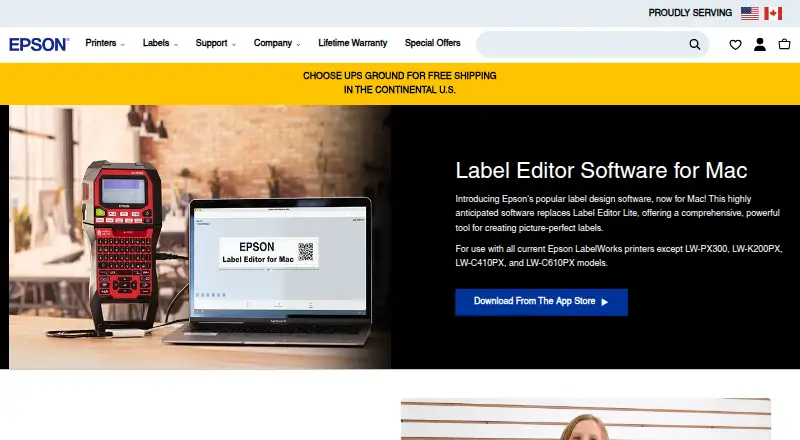
Epson Label Editor is desktop software for designing and printing labels with compatible Epson LabelWorks printers. The Mac version includes hundreds of templates for industry-specific labels and more than 1,000 industry symbols. Designs can combine symbols, frames, images, illustrations, mixed-length labels, tables up to 5 rows by 5 columns, and sequential numbering. Users can import images, logos, and other graphics, or load batch data from Microsoft Excel in CSV or TXT format. Supported barcode and code formats include QR Code, DataMatrix, EAN-8, EAN-13, CODE39, CODE128, UPC-A, UPC-E, NW-7, ITF, and GS1-128. Labels print over USB or wirelessly, although wireless printing is limited to the LW-PX800, LW-Z5010PX, and LW-Z5000PX. The Mac product page lists compatible models and excludes several others, including LW-PX300 and LW-K200PX. The App Store listing requires macOS 12.5 or later and says no driver installation is needed for printer connection. The software is free to download with unlimited licenses.
Good
- Free download with unlimited licenses.
- Includes hundreds of industry-specific templates.
- Supports more than 1,000 industry symbols.
- Imports Excel batch files in CSV or TXT format.
- Supports USB printing and selected wireless printers.
Watch out
- Wireless printing is limited to three listed models.
- Mac product page excludes LW-PX300 and LW-K200PX.
- Mac App Store listing requires macOS 12.5 or later.
Who it suits
It suits Mac or Windows users designing labels for compatible Epson LabelWorks printers, especially when they need templates, codes, or spreadsheet batch imports. Check printer compatibility and the macOS requirement before choosing it.
Verdict
Epson Label Editor offers label layout tools, batch imports, and broad code support at no charge. Printer compatibility and wireless model limits are important to confirm first.
Plans and prices
From Epson Label Editor's own pricing page, checked 7 Oct 2026.
| Plan | Price | What it gives you |
|---|---|---|
| Epson Label Editor for Mac | Free | Free download · unlimited licenses |
The facts
Each one read from Epson Label Editor's own pages, with the date it was checked.
What it does
- Batch imports
- The software can import batch files from Microsoft Excel in CSV or TXT format.checked 7 Oct 2026
- Codes
- Supported barcode and code formats include QR Code, DataMatrix, EAN-8, EAN-13, CODE39, CODE128, UPC-A, UPC-E, NW-7, ITF, and GS1-128.checked 7 Oct 2026
- Design tools
- The Mac app supports symbols, frames, images, illustrations, mixed-length labels, tables up to 5 rows by 5 columns, and sequential numbering.checked 7 Oct 2026
- Images
- Users can import images, logos, and other graphics into labels.checked 7 Oct 2026
- Printer compatibility
- The Mac product page excludes LW-PX300, LW-K200PX, LW-C410PX, and LW-C610PX; its listed compatible models include LW-PX400, LW-PX700, LW-K740PX, LW-PX750, LW-PX800, LW-PX900, LW-Z5000PX, and LW-Z5010PX.checked 7 Oct 2026
- Printer connection
- The App Store listing says no driver installation is required for printer connection.checked 7 Oct 2026
- Printing
- Labels can be printed wirelessly or over USB; wireless printing is available only on the LW-PX800, LW-Z5010PX, and LW-Z5000PX.checked 7 Oct 2026
- Privacy disclosure
- The developer indicates that usage data may be collected for analytics and not linked to the user; Apple says this information has not been verified by Apple.checked 7 Oct 2026
- Purpose
- Epson Label Editor is label design software for Mac that lets users design and print labels with compatible Epson LabelWorks printers.checked 7 Oct 2026
- Support
- Epson LabelWorks lists phone support at +1 (800) 458-3430, Monday through Friday, 8 am to 4 pm CST.checked 7 Oct 2026
- Templates and symbols
- The Mac software includes hundreds of templates for industry-specific labels and more than 1,000 industry symbols.checked 7 Oct 2026
Where it runs
- macOS requirement
- The App Store listing requires macOS 12.5 or later.checked 7 Oct 2026
The company
- Maker background
- Epson LabelWorks says it serves the United States and Canada and that Seiko Epson acquired K-SUN Corporation in 2014; K-SUN began serving the industrial label printing market in 1978.checked 7 Oct 2026
Alternatives to Epson Label Editor
- 1
Brother P-touch Editor
Free planAndroidiOSAPImacOS7.4Free plan - 2

BarTender
AndroidiOSWebAPI7.2From $199 a year - 3

DYMO Connect
iOSWebAPImacOS6.6 - 4

Label LIVE
macOSWindows6.5From $19.99 a month - 5

Labeljoy
Windows6.4From $14.90 a month - 6

Avery Design & Print
Free planWeb6.3Free plan