EngView Packaging Suite
EngView Packaging Suite is CAD/CAM software for designing and producing boxes and POP/POS displays.
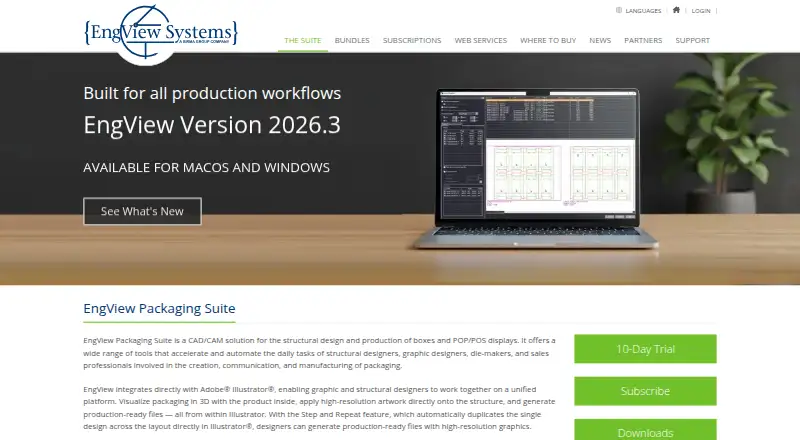
What EngView Packaging Suite is
EngView Packaging Suite is CAD/CAM software for designing and producing boxes and POP/POS displays. It supports a workflow from concept and dieline creation through 3D visualization and production output, with more than 2,500 ready-to-use packaging standards, including full ECMA and FEFCO codes. Its Adobe Illustrator integration supports applying artwork, viewing packaging in 3D and generating production-ready files. The 3D Presenter can create 3D PDF and web3D outputs with artwork and finishing effects. For production, Layout Optimizer arranges designs on sheets to reduce waste and can nest multiple one-ups or artworks. The CAM module works with cutting plotters, lasers and waterjets, finding tool paths intended to reduce cutting time. An API lets organizations integrate parametric design technology into web-to-print platforms, packaging e-shops and custom applications.
Good
- Includes more than 2,500 packaging standards.
- Connects with Adobe Illustrator for artwork and production files.
- Layout Optimizer arranges designs to reduce sheet waste.
- CAM supports plotters, lasers and waterjets.
Watch out
- No free plan; the trial lasts 10 days.
- Lite costs €760 a year.
- Trial access requires registration and contact with a local representative.
Who it suits
EngView Packaging Suite suits packaging teams that need structural design, 3D presentation and production preparation. Its API may also suit teams integrating packaging design into web-to-print or custom applications.
Verdict
EngView Packaging Suite covers design through production output, with tools for 3D presentation, layout optimization and CAM. Its annual plans start at 760.00 EUR, and the trial requires registration and representative contact.
Plans and prices
From EngView Packaging Suite's own pricing page, checked 30 Sep 2026.
| Plan | Price | What it gives you |
|---|---|---|
| Lite | €760 a year | 2500+ parametric templates · 3D visualization · Adobe Illustrator integration · Annual Subscription Only |
| Standard | €2,080 | Advanced parametric drafting · Master Canvas · production optimization tools · Yearly Subscription Plan paid annually (save 2 monthly fees) |
| Professional | €3,620 | End-to-end solution · optimization tools · automation · Yearly Subscription Plan paid annually (save 2 monthly fees) |
| Custom | Priced on request | Configuration tailored to workflow, equipment, and team expertise · Contact for a tailored plan |
The facts
Each one read from EngView Packaging Suite's own pages, with the date it was checked.
What it does
- 3D presentation
- The 3D Presenter supports realistic visualization with artwork and finishing effects and can generate 3D PDF and web3D outputs.checked 30 Sep 2026
- Adobe Illustrator
- EngView integrates with Adobe Illustrator for applying artwork, viewing packaging in 3D, and generating production-ready files.checked 30 Sep 2026
- CAM
- The CAM module supports cutting plotters, lasers, and waterjets and finds tool paths intended to minimize cutting time.checked 30 Sep 2026
- Design library
- The product includes over 2,500 ready-to-use packaging standards, including full ECMA and FEFCO codes.checked 30 Sep 2026
- Operating systems
- The downloads page links to system requirements and a macOS and Illustrator compatibility document.checked 30 Sep 2026
- Product
- EngView Packaging Suite is CAD/CAM software for structural design and production of boxes and POP/POS displays.checked 30 Sep 2026
- Production layout
- Layout Optimizer places designs on sheets to minimize waste and supports nesting multiple one-ups or artworks on a sheet.checked 30 Sep 2026
- Security
- The privacy policy says website data is protected by SSL and signup passwords are encrypted.checked 30 Sep 2026
- Support
- The downloads page lists regional support contacts for Europe, Asia, Africa, Australia, DACH, North America, and South America.checked 30 Sep 2026
- Web integration
- EngView offers an API for integrating its parametric design technology into web-to-print platforms, packaging e-shops, and custom applications.checked 30 Sep 2026
- Workflow
- The suite supports packaging work from concept and dieline creation through 3D visualization and production output.checked 30 Sep 2026
The company
- Company history
- EngView Systems says it was formed in 1999 and specializes in packaging CAD/CAM systems and solutions for measurement and aluminum extrusion industries.checked 30 Sep 2026
- Founded
- 1999checked 23 Sep 2026
- Headquarters
- Sofia, Bulgariachecked 23 Sep 2026
Money
- Trial
- The maker offers a 10-day free trial, with download instructions sent after registration and contact with a local representative.checked 30 Sep 2026
The full review of EngView Packaging Suite
Overview
EngView Packaging Suite is CAD/CAM software for designing boxes and POP/POS displays, from initial concepts to production output. It suits packaging teams that need structural design, artwork presentation and manufacturing tools in one suite. Its breadth is the draw; the annual subscription prices and representative-led trial make it a considered purchase rather than a casual starting point.
Key features
The suite spans dieline creation, 3D visualization and production output, with a dieline editor, import and preflight checks. More than 2,500 ready-to-use packaging standards, including full ECMA and FEFCO codes, give designers a substantial starting library. That breadth is useful for recurring structural packaging work, though the library alone does not replace the need to shape designs for a particular job.
Adobe Illustrator integration connects artwork application with 3D viewing and production-ready file generation. The 3D Presenter adds artwork and finishing effects to realistic visualizations, then exports 3D PDF or web3D presentations. These tools help teams communicate how a package should look before production, not just how its dieline is constructed.
For manufacturing, Layout Optimizer arranges designs on sheets to reduce waste and can nest multiple one-ups or artworks. The CAM module supports cutting plotters, lasers and waterjets, with tool paths intended to minimize cutting time. Together, these features make the suite more compelling for operations that need design and output connected than for users who only need a basic mockup.
An API extends EngView’s parametric design technology into web-to-print platforms, packaging e-shops and custom applications. That is a meaningful option for teams building packaging workflows into other software, but it is not a reason to choose the suite if all you need is standalone dieline creation.
Pricing
EngView is paid software with no free plan. Lite costs €760 a year, billed as an annual subscription only. It includes 2,500+ parametric templates, 3D visualization and Adobe Illustrator integration, making it the entry point for teams that need core design and presentation without the more advanced drafting and production tools.
Standard costs €2,080 a year, paid annually under a yearly subscription plan that saves two monthly fees. It adds advanced parametric drafting, Master Canvas and production optimization tools. This is the more relevant tier for teams that need optimization in their working process, not just a template library and 3D view.
Professional costs €3,620 a year, also paid annually with two monthly fees saved. It is described as an end-to-end solution with optimization tools and automation, so it is aimed at workflows that need the suite’s broader capabilities. Custom pricing is available for a configuration tailored to workflow, equipment and team expertise. No seat or usage quotas are stated for these plans.
A 10-day free trial is available, but obtaining download instructions requires registration and contact with a local representative. That gives prospective buyers a way to assess the software, though the process is less immediate than a self-serve download.
Platforms
EngView lists API, macOS, web and Windows platforms. Its downloads page links to system requirements and a macOS and Illustrator compatibility document, which is useful for checking fit before a team commits.
Who it's for
EngView is best suited to packaging designers and production teams working across structural design, artwork review, layout optimization and CAM output. Its API also makes it relevant to businesses embedding parametric packaging design in web-to-print or e-commerce applications. It is less persuasive for someone seeking only occasional dielines or a free way to make a small number of mockups.
Pros and cons
- Pros: A broad workflow covers design through production, so teams can connect dielines, presentation and manufacturing tasks in one suite.
- Pros: More than 2,500 standards, including full ECMA and FEFCO codes, provide a deep template base for packaging work.
- Pros: Layout optimization and CAM support address sheet waste and cutting workflows, rather than stopping at visual design.
- Cons: The lowest tier still costs €760 a year, and there is no free plan for occasional users to rely on.
- Cons: The 10-day trial requires registration and contact with a local representative, adding friction to evaluation.
- Cons: Advanced drafting, production optimization and automation sit in higher-priced tiers, so the Lite plan may not cover teams seeking the suite’s full production depth.
Alternatives
Packly is the more approachable starting point for web-based dielines and 3D mockups: it has a free plan capped at three dieline templates and three mockups per month, while paid tiers start with Light+ at €37 a month. Choose it when a limited free allowance or lower-priced monthly entry matters more than EngView’s integrated CAD/CAM workflow.
Packaging Dieline is worth considering for a free web-based option with unlimited exports and commercial use; its free plan covers four of 18 styles and exports PDF, AI, SVG and DXF files. Pick it when those formats and a zero-cost start are sufficient, rather than EngView’s production optimization and CAM tools.
FinalPack offers a free starter plan with five basic models per month and interactive online 3D preview, but no PDF/DXF export or industrial rendering. It is a better fit when free online previews matter more than production-file output.
VPack is a paid alternative for readers comparing packaging software on Linux, macOS or Windows; licensing requires contacting ERPA.
Impact CAD is a paid macOS and Windows alternative with pricing and demonstrations handled through Arden or a local reseller.
Picador is a paid macOS and Windows option with single-user or multi-user licensing.
iC3D Suite is a paid alternative for packaging types on Mac or Windows, with floating or concurrent-user licensing and a free trial.
KASEMAKE is another paid option for Windows.
Browse the Packaging Design Software category for more choices.
Verdict
Choose EngView Packaging Suite if your team needs structural packaging design joined to 3D presentation, layout optimization and CAM output, with an API available for custom integrations. Its extensive standards library and production-oriented breadth justify considering it for established packaging workflows. Look elsewhere if you need a free or inexpensive entry point, a frictionless trial, or only occasional dieline and mockup work.
Alternatives to EngView Packaging Suite
- 1
ZebraDesigner
Free planAndroidiOSWebWindows8.2$345 one-time - 2

MarkMagic
WebAPILinuxmacOS7.4From $2,585 a year - 3

BarTender
AndroidiOSWebAPI7.2From $199 a year - 4
Packdroid
AndroidiOSWebAPI6.7From $9 a month - 5

Packly
Free planWeb6.7From €379 a year - 6
Packaging Dieline
Free planWebAPI6.6From $19 a month