eMonitor
eMonitor provides workforce insights into productivity, attendance, application usage, and compliance through a consent-based monitoring framework.
What eMonitor is
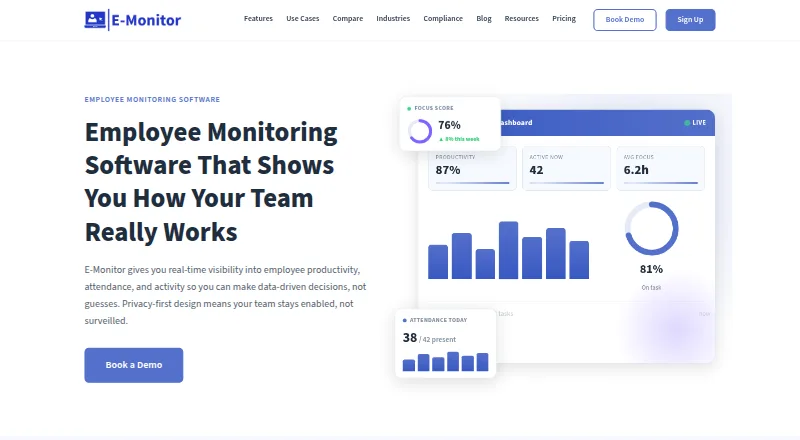
eMonitor provides workforce insights into productivity, attendance, application usage, and compliance through a consent-based monitoring framework. It tracks work time, breaks, overtime, clock-ins and outs, absences, and shifts. Productivity scores draw on application usage and active time, with customizable categories for productive and unproductive activity. Screenshot monitoring supports scheduled captures, options to blur sensitive content, and role-based access. Dashboards, scheduled reports, custom dashboard building, and real-time alerts for policy violations or unusual activity help teams review monitoring data. The maker says monitoring runs on work devices during working hours, employees can see their own data, and employees are notified before monitoring starts. The agent can be deployed to Windows, macOS, Linux, or Chromebook devices. The service is cloud-hosted by default; US, EU, and India data residency is offered on Professional and Enterprise, while on-premises deployment is available for Enterprise customers with specific compliance requirements. There is no free plan, and a 7-day trial is listed. The maker says it is not a dedicated forensic data-loss-prevention platform and is not aimed at deskless workforces without computers.
Good
- Tracks attendance, shifts, and work time.
- Screenshot captures can blur sensitive content.
- Employees can view their own data.
- Offers data-residency options on Professional and Enterprise.
Watch out
- No free plan is listed.
- Starter supports up to 25 users and two teams.
- Not designed for deskless workforces without computers.
- Not a dedicated forensic data-loss-prevention platform.
Who it suits
It suits organizations monitoring computer-based work, attendance, app usage, and compliance, particularly where employees need visibility into their own monitoring data. The maker says it is not aimed at deskless workforces without computers.
Verdict
eMonitor combines time tracking, productivity categorization, screenshots, reporting, and alerts. Consider its stated workforce limitations and the plan-specific differences in retention, integrations, and deployment when assessing fit.
Plans and prices
From eMonitor's own pricing page, checked 29 Sep 2026.
| Plan | Price | What it gives you |
|---|---|---|
| Starter | $3.90 a month | Up to 25 users · 2 teams · 7-day data retention · time tracking and attendance · app and website tracking · productivity classifications · Billed annually. $5.90/user/month billed quarterly. |
| Professional | $6.90 a month | Unlimited users · up to 10 teams · 90-day data retention · screenshots · activity logs · real-time alerts · custom dashboards · Billed annually. $10.90/user/month billed quarterly. |
| Enterprise | $13.90 a month | Unlimited users · up to 50 teams · custom data retention · API access · SSO/SAML · dedicated support · dedicated account manager · Billed annually. $22.90/user/month billed quarterly. |
The facts
Each one read from eMonitor's own pages, with the date it was checked.
What it does
- Alerts
- Custom rules can send real-time alerts for policy violations, unusual activity, or security events.checked 29 Sep 2026
- Deployment
- The homepage says the agent can be deployed to Windows, macOS, Linux, or Chromebook devices through MDM or a self-install link, with employees notified before monitoring starts.checked 29 Sep 2026
- Integrations
- The pricing page lists HRIS, Slack, and Jira integrations on Professional, and Azure SSO integration on Enterprise.checked 29 Sep 2026
- Limits and fit
- The maker says eMonitor is not a dedicated forensic data-loss-prevention platform and is not aimed at deskless workforces without computers.checked 29 Sep 2026
- Privacy
- The maker says monitoring runs on work devices during working hours and employees can see their own data.checked 29 Sep 2026
- Productivity analytics
- It scores productivity from application usage and active time using customizable productive and unproductive categories.checked 29 Sep 2026
- Purpose
- eMonitor provides workforce insights on productivity, attendance, application usage, and compliance through a transparent, consent-based monitoring framework.checked 29 Sep 2026
- Reporting
- The platform offers dashboards, scheduled report delivery, custom dashboard building, and role-based data access.checked 29 Sep 2026
- Screenshots
- Screenshot monitoring supports configurable periodic captures, blur options for sensitive content, and role-based access to captured images.checked 29 Sep 2026
- Security
- The maker says data is encrypted at rest and in transit with AES-256, and cites role-based access controls and regular third-party penetration testing.checked 29 Sep 2026
- Self-hosting and residency
- The homepage FAQ says the service is cloud-hosted by default, offers US, EU, and India data-residency options on Professional and Enterprise, and has on-prem deployment for Enterprise customers with specific compliance requirements.checked 29 Sep 2026
- Support
- The pricing page lists standard support on Starter, priority support on Professional, and phone support plus a dedicated account manager on Enterprise.checked 29 Sep 2026
- Time and attendance
- The platform tracks work time, breaks, overtime, clock-ins, clock-outs, absences, and shifts.checked 29 Sep 2026
The full review of eMonitor
eMonitor is workforce-monitoring software for computer-based teams that need attendance records, application activity, productivity scoring, and compliance oversight in one system. It is strongest for organizations that want configurable monitoring with employee visibility and privacy controls. It is a weaker fit for deskless workforces or specialist forensic data-loss prevention.
Overview
eMonitor combines work-time records with application and website tracking, productivity classifications, screenshots, dashboards, scheduled reports, and alert rules. Managers can define which applications count as productive or unproductive, while role-based permissions govern access to captured images and other data. That combination is practical when attendance and computer activity must be reviewed together instead of reconciled across separate products.
Monitoring is described as running on work devices during working hours, with employees notified before it starts and able to view their own data. The maker says information is encrypted at rest and in transit with AES-256, protected by role-based access controls, and subject to regular third-party penetration testing. Those measures support a transparent workforce program, but they do not make eMonitor a dedicated forensic data-loss-prevention platform.
Key features
Attendance and productivity
Clock-ins, clock-outs, breaks, overtime, absences, and shifts give managers a consolidated attendance record. Productivity scores use application usage and active time, with customizable productive and unproductive categories. Custom categories can better reflect different departments, although any score still represents monitored computer activity rather than a complete measure of contribution.
Screenshots and access control
Configurable periodic screenshots provide visual context for activity. Blur options help reduce exposure of sensitive content, and role-based access limits who can view images. These controls make screenshot monitoring more defensible for organizations that need evidence of work activity without unrestricted image access.
Reports and alerts
Dashboards, scheduled report delivery, custom dashboard building, and role-based data access support both routine management and controlled oversight. Custom rules can issue real-time alerts for policy violations, unusual activity, or security events, which is more actionable than relying only on retrospective reports.
Deployment and security posture
The agent can be deployed to Windows, macOS, Linux, or Chromebook devices through MDM or a self-install link. Cloud hosting is the default; Professional and Enterprise offer US, EU, and India residency choices, while Enterprise can be deployed on premises for specific compliance requirements. HRIS, Slack, and Jira integrations are on Professional, with Azure SSO on Enterprise.
Pricing
eMonitor is paid software with a 7-day trial and no free plan. Annual billing starts at $3.90/user/month; quarterly billing is shown at the higher rates below.
Starter — $3.90/user/month annually; $5.90/user/month quarterly
Starter supports up to 25 users and two teams, with seven-day data retention. It includes time tracking and attendance, app and website tracking, and productivity classifications, plus standard support. This is the sensible entry point for a small computer-based team that needs core monitoring, but the short retention window and lack of screenshots, alerts, dashboards, and listed integrations limit longer-term analysis.
Professional — $6.90/user/month annually; $10.90/user/month quarterly
Professional removes the user cap, allows up to 10 teams, and retains data for 90 days. Screenshots, activity logs, real-time alerts, and custom dashboards add operational depth, while HRIS, Slack, and Jira integrations and priority support suit growing organizations. It is the strongest general-purpose tier when managers need investigation and reporting rather than basic attendance alone.
Enterprise — $13.90/user/month annually; $22.90/user/month quarterly
Enterprise includes unlimited users, up to 50 teams, custom retention, API access, SSO/SAML, dedicated support, and a dedicated account manager. Azure SSO, on-premises deployment, and residency options address stricter identity, compliance, or deployment requirements. The premium is justified for larger or regulated organizations; smaller teams are unlikely to need its administrative scope.
Platforms
eMonitor supports API, Linux, macOS, self-hosted deployment, web, and Windows. The agent deployment description also includes Chromebook devices, with MDM or self-install distribution.
Who it's for
Choose eMonitor for computer-based organizations that need attendance, productivity categorization, screenshots, reporting, and policy alerts under one consent-oriented framework. Professional fits expanding teams needing integrations and 90-day history; Enterprise fits organizations requiring custom retention, SSO/SAML, API access, residency choices, or on-premises deployment. It is not aimed at deskless workforces without computers, and buyers seeking dedicated forensic data-loss prevention should look elsewhere.
Pros and cons
- Pro: Attendance, application use, productivity scoring, screenshots, reports, and alerts are combined in one platform.
- Pro: Employee notification, self-visibility, blur controls, and role-based access support a more transparent monitoring policy.
- Pro: Professional and Enterprise provide residency choices, while Enterprise adds on-premises deployment and identity controls.
- Con: Starter retains data for only seven days and is capped at 25 users and two teams.
- Con: Screenshots, alerts, custom dashboards, and integrations begin on Professional, increasing the cost of a fuller program.
- Con: The product does not target deskless work or specialist forensic data-loss prevention.
Alternatives
For a broader category browse, see Dark Web Monitoring Services. CyberGuard360 Deep Diver is the better choice when a free-forever plan with five dark-web prospect scans per month is sufficient. DARKX suits buyers wanting API and web access with a free tier of 15 credits per month and one domain, IP, or phone. Jsmon Dark Web Monitoring offers a no-card, one-time free trial with 1,500 lifetime credits and email alerts. PhishEye is a free option for monitoring one brand with a single typosquat scan and 30-day history. Dark Web ID, RiskProfiler KnyX, and Allure Security Dark Web Monitoring are paid alternatives. Symbol Cyber Threat Surveillance is a paid service with subscription-dependent daily internet-source searches.
Verdict
eMonitor is a strong choice for computer-based employers that want attendance and productivity oversight, configurable screenshots, reporting, and alerts with visible privacy safeguards. Choose Professional for the best balance of capability and scale, or Enterprise when retention, identity, residency, or on-premises requirements are central. Look elsewhere for deskless operations or dedicated forensic data-loss prevention.
Alternatives to eMonitor
- 1

CyberGuard360 Deep Diver
Free planWeb7.2From $79 a month - 2

DARKX
Free planWebAPI6.6From $21 a month - 3
Passguard
WebAPI6.3From €250 a month - 4
PhishEye
Free planWebAPI6.3Free plan - 5

DarkThreat
WebAPI6.2From $2,000 a year - 6

DarkWebSonar
WebAPI6.2From $49 a month