Embrowser
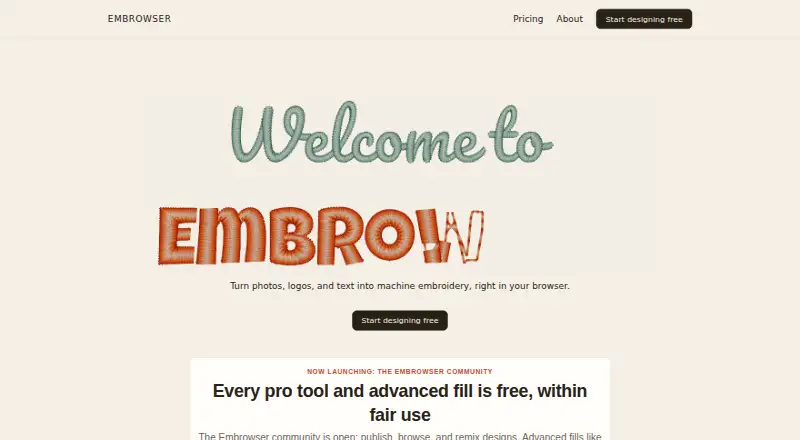
Embrowser is a browser-based tool for turning photos, logos, and text into machine embroidery designs.
What Embrowser is
Embrowser is a browser-based tool for turning photos, logos, and text into machine embroidery designs. Its editor includes path and node editing, freehand drawing, a knife tool, shape operations, and text that can follow curved paths. Image tracing converts photos into editable paths and stitches, and a 3D preview lets you inspect a design before stitching. It imports SVG and image files and exports embroidery designs in PES, DST, JEF, VP3, EXP, and U01 formats. The maker says machines that read these formats include most home and commercial machines. Embrowser runs without installation but requires an internet connection; the maker says it works on Windows, Mac, Linux, and tablets. Desktop and laptop browsers are best for editing, tablets suit viewing and simple edits, and phones are too small for the editor. Users can share and remix community designs. Free offers public view links; Hobby adds private folder sharing. Plans include Free, Hobby at $9.99 a month, and Hobby at $99.90 a year.
Good
- Traces images into editable paths and stitches.
- Previews designs in 3D before stitching.
- Exports six embroidery file formats.
- Community designs can be shared and remixed.
- Free plan includes two auto-traces per week.
Watch out
- Requires an internet connection.
- Phones are too small for the editor.
- Free plan limits saved designs to 10.
- Free plan limits files to 25 MB.
Who it suits
Embrowser suits people who want to create or adapt embroidery designs in a browser, including users who need image tracing or a 3D stitch preview. It is better suited to desktop and laptop editing than phone use.
Verdict
Embrowser combines drawing, image tracing, file conversion, and a 3D preview in a browser editor. Check its device, connection, and plan limits against your workflow before choosing a plan.
Plans and prices
From Embrowser's own pricing page, checked 8 Oct 2026.
| Plan | Price | What it gives you |
|---|---|---|
| Free | Free | 10 saved designs · 3 custom fonts · 200 MB storage · 2 image auto-traces/week · 25 MB per file · fair-use limits |
| Hobby (monthly) | $9.99 a month | 500 saved designs · 3 GB storage · 100 custom fonts · higher auto-tracing and advanced-fill limits · private folder sharing · 100 MB per file · $9.99/mo |
| Hobby (yearly) | $99.90 a year | 500 saved designs · 3 GB storage · 100 custom fonts · higher auto-tracing and advanced-fill limits · private folder sharing · 100 MB per file · $99.90/yr; 2 months free compared to monthly |
The facts
Each one read from Embrowser's own pages, with the date it was checked.
What it does
- Auto digitizing
- Image tracing can convert photos into editable paths and stitches; the Free plan includes 2 image auto-traces per week.checked 8 Oct 2026
- Commercial use
- The maker says original designs created in Embrowser may be used for personal or commercial projects, subject to its Terms of Service.checked 8 Oct 2026
- Design tools
- It includes path drawing and editing, node editing, a knife tool, freehand drawing, shape operations, and text that can follow curved paths.checked 8 Oct 2026
- File formats
- It supports embroidery files PES, DST, JEF, VP3, EXP, and U01, plus SVG and image imports, and exports to the six listed embroidery formats.checked 8 Oct 2026
- Privacy
- The privacy policy says Embrowser does not sell personal information and does not automatically scan customer content for advertising or profiling.checked 8 Oct 2026
- Purpose
- Embrowser turns photos, logos, and text into machine embroidery in a web browser.checked 8 Oct 2026
- Security
- The privacy policy says design files are stored in Cloudflare R2 with provider-managed encryption at rest and TLS in transit, and browser-to-service traffic uses HTTPS.checked 8 Oct 2026
- Sharing and community
- Users can publish, browse, like, comment on, and remix community designs; Free has public view links and Hobby adds private folder sharing with specific users.checked 8 Oct 2026
- Stitch preview
- The product provides a 3D preview of a design before stitching.checked 8 Oct 2026
- Support
- Users can contact support by email or in-app help resources, and Hobby users receive priority support.checked 8 Oct 2026
- Usage limits
- The FAQ lists per-design file size limits of 25 MB for Free and 100 MB for Hobby.checked 8 Oct 2026
Where it runs
- Device limitation
- The maker says the editor works best on desktop and laptop browsers, tablets are suitable for viewing and simple edits, and phones are too small for the editor.checked 8 Oct 2026
- Machine compatibility
- The maker says it works with machines that read PES, DST, JEF, VP3, EXP, or U01 files, covering most home and commercial machines.checked 8 Oct 2026
- Platform and connection
- Embrowser runs in a browser without installation and requires an internet connection; the maker says it works on Windows, Mac, Linux, and tablets.checked 8 Oct 2026
Alternatives to Embrowser
- 1
Boldbobbin
Free planiOSWebLinuxmacOS8.0From $21 a month - 2

mySewnet Embroidery
Free planAndroidiOSWebmacOS8.0Free plan - 3
Ink/Stitch
Free planOpen sourceWebExtensionLinuxmacOS7.5Free plan - 4
PEmbroider
Free planOpen sourceAPImacOSWindows7.1Free plan - 5

Embird
macOSWindows6.9$15 one-time - 6
StitchConsole
Free planWebLinuxmacOSWindows6.9From $19 a month