Ellie
Ellie is an AI email assistant that prepares reply drafts from email-thread context and learns a user’s tone, sign-offs, and writing patterns from sent mail.
What Ellie is
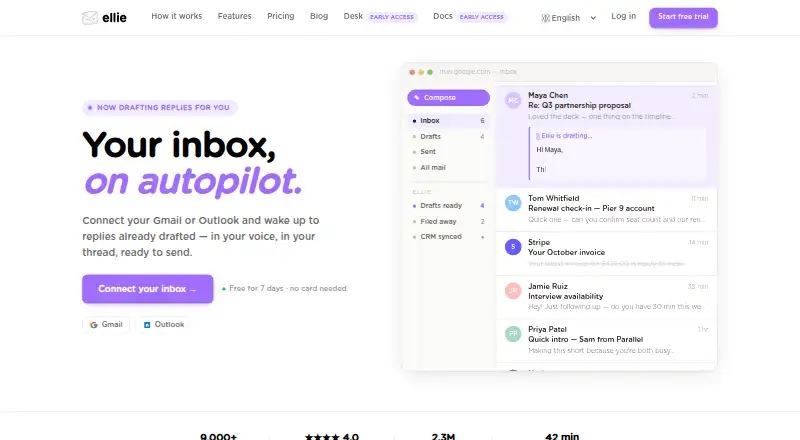
Ellie is an AI email assistant that prepares reply drafts from email-thread context and learns a user’s tone, sign-offs, and writing patterns from sent mail. With Gmail or Outlook connected, it can categorize incoming messages and save drafts for review; it never sends a message without the user reviewing and sending it. Users can add website addresses or upload documents such as PDFs and DOCX files to provide factual context. Roles let users set different personas, reference materials, and tones for different kinds of email. Ellie works on the web, through browser extensions, and on Windows, with extensions listed for Chrome, Firefox, and Microsoft Edge. A native Outlook desktop add-in is also available. The free plan allows 10 draft replies a day, one connected account, and one team seat, but has no auto-drafts. Email content is processed by OpenAI and/or Azure OpenAI; Ellie says it does not use email data to train general models.
Good
- Drafts use email thread context.
- Users review and send every message themselves.
- Roles support different personas, tones, and knowledge bases.
- Website links and documents can add factual context.
- Browser extensions and an Outlook desktop add-in are listed.
Watch out
- Free plan has no auto-drafts.
- Free plan is limited to 10 replies per day.
- Casual costs $19 a month.
Who it suits
Ellie suits people who want help drafting replies in Gmail or Outlook while retaining control over sending. Its roles and knowledge base can suit users handling different kinds of email.
Verdict
Ellie prepares contextual drafts while leaving the final sending decision to the user. The free tier has daily and account limits, while auto-drafting is listed with the Business plan.
Plans and prices
From Ellie's own pricing page, checked 30 Sep 2026.
| Plan | Price | What it gives you |
|---|---|---|
| Free | Free | 10 draft replies/day · no auto-drafts · 1 connected email account · 1 team seat |
| Casual | $19 a month | 25 replies/day · browser extension · 200 sent-email training examples · 1 connected account · $ 19 /monthly |
| Business | $39 a month | 100 replies/day · auto-draft · auto-categorise · 3 seats included · 1 connected account per user · $ 39 /monthly |
| Professional | $79 a month | Unlimited replies/day · up to 3 connected accounts per user · custom team seats · $ 79 /monthly |
The facts
Each one read from Ellie's own pages, with the date it was checked.
What it does
- Auto-drafts
- When connected to Gmail or Outlook, Ellie reads incoming emails, categorises them, and saves draft replies for review.checked 30 Sep 2026
- Calendar integration
- The optional Google Calendar integration is read-only and cannot create, modify, or delete events or send invitations.checked 30 Sep 2026
- Data processing
- Email content is processed by OpenAI and/or Azure OpenAI, and Ellie says it does not use email data to train general models.checked 30 Sep 2026
- Email clients
- Ellie supports connected Gmail or Outlook accounts and on-demand drafting in Gmail Web and Outlook Web.checked 30 Sep 2026
- Email support
- Ellie says its support team replies personally by email at [email protected].checked 30 Sep 2026
- Encryption
- Ellie states that data is encrypted in transit and at rest.checked 30 Sep 2026
- Google Tasks
- Ellie can create follow-up tasks in a Google Tasks list named Ellie when that integration is enabled.checked 30 Sep 2026
- Knowledge Base
- Users can add website URLs and upload PDF, TXT, DOCX, PPTX, or MD files for factual context.checked 30 Sep 2026
- Outlook add-in
- Ellie is available as a native Outlook desktop add-in through Microsoft AppSource.checked 30 Sep 2026
- Roles
- Roles provide different personas, knowledge bases, and tones for different types of email.checked 30 Sep 2026
- Security review
- Ellie says it completed a Google CASA Tier 2 security review and performs regular automated vulnerability scanning.checked 30 Sep 2026
- Voice learning
- Ellie learns tone, sign-offs, and writing patterns from sent mail.checked 30 Sep 2026
- What it does
- Ellie is an AI email assistant that drafts replies in your writing style using thread context.checked 30 Sep 2026
Where it runs
- Browser extensions
- The download page lists Chrome, Firefox, and Microsoft Edge extensions.checked 30 Sep 2026
- Human approval
- Ellie never sends an email without the user reviewing and sending it.checked 30 Sep 2026
The full review of Ellie
Ellie is an AI email assistant for Gmail and Outlook that builds reply drafts from thread context and your established writing style. It suits professionals who want personalization and reference material without surrendering control of the send action. Its strongest case is structured, review-first assistance; readers who need genuinely hands-off sending or very high volume should look elsewhere.
Overview
Ellie can draft replies on demand and, on its Business plan, read incoming messages, categorize them, and save drafts for review. Every message still requires your approval and send action, so it reduces composition work rather than removing accountability. Voice learning uses sent mail to recognize tone, sign-offs, and recurring writing patterns.
Its Knowledge Base accepts website URLs and PDF, TXT, DOCX, PPTX, or MD files. Roles combine different personas, knowledge bases, and tones, while tone controls and custom instructions let you steer individual drafts. This is useful for people writing in several professional voices or relying on approved reference material, although those capabilities reward deliberate setup.
Ellie supports connected Gmail and Outlook accounts, plus on-demand drafting in Gmail Web and Outlook Web. The optional Google Calendar connection is strictly read-only: it cannot create, edit, or delete events or send invitations. Google Tasks integration can create follow-up tasks in a list named Ellie. Ellie says it encrypts data in transit and at rest, completed a Google CASA Tier 2 security review, and runs regular automated vulnerability scans. Email content is processed by OpenAI and/or Azure OpenAI, and Ellie says it is not used to train general models.
Key features
- Contextual drafting: Thread-aware replies and learned writing patterns make the service more personal than a blank prompt, while mandatory review keeps errors from being sent automatically.
- Auto-drafts and categorization: Business can prepare drafts as messages arrive, a meaningful time saver for monitored inboxes; it remains limited by the plan's daily quota.
- Knowledge and roles: Uploaded files, URLs, and role-specific personas help separate customer, internal, or specialist correspondence.
- Client coverage: Chrome, Firefox, and Edge extensions cover browser workflows, and a native Outlook desktop add-in is distributed through Microsoft AppSource.
- Follow-up tools: Calendar is informational only, while Tasks can create follow-ups without changing calendar events.
Pricing
The free plan costs free and allows 10 draft replies per day, one connected email account, and one team seat. It has no auto-drafts, making it a sampler for occasional on-demand writing rather than an inbox automation plan. Ellie also offers a 7-day trial.
Casual costs $19 a month (billed $ 19 /monthly). It raises usage to 25 replies per day, adds the browser extension, and includes 200 sent-email training examples, but still covers only one connected account and does not include the Business auto-draft workflow. It fits an individual who wants more capacity and personalization.
Business costs $39 a month (billed $ 39 /monthly). It permits 100 replies per day, auto-drafts, auto-categorization, and three seats, with one connected account per user. This is the practical choice for a small team willing to review queued drafts.
Professional costs $79 a month (billed $ 79 /monthly). It removes the daily reply ceiling, supports up to three connected accounts per user, and offers custom team seats. Choose it for heavier individual or team usage; otherwise its additional capacity is difficult to justify over Business.
Platforms
Ellie is offered as a browser extension, web service, and Windows software. Extensions are listed for Chrome, Firefox, and Microsoft Edge. Gmail and Outlook are the supported connected mail providers, with browser drafting in both web clients and a native Outlook desktop add-in.
Who it's for
Choose Ellie if your work involves repeated replies, multiple tones, or organization-specific source material and you want a person to approve every send. Casual suits a solo writer with moderate volume; Business suits a small group that benefits from automatic draft queues; Professional is for users with several accounts or no daily quota tolerance. It is a weaker fit if you want calendar automation, unrestricted free usage, or fully autonomous sending.
Pros and cons
Pros
- Human-controlled sending: No email leaves without review and send action.
- Deep personalization: Sent-mail learning, roles, tone controls, custom instructions, and file or URL context can produce purpose-specific drafts.
- Clear team progression: Business includes three seats, while Professional supports custom seats and multiple accounts.
- Broad Outlook support: Browser workflows and a native desktop add-in cover more than webmail alone.
Cons
- Free limits are tight: Ten replies per day, one account, one seat, and no auto-drafts restrict the no-cost tier.
- Automation is paywalled: Auto-drafting and categorization begin at $39 per month.
- Calendar integration is passive: Read-only access cannot alter events or send invitations.
- Per-user account limits remain: Business allows one connected account per user, and even Professional tops out at three.
Alternatives
Pick AI Email Writing Tools for a category-wide comparison. WPS AI Email Writer is the better choice for unlimited free writing with no signup or ads, and it runs on Android, iOS, Linux, macOS, web, and Windows. WriteMail.ai costs less for defined monthly volumes, starting at 6.95 USD for 50 AI emails. AI Perfect Assistant suits Microsoft 365, Chrome, and Telegram users who prefer a token-based free tier. ForthWrite is a fit for a free weekly allowance across Gmail and Outlook when custom personas and auto-drafting are unnecessary. Kerna offers a token-based starter plan and GPT-5.6 across macOS, web, and Windows. GPT for Gmail is focused on Gmail workflows. Jetwriter AI combines a browser extension and web app with a 15-response free monthly tier. Lavender is preferable when the goal is analyzing and personalizing a small number of emails rather than maintaining an auto-draft inbox.
Verdict
Ellie is a strong choice for Gmail or Outlook users who want drafts that reflect their voice and supplied business context while retaining final approval. Business is the sweet spot for small teams needing auto-drafts and categorization; Professional earns its price only with heavier volume or multiple accounts. Look elsewhere if unlimited free use, lower-cost fixed quotas, calendar actions, or autonomous sending matters more than controlled, personalized drafting.
Alternatives to Ellie
- 1
WPS AI Email Writer
Free planAndroidiOSWebAPI8.0From $5.83 a month - 2

WriteMail.ai
Free planAndroidiOSWebAPI8.0From $60 a year - 3

ForthWrite
Free planWebAPIExtensionmacOS7.6From $24 a month - 4

AI Perfect Assistant
Free planAndroidiOSWebExtension7.2From $16.99 a month - 5

GPT for Gmail
Free planAndroidiOSWebExtension7.2From $9 a month - 6
Kerna
Free planWebmacOSWindows7.1From €12 a month